
What Manual Invoice Entry Really Costs a Manufacturing Business
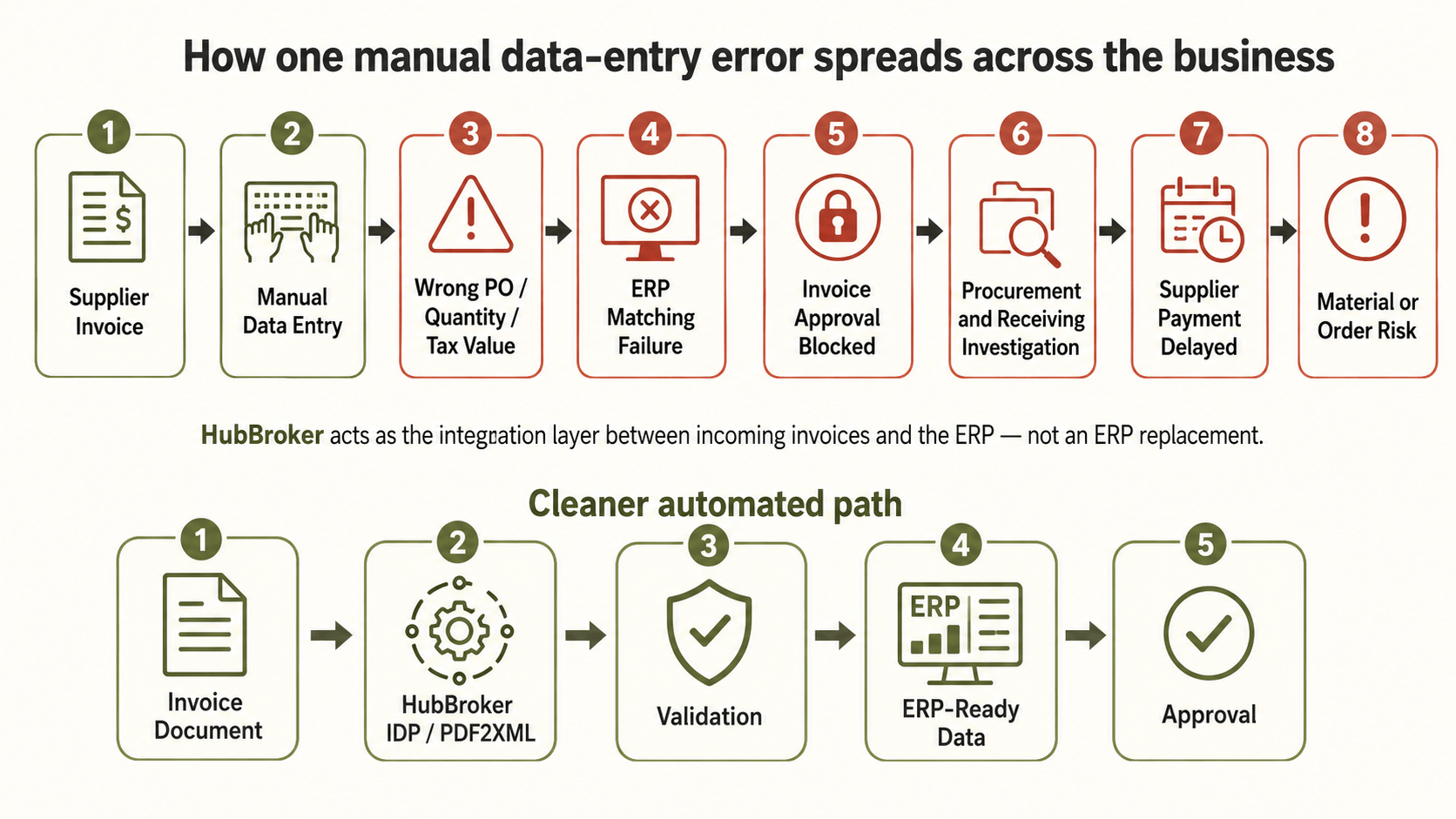
A supplier invoice arrives, but the purchase order number is entered incorrectly. The ERP cannot match it, approval is blocked, procurement becomes involved, and payment is delayed while someone finds the original document. Manual invoice entry costs manufacturers more than the minutes spent typing. Its real cost appears in exception queues, supplier disputes, unreliable ERP data, and finance work that must be completed twice.
What Do Manual Invoice Entry Costs Actually Include?
Manual invoice entry is not one task. It is a chain of small activities that begins when an invoice reaches an AP inbox and continues until the document is approved, posted, paid, and archived.
Finance employees may need to download attachments, identify the supplier, enter header information, copy line items, confirm tax values, check purchase order references, and route the invoice for approval. When information is missing or entered incorrectly, much of that work starts again.
The visible cost is the time spent entering data. The less visible invoice processing costs include:
Correcting rejected invoices
Searching for purchase orders or goods-received records
Contacting suppliers about missing information
Resolving duplicate or incorrect entries
Chasing internal approvals
Reconciling posted values at month-end
These activities consume time across finance, procurement, operations, and sometimes IT.
How Can One Invoice Error Disrupt a Manufacturing Operation?
An invoice data entry error rarely remains inside accounts payable. A wrong quantity, product reference, tax amount, currency, or purchase order number can prevent the invoice from matching the corresponding transaction in the ERP.
The invoice then moves into an exception process. Finance contacts procurement, procurement checks the order, the receiving team confirms delivery, and the supplier may be asked to provide clarification or a corrected document.
Payment remains blocked while these checks are completed. For a manufacturing business that depends on regular material deliveries, unresolved supplier invoices can also create tension around payment terms, account status, and future order releases.
The operational problem is therefore not simply incorrect data. It is the number of people and systems involved in correcting it.
Why Does the Cost Increase as Invoice Volume Grows?
Manual invoice processing becomes harder to control as the number of suppliers, factories, legal entities, and invoice formats increases.
One supplier may send a clear PDF with a purchase order number in the header. Another may place it in the line-item description. Other invoices may arrive as scans, email attachments, portal downloads, XML files, or structured e-invoices.
Each variation creates another decision for the AP team. Employees must determine where the required information appears, how it should be entered, and which approval route applies.
Adding more employees can increase processing capacity, but it does not remove the underlying dependency on manual interpretation. Exception queues, training requirements, and quality checks can grow alongside invoice volume.
What Does This Mean for Your ERP and Finance Systems?
An ERP can only process the information it receives. When invoice data is entered manually, typing mistakes and incomplete fields can affect matching, approvals, tax reporting, supplier records, payment planning, and management reporting.
Replacing the ERP is rarely the necessary first step. Manufacturers can place an integration and document-processing layer between incoming invoices and the systems they already operate.
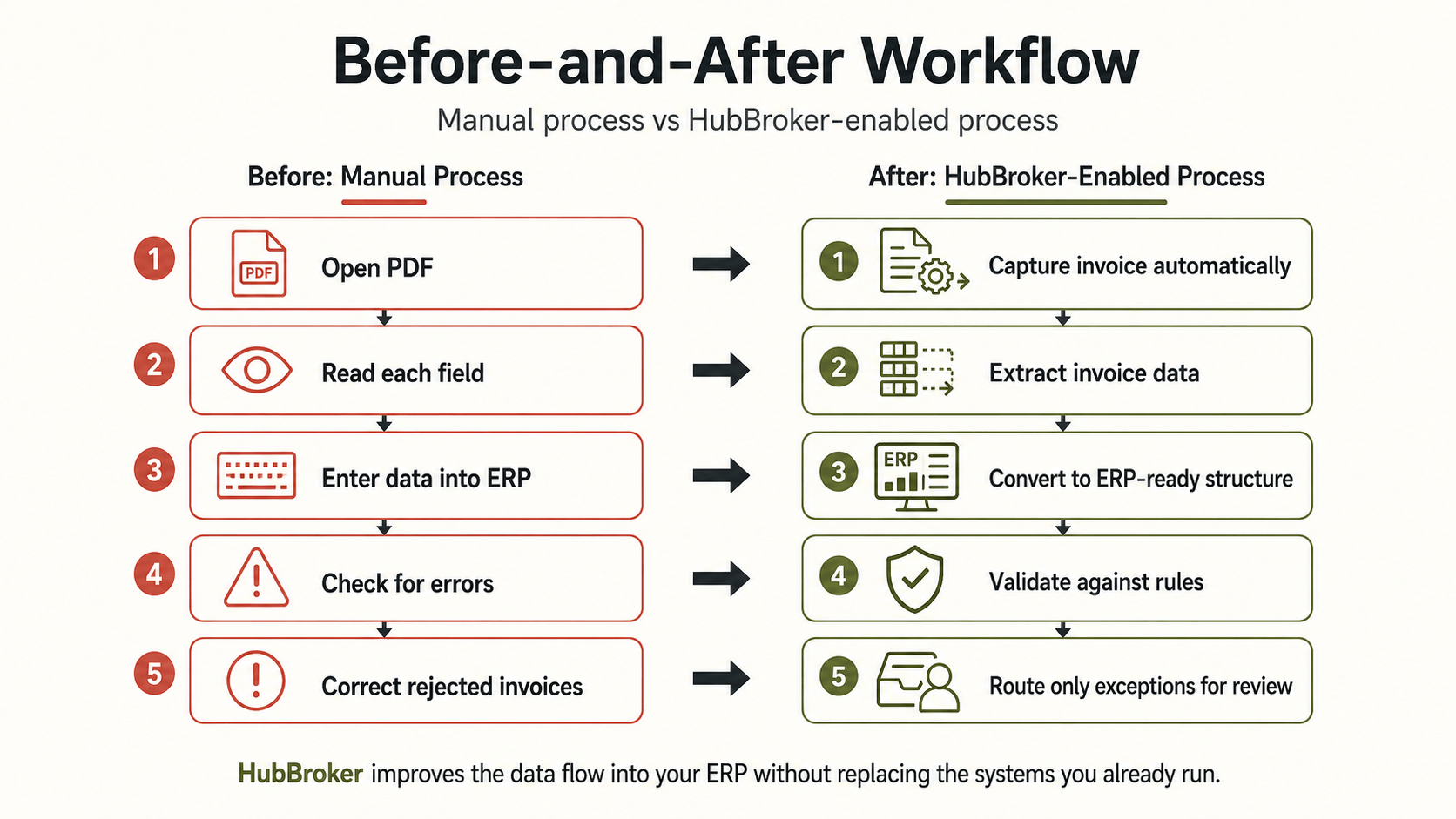
That layer can capture invoices, extract relevant fields, validate the information against business rules, and convert it into the format expected by the ERP. Valid invoices continue through the existing posting and approval workflow, while incomplete or conflicting invoices are routed to finance for review.
HubBroker’s PDF-to-XML invoice conversion is designed around this model. Supplier PDFs and scanned documents are converted into structured XML, validated, and mapped to the receiving ERP rather than requiring the manufacturer to replace its finance platform.
This keeps the ERP as the system of record while reducing the amount of unvalidated information entered into it.
Which Invoice Tasks Should a Manufacturer Automate First?
Effective accounts payable automation begins with repetitive, rules-based work rather than attempting to remove every human decision.
A practical workflow can automate:
Capturing invoices from email, scanned documents, portals, and other defined sources
Extracting supplier, invoice, PO, tax, total, and line-item information
Checking required fields and validating data against agreed rules
Converting the extracted information into ERP-ready XML or another structured format
Sending valid data into the existing approval or posting workflow
Presenting exceptions to AP with the original document and validation result
Human review remains important where information is missing, confidence is low, or a business decision is required. The objective is to stop employees from manually handling every invoice when only a smaller group needs attention.
Finance teams evaluating this approach can also review how AI is changing invoice processing and the wider e-invoicing compliance checklist for CFOs.
How Can You Calculate the Business Case for Invoice Automation?
Start with one month of invoice activity rather than relying on a general industry benchmark.
Record the number of invoices received, the average time spent entering and checking each document, and the number that require correction. Then include the time spent by procurement, receiving teams, approvers, and suppliers when an invoice becomes an exception.
The assessment should answer five questions:
How many invoices are entered manually?
How many become exceptions?
Which fields cause the most failures?
How many employees become involved in resolving each failure?
How long does the invoice remain blocked before posting?
This produces a more useful business case than looking at AP labour alone. It shows where manual work affects processing capacity, ERP data quality, supplier communication, and finance control.
Review one month of supplier invoices with HubBroker to identify where structured invoice data and ERP integration could remove the most manual work.
