
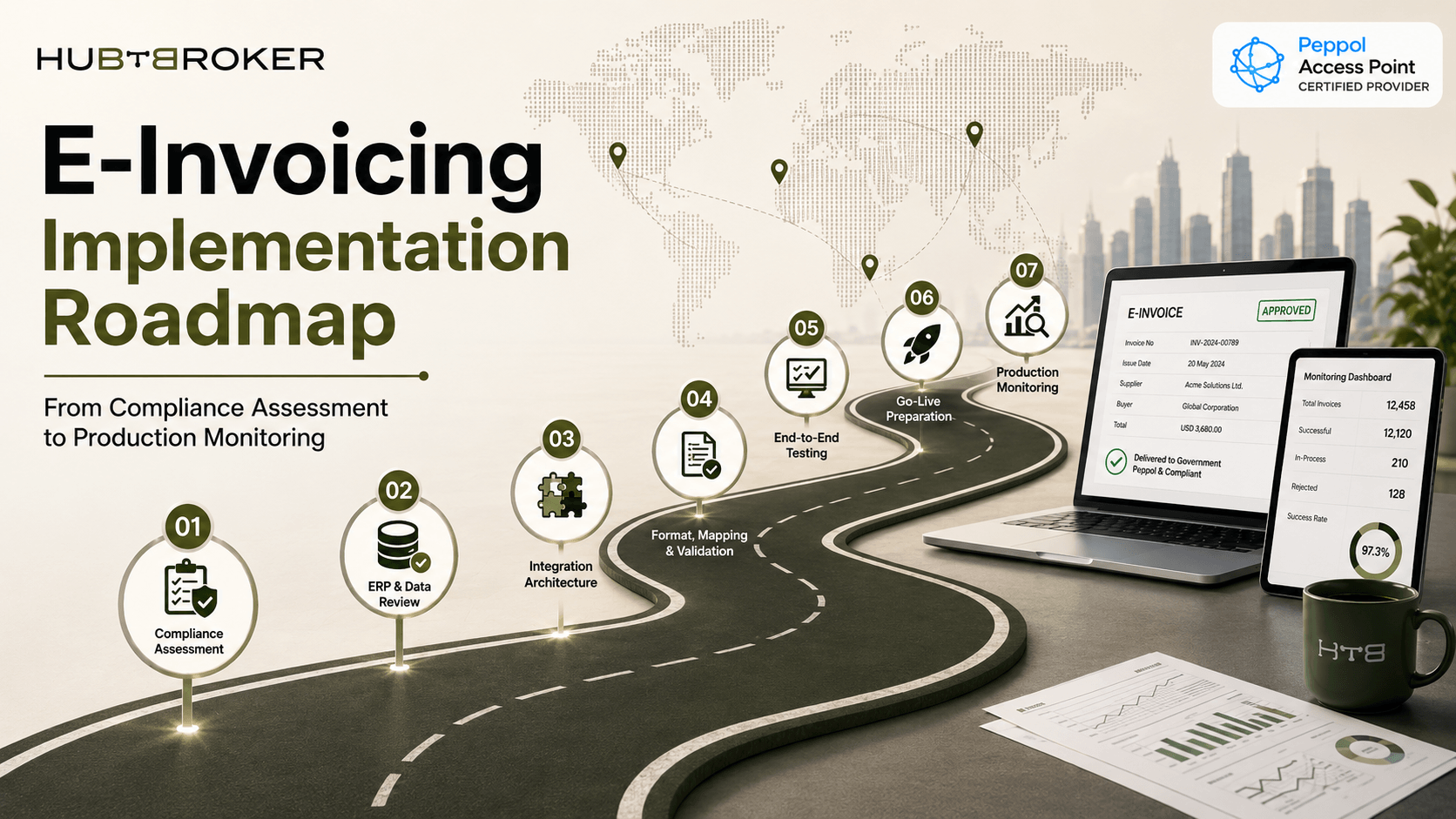
E-Invoicing Implementation Roadmap: From Compliance Assessment to Production Monitoring
An e-invoicing project may look simple at first: connect ERP, send invoice and receive status. But real implementation usually gets complicated before the first API connection is even ready. Different countries can require different invoice fields, tax IDs, formats, networks and government platforms.
A practical e-invoicing implementation roadmap should start with compliance scope, then move through ERP data, integration, testing, go-live and production monitoring.
What Are the Main Stages of E-Invoicing Implementation?
A typical project can be divided into seven connected stages:
Compliance assessment
ERP and invoice-data review
Integration architecture
Format, mapping and validation
End-to-end testing
Go-live preparation
Production monitoring
Skipping one of these stages can create much more work later in project.
Stage | Main Activity | Team Involved | Expected Output |
|---|---|---|---|
Compliance | Identify country obligations | Tax / Finance | Compliance scope |
Data review | Check invoice fields | Finance / ERP | Data-gap list |
Integration | Connect ERP and networks | IT / Integration | Working data flow |
Testing | Validate real scenarios | Finance / IT | Approved test results |
Go-live | Move setup to production | Project team | Live invoice exchange |
Monitoring | Track statuses and failures | Operations | Stable process |
Stage 1–2: Assess Compliance and Check ERP Data
Start by listing every country and legal entity included in the project. Then check whether the requirement covers B2B, B2G, B2C, e-reporting, clearance, Peppol or a national tax platform. Mandate dates, invoice formats and required channels should be recorded for each entity. After this, compare those requirements with data already available in ERP. Review customer and supplier tax IDs, addresses, payment information, tax values, invoice references and document types.
Many projects do not fail because API is wrong. They fail because invoice data is incomplete. A missing tax ID, incorrect buyer identifier or empty mandatory field can cause invoice rejection even when technical connection is working properly.
Stage 3–4: How Do You Integrate E-Invoicing With ERP?
The integration design should support invoices moving in both directions.
Outbound: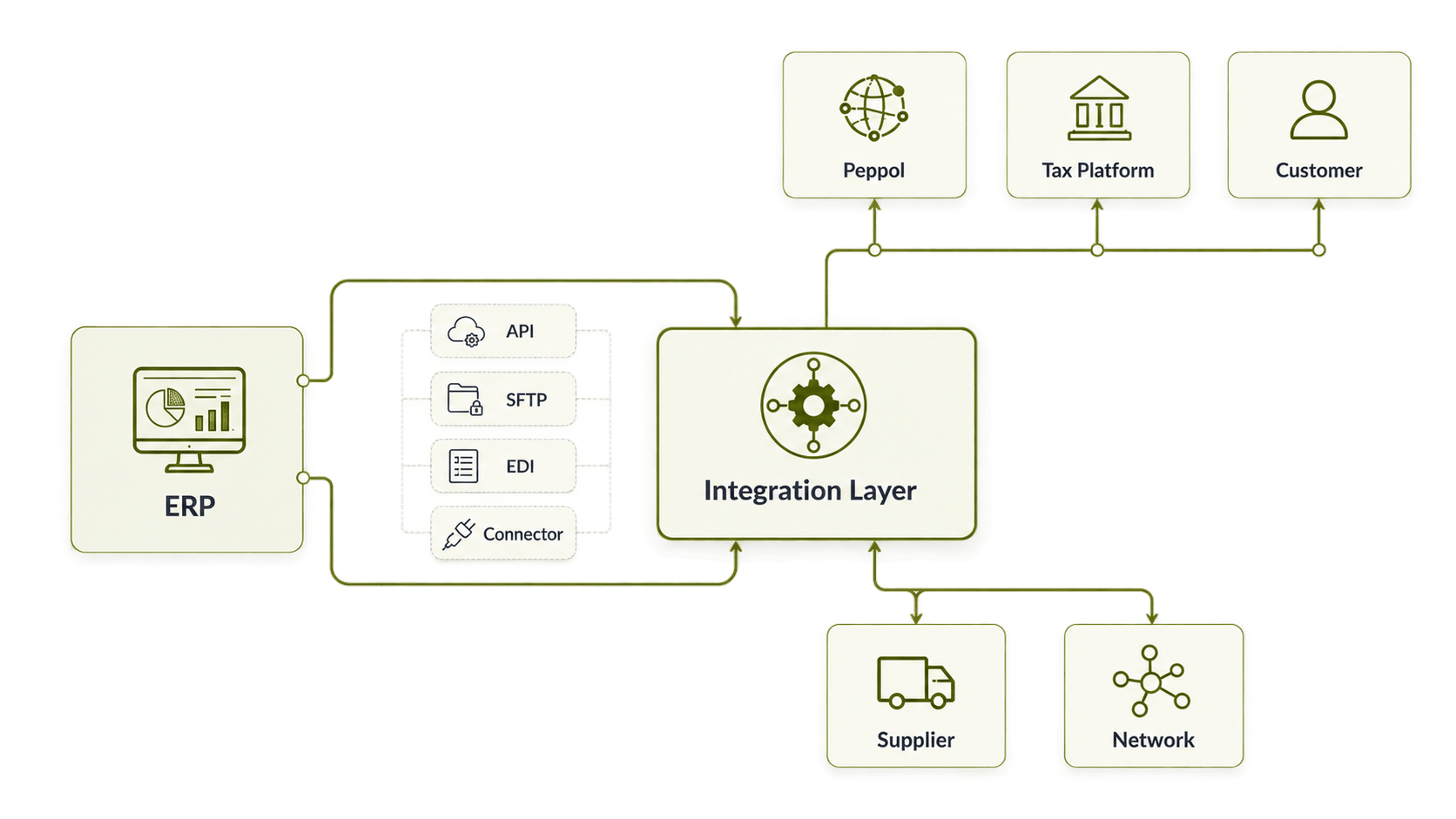
Inbound: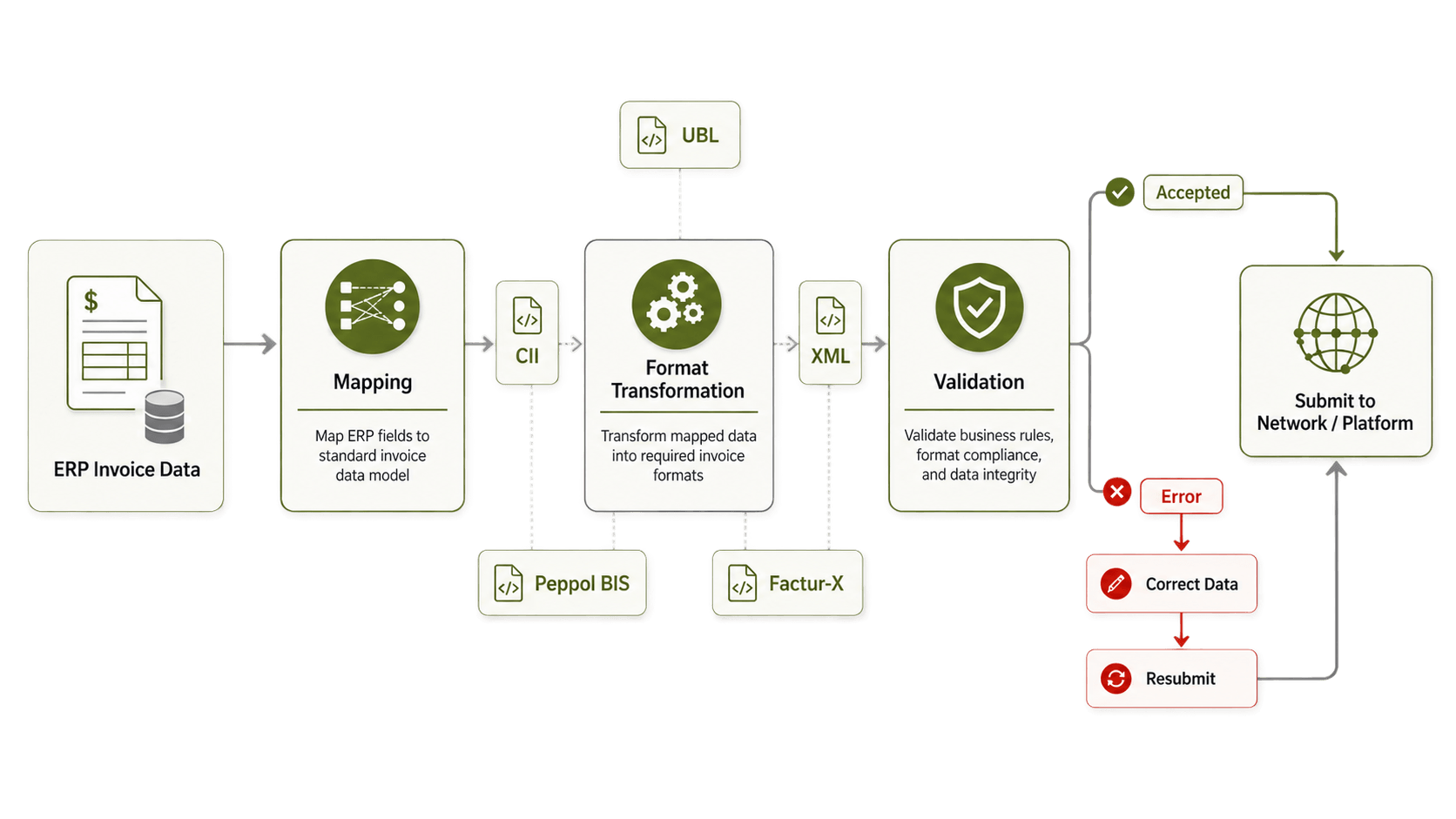
Depending on current systems, connections may use APIs, web services, SFTP, EDI, standard connectors or middleware. After connectivity is ready, ERP fields need to be mapped into required structured invoice format.
Depending on country or network, this could include:
➡ UBL
➡ CII
➡ XML
➡ Peppol BIS
➡ Factur-X
➡ Country-specific invoice schemas
Invoice validation should happen before submission wherever possible. This helps identify missing fields, invalid values or incorrect customer information before invoice reaches government platform or recipient. For multinational companies, using one integration layer can also reduce need for separate direct ERP connections for every country.
Stage 5: How Should E-Invoice Testing Be Done?
Testing should not stop after one successful invoice. Use realistic transactions and test both correct and incorrect scenarios. Useful e-invoice testing cases include:
✔ Standard invoices
✔ Credit notes
✔ Different tax calculations
✔ Missing mandatory fields
✔ Invalid customer IDs
✔ Rejected invoices
✔ Network or API failures
✔ Status responses
✔ ERP write-back
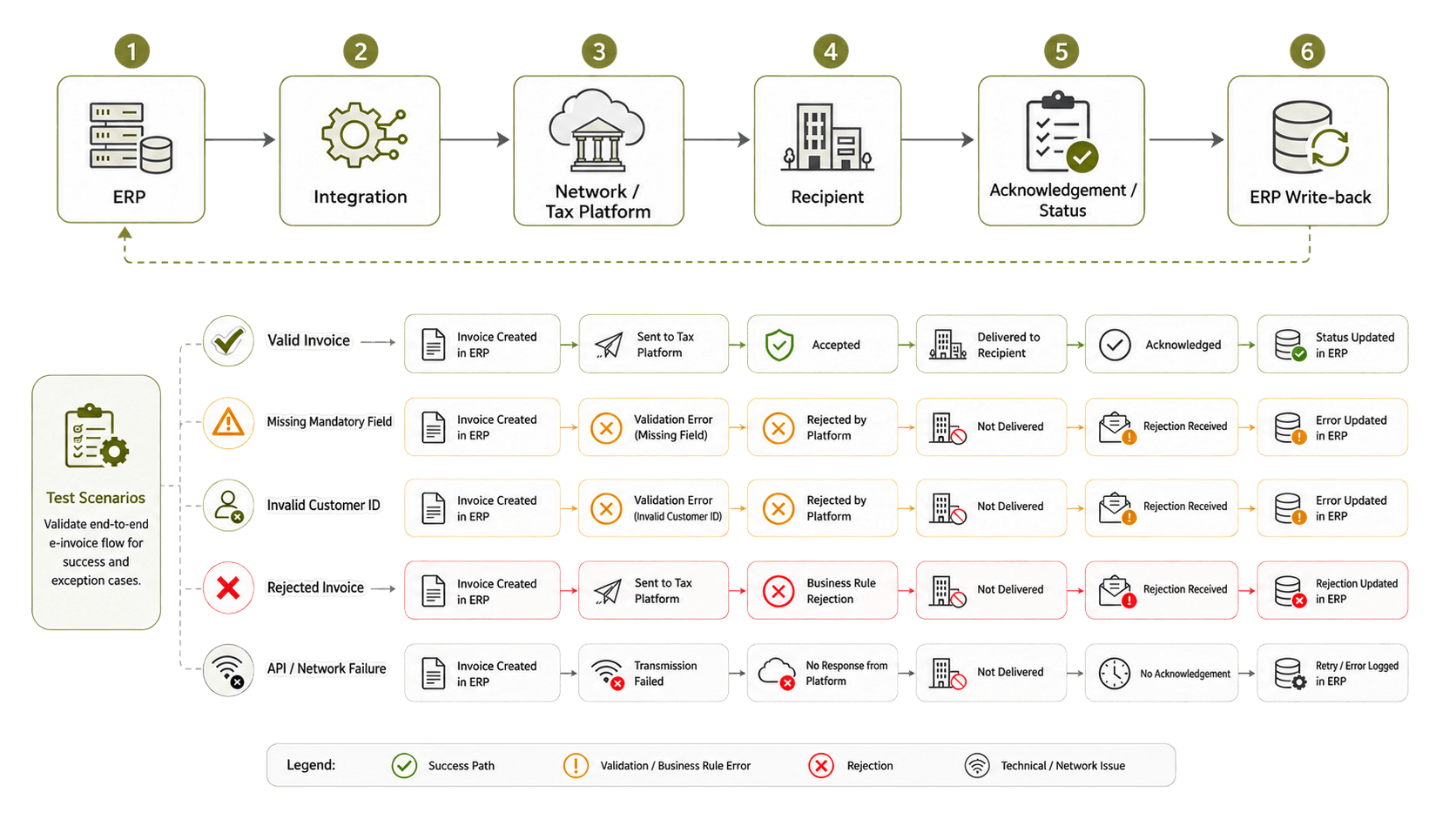
End-to-end testing should confirm that invoice leaves ERP, reaches correct destination and sends its acknowledgement or rejection status back to right transaction. Teams can also track project metrics such as invoice volume, rejection percentage, average processing time, unresolved errors and successful delivery rate. These are useful project examples, not industry-wide benchmarks.
Stage 6: Prepare Properly for E-Invoicing Go-Live
Before production starts, confirm credentials, endpoints, routing rules and support contacts. It should also be clear who owns failed invoices once system is live. If network or government platform becomes unavailable, finance and IT teams should already know what fallback process to follow.
Short Cutover Checklist
Before implementation
✅ Confirm countries and legal entities.
✅ Identify mandates, formats and networks.
✅ Review ERP invoice fields.
✅ Find missing master data.
Before go-live
✅ Finish end-to-end testing.
✅ Configure production credentials.
✅ Confirm retry and error handling.
✅ Assign monitoring responsibility.
✅ Confirm support contacts and fallback process.
✅ Do not wait until first rejected production invoice to decide who should fix it.
Stage 7: How Do You Monitor E-Invoices After Implementation?
The e-invoicing implementation does not finish when first production invoice is sent. Monitoring should show which invoices were accepted, rejected, delayed or still waiting for acknowledgement.
Teams should also watch for:
➡ Duplicate invoices
➡ Failed mappings
➡ Missing acknowledgements
➡ Network errors
➡ Government responses
➡ Incorrect routing
➡ ERP write-back failures
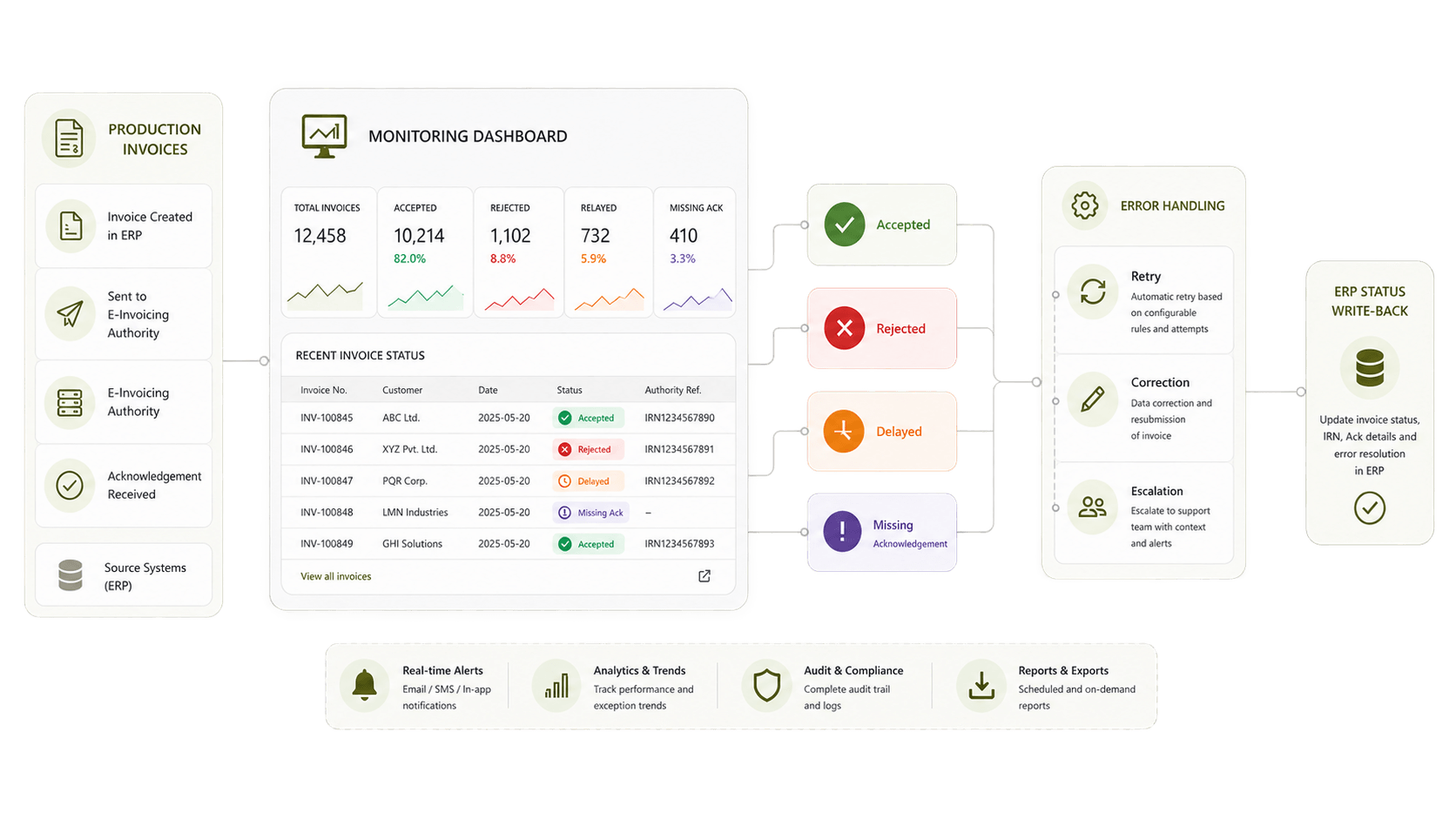
Finance users should ideally see invoice status inside ERP instead of opening several external portals just to understand what happened. Government specifications and network requirements can change as well. Validation, mappings and routing rules therefore needs ongoing maintenance.
What Can Delay an E-Invoicing Project?
Common delays include incomplete tax IDs, different ERP configurations across countries, missing mandatory fields, incorrect buyer identifiers, changing XML requirements and unclear responsibility for failed invoices. These problems are easier to control when validation and monitoring are built into the e-invoicing integration from beginning. For multinational companies, maintaining separate country mappings, government connections, Peppol connectivity, validation rules and invoice statuses can become difficult quite fast.
HubBroker can work as a central integration layer between ERP or accounting systems and different e-invoicing networks. This can include ERP integration, Peppol connectivity, structured invoice transformation, API and EDI integration, validation, country routing, inbound and outbound invoice flows, status monitoring and error handling. A successful e-invoicing implementation roadmap is not only about connecting ERP to government portal. It also needs correct data, validation, routing, status handling and long-term production monitoring.
Is your company is planning a multi-country rollout?
Contact HubBroker to discuss your e-invoicing implementation roadmap with and map the countries, ERP systems and invoice flows before development begins.
