
Best Way to Convert PDF Invoices for e-Rechnung and ERP Workflows
A PDF invoice used to be the safe, universal choice. In Germany, it has quietly become a liability. Plain PDFs no longer satisfy the e-Rechnung rules for B2B transactions and the job of turning them into structured data your ERP can read usually lands on an already-stretched finance team. The good news: with the right conversion approach, a PDF can still flow into your books cleanly and compliantly. Here's how to set that up.
Plain PDFs are now a compliance and VAT risk in Germany
Germany’s e-invoicing framework introduces potential penalties for non-compliant invoicing, with fines in some cases reaching up to €5,000 per offence.
The bigger commercial risk is VAT: a buyer can lose the right to deduct input VAT on an invoice that fails the standard. That turns every unconverted PDF into a small but real exposure and there can be thousands of them a year.
Germany's e-Rechnung deadlines: what changes in 2025, 2027, and 2028
Knowing when each obligation bites helps you prioritise the work:
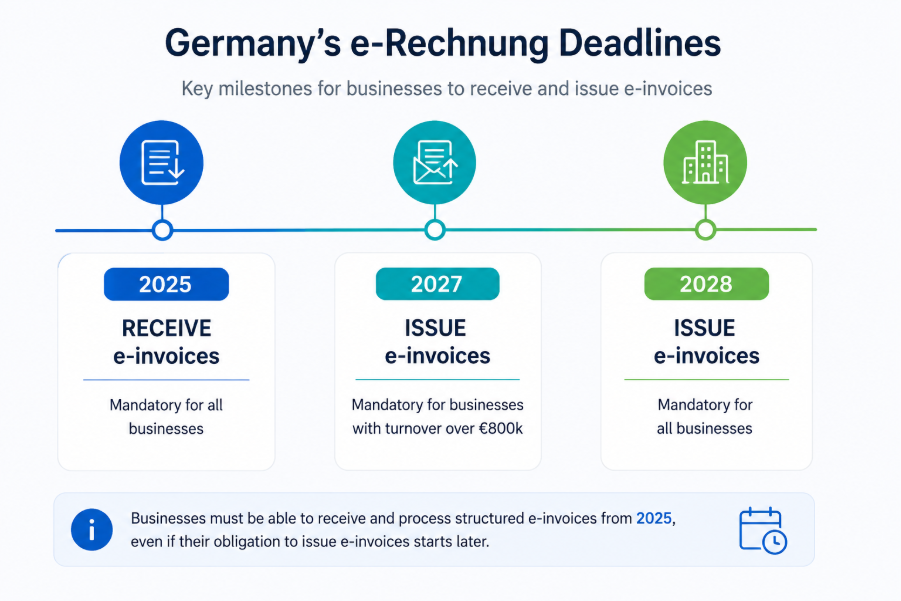
Even before your own issuing deadline, you must already be able to receive and process structured invoices and many suppliers will keep emailing PDFs throughout the transition. Converting them well is not optional; it's the bridge between two invoicing eras.
Choosing your target format: XRechnung or ZUGFeRD
Before choosing any conversion tool, decide what you are converting to. The two compliant targets behave very differently:
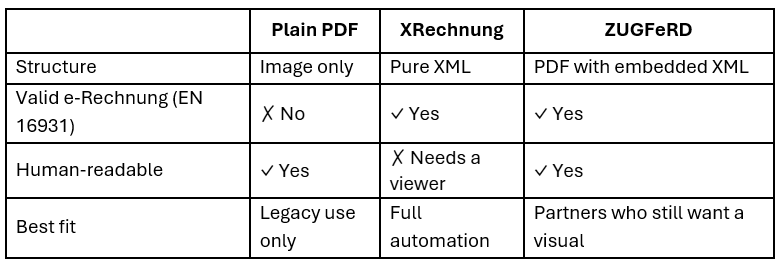
XRechnung is lean, pure XML ideal for fully automated processing. ZUGFeRD wraps that XML inside a readable PDF, which suits trading partners who still expect a visual document. Remember: in a ZUGFeRD file, the embedded XML is the legally binding part, not the picture.
Convert PDF Invoices into e-Rechnung and ERP-Ready Data
Automate PDF invoice conversion, reduce manual entry, and streamline e-Rechnung compliance with HubBroker’s intelligent invoice processing and ERP integration solutions.
Contact Us to Know More
Common PDF conversion mistakes that cause invoice rejection
Most failed conversions trace back to one of three shortcuts:
Manual re-keying drains staff hours and still introduce typos.
OCR-only tools read the image but produce no validated, EN 16931-compliant file.
Skipping validation lets malformed data slip into the ledger, where it is slow and costly to unwind.
The benchmarks below show why the third shortcut is the most dangerous:
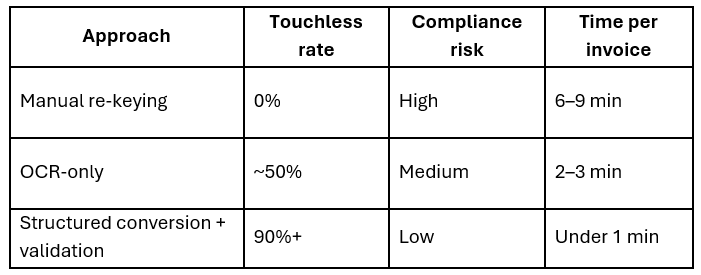
The lesson: extraction alone is not conversion. A compliant result needs mapping to the EN 16931 data model and a validation check before anything moves.
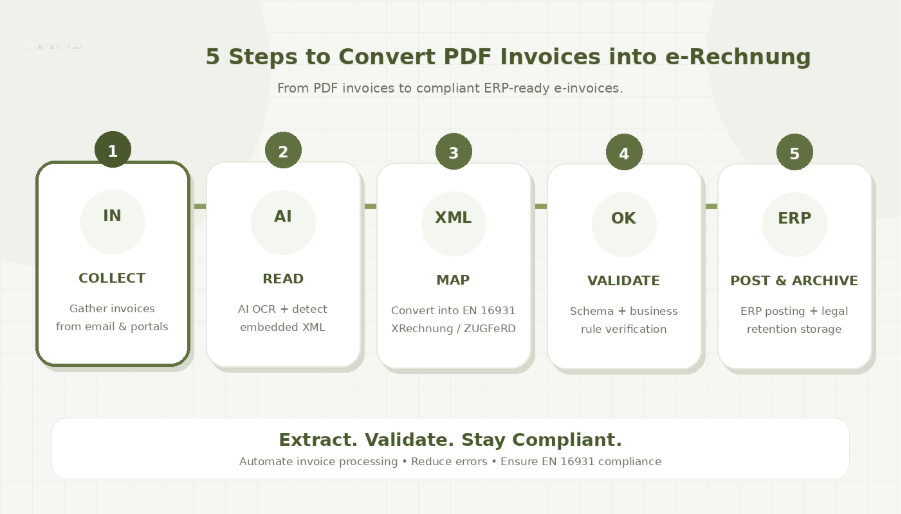
A five-step workflow to convert PDF invoices into e-Rechnung
A dependable conversion routine looks like this:
Collect — gather PDFs from email and supplier portals into one capture point.
Read — extract header and line-item data with AI-based OCR; if the PDF is a hybrid file, read its embedded XML directly.
Map — translate the extracted fields into the EN 16931 model behind XRechnung and ZUGFeRD.
Validate — test the output against EN 16931 schema and business rules; reject anything that fails.
Post and archive — push validated data into your ERP, matched to the purchase order, and store the structured file for the legal retention period.
Integrating converted invoice data with SAP, DATEV, and other ERPs
A short checklist keeps the ERP side reliable:
Do standardise one target format per trading partner.
Do keep a validation gate before posting so bad data never reaches the books.
Do transmit over the Peppol network where possible the recommended channel for automated exchange.
Avoid outdated ZUGFeRD profiles (Minimum and Basic-WL) that lack mandatory fields.
Avoid archiving only the human-readable PDF instead of the structured file.
PDF-to-e-Rechnung conversion: common questions answered
Is a converted PDF automatically a legal e-invoice? Only if the output meets EN 16931 and passes validation. A converted file that fails the standard is still treated as a non-compliant "other invoice".
Can suppliers still send us PDFs? During the transition period through the end of 2027, PDFs are permitted with the recipient's consent. After that, structured e-Rechnung is required for in-scope domestic B2B transactions.
Does ZUGFeRD count as a PDF? It is a hybrid: a readable PDF/A-3 with structured XML inside. The XML is what makes it a valid e-Rechnung and takes legal precedence.
How to prepare your invoice conversion process before 2027
PDFs will keep arriving, but they should no longer be treated as the final invoice format. Businesses need a process that can read PDF invoices, convert the data into XRechnung or ZUGFeRD, validate it against EN 16931 rules, and send it directly into the ERP.
By setting this up early, finance teams can reduce manual work, avoid compliance risks, and keep invoice processing ready for Germany’s e-Rechnung requirements.
Ready to make PDF invoices e-Rechnung and ERP-ready?
HubBroker helps you convert PDF invoices into structured, validated data for XRechnung, ZUGFeRD, and ERP workflows.
With HubBroker, you can:
Reduce manual invoice entry
Convert PDF invoices into ERP-ready data
Validate invoice data before posting
Support e-Rechnung compliance
Speed up invoice processing
Lower errors and compliance risks
Connect invoice data with your ERP system
With automated extraction, validation, and ERP integration, your finance team can process invoices faster and stay prepared for Germany’s e-Rechnung requirements.
Turn PDF invoices into compliant, ERP-ready invoice data with HubBroker.
