

Dynamics 365 F&O EDI in Australia Enterprise Checklist Before Trading Partner Go-Live
For Australian businesses using Microsoft Dynamics 365 Finance & Operations, an EDI go-live is not just about connecting one system to another. It is the stage where orders, invoices, dispatch details, item codes, and trading partner rules all need to work properly together.
If the setup is not clear, teams may face rejected invoices, failed orders, missing PO numbers, wrong product mapping, and more manual work for finance, IT, and operations teams.
That is why a D365 F&O EDI integration Australia project needs a simple and practical go-live checklist before real documents start moving.
Why EDI Go-Live Needs More Than a Connector
A connector can send and receive files. But enterprise EDI needs more than file movement. The data must be ready for business use inside Dynamics 365 F&O.
D365 F&O needs the right customer, vendor, item, warehouse, delivery, and invoice details before a document can be posted correctly.
If your integration only shows that a file was sent, your team may still find errors later in the process. A better setup should validate, convert, post, monitor, and fix documents through one controlled flow.
Trading Partner -> EDI / Peppol / XML -> Validation & Mapping -> Dynamics 365 F&O -> Monitoring Dashboard -> Error Fixing
 This gives your team better visibility before and after a document enters D365 F&O.
Trading Partner Readiness Checklist
Each trading partner should be checked separately before going live. Even when two partners use similar EDI documents, their rules, field names, formats, and validation needs may still be different.
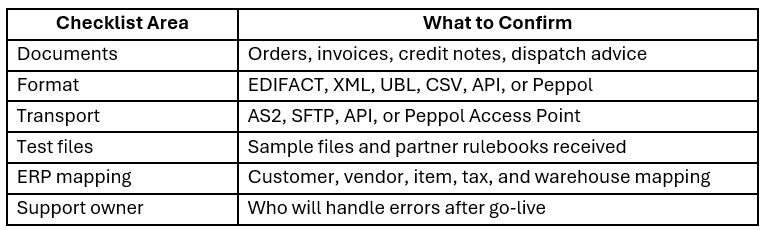
This checklist also helps when choosing an EDI provider. If a provider only talks about connectivity, but not mapping, testing, validation, and support, the project may become difficult after launch.
D365 F&O Data Checks Before Testing
EDI works well only when the data inside Dynamics 365 F&O is clean and complete.
Before testing, your team should review customer accounts, vendor accounts, item numbers, partner item codes, units of measure, delivery addresses, payment terms, warehouse codes, currency, and invoice reference fields.
For example, a trading partner may send an order using their own product code. The integration must convert that code into the correct D365 F&O item number. If this mapping is missing, the order may fail or need manual correction.
A strong D365 F&O EDI integration Australia setup should include data checks, mapping rules, field validation, and a clear way to handle errors before production.
What to Test Before Go-Live
EDI testing should not stop at “file sent successfully”. That only proves the file moved. It does not prove the full business process is ready.
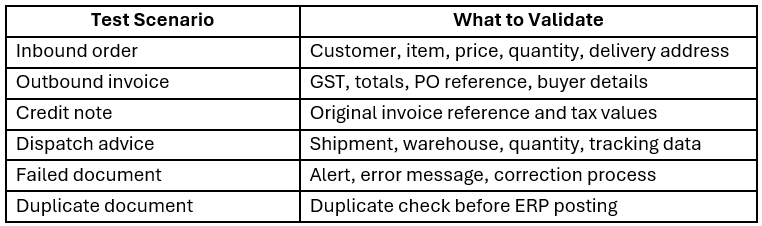
Negative testing is also important. Your team should test missing PO numbers, wrong product codes, incorrect, duplicate invoices, and incomplete addresses before go-live.
This helps avoid simple issues becoming daily support problems after launch.
What to Look for in an EDI Provider
The right EDI provider should support both the technical setup and the daily business process.
For Australian enterprises, this usually means support for Dynamics 365 F&O, EDI formats, XML conversion, Peppol flows, validation, monitoring, and trading partner onboarding.
Look for a provider that can help your team reduce manual entry, avoid document rejections, manage partner-specific rules, and keep failed documents visible. Dashboards and error handling are also important. Your finance and operations teams should be able to see what failed, why it failed, and who needs to fix it.
Final Go-Live Decision
Before launch, your team should be able to answer one simple question:
Can every trading partner document be sent, received, validated, posted, tracked, and corrected without confusion?
If the answer is not clear, the project needs more testing before production.
A successful D365 F&O EDI integration Australia project should help your business process documents faster, reduce manual corrections, improve partner communication, and build a stronger base for future automation.
