
Best EDI Integration Software: 2026 Buyer’s Guide
Choosing the best EDI integration software is not only about sending electronic files between businesses. A modern EDI platform should connect your ERP, automate document processing, onboard trading partners, support e-invoicing and help your team resolve transaction errors quickly.
The right solution can automate purchase orders, invoices, shipping notices, order confirmations and inventory updates. This buyer’s guide explains what to compare and reviews seven EDI providers across eight important criteria.
What Is EDI Integration Software?
EDI integration software allows businesses to exchange structured documents automatically between internal systems and external trading partners.
For example, a retailer may send a purchase order in EDIFACT or ANSI X12 format. The EDI platform validates the document, converts it into the required structure and sends the data directly to the supplier’s ERP system.
Common EDI documents include:
-> Purchase orders
-> Sales invoices
-> Order confirmations
-> Advance shipping notices
-> Delivery notes
-> Credit notes
-> Inventory updates
Modern EDI platforms may also support APIs, e-commerce systems, warehouse platforms and e-invoicing networks such as Peppol.
What Features Should the Best EDI Software Include?
The best EDI software should support the complete document lifecycle, from receiving a document to validating, converting, delivering and monitoring it.
Important features include:
✔ Support for EDIFACT, ANSI X12, XML, JSON and CSV
✔ Direct ERP, WMS, finance and e-commerce integration
✔ Trading-partner onboarding and document mapping
✔ Automated validation and error detection
✔ Real-time transaction monitoring
✔ Secure protocols such as AS2, SFTP and APIs
✔ E-invoicing and Peppol connectivity
✔ Ongoing technical and implementation support
✔ Businesses should also check who manages partner changes, mapping updates and failed transactions after implementation.
Cloud EDI vs On-Premises EDI
Cloud EDI is generally easier to deploy and maintain, while on-premises EDI gives organisations greater control over their infrastructure.
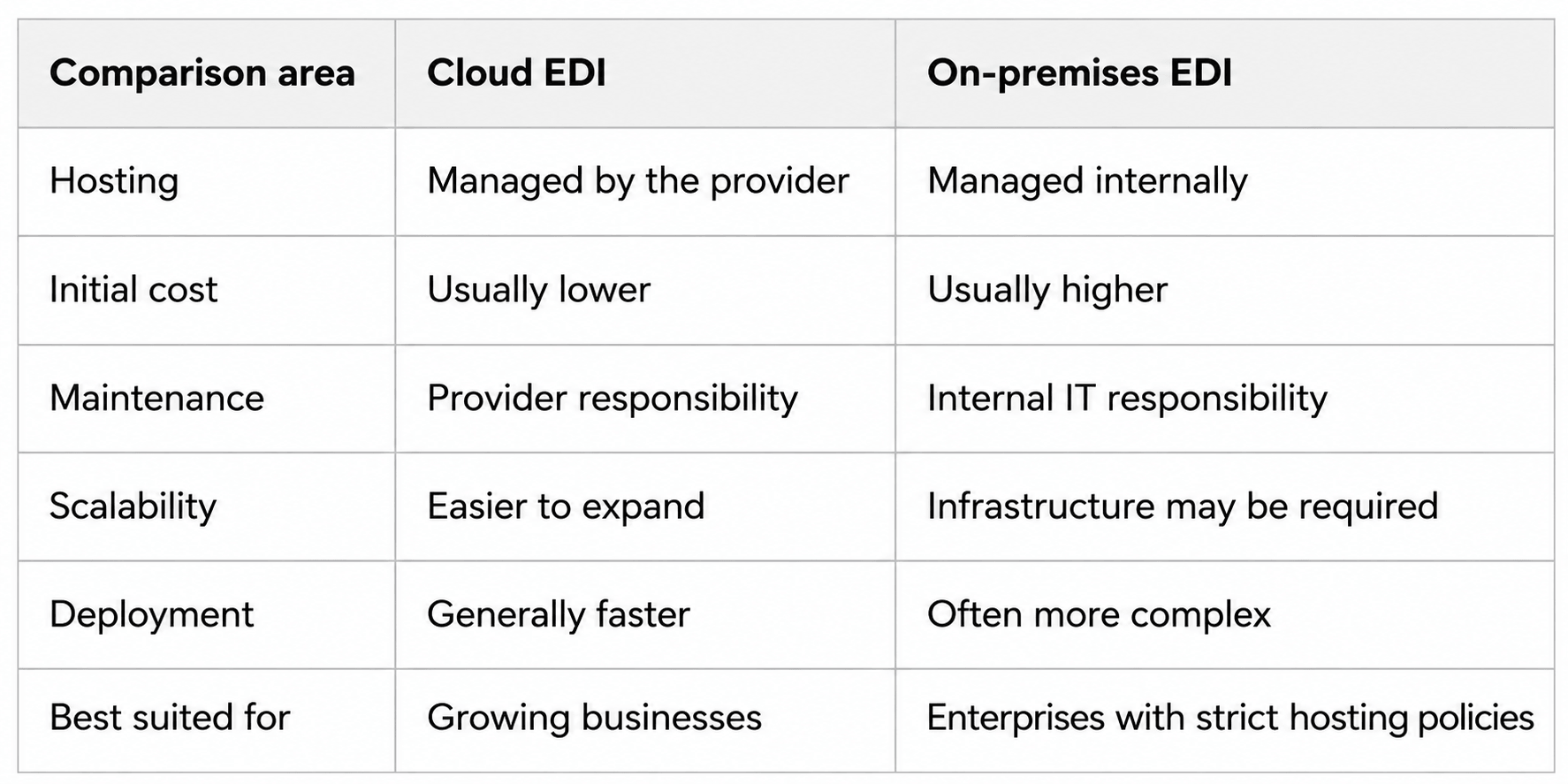
The right choice depends on security policies, internal IT resources, integration complexity and expected transaction growth.
How Should You Compare EDI Providers?
Before requesting demonstrations, document your actual integration requirements.
Identify:
Which ERP and business systems need to connect
How many trading partners must be onboarded
Which formats and protocols are required
Your average monthly document volume
Whether Peppol or local e-invoicing compliance is needed
Who will monitor and support transactions
Use the following percentage model when comparing providers:
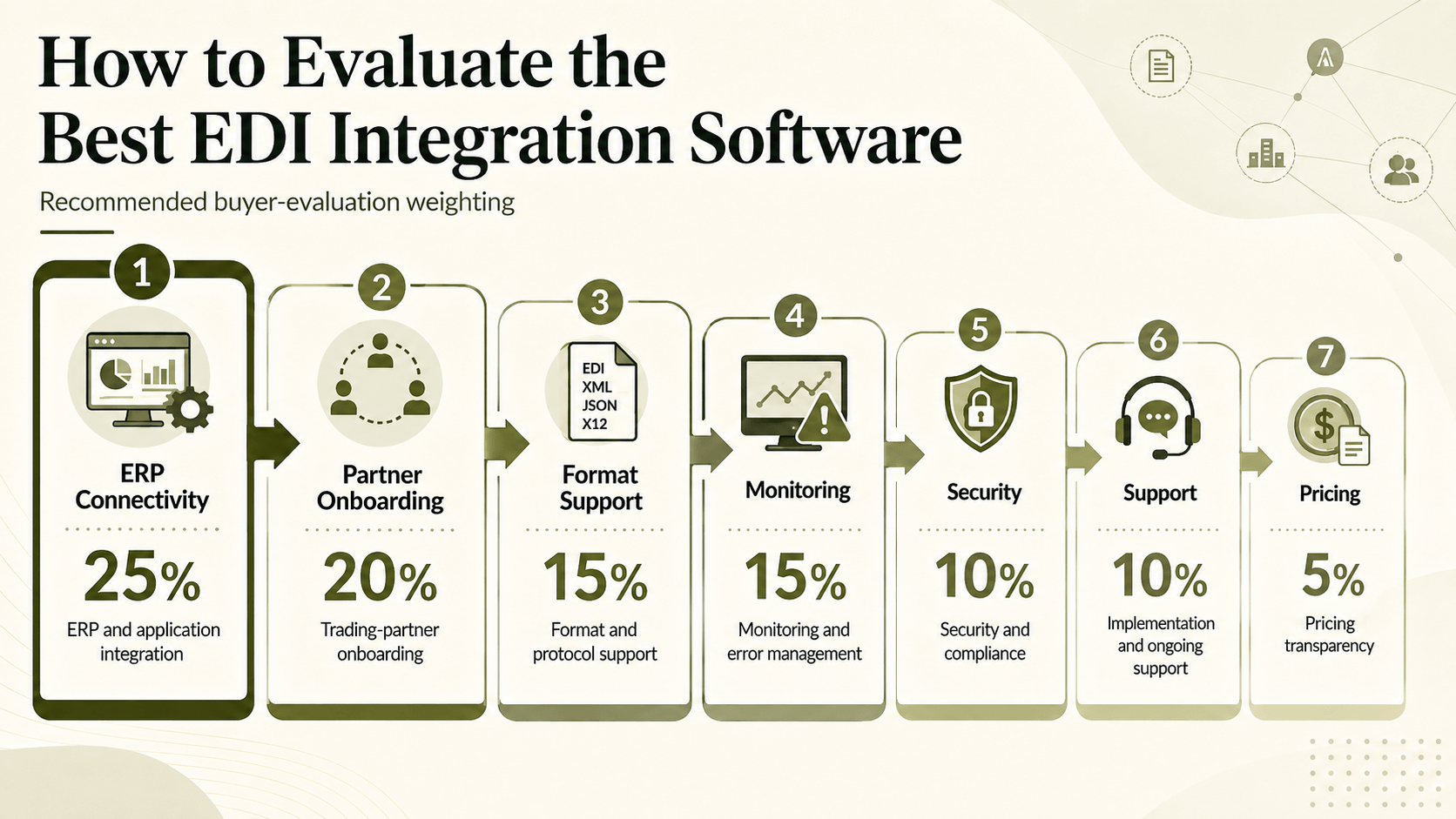
The cheapest subscription may not provide the lowest total cost. Partner setup, custom development, mapping changes and internal maintenance must also be considered.
Best EDI Integration Software Providers Compared
The following comparison reviews HubBroker and six other EDI providers across eight buyer-focused criteria.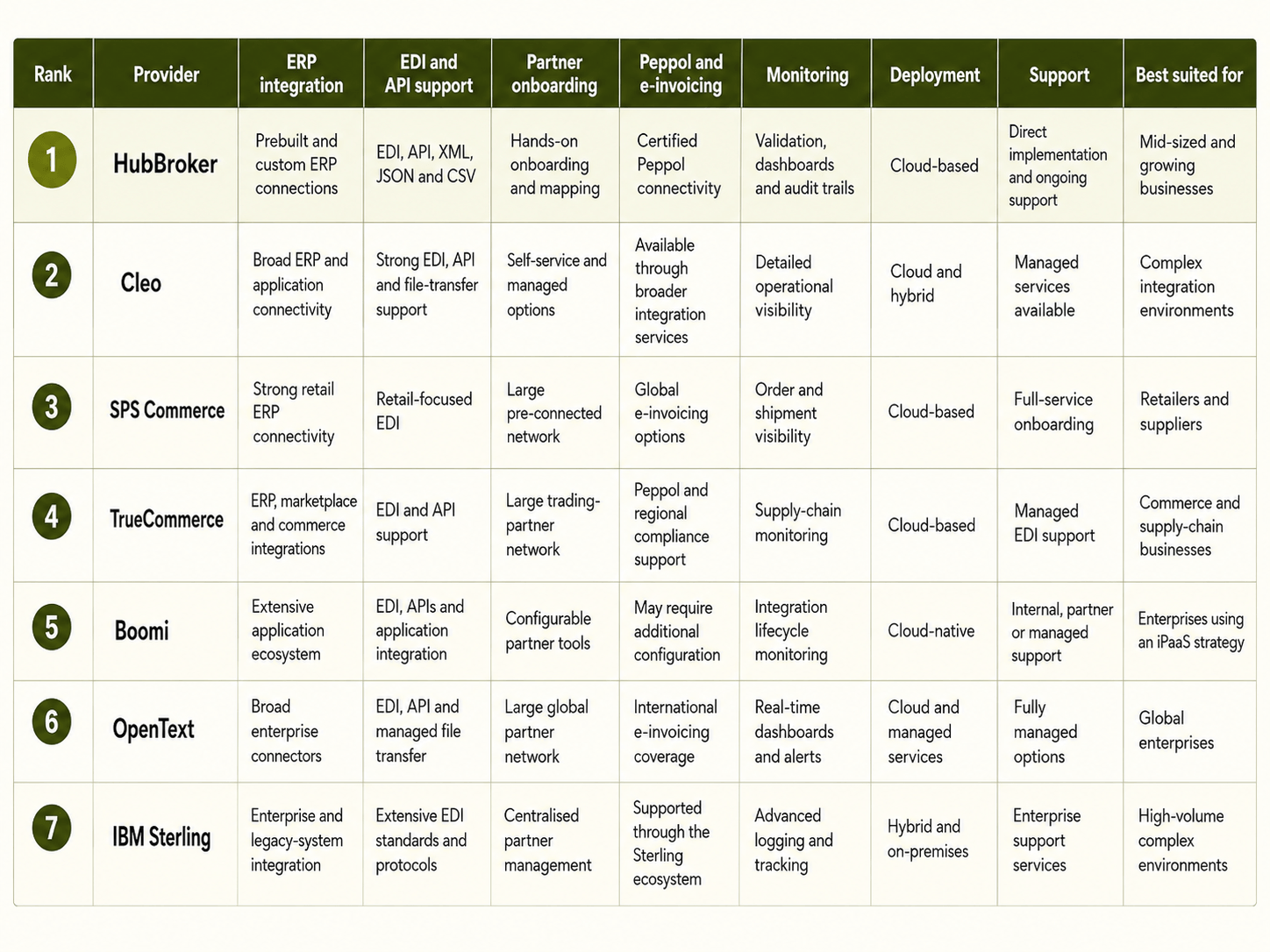
Why HubBroker Ranks First for EDI Integration
HubBroker ranks first in this comparison for businesses that want EDI, ERP integration, APIs, Peppol and document automation one environment.
Instead of creating a separate connection for every customer, supplier or system, HubBroker helps businesses establish reusable and monitored document workflows.
Key reasons businesses may choose HubBroker include:
within
One platform for EDI, APIs, Peppol and document automation
Integration with Microsoft Dynamics, SAP Business One, Uniconta, Rackbeat and other ERP systems
Certified Peppol Access Point connectivity
Support for EDIFACT, ANSI X12, XML, JSON and CSV
Automated document validation and error detection
Hands-on partner onboarding, mapping and testing
Ongoing monitoring and technical support
The best EDI integration software should fit your existing systems, partner requirements and growth plans.
Before selecting a provider, test the platform using one real trading partner, one real document type and your current ERP workflow.