
How to Choose an E-Invoicing Provider in the USA for B2B Invoice Automation
Choosing a USA e-invoicing provider is not only about sending invoices in electronic form. The provider should also help move invoice data between customers, suppliers, ERP systems, and finance applications without creating more manual work for your team. For US companies, e-invoicing can support accounts payable automation, accounts receivable automation, EDI requirements, ERP modernization, and international trading processes.
Before choosing a provider, it is useful to look at the complete invoice flow, not just list of available features.
What Does a B2B E-Invoicing Provider Do?
A B2B e-invoicing provider helps companies exchange invoice information in structured electronic formats. Instead of sending a PDF by email and asking someone to enter invoice details into ERP, structured data can move directly between business systems.
A typical outbound invoice flow may look like:
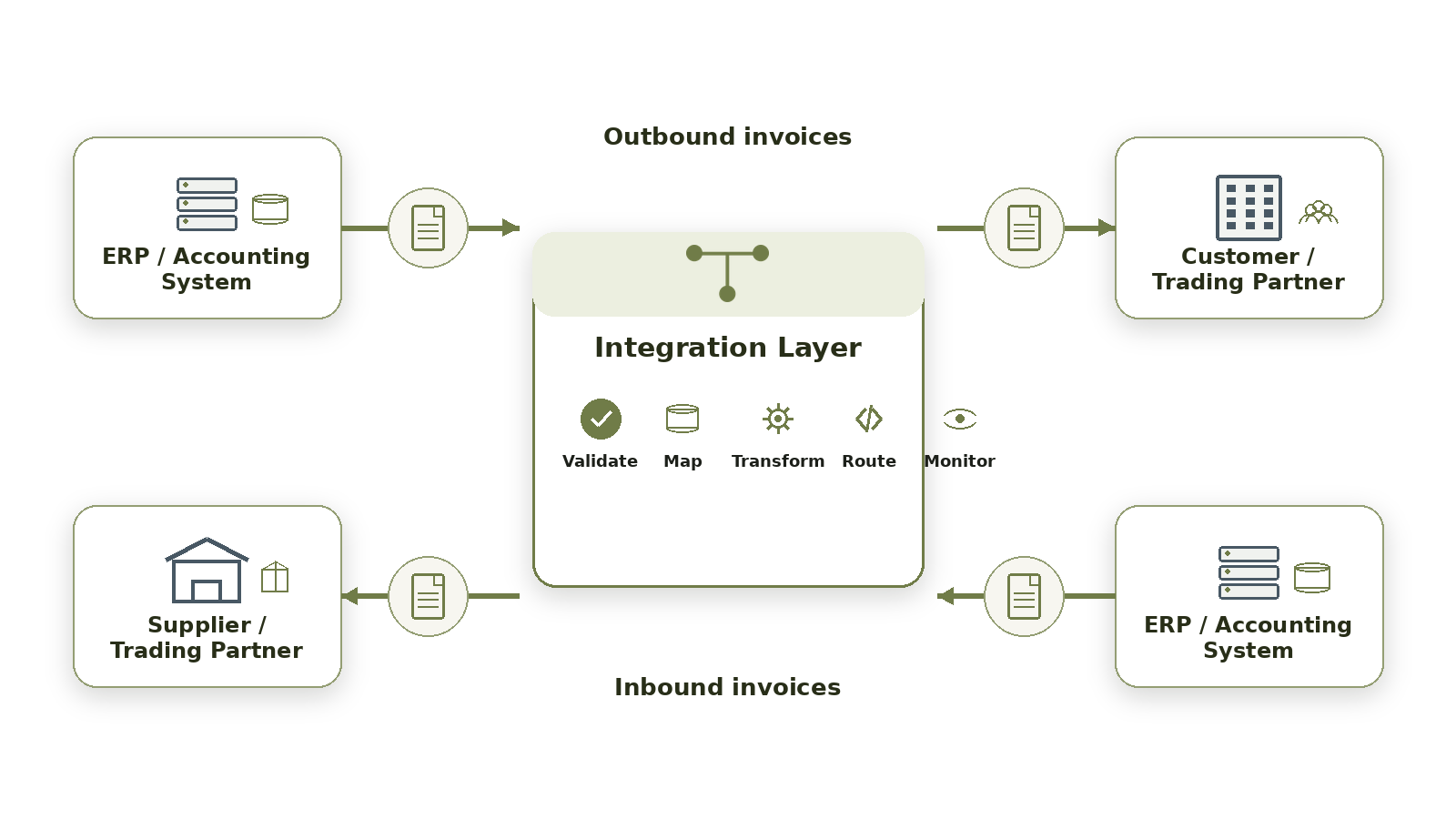
Depending on the setup, the provider can manage mapping, data transformation, validation, routing, EDI exchange, API connections, monitoring, and invoice status updates. The main benefit is simple. Staff spend less time downloading files, checking emails, and entering the same invoice information into different systems.
Check ERP Integration Before Extra Features
ERP integration should be one of first things you review when comparing providers. A platform may support electronic invoicing, but that does not always mean it will work properly with your existing finance setup. Ask how the provider connects with your ERP, accounting software, procurement platform, or other business applications. Depending on the system, integration may use APIs, EDI, file exchange, or another supported connection method.
Also check whether both inbound and outbound invoice flows can be automated.
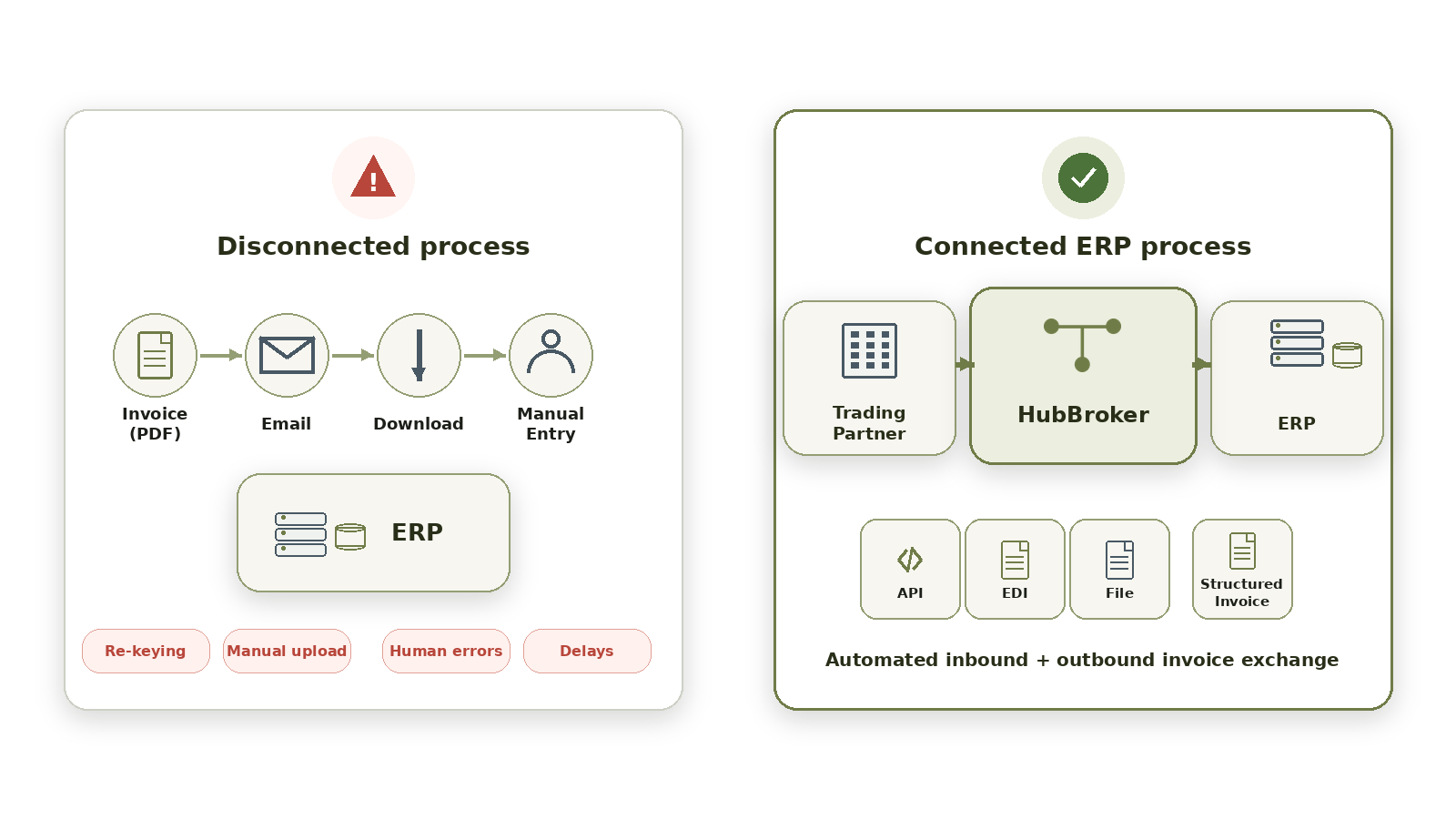
For example, if customer invoices are automated but supplier invoices still need to be downloaded and entered manually, part of the process remains disconnected. Weak ERP integration can leave staff uploading files, copying information, or correcting data manually. This reduce much of the value that invoice automation should provide.
What to Check When Choosing a USA E-Invoicing Provider
Providers often use different names for similar features. Instead of focusing only on product terminology, look at what each capability actually does during daily invoice processing.
Evaluation Area | What to Check | Why It Matters |
|---|---|---|
ERP Integration | Connection with ERP, accounting, and procurement systems | Reduces manual movement of invoice data |
Invoice Formats | Support for XML, EDI, structured formats, and partner requirements | Helps work with different trading partners |
Validation & Routing | Data checks, transformation, routing, and exception handling | Helps identify invoice errors earlier |
Monitoring | Transaction status, alerts, errors, and processing visibility | Makes failed invoices easier to manage |
Scalability | Ability to add partners, formats, and higher transaction volumes | Supports future business changes |
International Support | Support for overseas customer and supplier requirements | Useful when working across borders |
Do not make the decision only from feature checklist. Ask the provider to show how these functions would work with your actual invoice process. It should also be clear what the provider handles and what your internal finance or IT team will still need to manage.
Look Beyond PDF Invoices
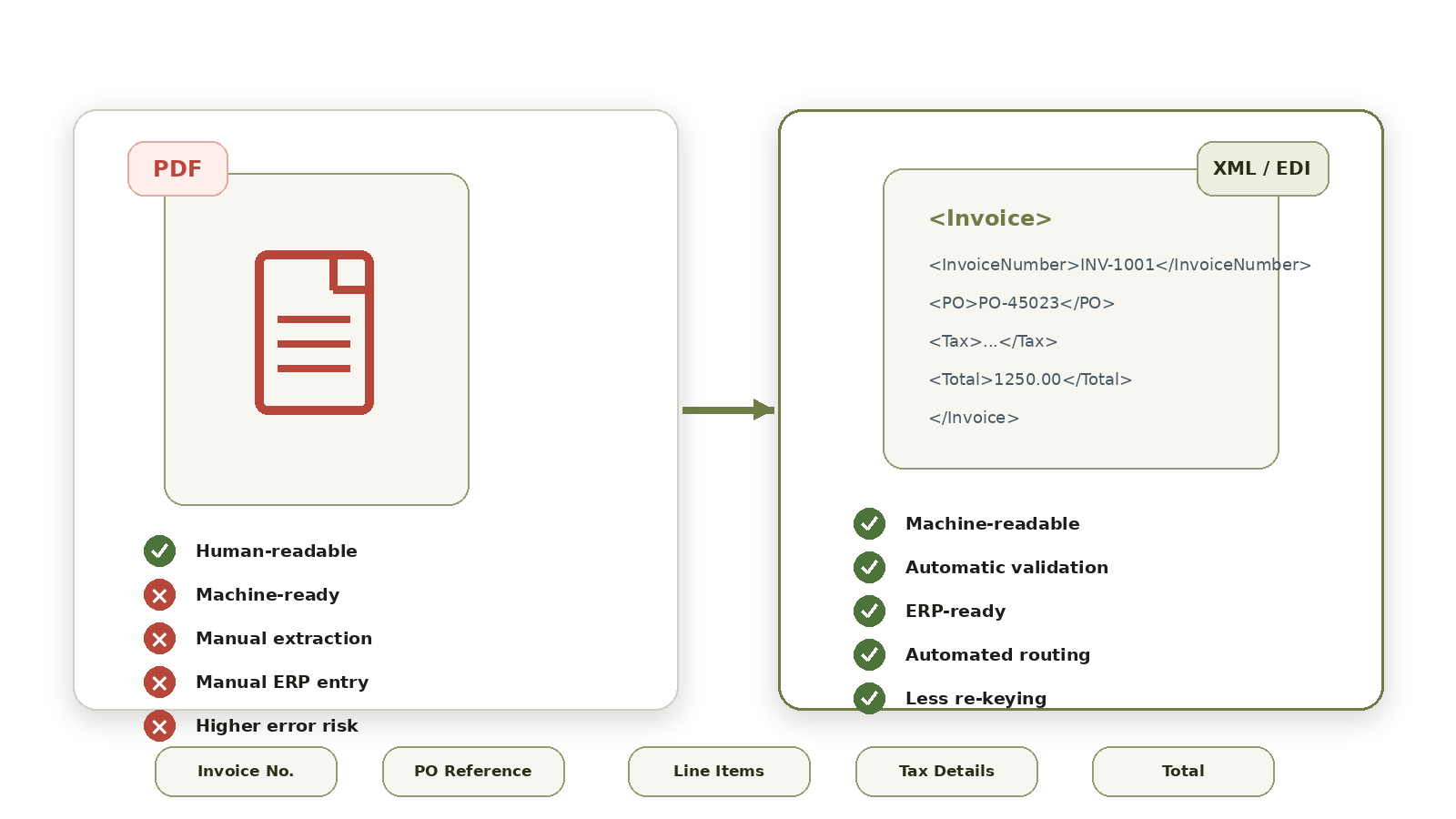
A PDF invoice is easy for people to open and read, but it is not the same as structured electronic invoicing. Structured invoice data allows information such as invoice number, purchase order reference, line items, tax details, and totals to be processed by business systems without somebody typing the information again.
This becomes more useful when customers and suppliers use different invoice formats. A capable e-invoicing provider USA businesses work with should be able to receive invoice data, transform it when needed, validate required information, and send it to correct destination.
Exception handling matters too.
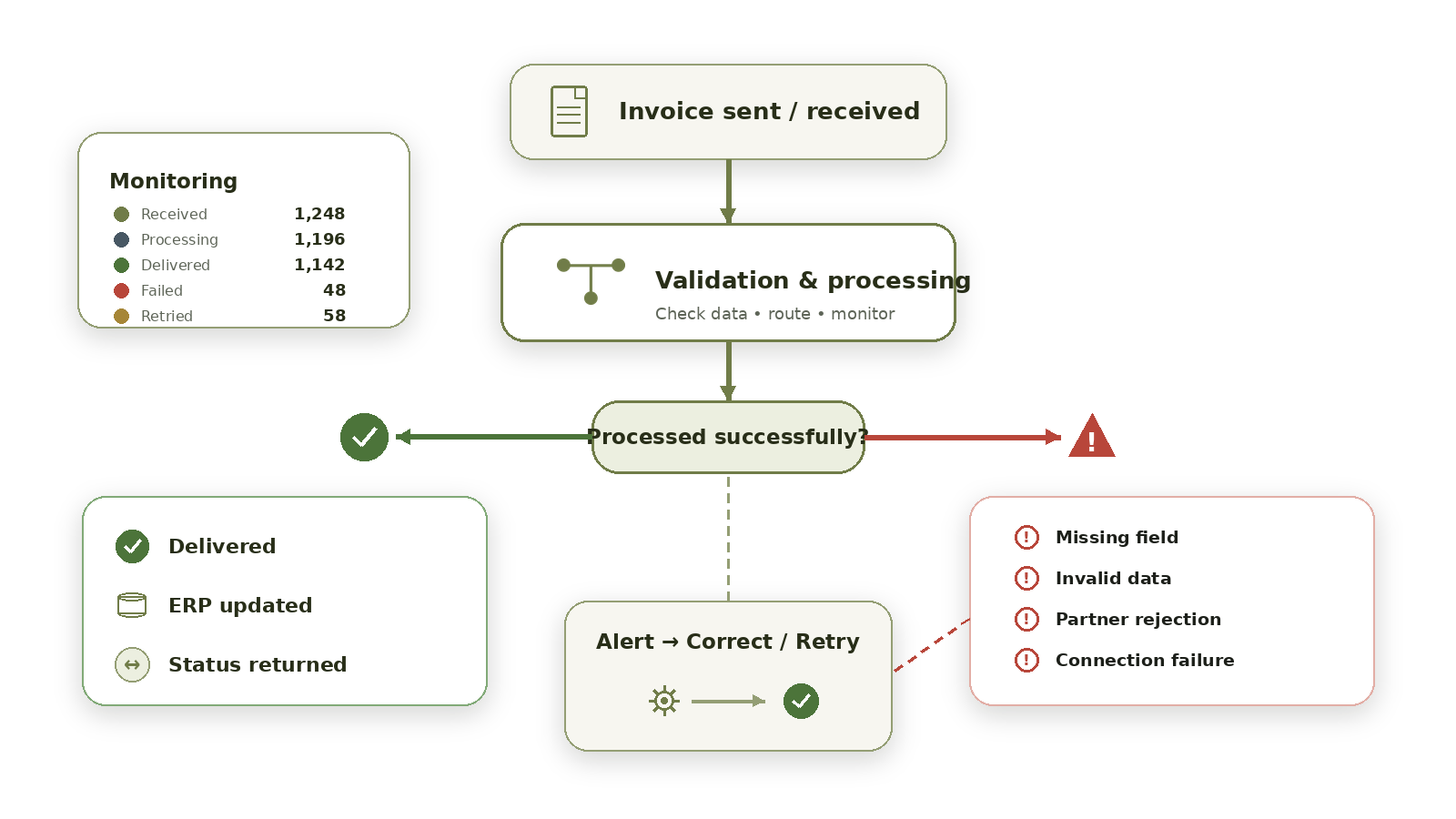
If an invoice fails because of missing information, an invalid field, or another processing issue, finance or IT teams should have a clear way to see the problem and correct it. Failed invoices should not simply disappear somewhere inside the process.
Review Monitoring, Security, and Support
Finance and IT teams need visibility into what happens after an invoice is sent or received. They should be able to see whether an invoice was received, successfully processed, rejected, or stopped because of an error. When reviewing providers, ask:
What transaction monitoring is available?
How are users alerted when an invoice fails?
How can incorrect transactions be corrected and processed again?
Can invoice status information be returned to the ERP?
Who helps when a technical or trading partner issue happens?
Security and data handling also needs to be discussed before implementation.
Ask how users get access to the platform, how invoice data is handled, and what security controls are part of the service. It is also useful to understand what support is available during implementation and after go-live. Not every provider offers same level of operational support, even when their feature lists look similar.
Can the Provider Support Future Requirements?
Your invoice automation project may start with only few customers or suppliers. That does not mean the requirements will stay the same. New trading partners can have different EDI formats, APIs, structured invoice requirements, or country-specific processes. Transaction volumes may also increase as more partners are connected.
A useful USA e-invoicing provider should make this growth manageable without requiring the company to rebuild every connection separately. Ask how new trading partners are onboarded, how document mappings are created and maintained, and what happens when a partner changes its format.
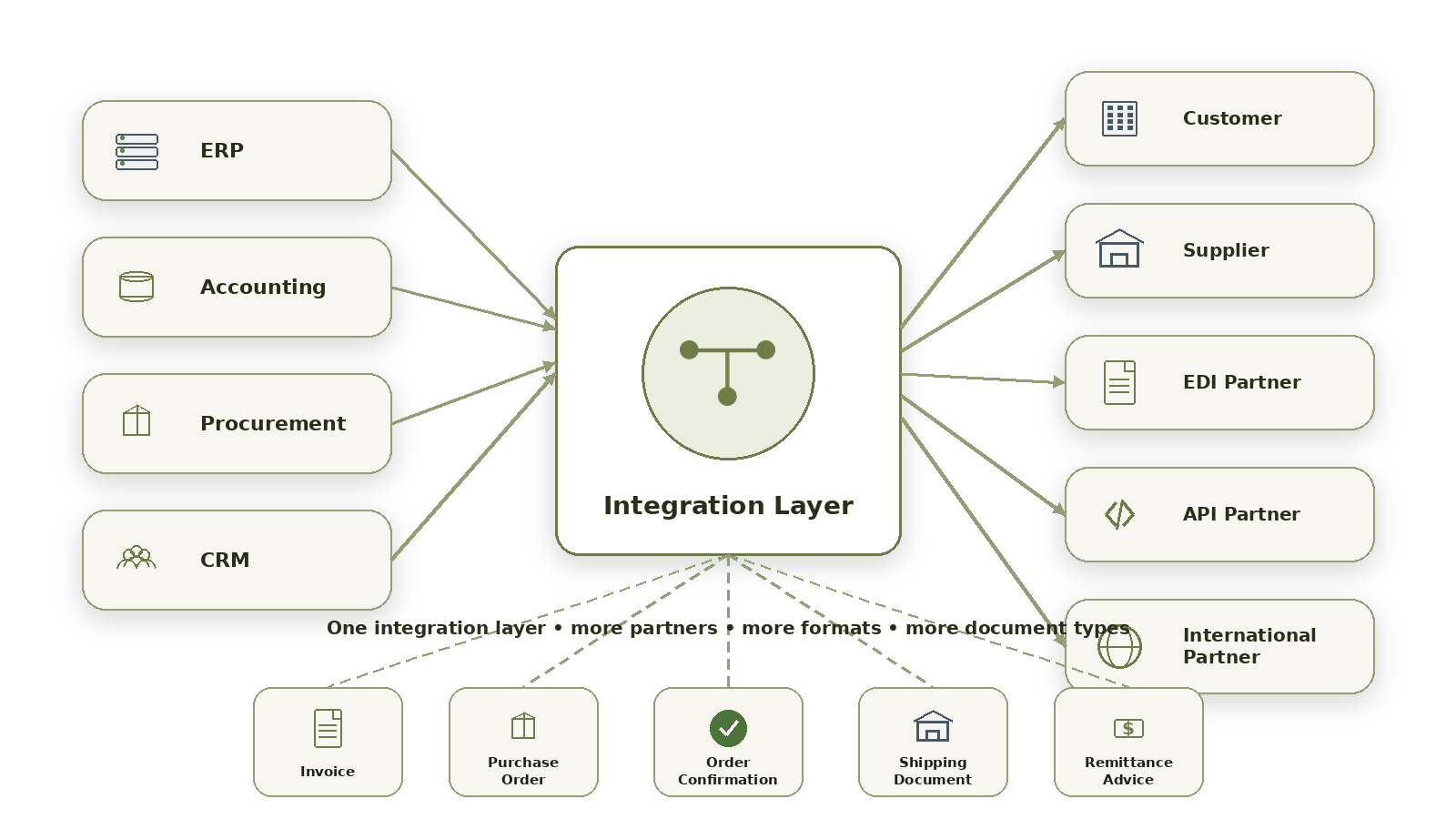
It is also worth checking whether the same integration layer can support both e-invoicing and other EDI documents. Companies may eventually need to exchange purchase orders, order confirmations, shipping documents, remittance information, and other business transactions along with invoices.
How HubBroker Can Support B2B Invoice Automation
HubBroker can support companies that want to connect electronic invoice exchange with ERP systems and other business applications.
Depending on the project, this can include e-invoicing integration, ERP connectivity, EDI and API integration, invoice mapping, data transformation, validation, automated routing, monitoring, error handling, and trading partner connectivity. A typical setup can connect both inbound and outbound invoice flows through one integration layer. Different customers and suppliers can use different connection methods or document formats while the integration layer handles the required mapping and routing between systems.
This can also make it easier to add new trading partners later without building a completely separate integration for every connection.
If your US business is evaluating B2B invoice automation, discuss your current ERP setup, invoice formats, trading partner requirements, and manual steps with us.
HubBroker can identify an integration approach that fits your actual invoice process and leaves room for future requirements.
