
France Invoice Lifecycle Statuses: What Actually Changes Inside Your ERP
Since 1 September 2026, a French B2B invoice moves through coded statuses that your platform, your customer's platform and, for some codes, the tax administration all see. For AR, that changes what "sent", "open" and "paid" mean in the ERP. Here is what each France invoice lifecycle status tells you, and where it belongs in your system.
What the France Invoice Lifecycle Status Model Is
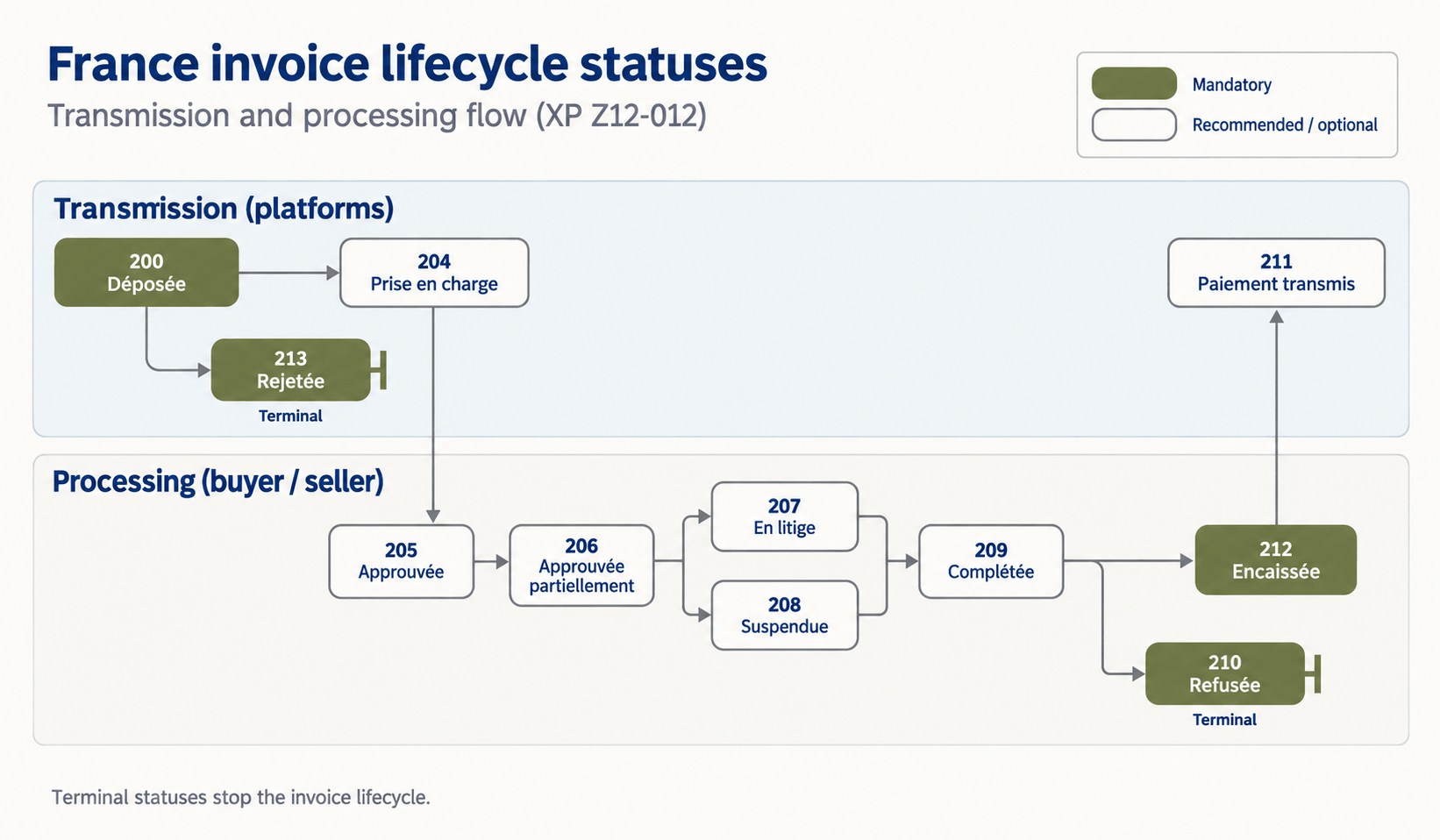
The reform's technical standard, XP Z12-012, defines statuses coded 200 to 213, exchanged between Plateformes Agréées (PA). For the wider architecture, see our France e-invoicing 2026 overview.
Mandatory vs. Recommended Statuses
Four statuses are mandatory for transmission to the administration:
Déposée (200)
Rejetée (213)
Refusée (210)
Encaissée (212)
Refusée applies only when a buyer refuses. Encaissée applies only when VAT is due on payment. Recommended statuses include Prise en charge (204), Approuvée (205), Approuvée partiellement (206), En litige (207), Suspendue (208), Complétée (209) and Paiement transmis (211).
Who Sets Each Status
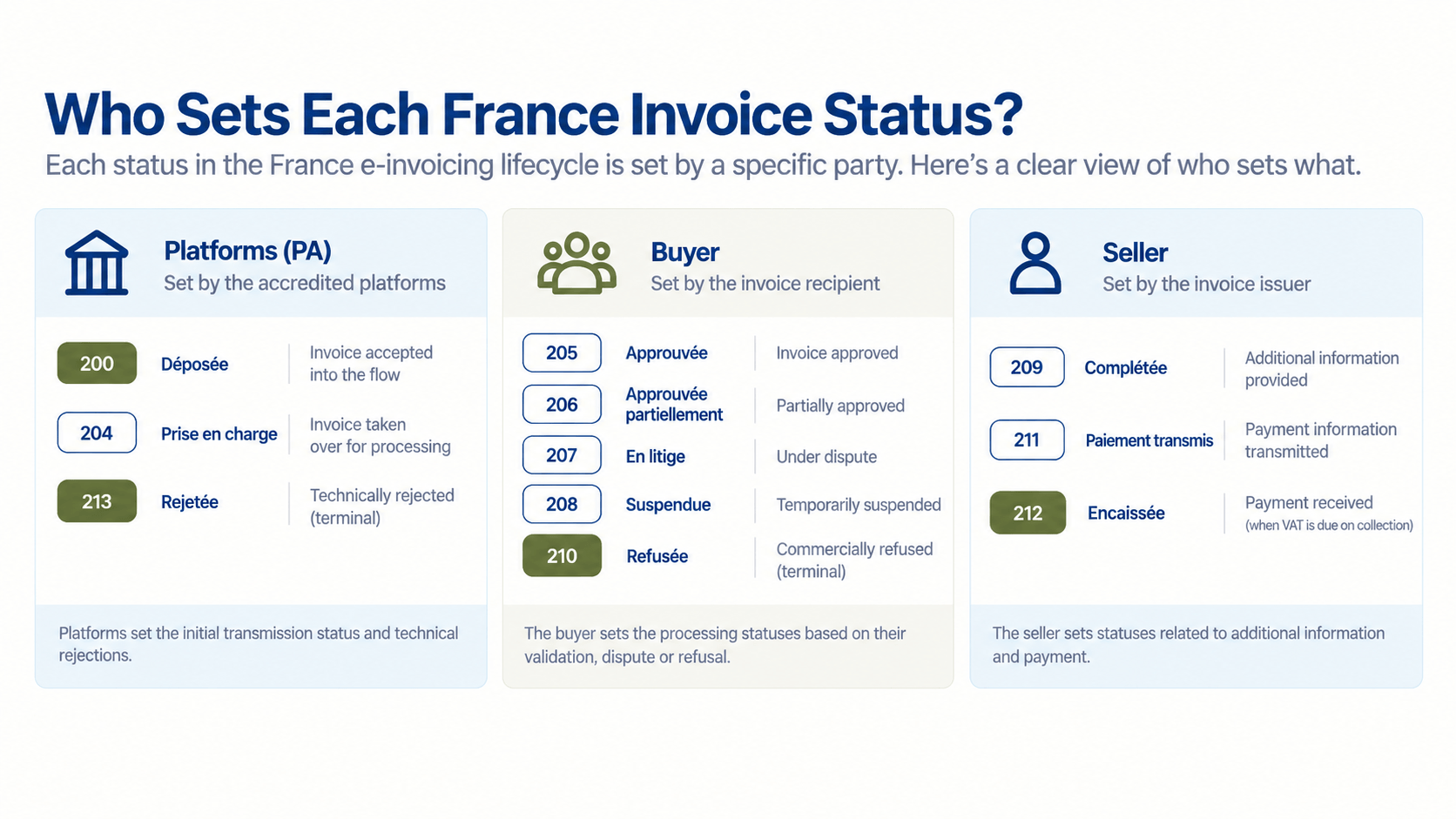
Platforms set Déposée and Rejetée. The buyer sets Approuvée, En litige and Refusée. The seller sets Complétée and Encaissée.
The Four Statuses AR Teams Must Act On
Déposée: Your New Proof of Dispatch
Your PA has accepted the invoice into the flow. Store the timestamp against the invoice record. It is stronger evidence than "we emailed it".
Three optional statuses follow it. Émise par la plateforme (201) means your PA has forwarded the invoice. Reçue par la plateforme (202) means the buyer's PA has confirmed receipt. Mise à disposition (203) means the invoice has reached the buyer. Together they answer collections' most common question: did the customer get it?
Rejetée: Fix It Before the Buyer Ever Sees It
A technical rejection: invalid format, missing field, or a recipient not found in the directory. It is terminal. Correct the data and resend. Until then, it should not sit in your ledger as an open receivable.
Refusée: A Refusal Cancels the Invoice
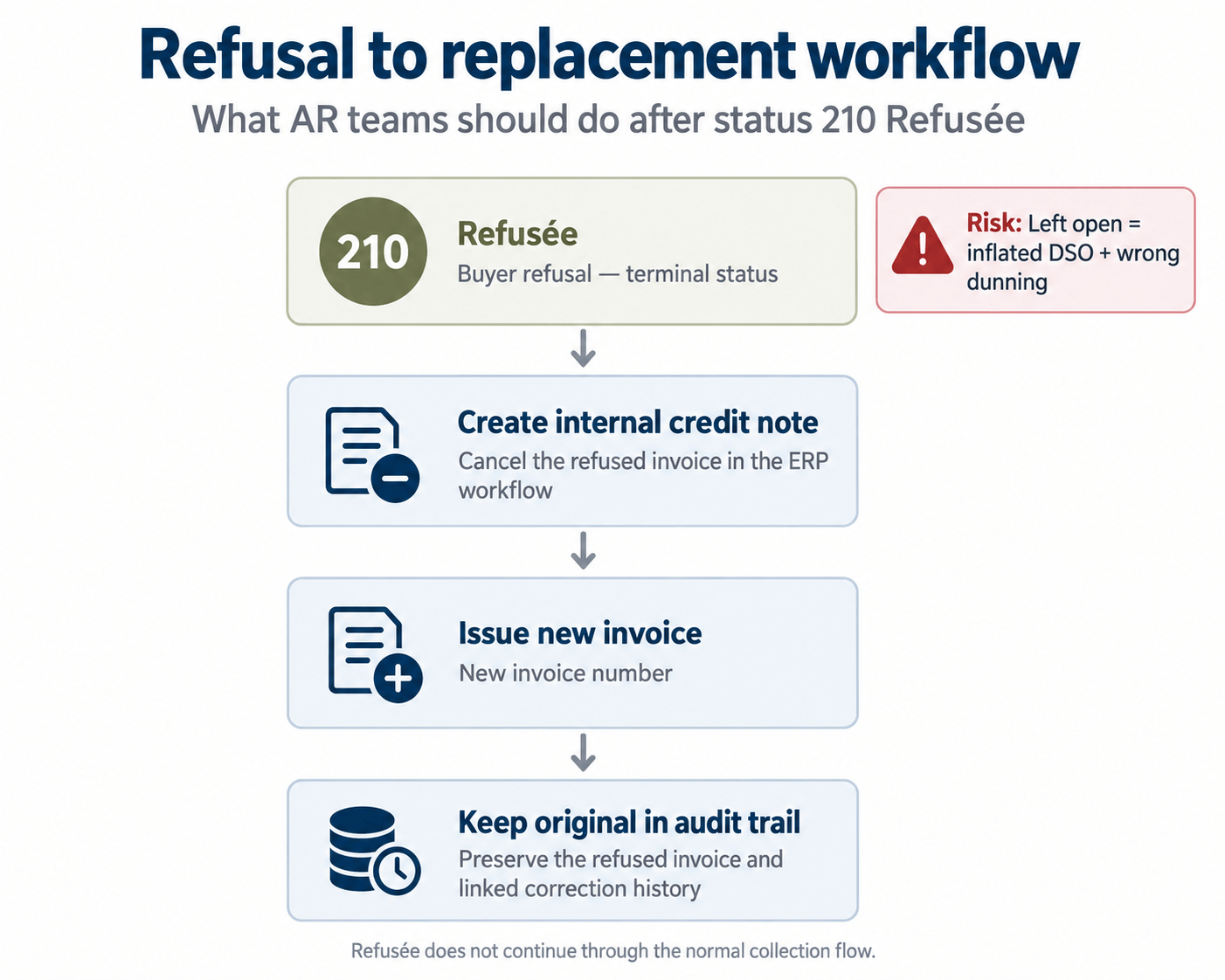
The buyer's commercial refusal, with a reason code. Also terminal: a refusal counts as a cancellation, so you issue an internal credit note and a new invoice. A dispute flag in the ERP is not enough.
Encaissée: AR Now Owns a VAT-Relevant Event
Where VAT is due on collection, you report payment received, once per partial payment if needed. Because this feeds VAT pre-filling, cash application becomes a compliance step.
What Changes Inside Your ERP
Map PA Status Codes to ERP Invoice States
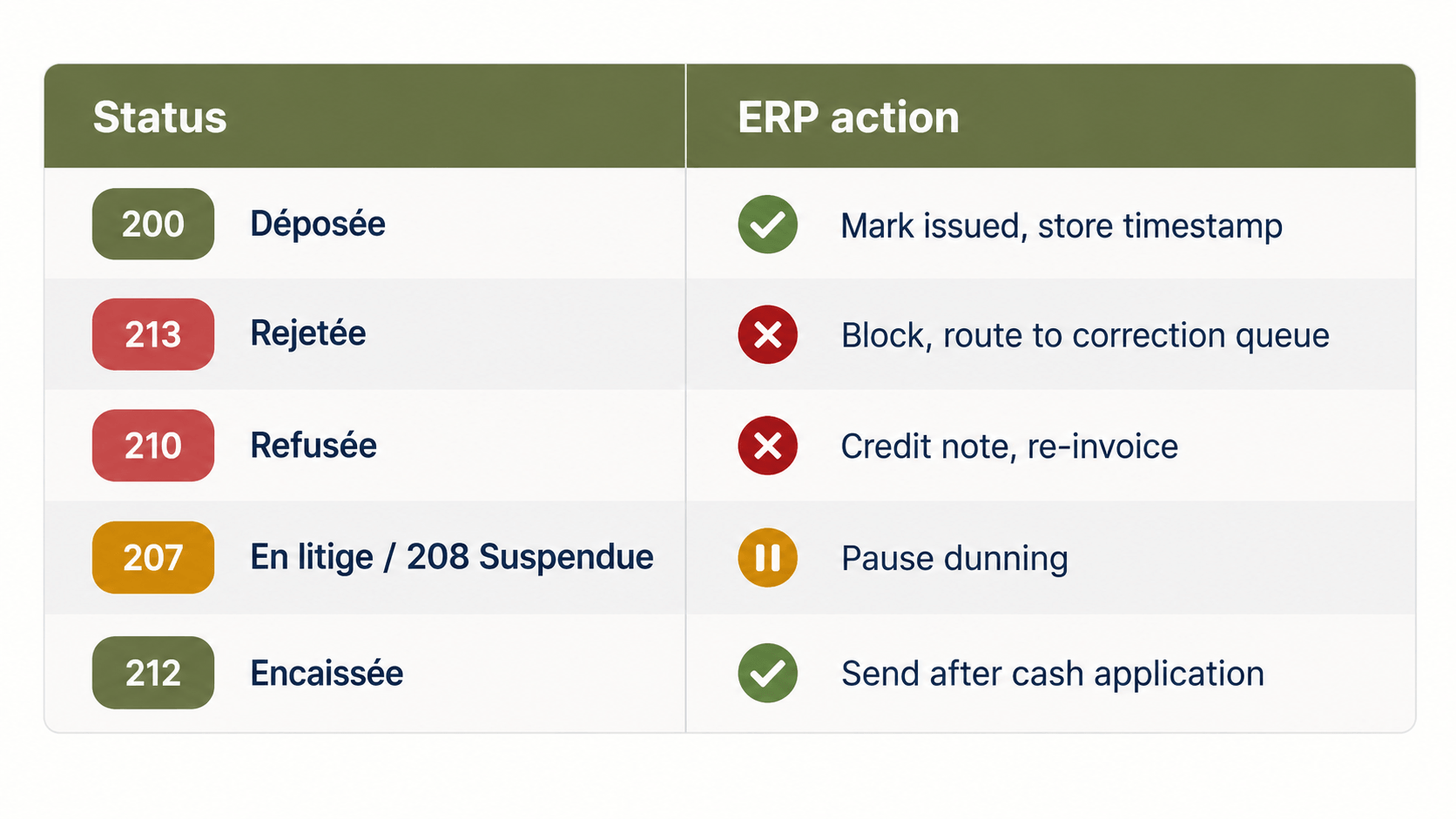
Your ERP knows "posted", "open" and "closed", not 210 or 212. Map each code to an ERP state and an AR action.
Terminal Statuses Need a Credit-Note Workflow
Rejetée and Refusée end the invoice's life. The correction and replacement need a defined path and an owner.
After a refusal, the replacement is a new invoice with its own number. The original stays in the audit trail alongside its credit note. If the ERP keeps the refused invoice open, DSO inflates with an uncollectable receivable and dunning chases money the customer has rejected.
Collections Must Read Buyer Statuses
Dunning an invoice marked En litige damages the relationship. Suspendue asks you to respond with Complétée and supporting documents: a task, not a reminder.
Cash Application Must Trigger an Outbound Status
When a payment is matched in the ERP, Encaissée must reach your PA. Done manually, it arrives late or not at all.
Where AR Processes Break in Practice
Statuses sit in the PA portal. AR works from the ERP ageing report, so a Refusée can go unnoticed for weeks while the invoice looks merely overdue.
Partial payments are posted as one lump. Only the final instalment triggers Encaissée, so the first is missing from the VAT data.
Disputes are settled by email. A fix is agreed, but nobody updates the status, so it shows En litige indefinitely.
Rejections are fixed at the platform, not at source. Someone corrects a missing buyer identifier in the PA portal. The ERP master data stays wrong, so the same rejection returns next month.
Integration Layer, Not ERP Rebuild
You do not need a new ERP. You need a layer that connects your ERP to your PA, translates status codes and writes them back to the invoice record.
HubBroker's e-invoicing solution does this on top of the system you run today. See how it works for Dynamics 365 Business Central and e-conomic.
FAQ
Which France invoice lifecycle statuses are mandatory? Déposée, Rejetée, Refusée and Encaissée. Refusée is required only when a buyer refuses an invoice, and Encaissée only when VAT is due on payment.
Can a refused invoice be corrected and resent? No. Refusée is terminal, so the original invoice is closed. You issue an internal credit note and then a new invoice with its own number.
Who sends Encaissée? The seller, through its PA, once payment is received. For partial payments it can be sent more than once, until the full amount is settled.
Do optional statuses matter if they're not mandatory? Yes, for AR. Statuses such as En litige, Suspendue and Approuvée show where an invoice is stuck. That is what collections needs to prioritise.
What if my ERP can't store status codes? Keep them in the integration layer and write the resulting state back, with no changes to the ERP core.
Next Step
Working out how statuses should flow into your ERP? We can walk through your AR process with you. Talk to us.
