
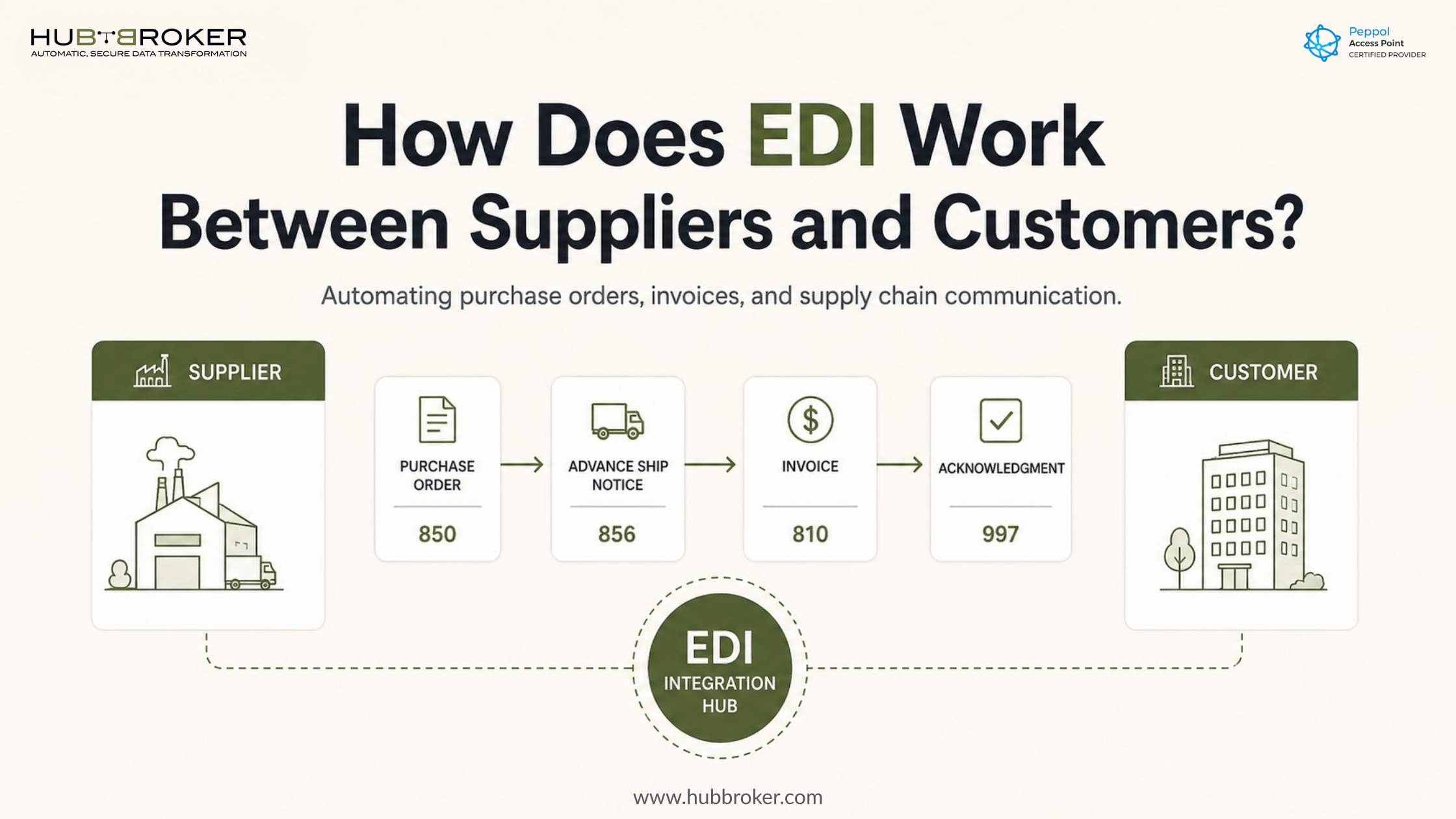
How Does EDI Work Between Suppliers and Customers?
EDI (Electronic Data Interchange) is a standardized system that allows suppliers and customers to exchange business documents like purchase orders and invoices electronically and automatically. EDI replaces manual, paper-based processes, reducing errors and speeding up transactions across the supply chain. A full EDI transaction cycle can complete in minutes rather than days.
Manual document exchange sounds manageable until order volumes scale. Email attachments get missed. PDFs land in the wrong inbox. Someone re-enters data that was already entered somewhere else. By the time the supplier ships, three people have touched a purchase order that should have moved automatically.
That is the core problem EDI solves. Electronic Data Interchange replaces every one of those manual steps with a structured, machine-to-machine exchange. According to research from Global eXchange Services (GXS), companies that adopt EDI reduce transaction processing costs by up to 35%. That is not a marginal efficiency gain it is a structural change in how supply chain operations run.
This guide covers exactly how EDI works between suppliers and customers: what happens at each step, which document types are involved, what the measurable benefits look like, and how to evaluate the right integration approach for your business.
What Is EDI and How Does It Work?
EDI stands for Electronic Data Interchange. At its core, EDI is a standardized method for sending and receiving structured business documents electronically, without human intervention at each step.
Here is why the "standardized" part matters. Without a shared format, two systems cannot reliably read each other's data. EDI solves this by requiring both parties to use a recognized format most commonly ANSI X12 (used primarily in North America) or UN/EDIFACT (used widely in Europe and internationally). Once both sides speak the same format, documents move from system to system automatically.
The basic flow looks like this:
The buyer's ERP generates a document (e.g., a purchase order)
An EDI integration layer translates it into the agreed standard format
The document transmits to the supplier's system via a secure communication protocol (AS2, SFTP, or through a Value-Added Network)
The supplier's system reads and processes the document automatically
A confirmation travels back to the buyer
No email. No manual entry. No waiting for someone to open a PDF.
What EDI standards are most commonly used between suppliers and customers?
ANSI X12 - Dominant in retail, healthcare, and logistics in North America. Used by major retailers including Walmart and Target.
UN/EDIFACT - The international standard, widely adopted across European manufacturing, wholesale, and distribution sectors.
Peppol - A network-based standard gaining rapid adoption for B2G and B2B e-invoicing across Europe. HubBroker operates as a certified Peppol Access Point provider, enabling compliant invoice exchange across borders.
Each standard defines strict document structures. That strictness is what makes automated processing reliable at scale.
What Types of Documents Are Exchanged via EDI?
Every major document in a supplier-customer transaction has a corresponding EDI message type. The most common ones you will encounter:
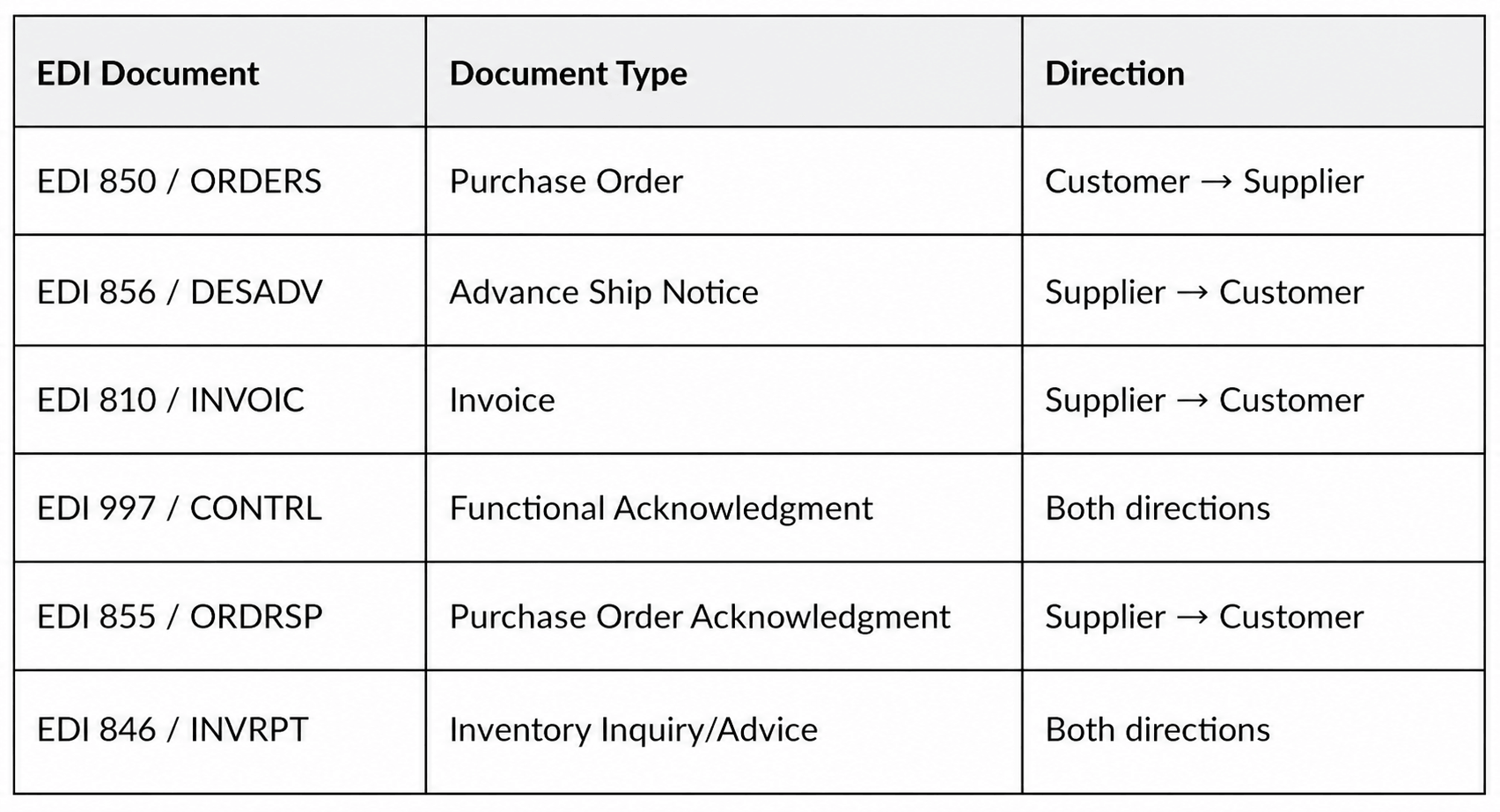
The EDI 997 (or CONTRL in EDIFACT) is often overlooked but operationally important. It confirms that a document was received and structurally valid. Without it, neither party knows whether the transmission succeeded.
Beyond standard order-to-invoice documents, EDI also supports remittance advice, return authorizations, and price/catalog feeds depending on the trading partner's requirements and the industry.
How Does EDI Work Between Suppliers and Customers in Practice?
A typical EDI transaction cycle between a retailer and a manufacturer moves through five stages. Each stage triggers the next automatically.
Stage 1: Customer sends a Purchase Order (EDI 850)
The retailer's ERP generates a purchase order and transmits it via EDI directly to the supplier's system. No email. No attachment. The supplier's system receives a structured document it can process immediately.
Stage 2: Supplier acknowledges receipt (EDI 997)
Within seconds, the supplier's system sends back a functional acknowledgment. The customer now knows the order arrived intact. If something was malformed, the 997 flags it before any fulfillment begins.
Stage 3: Supplier confirms the order (EDI 855)
The supplier's system sends a Purchase Order Acknowledgment confirming quantities, pricing, and expected ship dates. Discrepancies surface here, not after goods are packed.
Stage 4: Supplier ships and sends an Advance Ship Notice (EDI 856)
Before the delivery arrives, the supplier transmits shipment details electronically. The customer's warehouse knows what is coming, when, and in what configuration. This is what makes automated receiving possible.
Stage 5: Supplier sends an Invoice (EDI 810)
Once goods are shipped, the supplier submits a digital invoice. The customer's system performs a three-way match purchase order, ship notice, invoice and processes payment without manual review.
The entire cycle can complete in minutes. With paper-based or email-driven processes, the same cycle typically takes days.
How does EDI connect to an ERP system?
EDI does not operate in isolation. For the transaction cycle above to run automatically, EDI must connect directly to your ERP so that purchase orders land in your order management module, invoices post to accounts payable, and ship notices update inventory records without anyone copying data between systems.
This is where ERP EDI integration becomes the critical implementation layer. Without it, EDI only moves documents between systems. With it, EDI drives actual business processes end to end.
HubBroker provides EDI integration services that connect ERP systems including Microsoft Dynamics 365, SAP Business One, and others to trading partner networks, automating the full order-to-cash and procure-to-pay cycle.
What Are the Key Benefits of EDI for Suppliers and Customers?
EDI delivers measurable advantages on both sides of a trading relationship. These are not abstract improvements each one maps to a specific operational cost or risk.
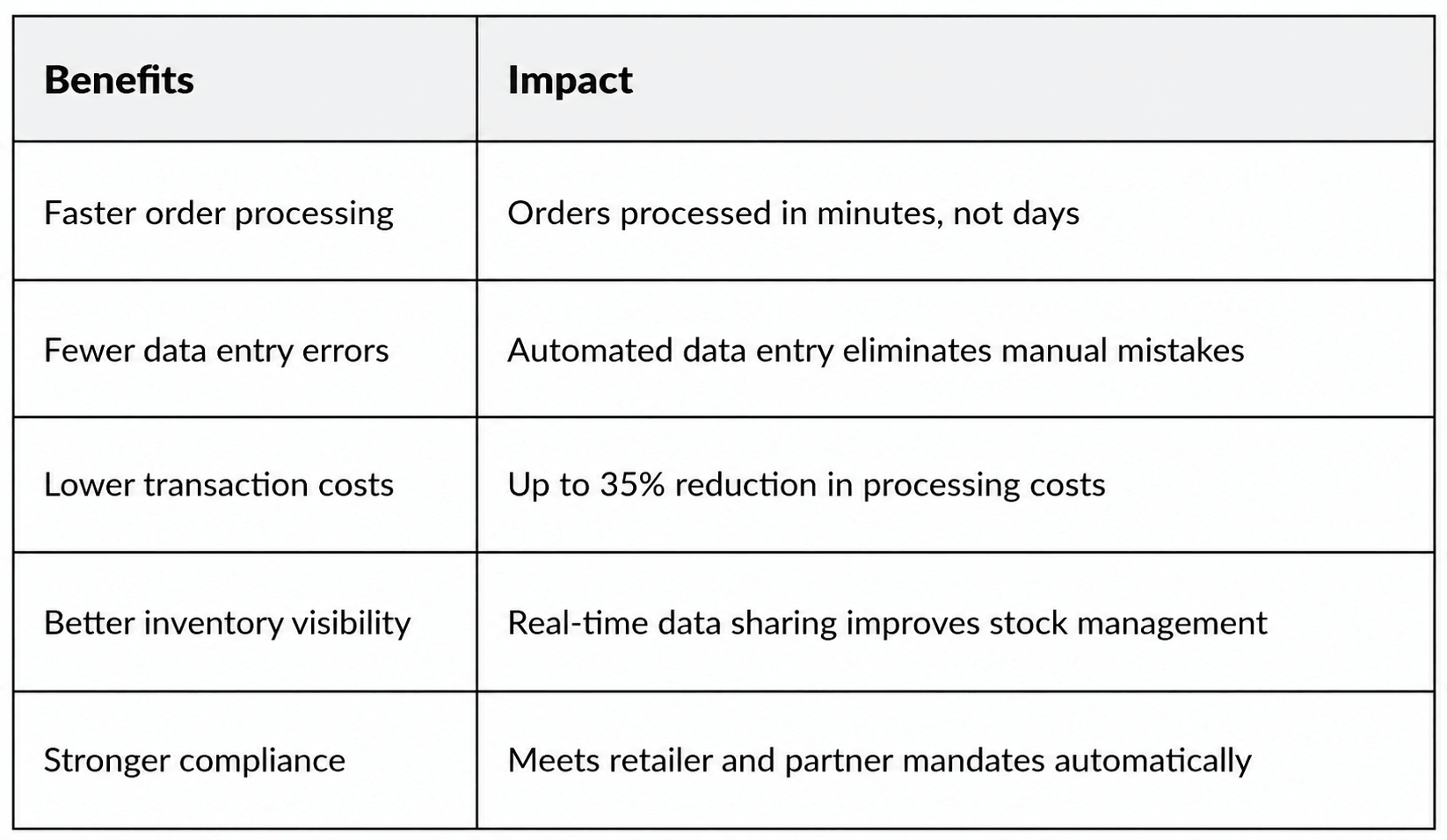
Large retailers Walmart, Target, Carrefour have required EDI compliance from suppliers for decades. For suppliers, EDI compliance often determines whether they can transact with major customers at all. That is a hard business requirement, not a nice-to-have.
What does EDI mean for suppliers specifically?
Suppliers that implement EDI gain:
Faster payment cycles, because invoices process automatically rather than waiting in an AP queue
Fewer chargebacks, because ASNs and invoices match expected formats exactly
Access to larger customers who mandate EDI as a condition of doing business
Reduced administrative overhead on order processing and billing
What does EDI mean for customers specifically?
Customers that implement EDI gain:
Automated purchase order generation triggered by inventory thresholds or demand signals
Real-time shipment visibility before goods arrive at the warehouse
Three-way invoice matching without manual review, reducing fraud risk and processing time
Consistent data quality across every supplier, regardless of their internal systems
What Are the Main EDI Transmission Methods?
Getting documents from one system to another requires a communication protocol. Three options are most common:
AS2 (Applicability Statement 2): A direct, point-to-point protocol with built-in encryption and delivery receipts. Used widely in retail and manufacturing for high-volume, direct trading partner connections.
SFTP (Secure File Transfer Protocol): File-based transfer over an encrypted connection. Lower setup complexity than AS2, commonly used for batch transmissions.
VAN (Value-Added Network): A third-party intermediary that manages routing, translation, and security between trading partners. VANs lower the technical barrier for smaller suppliers because the VAN handles format translation and partner onboarding.
The right choice depends on your volume, the technical requirements of your trading partners, and how many partners you are connecting. High-volume retailers typically mandate AS2. Smaller suppliers often start with a VAN before migrating to direct connections as volume grows.
How does a VAN differ from direct EDI integration?
A VAN acts as a hub. You connect once to the VAN, and the VAN routes your documents to each trading partner. Direct EDI integration connects your system point-to-point with each partner.
VANs reduce initial setup effort but introduce per-transaction fees that accumulate at scale. Direct integration has higher upfront complexity but lower long-term cost per transaction. Most organizations start with a VAN and move toward direct connections as their trading partner network grows.
What about PDF invoices can they work with EDI?
Not natively. EDI requires structured data formats, not unstructured documents like PDFs. If suppliers send PDF invoices, those documents need to be converted into structured XML or EDI format before they can be processed automatically.
HubBroker's PDF to XML conversion service handles exactly this extracting invoice data from PDFs and converting it into validated XML that feeds directly into ERP systems. This is a practical bridge for businesses onboarding suppliers who cannot yet send native EDI.
Which Industries Use EDI Most?
EDI adoption is highest where document volumes are large, compliance requirements are strict, or both.
Retail and eCommerce: High order frequency, multiple trading partners, and retailer mandates drive near-universal EDI adoption among major suppliers.
Manufacturing: Suppliers and customers exchange forecast data, purchase orders, and ASNs across complex, multi-tier supply chains.
Logistics and transportation: Shipment notices, freight invoices, and delivery confirmations move between carriers, 3PLs, and shippers via EDI.
Healthcare and pharmaceuticals: Regulatory requirements and patient safety standards demand accurate, auditable document exchange.
Wholesale and distribution: High-volume order processing across large supplier and customer networks makes manual methods unsustainable.
How Should You Choose Between EDI and API Integration?
EDI and APIs both move data between systems. They solve different problems.
EDI uses fixed, batch-based document formats designed for high-volume, standardized transactions between known trading partners. APIs enable real-time, flexible data exchange and work better for dynamic integrations connecting to marketplaces, portals, or applications that require frequent bidirectional data flow.
The practical answer: many modern supply chains use both. EDI handles structured partner transactions; APIs handle real-time application integrations.
HubBroker provides ERP API integration alongside EDI services, so businesses can automate both types of data exchange through a single integration layer.
Frequently Asked Questions About EDI Between Suppliers and Customers
What does EDI stand for?
EDI stands for Electronic Data Interchange. EDI is a standardized system for exchanging structured business documents like purchase orders and invoices electronically between organizations, without manual data entry.
Is EDI the same as e-invoicing?
No, but they overlap. EDI covers a broad range of document types across the order-to-cash cycle. E-invoicing specifically refers to the electronic exchange of invoice data. Peppol e-invoicing is a specific network-based standard for B2B and B2G invoice exchange, particularly in Europe. HubBroker offers a dedicated Peppol e-invoicing solution for businesses that need compliant invoice exchange across European trading networks.
How do small suppliers get started with EDI?
Most small suppliers start with a web-based EDI service provider or VAN that handles translation and transmission without requiring internal development. This lowers the barrier to entry significantly. As transaction volumes grow, businesses typically move toward direct ERP EDI integration.
Can EDI be replaced by AI?
AI can make EDI smarter for example, by improving document capture, exception handling, and anomaly detection. But the core requirement for structured, standardized document exchange between trading partners will remain. AI and EDI complement each other rather than compete.
How long does EDI implementation take?
Timeline depends on the number of trading partners, document types, and the complexity of your ERP environment. A single trading partner connection with a well-configured ERP integration can go live in a few weeks. Larger rollouts covering multiple partners and document types typically take two to four months. HubBroker has delivered over 500 EDI integration projects across 40+ countries.
What happens when an EDI document fails?
A failed EDI document triggers an error acknowledgment (such as an EDI 997 with a rejection status). The sending system is notified, and the document must be corrected and retransmitted. A well-configured EDI integration includes exception handling and alerting so failures are caught immediately rather than discovered days later.
Which EDI format should suppliers use ANSI X12 or EDIFACT?
The answer depends on your trading partners, not your preference. North American retailers typically require ANSI X12. European customers and government entities typically use EDIFACT or Peppol. Many suppliers operating internationally need to support both. A managed EDI integration service handles format translation so your internal systems only need to work with one format.
Ready to Automate EDI Between Your Suppliers and Customers?
EDI removes friction from supplier-customer relationships by automating document exchange, eliminating manual data entry, and compressing transaction cycles from days to minutes. For businesses managing complex supply chains, EDI is the operational foundation that makes everything else run reliably.
Getting started requires two things: knowing which document types your trading partners require, and choosing an integration approach that connects EDI directly to your ERP.
HubBroker has delivered EDI integration for over 100 clients across 40+ countries, spanning retail, manufacturing, logistics, and distribution. Whether you need to connect a single trading partner or automate a full supplier network, the HubBroker team can scope the right solution for your environment.
Contact the HubBroker team to discuss your EDI integration requirements, or book a demo to see how the platform connects your systems in practice.
