
Croatia EInvoicing Compliance What Businesses Need for a Smooth Transition
A company in Split receives an electronic invoice, but its accounts team cannot match it to a purchase order. Meanwhile, sales staff notice missing product codes in their ERP. These small problems are part of Croatia einvoicing compliance. The Fiskalizacija 2.0 reform changes how businesses exchange invoices and report transaction information. It also puts more attention on customer records, item descriptions, and daily checks. Getting ready means following an invoice from creation to accounting, then fixing the places where people still need to intervene.
Which Croatian Businesses Must Use eRačun in 2026?
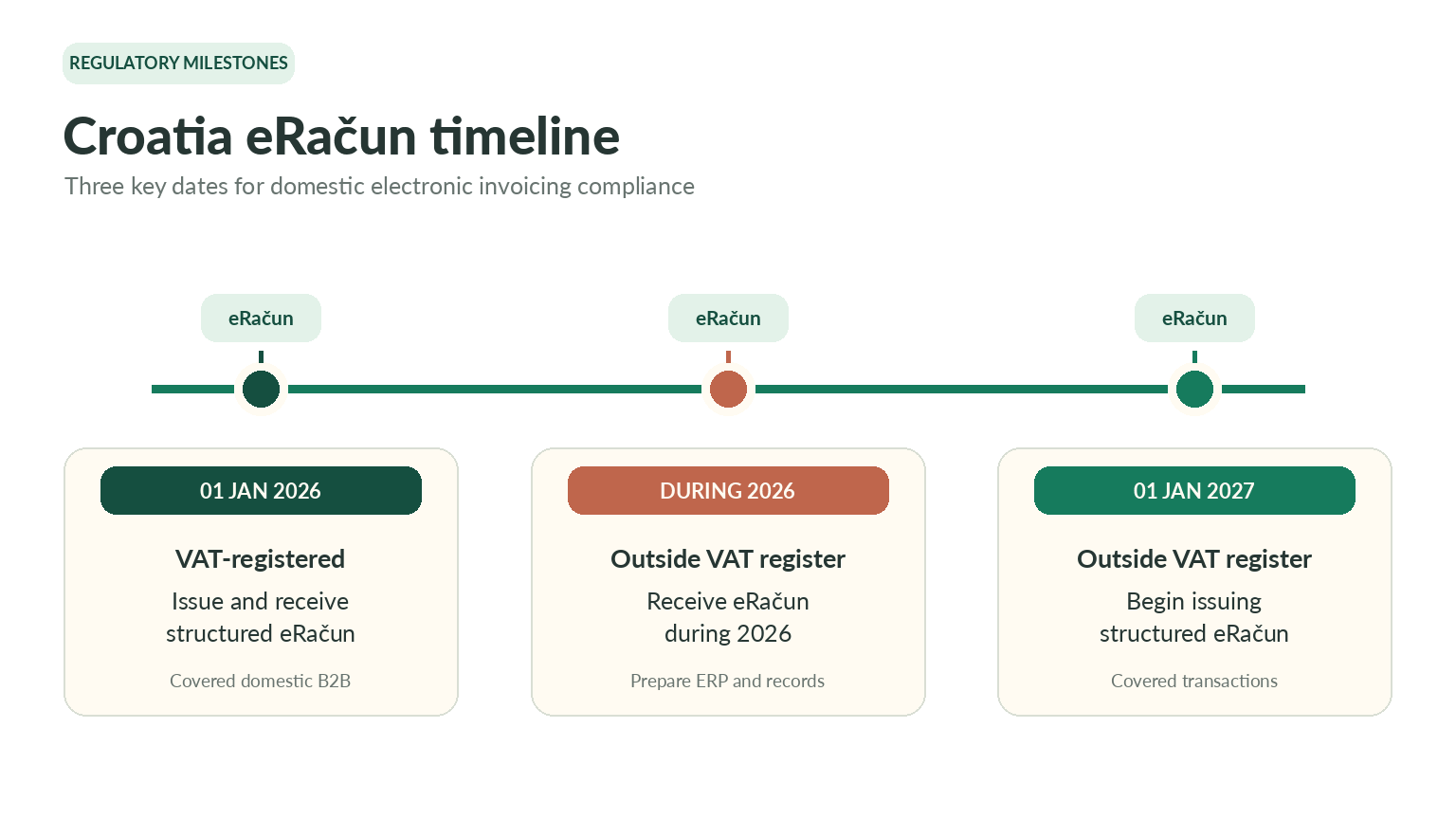
Since 1 January 2026, taxpayers established in Croatia and registered for VAT must issue and receive structured electronic invoices for covered domestic B2B transactions. Businesses outside the VAT register have to receive eRačun invoices during 2026. Their issuing obligation begins on 1 January 2027. That does not mean every sale follows one route. Consumer transactions, public procurement, and international invoices may have different requirements.
Check what your business sells, who receives the invoice, and which rules apply before updating your ERP. An eRačun contains structured data that software can read. A PDF emailed to a buyer is not automatically an eRačun.
Why Do Product Codes and Recipient Details Cause Problems?
Relevant invoice lines need a six-digit KPD 2025 code describing the product or service. A warehouse may hold hundreds of items, including products entered into the ERP years ago with very short descriptions. Matching them to the right classification can take longer than expected. Croatia's KLASUS classification tool can help staff find categories. But finance should involve colleagues who know the products, rather than selecting codes from vague item names. Uncertain cases deserve a closer review.
Buyer information can also hold up delivery. An incorrect identifier or outdated electronic receiving address may send an otherwise valid invoice to the wrong place, or stop it from arriving. Review customer records and the chosen electronic invoice exchange route together carefully. Someone should own updates to these records, so corrections are not lost between sales and accounting.
Practical Transition Checklist for ERP and Finance Teams
Use a small set of real invoices to test the whole process. Give each check an owner and save the result, including anything that failed.
1. Confirm which rules apply. Separate domestic business invoices from consumer, public-sector, and cross-border transactions.
2. Check item classifications. Match goods and services to KPD 2025 codes and review uncertain entries with the right colleagues.
3. Choose an intermediary. Review the Tax Administration's published list, available services, costs, and ERP connection options.
4. Set up authorizations. Confirm your electronic receiving address and authorize required intermediary functions through FiskAplikacija where applicable.
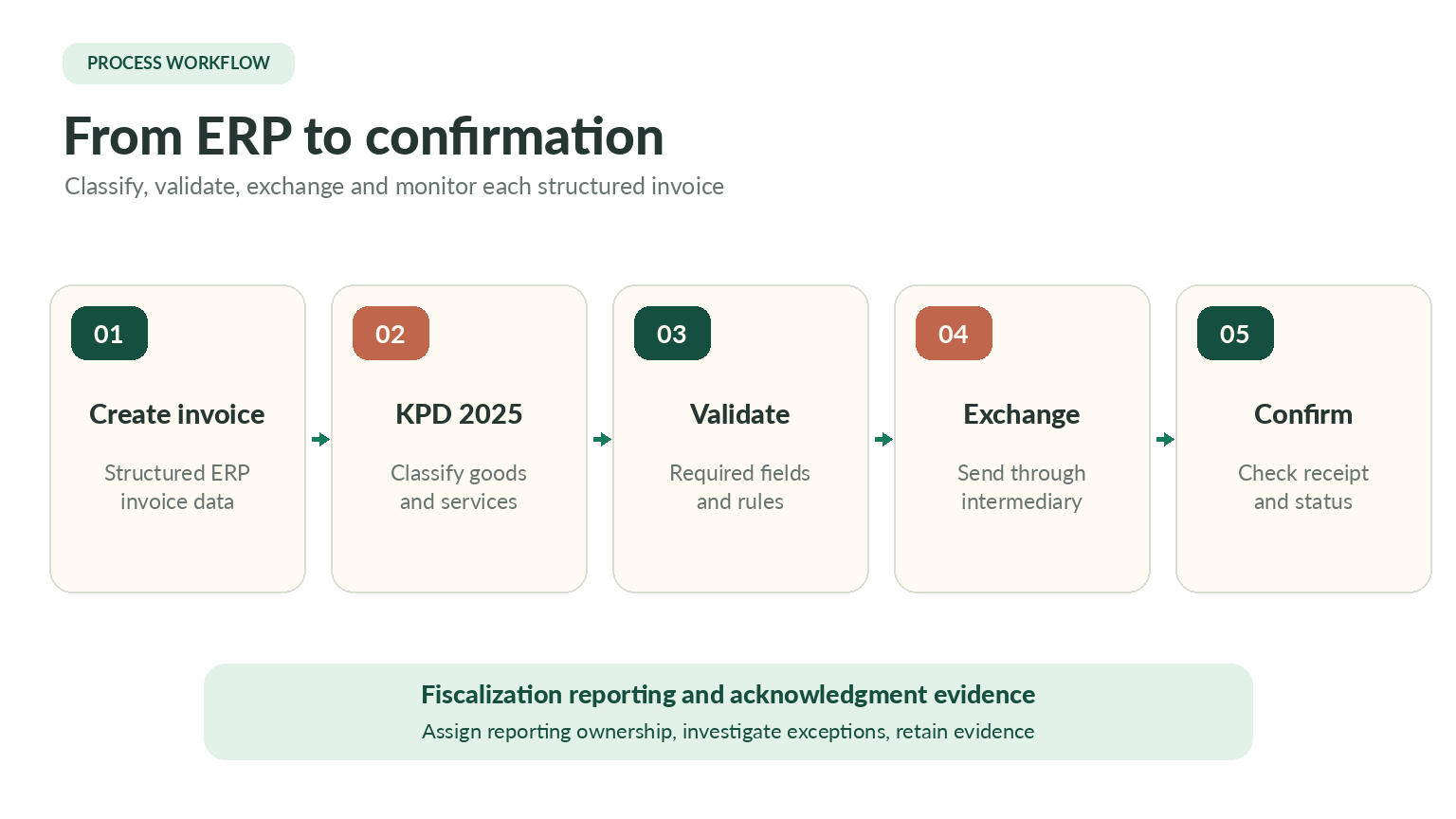
5. Test ERP exchange. Check outgoing structured files, incoming invoices, delivery messages, and rejection responses using real customer details.
6. Verify fiscalization records. Identify who reports required data, checks acknowledgments, and keeps submission evidence available.
7. Try difficult situations. Include credit notes, missing identifiers, rejected documents, duplicate attempts, and temporary connection outages.
Testing is not finished when the invoice leaves the system. Accounting must also find it, understand its status, and know what happens next.
What Should Daily Invoice Monitoring Look Like?
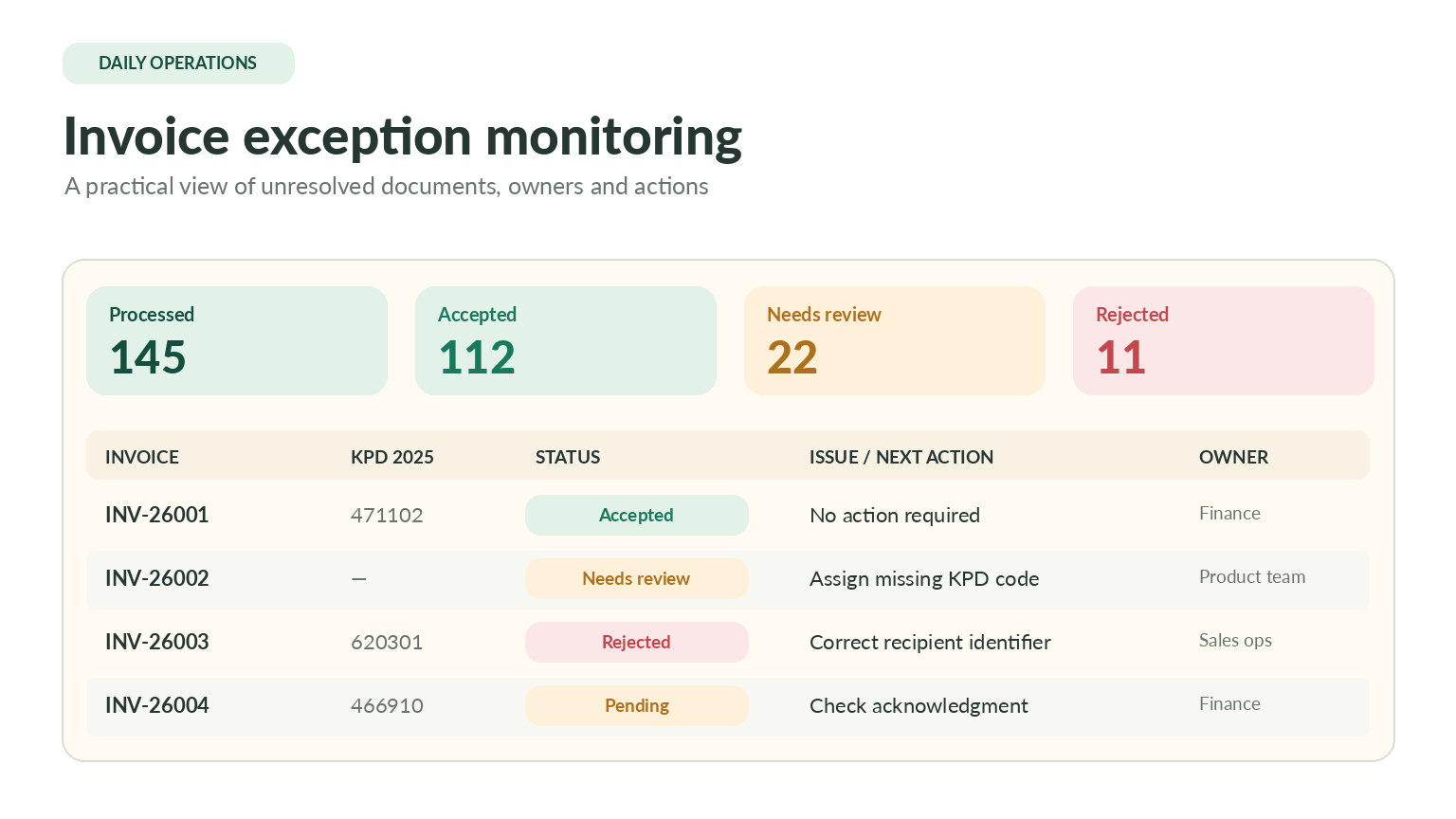
Automation does not remove the need to review exceptions. A finance employee should see which invoice needs attention, why it failed, and who will fix it. Incoming documents need matching and approval; outgoing documents need delivery checks. Correction and reporting evidence should remain linked to the original invoice.
Daily check | Possible problem | Useful response |
|---|---|---|
Incoming invoice | Supplier details differ | Review master data |
Outgoing delivery | Recipient not found | Check receiving address |
Product codes | KPD classification missing | Update item mapping |
XML validation | Required field incorrect | Correct and retest |
Fiscalization | Acknowledgment missing | Investigate reporting status |
Credit notes | Original invoice unlinked | Check document reference |
Duplicate attempts | Invoice sent twice | Review submission history |
Keep a daily list of unresolved documents rather than relying on a general dashboard. Assign an owner, record what was tried, and escalate problems that cannot be solved quickly. A successful send message alone does not prove everything is complete.
What Should You Ask an Integration Provider Before Switching?
Ask providers to demonstrate invoices from your own ERP, including one with a deliberate error. Confirm which intermediary services they offer, how incoming documents can be searched and exported, and who maintains connections. Request clear prices for setup, document volumes, support, and future validation updates. If your business operates across several locations, test user access and accounting records for different branches.
Technical exchange can be outsourced, but tax decisions and internal approvals still need owners. Croatia einvoicing compliance becomes easier when product codes, recipient records, and invoice statuses are checked together. Begin with a manageable set of transactions, then expand once staff can resolve the usual problems without guesswork.
