
The Best Methods for Connecting Shopify to an ERP System
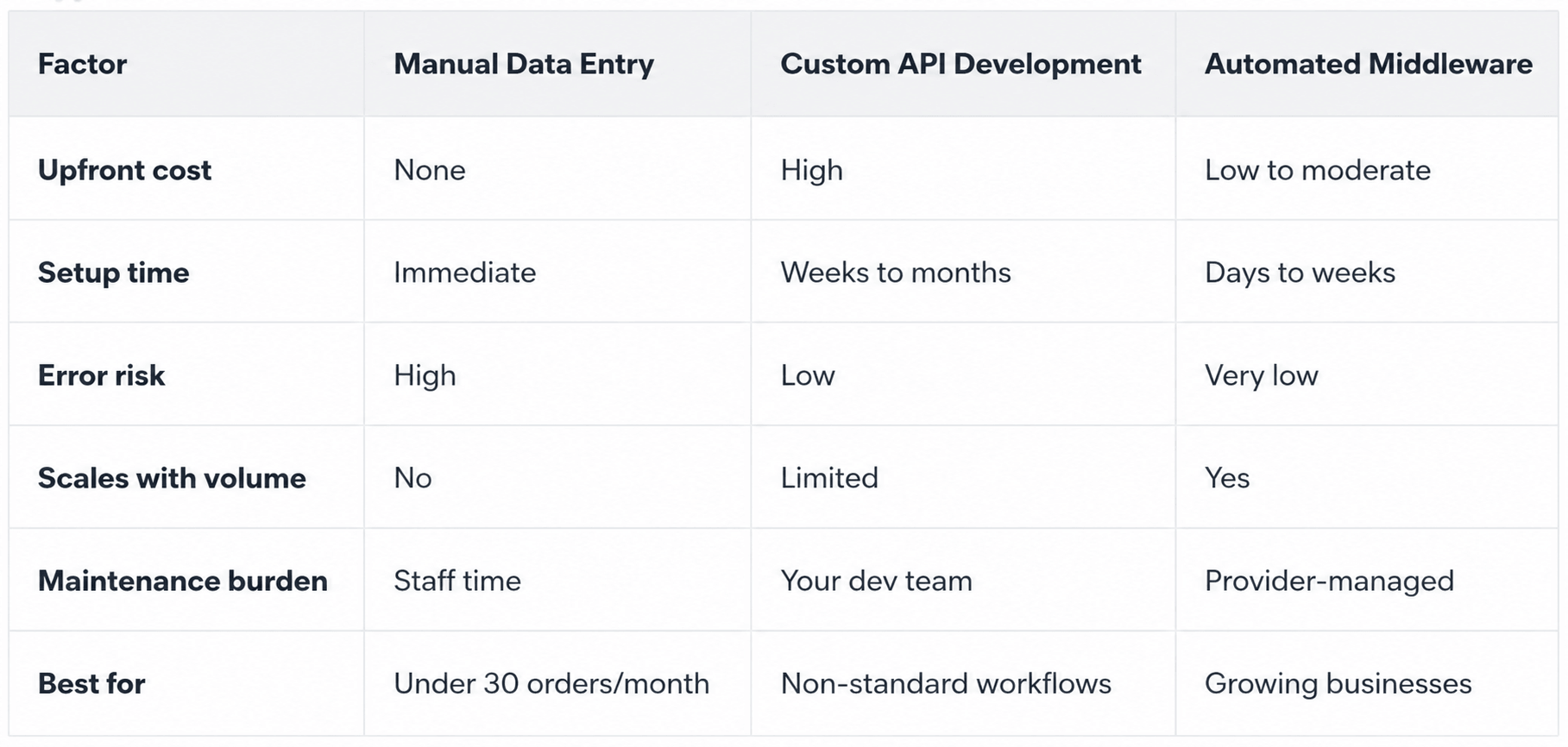
There are three main ways to connect Shopify to an ERP: manual data entry, custom API development, and automated middleware. For most growing businesses, middleware is the clear winner.
When your Shopify store starts scaling, the cracks appear fast. Orders pile up, inventory drifts out of sync, and your team spends hours re-entering data between systems. That's the problem Shopify ERP integration solves creating one automated data flow between your storefront and your back office.
Here's what you need to know.
Why It Matters
Shopify handles the customer side: orders, payments, and fulfillment. Your ERP handles the operational side: inventory, finance, and reporting. When they don't talk to each other, you get:
Manual entry errors - wrong SKUs, duplicate records, mismatched quantities
Inventory mismatches - Shopify showing stock your ERP has already allocated
Delayed invoicing - finance waiting on order data before billing can begin
Poor visibility - different teams working from different numbers
At low volumes, this is annoying. At scale, it's a liability.
The Three Integration Methods
1. Manual Data Entry
Someone logs into Shopify, copies order details, and enters them into the ERP by hand. No setup cost, no technical lift but the risks are real. Errors are inevitable, speed doesn't scale, and staff time gets consumed by repetitive tasks that add no value.
Use it only if you're processing fewer than 30 orders per month and not planning to grow.
2. Custom API Development
Shopify offers a REST and GraphQL API that developers can use to build a direct connection to your ERP. This gives you full control over data mapping and sync logic useful if your workflows are genuinely non-standard.
The trade-offs: it's expensive to build, takes weeks or months, and every Shopify API update or ERP upgrade becomes your team's problem to fix. For most small and mid-sized businesses, it's more investment than necessary.
Use it only if your requirements can't be met by existing platforms and you have the internal team to maintain it.
3. Automated Middleware Solutions
Middleware platforms sometimes called iPaaS solutions sit between Shopify and your ERP. They capture orders, transform data into the right format, validate it, and send it across automatically. No manual steps. No custom builds to maintain.
HubBroker's Shopify EDI integration covers the full process: requirement analysis, data mapping, testing, deployment, and ongoing monitoring. For businesses connecting to SAP Business One or Microsoft Dynamics 365 Business Central, this means complex rules VAT logic, multi-warehouse inventory, partial shipments, B2B pricing are handled out of the box.
Use it if you're scaling and want a reliable, low-maintenance integration that grows with your business.
Why Automation Wins at Scale
Manual and custom solutions both hit a ceiling. Staff can't keep up when orders double. Custom integrations break when APIs change.
Middleware is built to scale. Adding a new sales channel or ERP module doesn't mean rebuilding it means extending what's already working. HubBroker supports connections to SAP Business One, Microsoft Dynamics 365 Business Central, and other ERPs through the same infrastructure, so your integration grows as your business does.
Middleware also includes error monitoring. Failed transactions get flagged before they reach customers. That level of visibility is rare with manual processes or custom builds.
Key Benefits of Shopify ERP Synchronization
Real-time inventory sync - stock levels stay accurate across Shopify and your warehouse, reducing overselling
Automated order processing - orders flow into the ERP instantly; fulfillment starts faster
Cleaner financial data - invoices land in the ERP ready to process, with VAT and payment terms already applied
Fewer errors - removing manual steps removes the mistakes that come with them
Scalability - order volumes can grow without a matching increase in admin headcount
For businesses running Shopify with SAP Business One, orders convert automatically into SAP sales orders with customer data, SKUs, pricing, and VAT already mapped. For Danish and European webshops, the Shopify Business Central integration covers orders, customers, inventory, VAT, invoices, and fulfillment in one compliant flow.
What to Look for in a Provider
Not every integration provider delivers the same results. Evaluate any partner on:
ERP-specific experience - have they connected Shopify to your exact ERP before?
Data mapping depth - can they handle your SKU rules, VAT logic, and multi-warehouse setup?
Error monitoring - do they alert you when something fails?
Scalability - can the integration support new channels or ERP modules as you grow?
Structured implementation - is there a documented process from requirements to go-live?
Ongoing support - who do you call when something breaks?
HubBroker brings 15+ years of experience across 500+ integration projects in 40+ countries, with teams in Denmark and India who understand both Shopify and ERP systems.
Ready to Automate?
Every hour your team spends copying Shopify orders into an ERP is an hour a well-configured integration could handle in seconds.
The right Shopify ERP integration reduces errors, speeds up fulfillment, keeps inventory accurate, and gives your finance team clean data from day one.
Contact HubBroker to book a consultation or request a demo and see how Shopify ERP integration can remove the manual work slowing your operations down.