
SAP Integration Partners: How to Choose the Right Integration Provider
Choosing an SAP integration partner is not only about finding someone who can connect an API. The provider may need to connect SAP with ecommerce, CRM, 3PL, EDI, finance or e-invoicing systems. When comparing SAP integration partners, the bigger risk is choosing a setup that works for first connection but becomes difficult to manage when more integrations are added later.
Start With Your Integration Landscape, Not the Provider List
Before looking at providers, first understand your current system setup. This may include SAP S/4HANA, SAP ECC, SAP Business One, cloud applications or a mix of cloud and on-premise systems.
Also list the systems that need to exchange data with SAP, such as:
CRM
Ecommerce
WMS / 3PL
Procurement
Finance
EDI / Peppol
APIs
Custom applications
Integration options can be different depending on SAP product and setup. SAP documents OData and SOAP APIs for S/4HANA Cloud, while SAP Business One has its own HTTP/OData-based Service Layer.
The main question should be: Does the provider actually understand your SAP environment and the other systems around it?
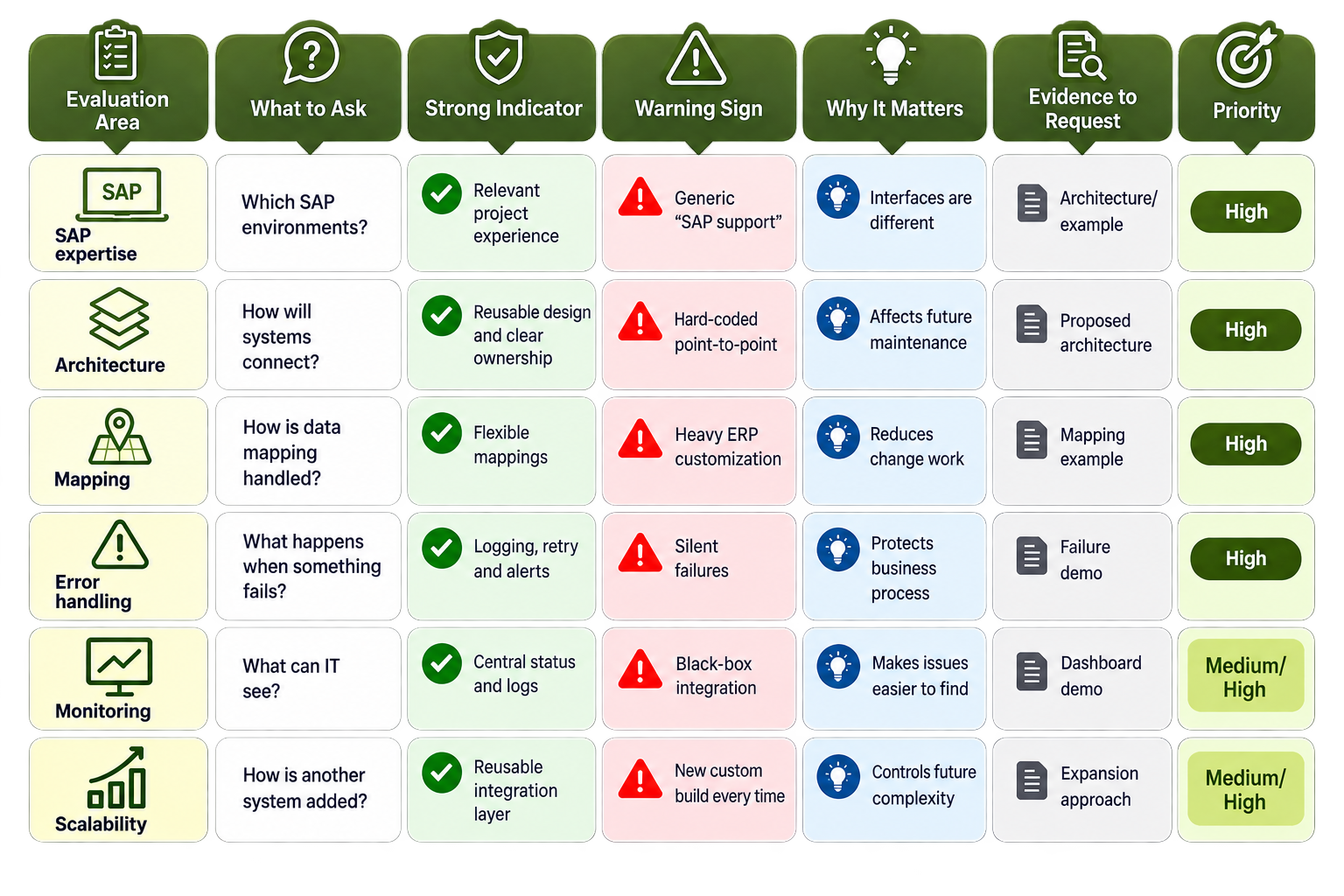
What Should You Compare Between SAP Integration Partners?
Do not only depend on sales claims. Ask for practical examples and evidence.
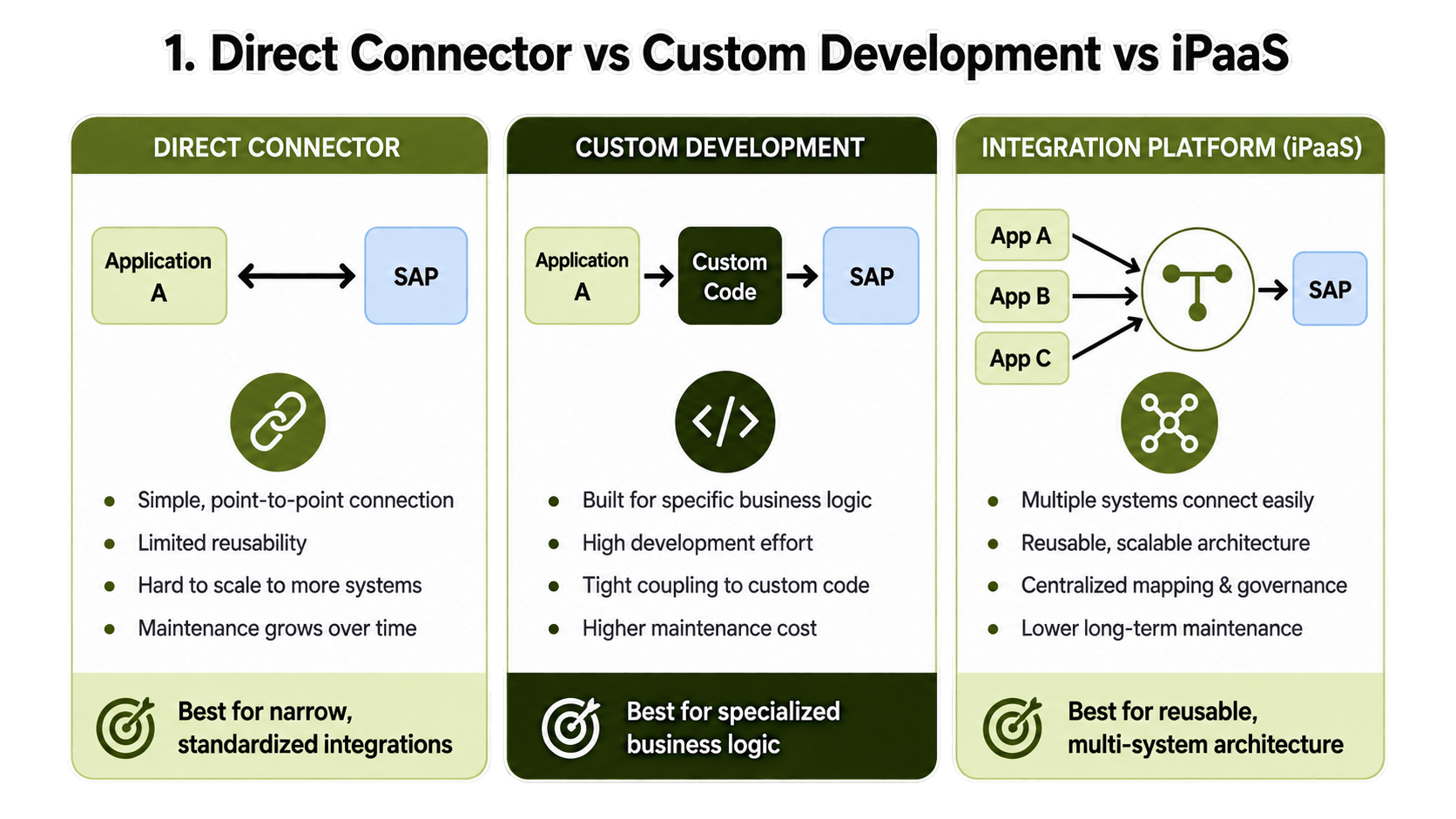
Direct Connector, Custom Development or Integration Platform?
A direct connector can work well for a simple and fixed connection. Custom development can support special business rules, but it can also create more code that need to be maintained later. An integration platform or iPaaS can keep mapping, transformation, routing, workflow logic, monitoring and error handling in one place. SAP also positions Integration Suite as an iPaaS for SAP and non-SAP integration scenarios. There is no one option that is always best.
The right choice depends on:
Integration complexity
Transaction volume
Business importance
Internal technical skills
Future systems
Support requirements
Do not choose only because one technology sounds better.
What Should the Integration Delivery Process Look Like?
A good provider should understand the business process before starting connector setup.
A simple delivery process can look like:
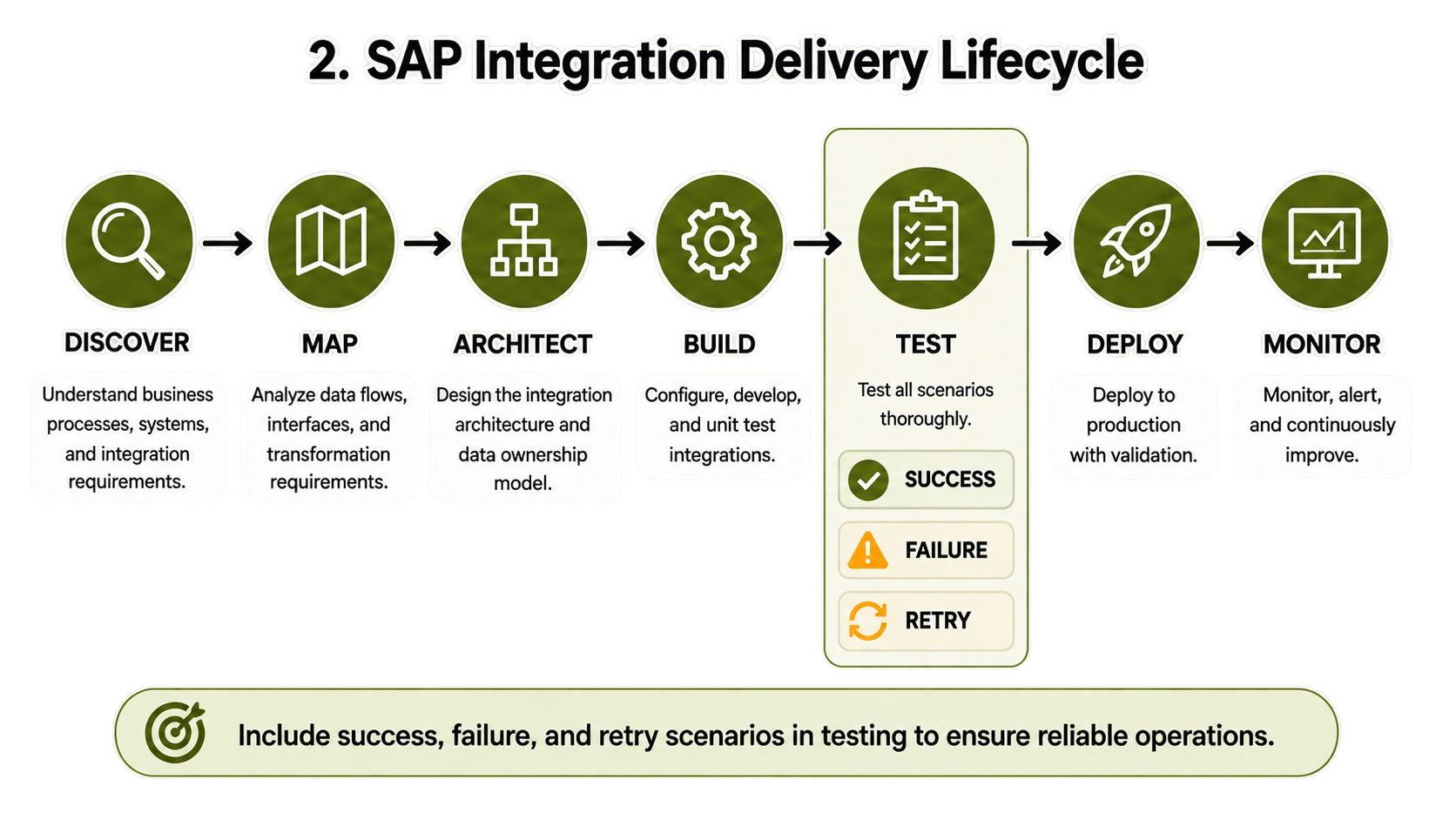
Testing should not only check if the integration works when everything is correct.
It should also test:
Success + Failure + Retry scenarios
The provider should first understand requirements and systems, then create mappings, decide architecture, configure the integration, test it and move it into production. After go-live, monitoring and change handling is also important.
Five Questions to Ask Before Selecting a Provider
Which SAP environments have you integrated?
Look for experience that matches your own SAP setup.How much SAP customization is required?
Some custom work may be needed, but too much can create future maintenance problem.How do failed transactions work?
Ask how errors are found, logged, retried and reported.How would we add another system later?
This shows whether the setup is reusable or just one custom connection.Who owns support after go-live?
Make sure monitoring, updates, interface changes, escalation and SLAs are clearly defined.
Red Flags When Comparing SAP Integration Providers
Some warning signs are easy to miss during sales discussions. Be careful when provider says “we integrate everything” but cannot explain the architecture.
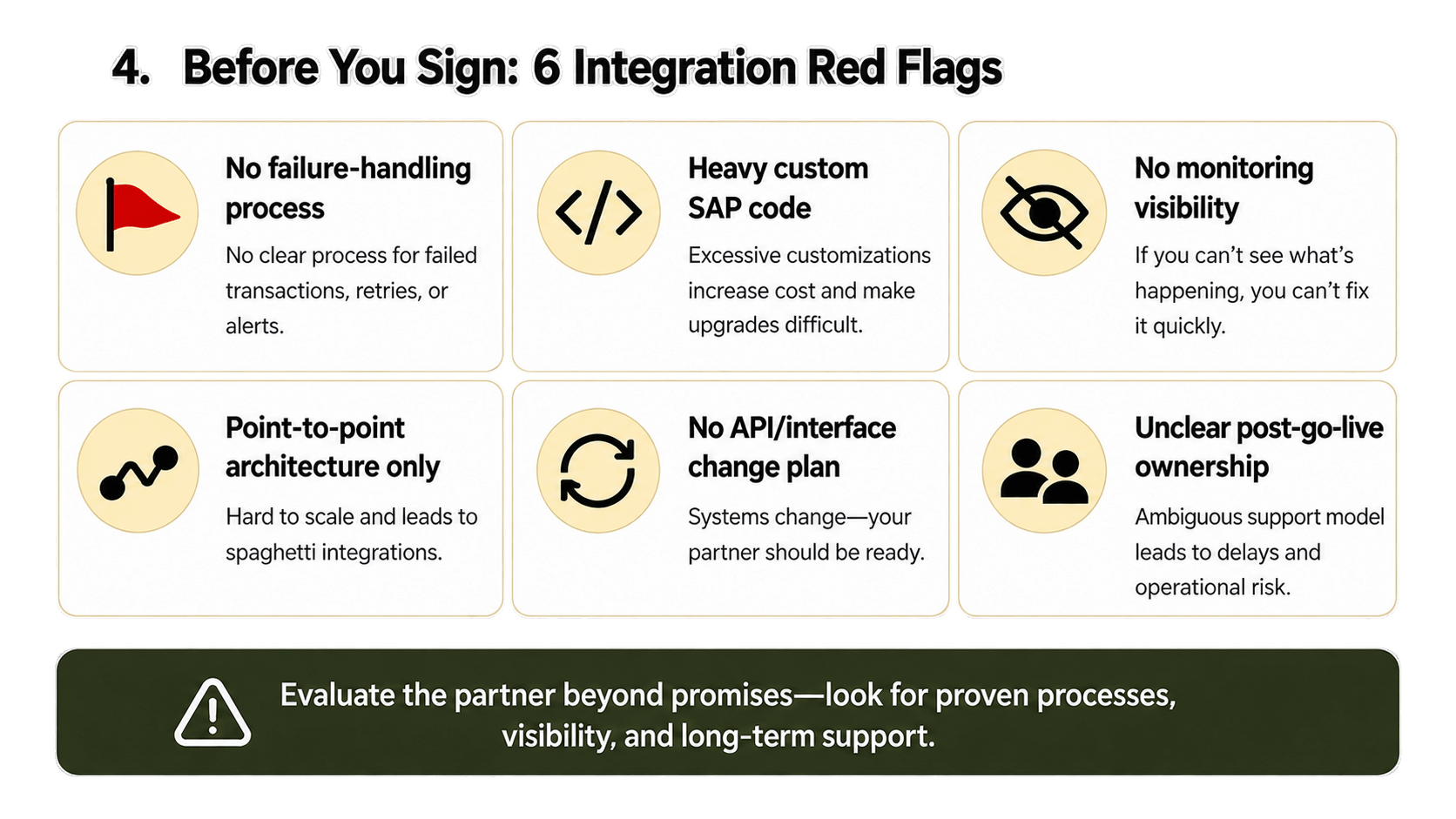
Other red flags include:
No failure testing
Too much custom SAP code
Weak monitoring
No clear support ownership
Black-box integrations
Pricing that only covers first setup
No clear process for future changes
A connection working on day one does not mean it will be easy to support after one or two years.
What Does a Scalable SAP Integration Architecture Look Like?
A simple scalable model can look like:
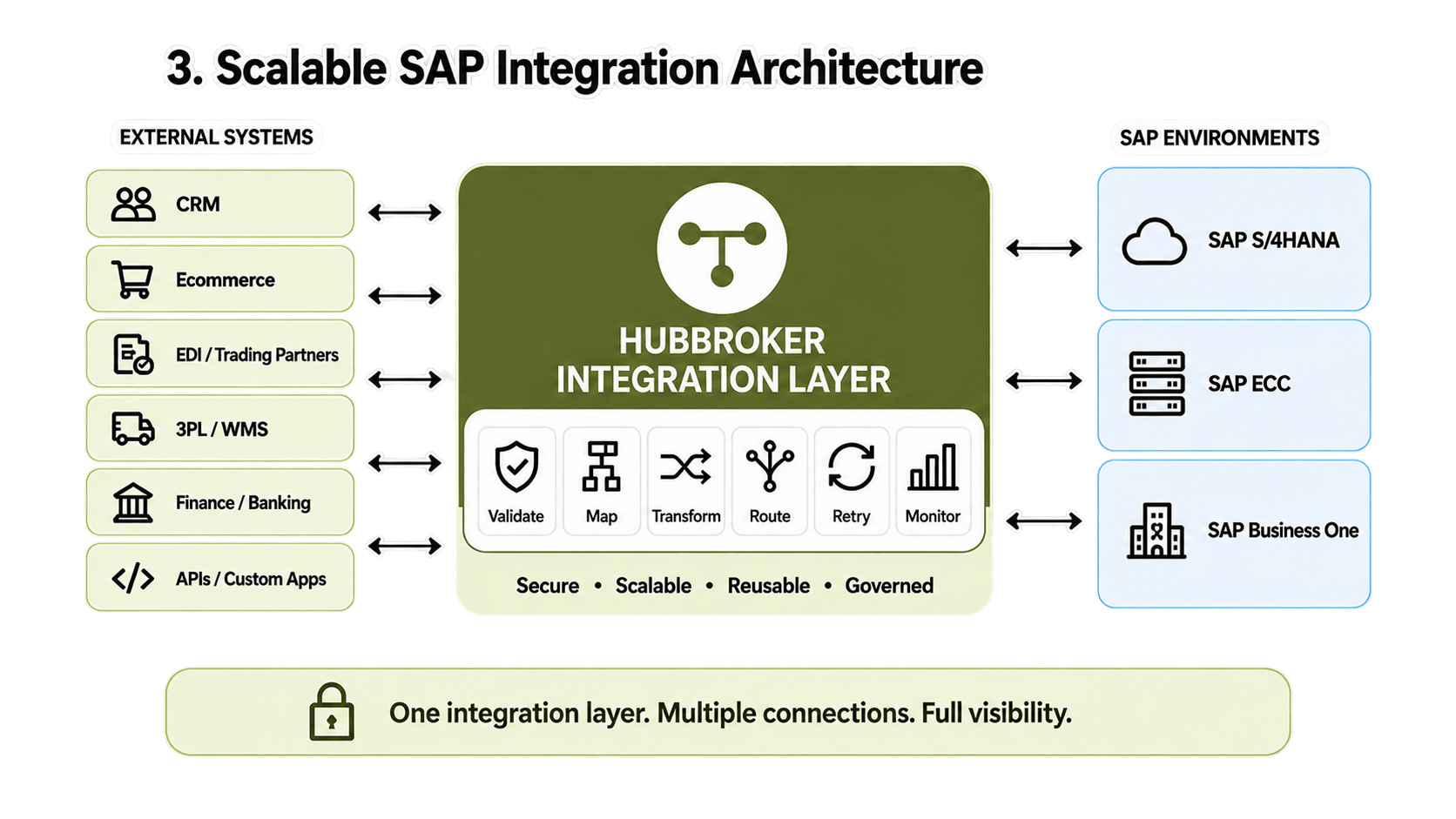
The integration layer may handle:
Connection
Validation
Mapping
Transformation
Routing
Retry
Monitoring
Instead of only asking: “Can System A connect to SAP?”
also ask: “Will the same setup still work when Systems B, C and D are added?”
This question can save lot of custom work later.
Specialist Partner or Large Systems Integrator?
Large system integrators can be a good fit for big SAP transformation projects where consulting, migration and several business areas are involved. Specialist integration providers may be a better fit when the main requirement is connecting SAP with ecommerce, EDI, APIs, 3PL, e-invoicing or trading partners. Company size should not be the only deciding point. The important thing is whether their delivery model matches your actual project.
What Should SAP Integration Cost Include?
Do not compare only the first implementation price. The total cost may include:
Initial implementation
Configuration
Mapping
Testing
Licensing
Transaction volume
Monitoring
Support
Future changes
New integrations
It is better to compare the multi-year total cost of ownership instead of only looking at the first project fee. A low setup price can become expensive later if every small change needs custom development.
When Should You Consider HubBroker?
HubBroker can be relevant when SAP need to connect with external applications, trading partners or document networks. Its published capabilities include iPaaS, EDI, API integration, ERP integration, e-invoicing and Peppol-related workflows, with SAP Business One also listed among its integrations. The main idea is to use a reusable integration layer instead of building separate custom connection for every external system.
Comparing SAP integration partners? First map your SAP environment, connected applications and data flows before deciding the architecture.
Talk to HubBroker’s integration team about your SAP integration requirements.
