
Magento SAP Integration: Orders, Inventory and Product Data Sync Guide
If Magento or Adobe Commerce is running your online store and SAP is managing stock, products, finance or warehouse, both systems need to share correct data. Without integration, teams may enter same data again and again, stock updates can be late and product details may not match.
A good Magento SAP integration helps connect both systems, so orders can move into SAP and stock, product or delivery updates can go back to Magento.
Key Takeaways
Magento orders can move into SAP automatically.
SAP stock can update Magento inventory.
Product and customer data need clear ownership.
Multi-store and multi-warehouse setup can make things more difficult.
Error checking and retry process is also important.
What Is Magento SAP Integration?
Magento SAP integration means connecting Magento or Adobe Commerce with SAP so data can move automatically between both systems.
A simple flow can look like this:
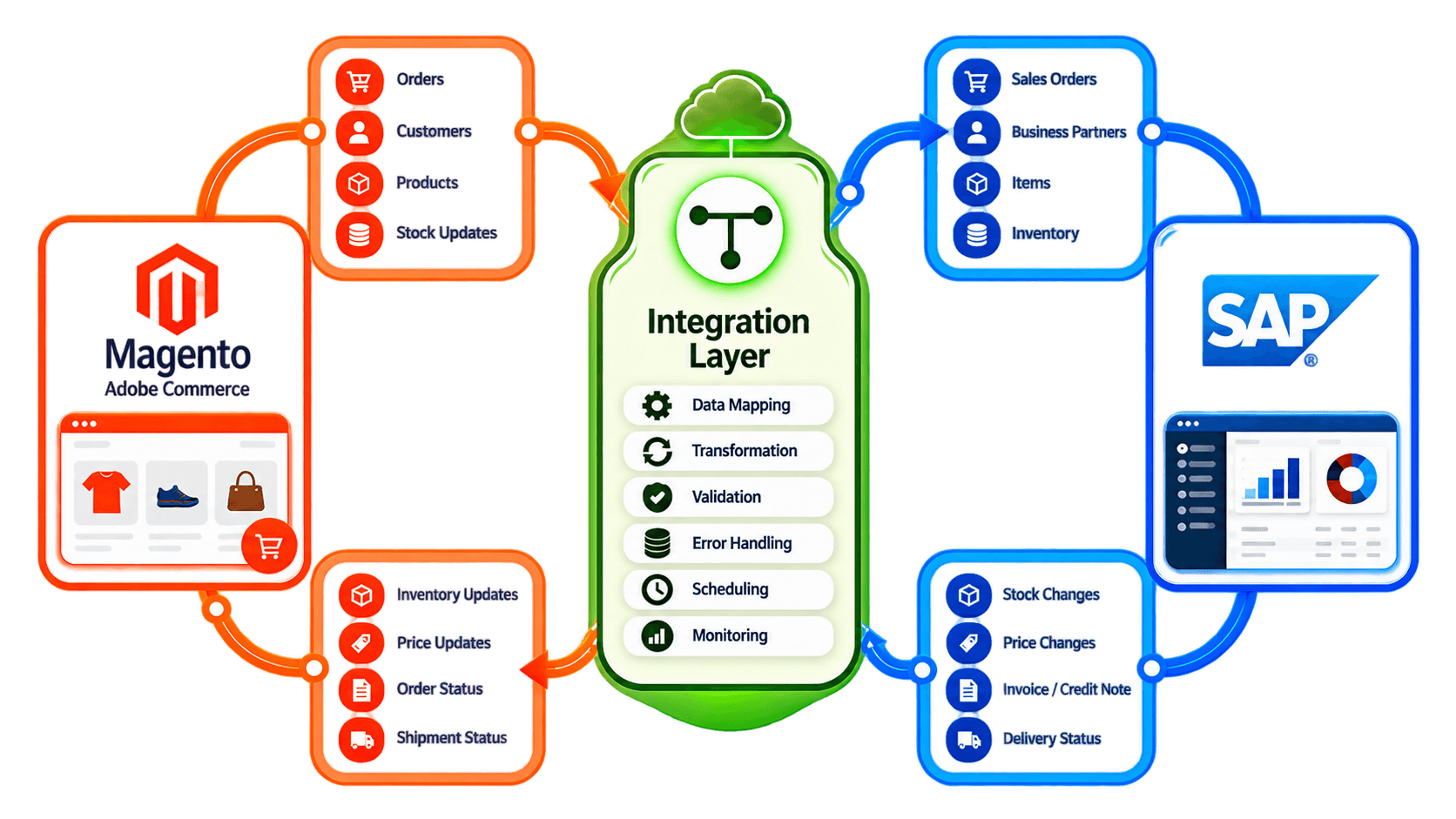
The integration layer can help with:
Data mapping
Checking required fields
Changing data format
Sending data to correct system
Error checking
Retry process
Monitoring
The exact setup depends on which SAP system your business use and what data you want to move. Not every business need the same flow.
What Data Should Magento and SAP Synchronize?
Magento can normally send data like:
Customer orders
Customer details
Shipping information
Discounts
Taxes
Payment reference
Cancellations
Returns
SAP can send data back like:
Stock quantity
Product SKU
Prices
Product details
Delivery status
Tracking number
Before starting integration, business should decide which system is the main source for each data. For example, SAP may be the main system for stock and price. Magento may be the main system for website description, product image and ecommerce content. If this is not clear, one system can replace correct data from another system and create confusion.
How Does a Magento Order Move Into SAP?
A normal order flow can be:
 First, the customer order is created in Magento.
Then the integration can:
Check customer details.
Match the product SKU.
Check price and currency.
Map tax values.
Check required fields.
Create sales order in SAP.
Send delivery or order status back to Magento.
If one transaction fails, it should not just stop without any message. The integration should save the error and try again after the problem is fixed. Duplicate checking is also important. If retry is not managed properly, same Magento order can be created two times inside SAP.
How Should Inventory and Product Data Sync?
Inventory is one of the most important data flow between SAP and Magento. When stock changes in SAP, the new quantity can be sent to Magento.
For example:
 Stock can change because of:
New order
Goods receipt
Warehouse transfer
Manual stock change
Return
If business has more than one warehouse, the integration may need to calculate how much stock should be shown online.
This can help reduce overselling, but it cannot fully stop it. API delay, wrong SKU mapping or late warehouse update can still create problem. For product data, the business should decide which system own each field. SAP can manage SKU, price or basic product details, while Magento can manage website description, images and other ecommerce content.
What Does the Data Show About Ecommerce and Inventory Operations?
The below numbers show why ecommerce and ERP data need to stay connected.
Metric / Study | Numerical Finding | Business Area | Why It Matters |
|---|---|---|---|
European B2C ecommerce turnover | €842bn in 2024; +7% | Ecommerce | Shows high online sales volume |
EU online shopping | 78% in 2025 | Customer Demand | Online shopping is very common |
EU enterprises with online sales | 23.8% in 2023 | Business Adoption | Many companies are already selling online |
Delivery-provider trust | 77% | Fulfilment | Delivery information can affect customer buying |
Sources: Ecommerce Europe 2025, Eurostat 2025/2026, DHL 2025.
These numbers will not be same for every Magento business. But they show that stock accuracy, order processing and delivery updates are important for ecommerce. When Magento and SAP are not connected properly, even small delay in data can create bigger issue during busy time.
Real-Time vs Scheduled Sync: What Should Run When?
Not every data need to move instantly.
Near-real-time sync can be useful for:
New orders
Important stock changes
Cancellations
Delivery status
Tracking updates
Scheduled sync can work for:
Large product updates
Price changes
Product attributes
Reports
Less urgent data
The right method depends on order volume, API limits, SAP setup and number of stores. Real-time is not always better. If business try to sync everything instantly, it can create too many API calls and make the integration more complex.
What Magento SAP Integration Challenges Should You Plan For?
There are many small issues that can happen in a real business setup.
Common problems include:
Wrong SKU mapping
Duplicate customers
Duplicate orders
Stock mismatch
Multiple warehouse rules
Currency mapping
Tax mapping
Different product structure
Pricing rules
API failure
Return handling
Missing information
Failed transactions
Another common issue is unclear data ownership. For example, if price is changed in Magento and also changed in SAP, which value should be correct? This should be decided before integration starts. Error ownership is also important. Finance team may need to fix tax information, while IT team may need to fix API or mapping errors.
What Should You Look for in a Magento SAP Integration Solution?
A good integration should fit the way your business actually works.
Check for:
Magento or Adobe Commerce connection
SAP compatibility
Two-way data sync
Order sync
Inventory sync
Product sync
Customer sync
Multi-store support
Multi-warehouse support
Flexible mapping
Error logs
Retry handling
Monitoring
API or EDI support
Ability to grow with business
Also ask few simple questions:
Which system own stock?
Which system own product data?
How duplicate orders will be stopped?
What happens when API fails?
How returns will be handled?
Which data really need fast sync?
These simple points can save lot of problem later.
How Can HubBroker Connect Magento With SAP?
HubBroker can help connect Magento and SAP through an integration layer. The main goal is simple: reduce repeated manual work and keep ecommerce and ERP data connected.
HubBroker can help with:
Magento order integration
SAP sales order creation
Stock sync
Product mapping
Customer data sync
Delivery updates
Tracking information
Error handling
Monitoring
Scheduled or near-real-time sync
This can help ecommerce, warehouse and finance teams work with same information instead of checking Magento and SAP separately.
Using Magento with SAP?
HubBroker can help check your order, stock, product, customer and delivery flow and build an integration setup based on how your business actually works.
