
Business Central XRechnung: What Breaks on 1 January 2027 If Your Setup Isn’t Ready
On 1 January 2027, many German Business Central users will have to stop sending PDF invoices to their domestic B2B customers. Your 2026 turnover decides whether this applies to you, and 2026 is almost over. Under German tax rules, the turnover test looks at the preceding calendar year, so total 2026 turnover is the figure that decides 2027 obligations.
This guide covers who is in scope, what Business Central XRechnung support covers out of the box, and the six steps to close the gaps before go-live.
Who the January 2027 deadline actually applies to
The €800,000 test is about the issuer
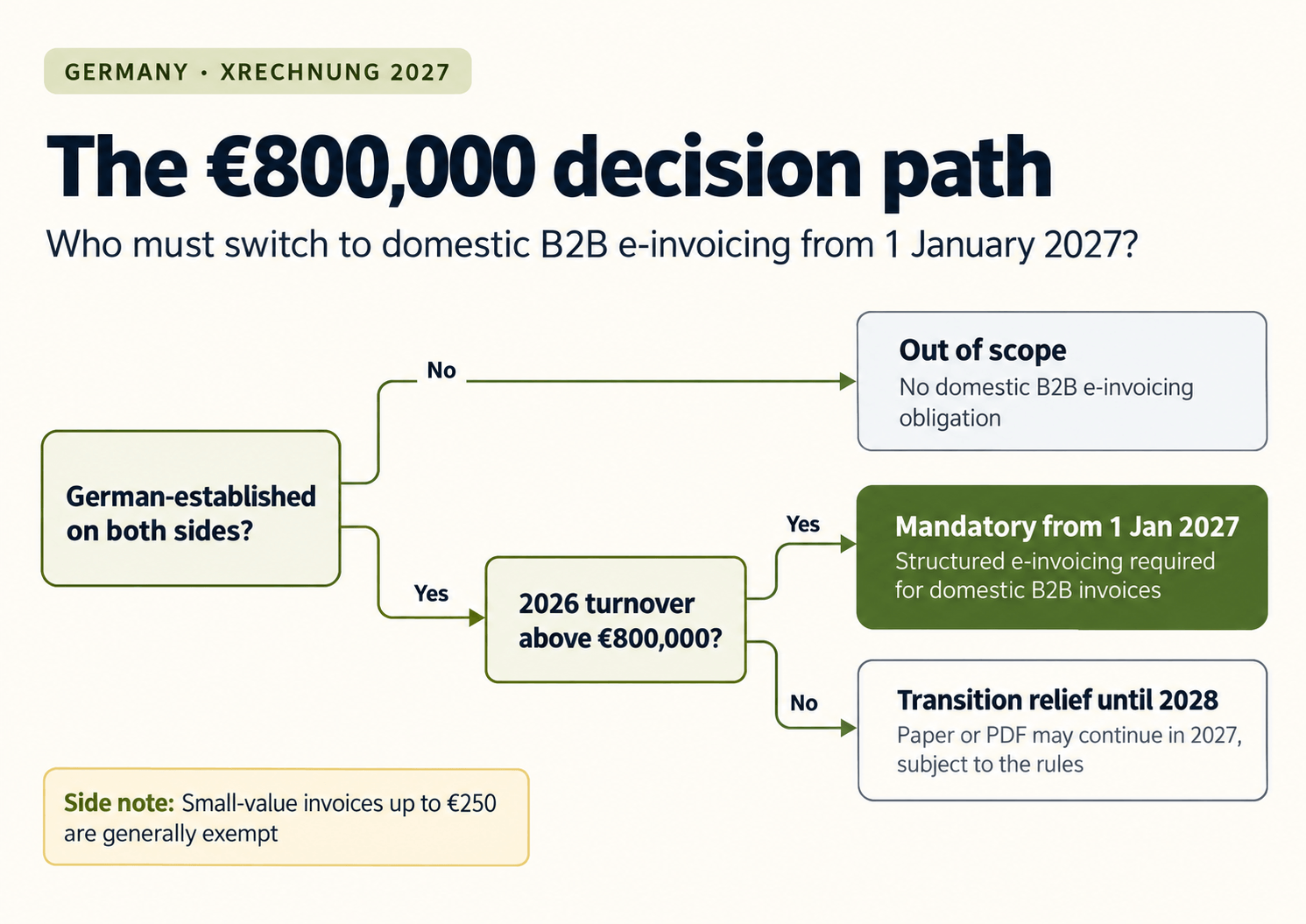
From 1 January 2027, the transition period ends for issuers whose previous-year turnover exceeds €800,000, and their domestic B2B transactions generally have to be invoiced electronically. The threshold is often misread. It refers to the issuer’s total turnover in the previous calendar year, not the value of a single invoice and not the customer’s turnover.
If you fall below the line, you get one more year. Smaller issuers with previous-year turnover of €800,000 or less may continue using paper in 2027, or a simple PDF if the recipient consents. From 1 January 2028, that relief ends for everyone.
What stays out of scope
Some invoices are not covered. Invoices under €250 and transport tickets are generally exempt, and if at least one party is not established in Germany, there is no domestic B2B e-invoicing obligation.
What Business Central already does for XRechnung
The E-Documents framework
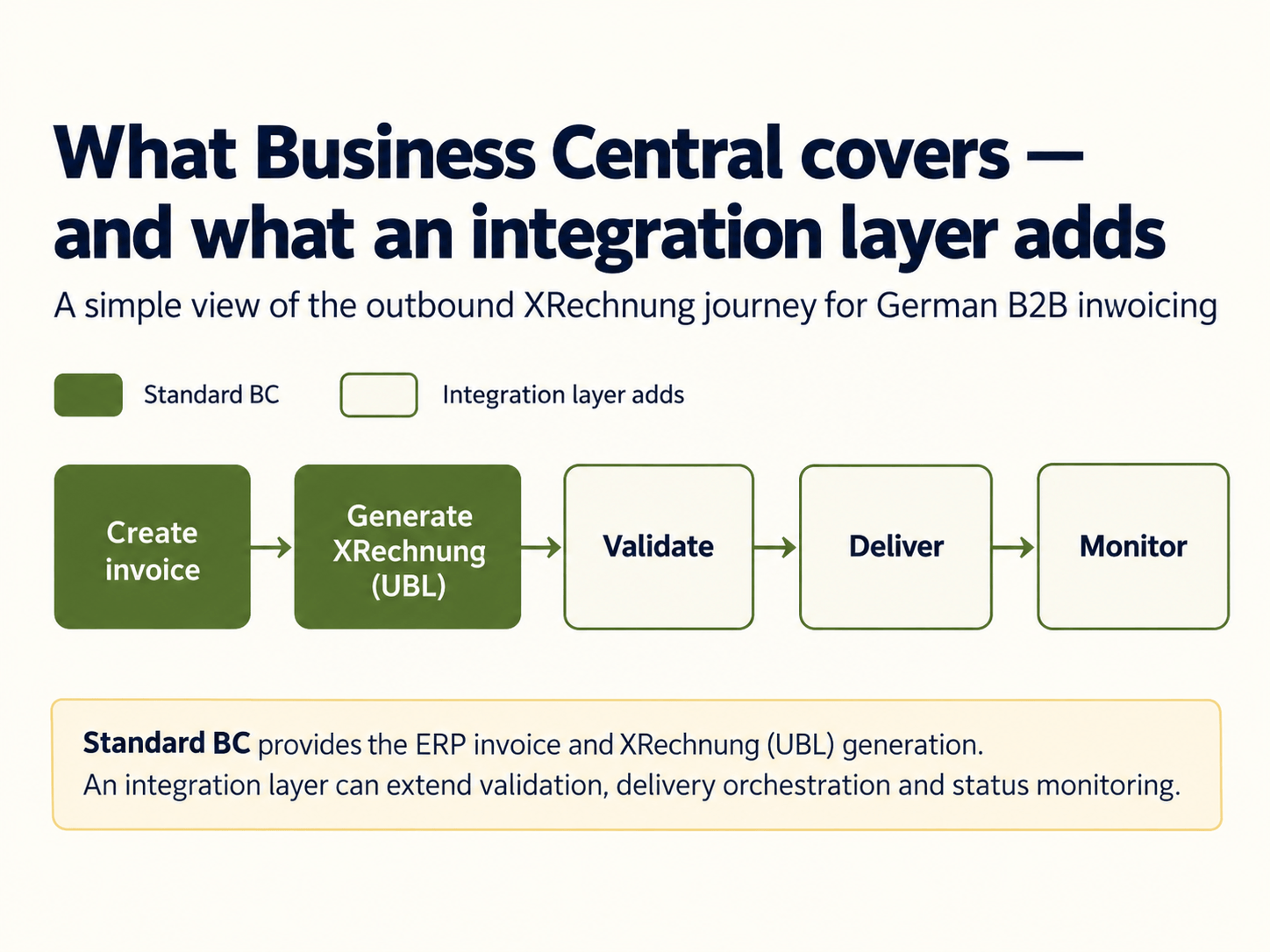
Microsoft has built e-invoicing into the German localisation. Starting with version 26.3, the E-Document framework for Germany supports XRechnung (UBL only), Peppol BIS 3 and ZUGFeRD. For delivery, users can connect through existing Peppol service providers via access points, or exchange documents by manual upload or e-mail.
That is a solid base. If you run an older version, a heavily customised tenant or several legal entities, read our breakdown of the compliance gaps most Dynamics 365 finance teams miss.
Where standard functionality stops
Generating an XRechnung file is one task. Getting it accepted is another. XRechnung exists in two syntaxes, CII and UBL, and Business Central’s standard export covers UBL only. Customers who require CII, customer-specific routing, delivery monitoring and rejection handling all sit outside the standard app. An integration layer on top of Business Central closes those gaps without replacing your ERP.
Step-by-step readiness plan for Business Central XRechnung
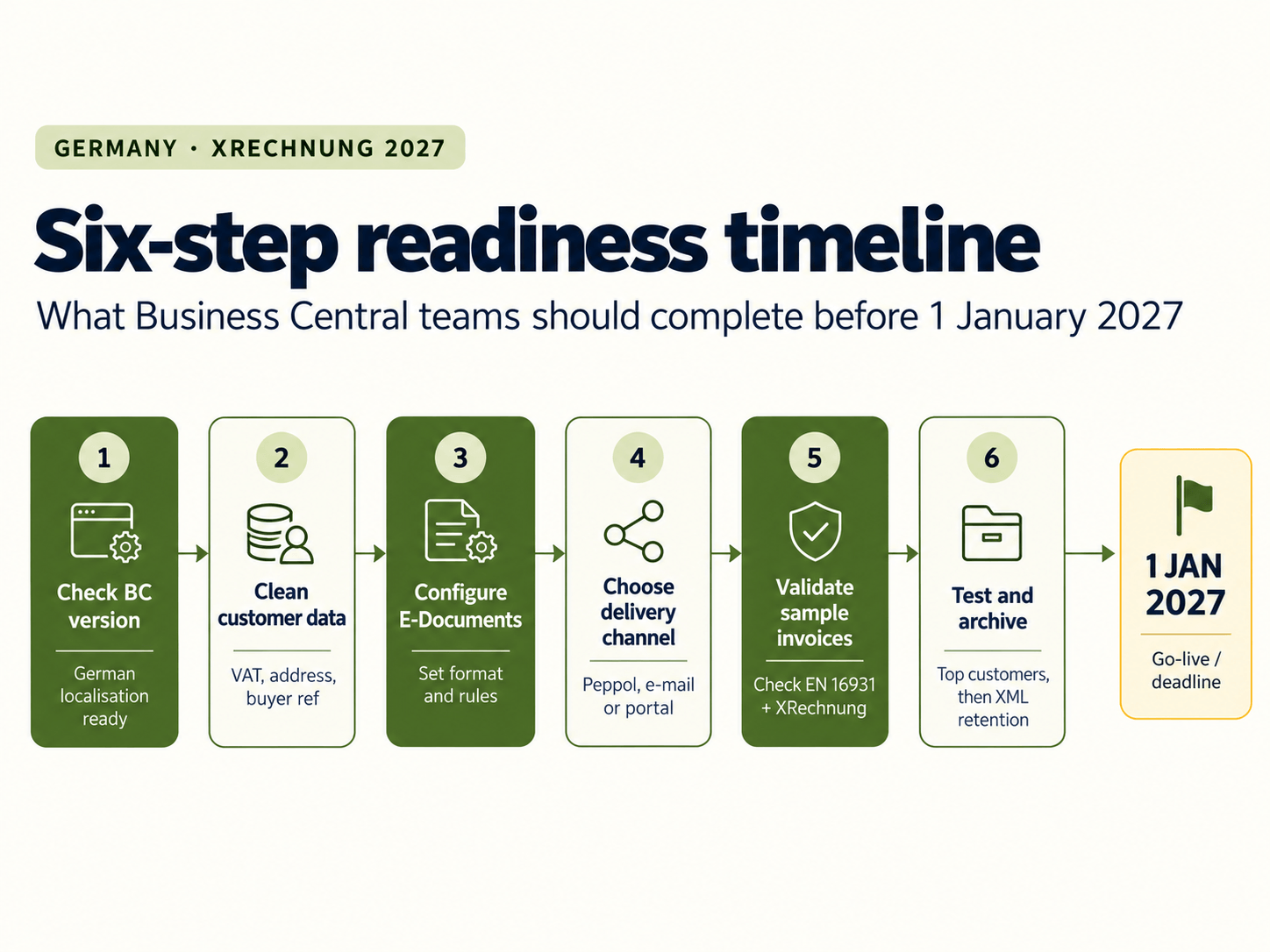
Step 1: Confirm your BC version and localisation
Check that your tenant runs the German localisation on a version with full format support. If you are behind, plan the update before testing anything else.
Step 2: Clean customer master data
XRechnung rejects incomplete data. Check VAT IDs, addresses, payment terms and buyer references for every German customer. For public-sector customers, the Leitweg-ID must be correct.
Step 3: Set up the E-Document service and format
Create the E-Document service, select XRechnung as the format and decide how buyer references are handled. The Export FastTab lets you mark the buyer reference as mandatory and choose where it is taken from.
Step 4: Choose your delivery channel
Decide how each customer receives invoices: Peppol, e-mail or a customer portal. Peppol removes most per-customer setup, because one Peppol Access Point connection reaches every registered receiver.
Step 5: Validate before go-live
Validate sample invoices against EN 16931 and the XRechnung rules. Test credit notes, discounts, multi-currency and mixed VAT rates, since these fail most often.
Step 6: Test with top customers, then archive
Send live test invoices to your ten largest German customers and confirm they post on their side. Then confirm your archive keeps the original XML. Our e-invoicing implementation roadmap covers the full sequence from assessment to production monitoring.
Inbound is already live: receiving XRechnung in Business Central
The sending deadline gets the attention, but the receiving obligation has applied since 2025. Business Central automates receipt of e-documents, including ZUGFeRD, where it extracts the embedded XML and processes it as a new e-document. If supplier invoices still arrive as PDFs and get keyed in manually, fix that alongside your outbound project.
Where an integration layer fits
Business Central creates the invoice. HubBroker handles what happens next: format conversion, validation, Peppol delivery and status monitoring, all inside your existing ERP setup. Your finance team keeps working in Business Central.
FAQ
Is ZUGFeRD acceptable instead of XRechnung?
Yes, provided the ZUGFeRD profile meets EN 16931. Many German buyers accept both, but confirm with your key customers.
Do we need Peppol to send XRechnung?
No. XRechnung can be sent by e-mail. Peppol adds reliable routing and delivery confirmation.
What if our 2026 turnover lands close to €800,000?
Prepare as if you are in scope. The setup work is the same, and 2028 covers everyone.
Do older Business Central versions support XRechnung?
Support has expanded over several releases. Check your exact version against Microsoft’s documentation.
Can EDI invoices continue after 2027?
EDI invoices are permitted until 31 December 2027 under transitional rules. After that, they must meet the e-invoice requirements.
Ready to test your setup?
If you want a second opinion on your Business Central XRechnung readiness, our team can review your current flow and identify the gaps before January. Book a demo to get started.
