
Business Central Shopify Integration for Automated Ecommerce
A customer in France places an order on a Shopify store that sells across Germany, France and Denmark. Shopify takes the payment straight away. But staff still copy the order into Microsoft Dynamics 365 Business Central, check VAT, confirm stock, send details to warehouse and later paste tracking number back into Shopify.
At 20 orders, this may still look manageable. At 300 orders, it becomes daily manual work. This is where business central shopify integration starts making a real difference. Order, stock, warehouse and finance data can move between systems without entering the same information twice.
Shopify Already Has the Order, So Why Create It Again in Business Central?
For a French customer order, the basic flow can look like:
Customer details, Shopify order number, SKU, quantity, VAT, delivery address, shipping charge, discount and payment information can be used to create the ERP sales transaction automatically. This removes repeated typing and also reduces common mistakes. Shopify can remain the source for checkout information, while Business Central handles ERP, finance and accounting process.
The full flow should work both ways: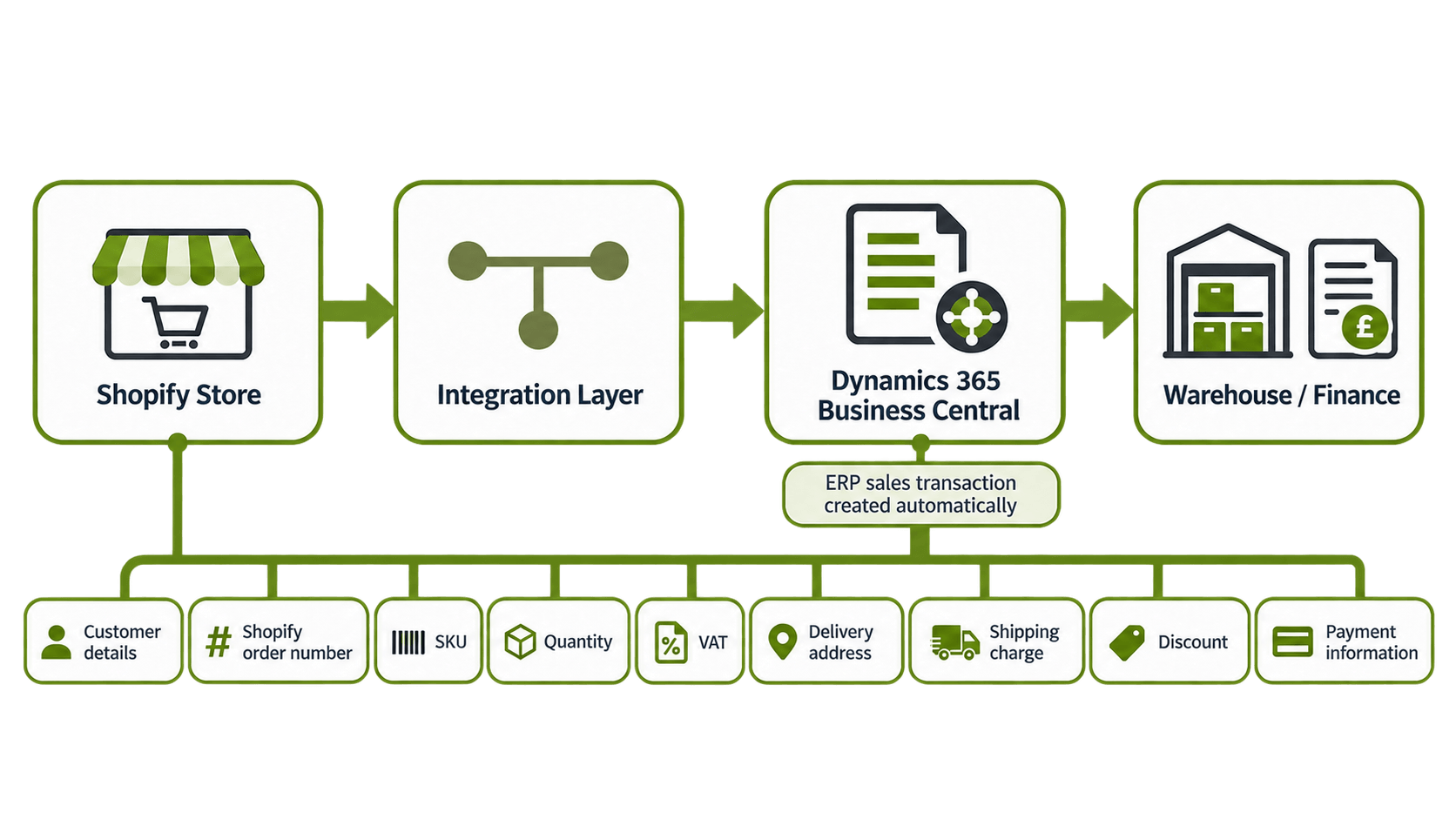
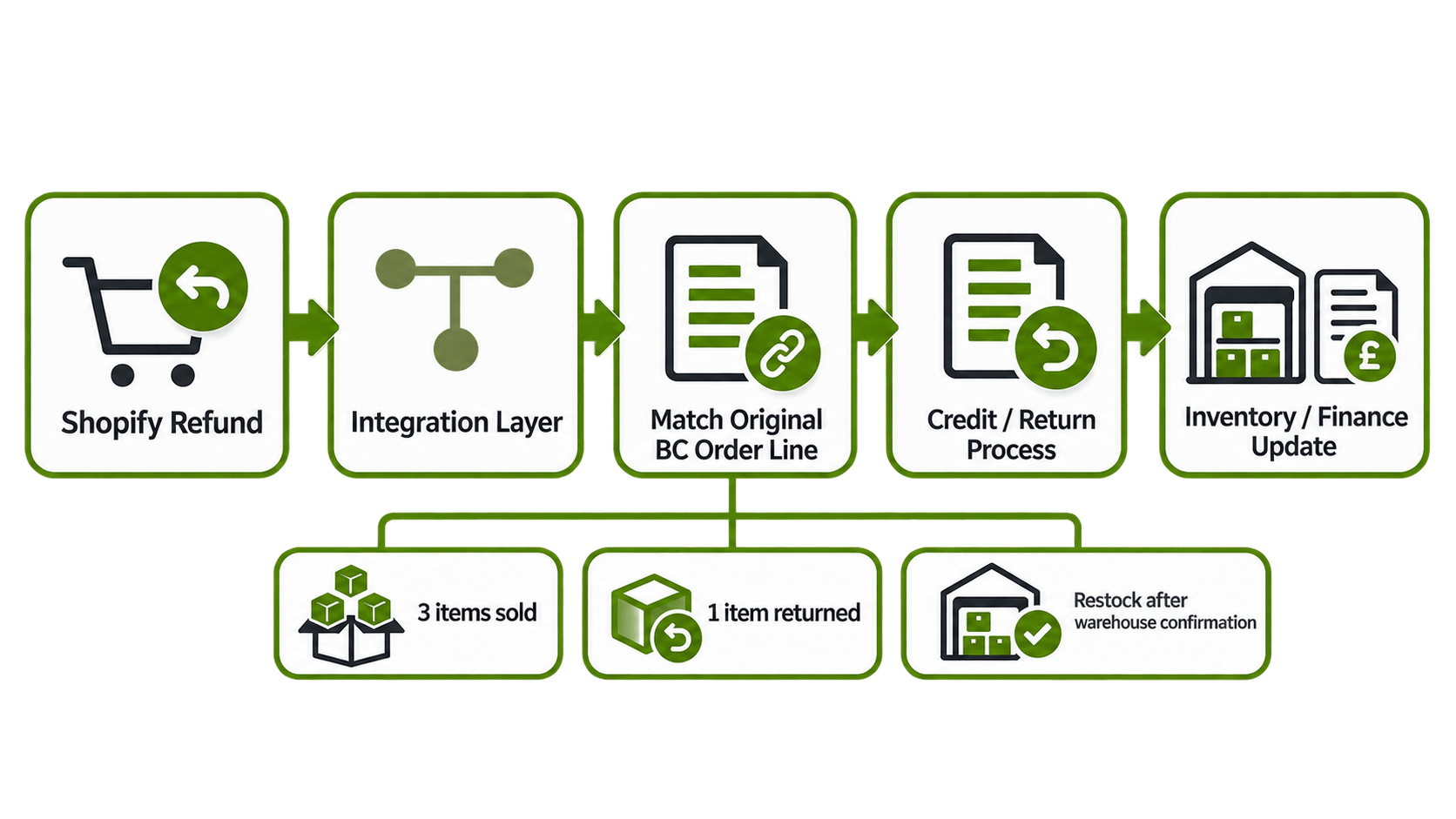
For returns, another flow may be:
Shopify Refund → Integration Layer → Business Central Credit / Return Process
The important part is keeping each event connected with the original order.
Shopify Shows Stock, but Business Central Says Zero. Which One Is Right?
For many ecommerce businesses, Business Central should control available stock because warehouse movements, other sales channels and manual stock adjustments happen there.
The flow can be:
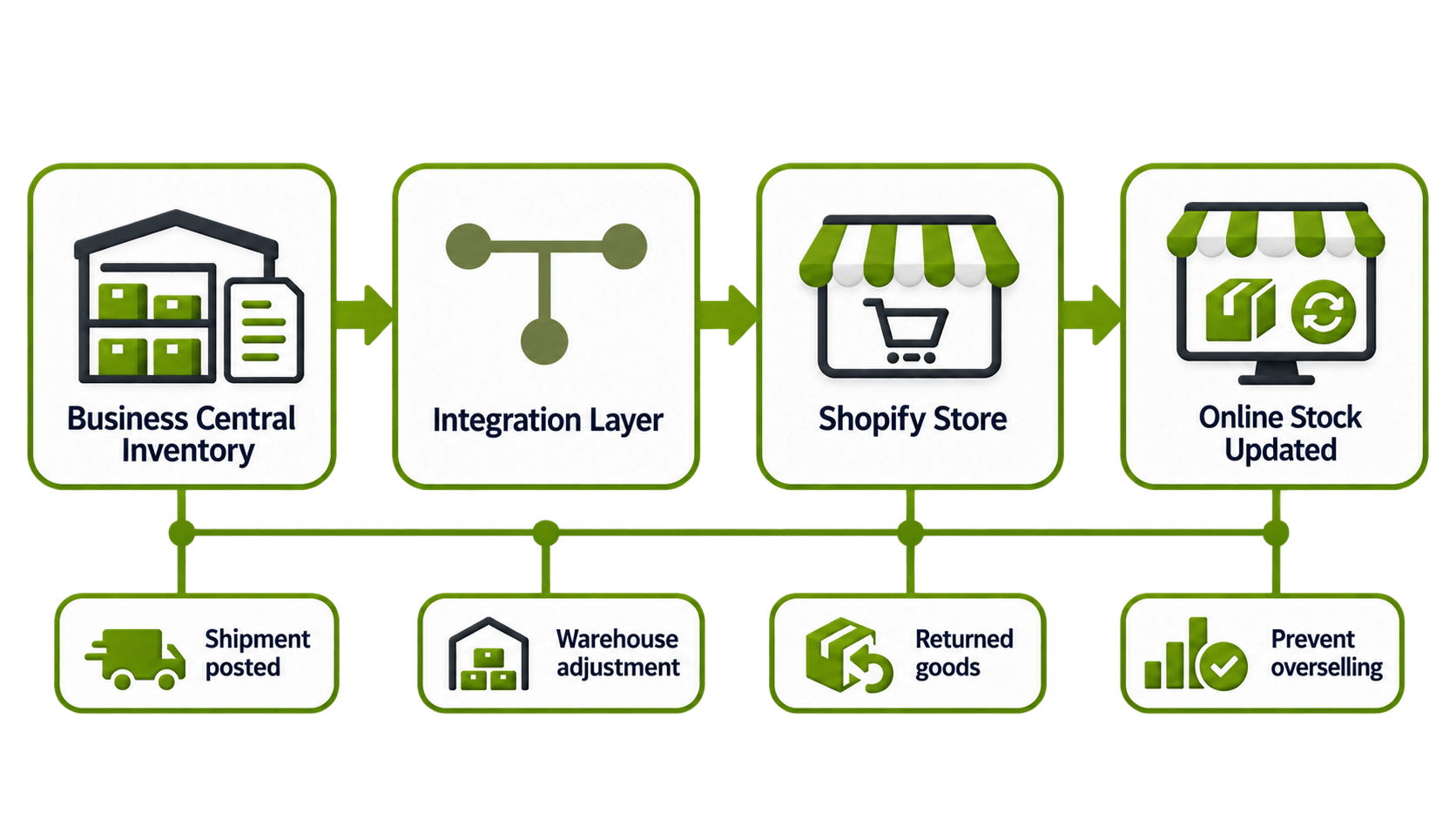
Imagine the last product is sold through another channel in Germany. Business Central stock becomes zero, but Shopify still shows one available. Another customer can then buy stock which no longer exists. Automatic inventory sync can update Shopify after sales, warehouse movements, stock adjustments or returned goods. When the business has several European warehouses, there also needs to be clear rules about which warehouse or location should feed the available Shopify stock.
Without this, stock may technically be synchronized but still show the wrong quantity for customers.
Can Shipment Tracking Return to Shopify Automatically?
Yes. Once warehouse or Business Central processes the shipment, fulfilment information can move back to Shopify automatically.

The tracking number, carrier and fulfilment status can be returned without staff opening the Shopify order manually. For small volumes, copying one tracking number may not feel like a problem. But doing the same task hundreds of times every day becomes unnecessary work. Automatic updates also gives customer service better information because Shopify can show the latest shipment status without waiting for somebody to update it.
Customer Returned One Item. What Should Happen in Business Central?
Imagine a German customer buys three products and later returns only one. The Shopify refund should match the original Business Central order and the exact returned line. It should not cancel or reverse all three products. Integration can send the SKU, returned quantity, refund amount and original order reference into the Business Central return or credit process. Business Central can then handle the correct financial adjustment and stock movement.
Returned stock should not always become available immediately. Warehouse may first need to confirm whether the product actually arrived and whether it is sellable, damaged or needs separate handling. So refund and physical return can be related, but they are not always same event.
We Sell Across Europe. How Should VAT Data Move?
For European ecommerce, VAT data also needs to travel correctly between Shopify and Business Central. Destination country, customer type, VAT details and transaction value should reach Business Central without being changed or lost during integration.
For cross-border B2C sales, some businesses may use the EU One Stop Shop depending on their VAT registrations and tax setup. IOSS may apply to certain imported low-value goods.
The actual VAT configuration should always follow the company's tax registrations and professional tax advice. EU Member States collected more than €38 billion through OSS and IOSS schemes in 2025, according to the European Commission. This shows that ecommerce tax data is not a small side process. It directly affects finance and reporting.
European Ecommerce Is Already an ERP Data Problem
European Digital Trend | Latest Figure | Why It Matters |
|---|---|---|
EU internet users buying online, 2025 | 78% | More orders enter backend systems |
EU businesses conducting e-sales, 2025 | 24% | Ecommerce is normal business flow |
E-sales share of business turnover, 2025 | 19% | Online data affects finance directly |
EU businesses using ERP, 2025 | 46.45% | ERP integration is widely relevant |
EU businesses using paid cloud, 2025 | 52.7% | Connected systems are becoming common |
Large businesses using ERP, 2025 | 88.71% | Automation matters more at scale |
EU VAT through ecommerce schemes, 2025 | €38bn+ | VAT data needs controlled handling |
Eurostat reports that Denmark had 39% of businesses selling online in 2025, while Belgium generated 30% of business turnover from e-sales. This means ecommerce is not only storefront activity anymore. It also creates ERP, warehouse, accounting and VAT work behind the scenes.
Which System Should Own Each Data Type?
Do not start integration before deciding which system should control each type of data. Business Central may normally control accounting, stock, ERP products and financial information. Shopify normally controls checkout, online customer orders and storefront activity. Product and pricing information can be controlled by either system depending on how the company works.
The important thing is choosing one clear source for each data type. If both systems are allowed to update the same information without clear rules, integration can create loops, duplicate updates and data conflicts. Clear ownership makes the flow much easier to maintain later.
When Manual Shopify Processing Starts Costing Too Much
Manual Shopify processing may work when order numbers are low. But several countries, warehouses, VAT cases, returns, refunds and fulfilment updates makes the process difficult quite quickly. Staff may spend more time checking and copying data instead of handling actual customer, warehouse or finance issues.
HubBroker can connect Shopify with Dynamics 365 Business Central so orders, inventory, shipment data, refunds and selected master data can move through one controlled integration flow. Business Central can stay as the main ERP and finance system, while Shopify continues to manage the ecommerce storefront. If your team still manually enters Shopify orders into ERP, updates stock in more than one place or copies tracking numbers between systems, start by checking which repeated steps can be automated first.
