
Amazon Shipment Tracking Sync Between Webshop and ERP
Selling on Amazon and your own webshop can create one common problem: keeping shipment information updated across all systems. An Amazon shipment tracking sync ERP setup helps move tracking numbers, carrier details and fulfilment status between Amazon, webshop, ERP, warehouse and shipping systems automatically. Staff don't have to enter the same tracking details again and again. Once shipment information is created, it can move through the connected systems.
This becomes even more useful when order volumes increase or a business starts selling through more channels.
Why Shipment Tracking Becomes Difficult Across Amazon, Webshop and ERP
Amazon may receive the customer order, while the ERP manages inventory, customer information and sales records. The warehouse prepares the shipment, and a carrier system may create the tracking number. When these systems work separately, shipment information can easily get stuck between them. Staff may have to copy a tracking number from carrier portal into ERP, and then manually update Amazon or webshop. This creates extra work and can also cause problems such as:
Missing or incorrect tracking numbers
Wrong carrier information
Orders showing old fulfilment status
Repeated manual work
More customer questions about delivery
Difficulty finding where an update failed
Creating the shipment is usually not the main problem. The bigger issue is making sure every connected system knows what happened after the order was shipped.
How Amazon Shipment Tracking Sync ERP Works
A typical Amazon shipment tracking sync ERP process may look like:

An order from Amazon or ecommerce webshop is first transferred into the ERP. From there, relevant order and fulfilment details can be sent to the warehouse, logistics platform or carrier system. Once shipment is prepared, the carrier or warehouse generates tracking number and shipping information. These details can then return to the ERP and be synchronized back to Amazon or the webshop. With this type of Amazon shipment tracking integration, teams don't need to keep moving shipping information manually between different platforms.
What Shipment Data Should Be Synchronized?
A tracking number is only one part of shipment information. Businesses should first decide which data each connected system actually need. Common shipment data may include:
Order number
ERP sales order reference
Shipment or fulfilment reference
Tracking number
Carrier or shipping service
Shipment date
Fulfilment status
Shipment status
Package information where required
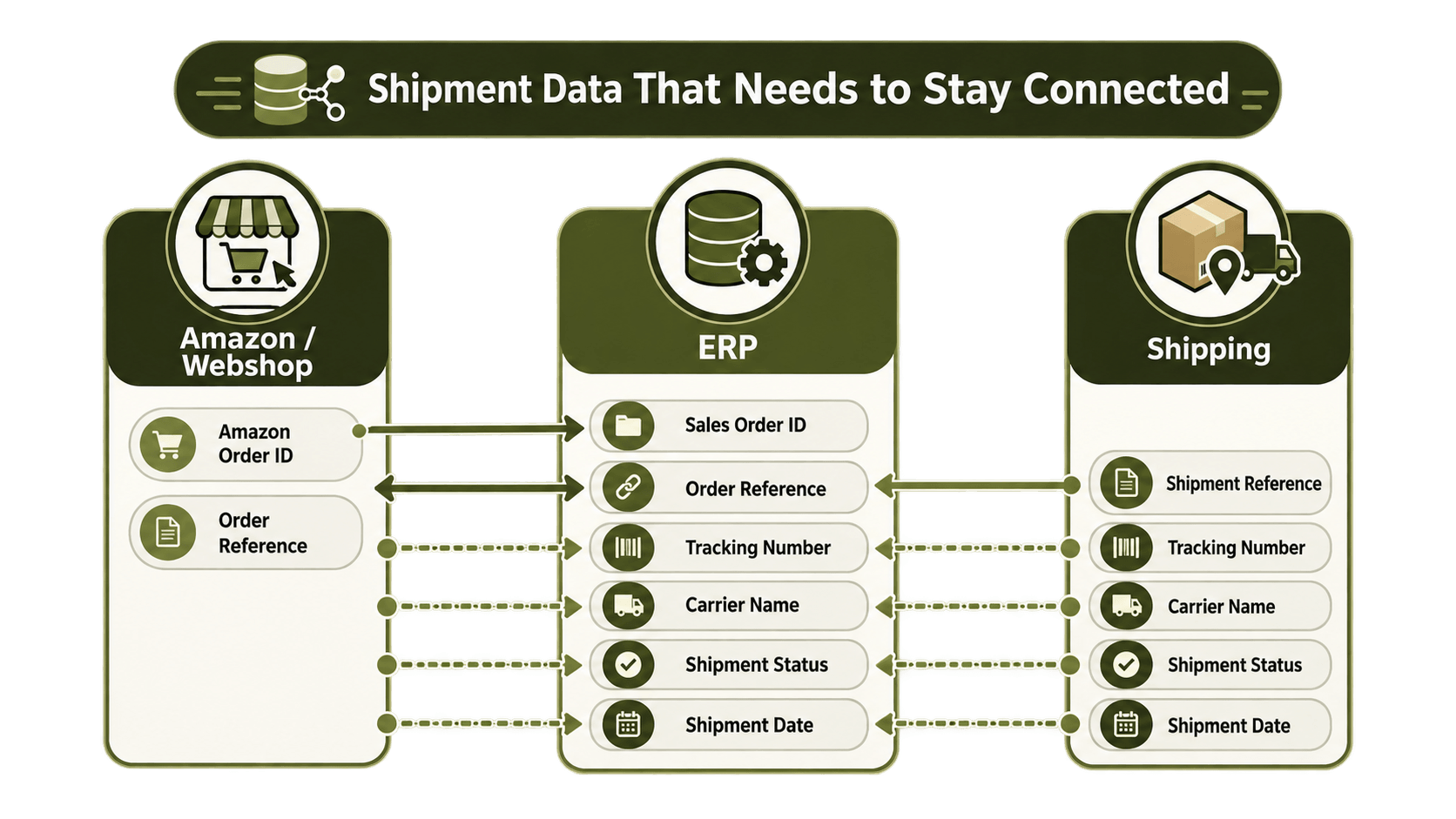
The exact information depends on how the webshop, ERP, warehouse and carrier systems are configured. Correct data mapping also matters. For example, Amazon may have one order reference while the ERP creates a different sales order number. The integration needs to keep this relationship so tracking information is sent back to the correct Amazon order. Without proper mapping, even a correct tracking number can end up connected with wrong order.
What Happens When Tracking Updates Fail?
Automation does not mean every shipment update will process correctly every time. A tracking update can fail because some information is missing, the order reference does not match, data comes in unexpected format, or one of the connected systems is temporarily unavailable. Because of this, a good ecommerce ERP integration should also include error monitoring. Failed messages can be identified and checked. Depending on how the integration is built, the message can be processed again once the problem is fixed.

This is better than losing a shipment update without anyone noticing and only discovering the issue when customer contacts support. Monitoring also makes it easier for operations teams to find whether the problem started in Amazon, webshop, ERP, warehouse, carrier or somewhere in the integration flow.
Benefits of Automating Amazon Shipment Tracking
Automating shipment status updates can remove quite a lot of repetitive work around Amazon order fulfilment. Operations teams spend less time copying tracking numbers between systems. Customer service teams can see more current shipment information, while ecommerce teams get a more consistent way of managing Amazon and webshop orders.

ERP shipping automation becomes even more useful when a company sells through several ecommerce channels. Instead of creating separate manual processes for Amazon, webshop and other marketplaces, businesses can use one integration layer to manage how orders, fulfilment updates and tracking information moves between their systems. It also makes the process easier to manage when order volumes starts growing.
Amazon Shipment Tracking Integration with HubBroker
HubBroker can work as an integration layer between Amazon, ecommerce webshops, ERP platforms, warehouses, carriers and other business systems. Depending on the business setup, HubBroker can support Amazon ERP integration and webshop ERP integration with data mapping, API and system integration, order synchronization, shipment tracking synchronization, data transformation and automated workflows. Error monitoring and retry handling can also be included in the integration setup. If shipment information cannot be processed first time, teams can identify the issue and process the data again after it has been corrected.
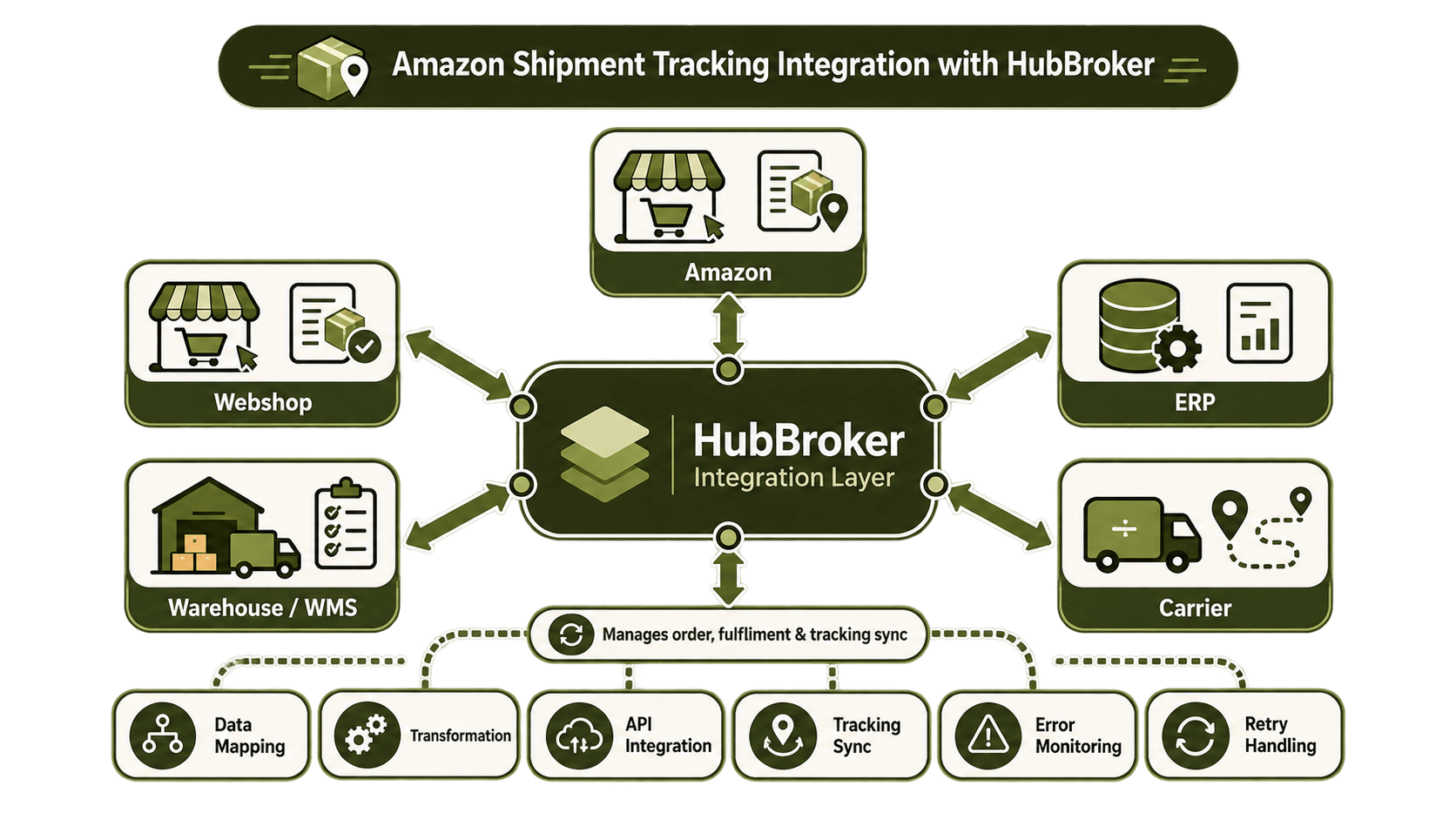
The idea is not to make Amazon, ERP, warehouse and webshop all do the same job. Each system can continue handling its own part of the process while important data moves between them automatically.
Final Thoughts
An Amazon shipment tracking sync ERP process can remove many small manual tasks that happen after an ecommerce order leaves the warehouse. Connecting Amazon, webshop, ERP and shipping systems helps tracking numbers, carrier information and fulfilment status move through a more controlled process. Staff have less data to enter manually, and teams get better visibility of what is happening with each shipment.
If you are looking at Amazon, webshop or ERP integration.
Talk with HubBroker about your current order and shipment flow and see where tracking automation can fit into the process.
