
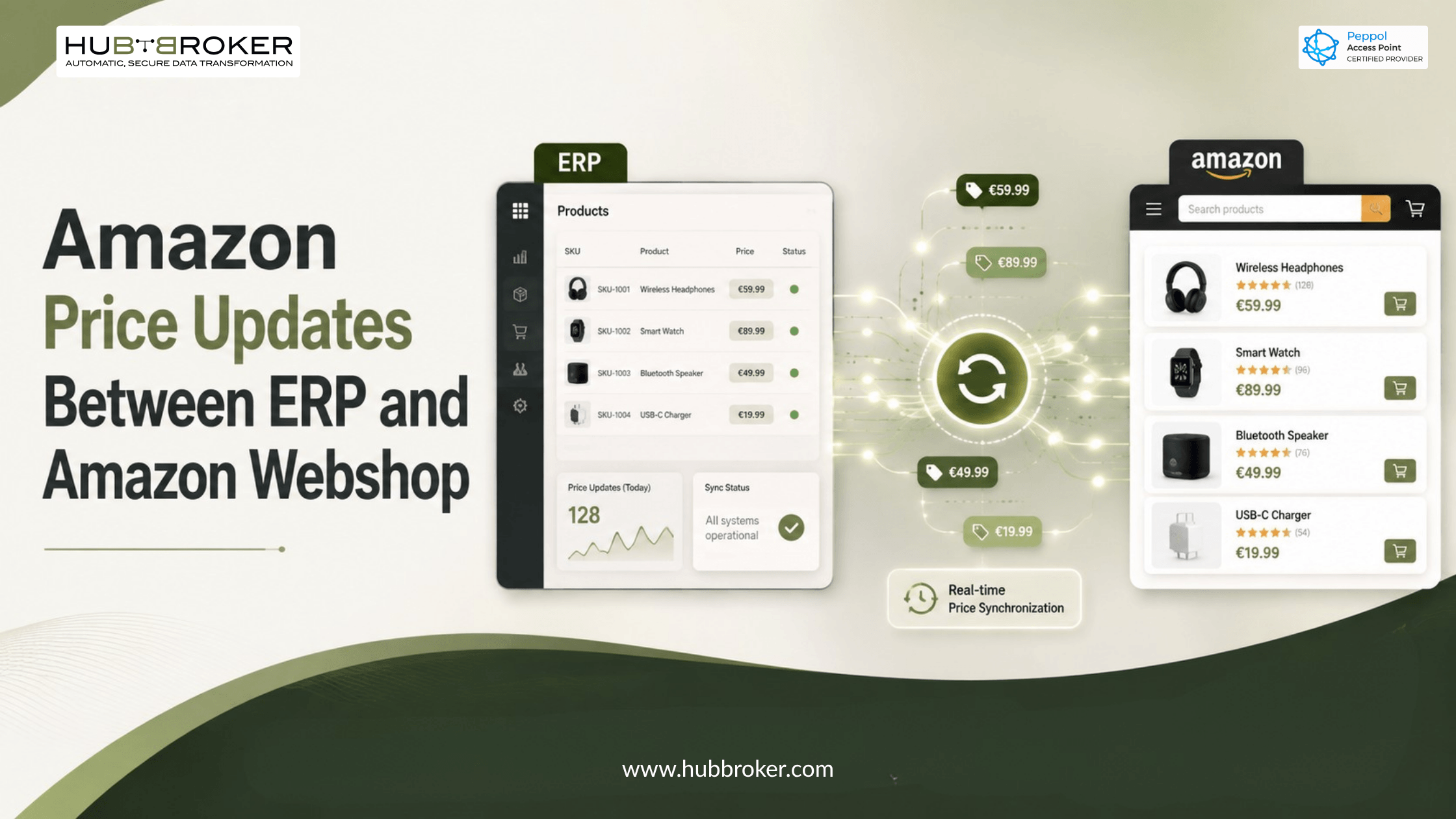
Amazon Price Updates Between ERP and Amazon Webshop
Updating product prices separately in an ERP system, Amazon Seller Central, and a webshop takes time and can cause mistakes.
For example, a price may be updated in the ERP but remain unchanged on Amazon or the webshop. This can lead to:
Incorrect profit margins
Customer complaints
Lost Featured Offer opportunities
Products being sold at the wrong price
Extra manual work for employees
An Amazon price updates ERP integration connects the ERP, Amazon marketplace, and webshop. It allows approved product prices to move automatically between these systems.
This is especially useful for European sellers that manage different Amazon marketplaces, currencies, VAT rules, promotions, and large product catalogues.
How Do You Sync Amazon Prices With an ERP System?
Amazon prices can be connected with an ERP system through Amazon’s Selling Partner API, also known as SP-API.
In most businesses, the ERP is the main source for:
Product prices
Product costs
Minimum profit margins
Tax information
Product details
When a price changes in the ERP, the integration can complete the following steps:
Read the new price from the ERP.
Apply VAT, currency, margin, or marketplace rules.
Match the ERP item number with the correct Amazon SKU.
Send the new price to the correct Amazon marketplace.
Check whether Amazon accepted or rejected the update.
Send the result back to the ERP or integration dashboard.
For a small number of products, prices can be updated one product at a time. For a large product catalogue, bulk updates may be more suitable.
Can Amazon Product Prices Be Updated Automatically?
Yes. Amazon product prices can be updated automatically when a price changes in the ERP.
Businesses can also schedule price updates or create rules based on:
Stock levels
Product costs
Competitor prices
Required profit margins
Promotional periods
Marketplace conditions
However, price automation should always include proper controls.
Businesses should define:
✔ Minimum selling price
✔ Maximum selling price
✔ Required profit margin
✔ Marketplace-specific price lists
✔ VAT-inclusive or VAT-exclusive prices
✔ Currency conversion rules
✔ Approval rules for large price changes
✔ Promotion start and end dates
These controls reduce the risk of an incorrect price being sent to hundreds or thousands of Amazon products.
How Are Prices Updated Between ERP, Amazon, and Webshop?
The best approach is to select one system as the main source of product prices. In many businesses, the ERP is selected as the pricing master because it already contains product costs, tax details, margins, and financial information. The integration platform reads the ERP price and converts it into the format required by Amazon and the webshop.
A normal price update process may look like this:
ERP price update → Pricing rules → Amazon and webshop update → Status returned to ERP
The integration can also return information from Amazon to the ERP, such as:
➡ Update errors
➡ Rejected prices
➡ Marketplace prices
➡ Competitive pricing information
➡ Product status
The right update method depends on the number of SKUs, update frequency, number of marketplaces, and Amazon API limits.
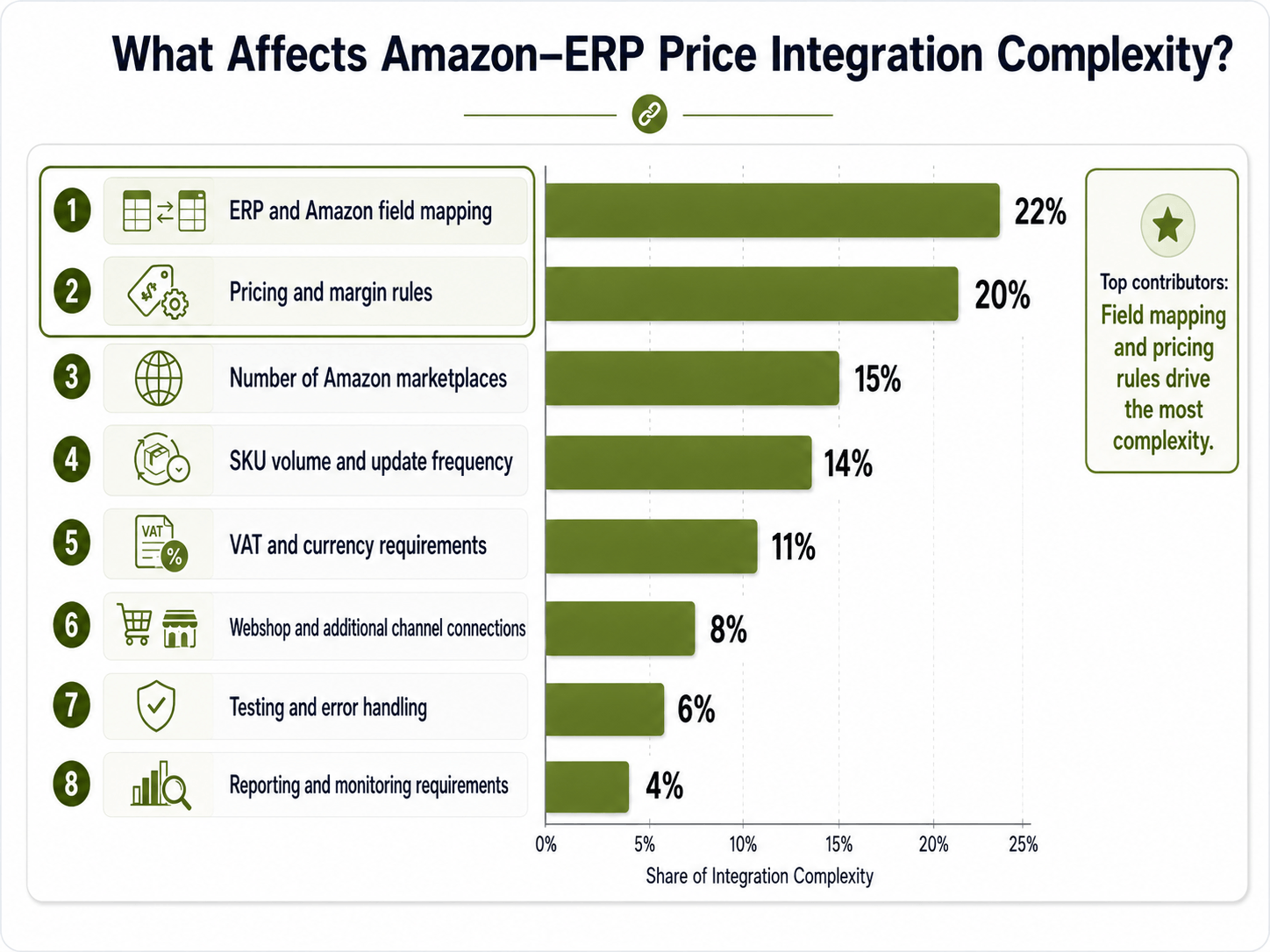
What Factors Affect Amazon Price Integration?
The effort required for an Amazon ERP price integration depends on the business setup. Important factors include the ERP system, product volume, pricing rules, data quality, number of Amazon marketplaces, and webshop connections.
The percentages below are only an example for project planning and infographic design. They do not represent measured industry results.
Why Choose HubBroker for Amazon Price Integration?
HubBroker helps businesses connect Amazon, ERP systems, and webshops through one structured integration process. Instead of updating the same product price manually in several systems, businesses can automate price updates and monitor failed transactions from one platform.
HubBroker can support Amazon integration with business systems such as:
Microsoft Dynamics 365 Business Central
SAP
Oracle
NetSuite
Other standard or custom ERP systems
The integration can also support other business data, including:
Orders
Inventory
Invoices
Shipping information
Product information
Customer data
This means that price synchronisation does not need to work as a separate process. It can become part of a complete Amazon and ERP integration. The solution can also be designed for European sellers that manage different prices, currencies, VAT rules, and commercial requirements across Amazon marketplaces.
HubBroker Amazon Integration Cost Factors
The cost of an Amazon integration depends on the required features and business setup.
HubBroker offers different platform editions and custom enterprise options. Final pricing is normally provided after the integration scope has been reviewed.
Important factor | What it includes | Expected cost impact |
|---|---|---|
ERP system | Standard or custom ERP connection | Medium to high |
Amazon marketplaces | Number of Amazon marketplace accounts | Medium |
Product volume | Total number of SKUs and update frequency | Medium to high |
Pricing rules | Margins, discounts, VAT, and price limits | Medium |
Webshop connection | Shopify, Magento, WooCommerce, or custom webshop | Medium |
Custom mappings | Matching ERP items, Amazon SKUs, and fields | Medium to high |
Monitoring and support | Logs, alerts, issue handling, and maintenance | Low to medium |
Additional workflows | Orders, inventory, invoices, shipping, and fulfilment | Medium to high |
There is normally no single fixed price for every Amazon price integration.
The final cost depends on:
Number of systems
Number of Amazon marketplaces
Product volume
Required pricing rules
Custom development
Transaction volume
Monitoring and support requirements
A scope discussion helps identify which parts are standard, which parts need custom development, and which HubBroker platform edition is suitable.
Improve Amazon Price Management With HubBroker
Automating Amazon price updates between ERP and Amazon webshop helps businesses improve pricing accuracy and reduce manual work. It also helps companies update prices faster, protect profit margins, and maintain better control across different Amazon marketplaces and sales channels.
With HubBroker, businesses can connect Amazon, their ERP system, and their webshop through one integration platform.
Contact HubBroker to discuss your Amazon ERP integration requirements and build a controlled price update process for your business.
