
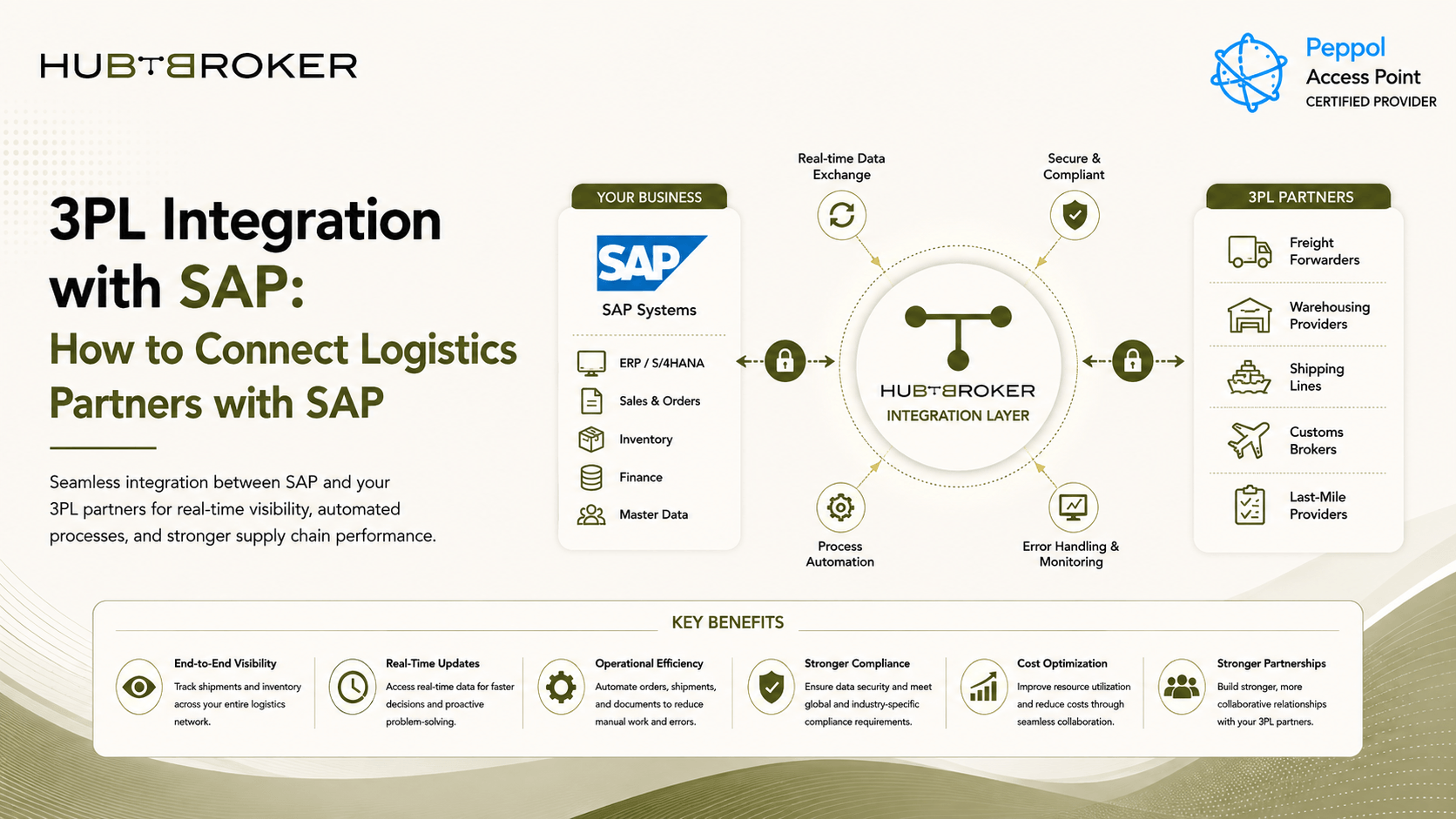
3PL Integration with SAP: How to Connect Logistics Partners with SAP
When SAP is managing orders and inventory, while a third-party logistics provider is handling warehouse and fulfilment, both systems need to share the right data. Without integration, teams may still depend on emails, spreadsheets, portals or entering the same information again in different systems.
A proper 3PL integration with SAP helps automate this data flow and keeps SAP and the 3PL connected for orders, inventory, shipments, receipts and other warehouse updates.
What Is 3PL Integration with SAP?
3PL integration with SAP means connecting your SAP system with a third-party logistics provider so data can move automatically between both sides. The connection can use EDI, APIs, structured files, middleware or an integration platform depending on what systems both companies are using. The important part is that data should move in both directions.
For example, SAP can send order or fulfilment information to the warehouse. The 3PL can then send back inventory updates, goods receipt, dispatch details, tracking numbers and delivery status.
How Does SAP–3PL Integration Work?
A simple setup can look like this:
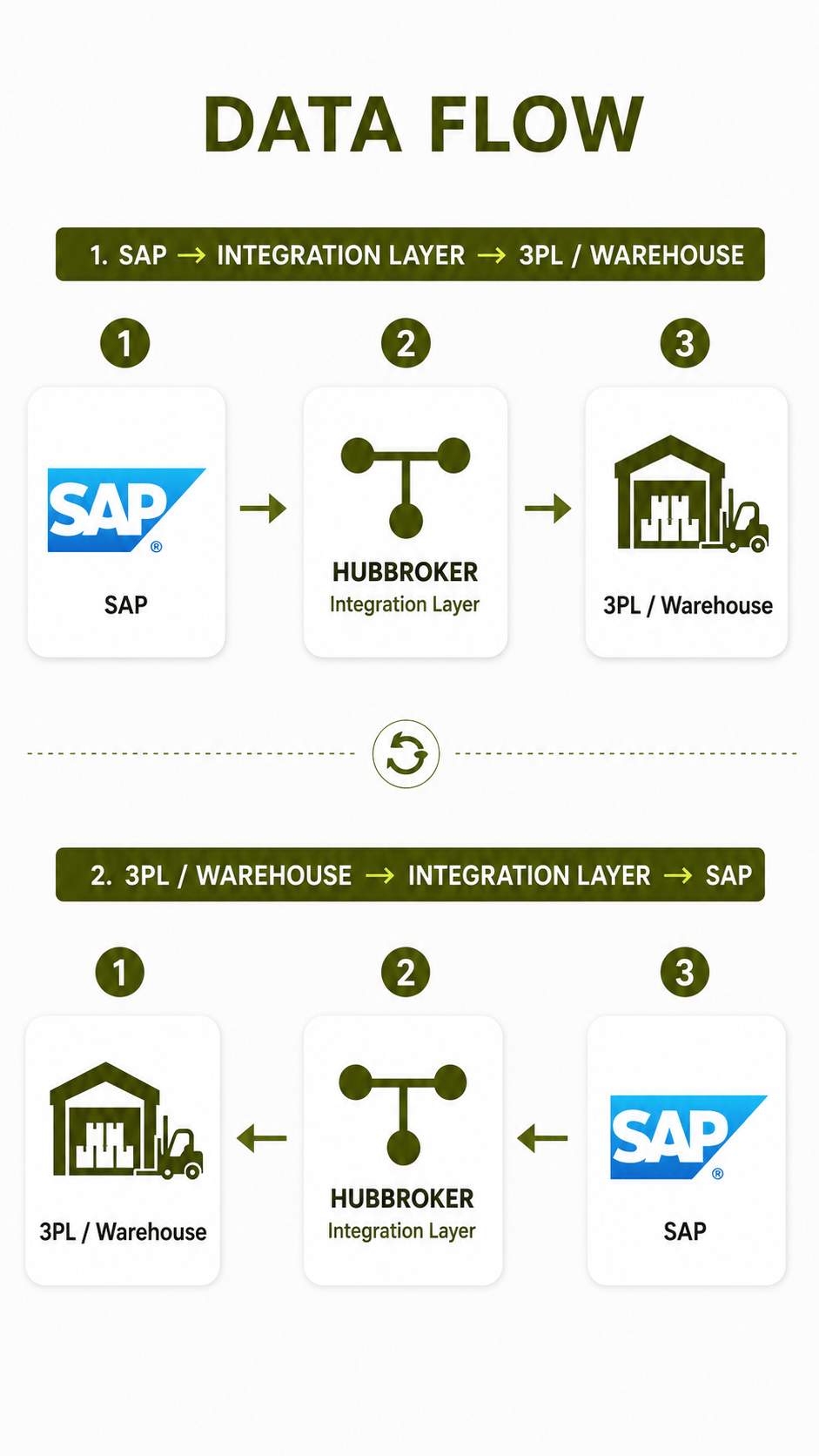
The integration layer works between both systems.
It can:
Map SAP fields with 3PL fields
Check required information
Convert data formats
Apply routing rules
Send transactions to the correct system
Handle responses and errors
For example, SAP may send a sales order to the 3PL. After the warehouse ships the order, the 3PL can send shipment confirmation back to SAP. This keeps both systems more updated without people manually checking each transaction.
What Data Is Exchanged Between SAP and a 3PL?
The exact data depends on the business and warehouse setup. Common transactions include:
➡ Sales or fulfilment orders
➡ Purchase and inbound warehouse details
➡ Goods receipts
➡ Inventory levels
➡ Stock adjustments
➡ Shipment confirmations
➡ Dispatch information
➡ Tracking details
➡ Delivery status
➡ Returns
The main thing is that these updates should connect back with the right process inside SAP. For example, if the 3PL sends a dispatch confirmation, that update should reach the related SAP order. It should not remain only inside the 3PL portal where another team need to check it manually.
What Are the Main Ways to Integrate SAP With a 3PL?
There are few different ways businesses can connect SAP with a logistics provider.
✔ Manual or Portal-Based Process
For very low transaction volumes, teams may use portals, email or spreadsheets. This can work in beginning, but it becomes difficult when order and shipment volumes increase.
✔ Custom Point-to-Point Integration
A company can build a direct connection between SAP and one 3PL. This gives good control, but every new partner may need another separate integration. IT team also need to manage mappings, security, credentials, monitoring and future changes for each connection.
✔ EDI Integration
EDI integration is useful when the 3PL already supports structured B2B documents.
It can be used for:
Orders
Warehouse instructions
Shipment messages
Inventory updates
Invoices
Different 3PL providers may still use different formats or rules, so mapping is normally required.
✔ API Integration
API integration can be useful when SAP and the 3PL have suitable APIs and faster data exchange is required. APIs can support near real-time updates for inventory, order status and shipments. But businesses should still check API security, authentication, limits and what data is actually available.
✔ Middleware or iPaaS
A middleware or iPaaS platform can manage EDI, APIs, files, mappings, routing and errors in one place. This becomes more useful when one SAP system need to connect with several warehouses or 3PL partners.
What Challenges Can SAP–3PL Integration Create?
The difficult part is normally not sending the first order. The real challenge is keeping both systems matched over time. Some common problems include:
✅Different data structures
✅ Wrong partner mappings
✅ Missing transactions
✅ Duplicate messages
✅ Delayed inventory updates
✅ Failed shipment messages
✅ Poor tracking visibility
✅ Incorrect order status
✅ Different partner formats
✅ Unclear responsibility for errors
For example, SAP may show stock as available while the warehouse has already used or shipped that stock. If inventory updates are delayed, sales and finance team may start working with wrong information. Another issue is having too many point-to-point connections. If every 3PL has a separate custom integration, adding new logistics partners can become more difficult and expensive.
What Should You Look for in a 3PL Integration Solution for SAP?
The solution should match your actual logistics setup, not only have a long list of features. Important things to check include:
✔ Connection with your SAP environment
✔ EDI, API and file support
✔ Two-way data exchange
✔ Data mapping and conversion
✔ Validation before sending
✔ Error handling
✔ Central monitoring
✔ Support for several 3PLs
✔ Warehouse connectivity
✔ Reusable mappings
✔ Security
✔ Transaction history
✔ Controlled reprocessing
It should also be easy to understand who will handle an error when something goes wrong. A good setup should make adding another 3PL easier instead of starting the complete integration again from zero.
How Can an Integration Platform Simplify SAP–3PL Connectivity?
An integration platform can act as one common layer between SAP and different logistics providers. SAP can send data in an agreed format, while the integration platform handles the format or connection required by each 3PL. This can include:
Partner-specific mappings
EDI documents
API connections
File conversion
Routing
Validation
Monitoring
Error handling
This setup can reduce manual work and give IT team one place to check the complete integration flow. It can also make adding new logistics partners more simple because common SAP-side logic can be reused. HubBroker provides iPaaS, EDI, API integration and ERP integration capabilities, including SAP Business One connectivity. This can help businesses connect SAP with different 3PL providers without managing every connection separately.
Getting Started With 3PL Integration with SAP
Start by checking your current SAP and warehouse process. Businesses should identify:
Which SAP system is being used
Current 3PL providers
Orders and warehouse transactions to automate
EDI, API or file formats supported
Data that need to move in both directions
How quickly updates are required
Who will monitor failed transactions
How future 3PL partners will be added
Once this is clear, it becomes easier to decide whether direct integration, EDI/API integration or an integration platform is the better option.
Planning a 3PL integration with SAP?
HubBroker can help connect your SAP system with logistics partners and automate order, inventory and shipment data through one integration setup.
