
SAP GS1 Integration: How to Connect Product and Supply Chain Data
A product may look completely correct inside SAP. The material number is there, dimensions are entered, customer is set up and delivery can be created. Then a retailer asks for a GTIN. A logistics partner needs an SSCC. Product information need to be shared through GDSN. Another trading partner wants GS1 EANCOM messages. A traceability project may also bring EPCIS into the process. Now the issue is not only managing data inside SAP. The bigger challenge is making that data understandable and usable by other systems across the supply chain.
SAP GS1 integration connects SAP product, location, logistics and transaction data with GS1 identifiers and standards, so information can move between manufacturers, retailers, distributors, logistics providers and other trading partners. The important point is that this is usually not one single integration. Product data, EDI transactions, logistics identifiers and traceability events may all need different flows.
Key Takeaways
SAP GS1 integration connects SAP data with standards like GTIN, GLN, SSCC, GDSN, GS1 EDI and EPCIS.
GDSN is mainly for product master data, while GS1 EDI is used for business transactions such as orders and despatch messages.
GTINs, GLNs and SSCCs give common identifiers so different systems can understand same products, locations, parties and logistics units.
An integration layer can handle mapping, validation, conversion, partner rules, routing and monitoring outside SAP.
The right setup depends on whether the business need product-data sync, retailer EDI, logistics automation, traceability or a mix of these.
What Is SAP GS1 Integration?
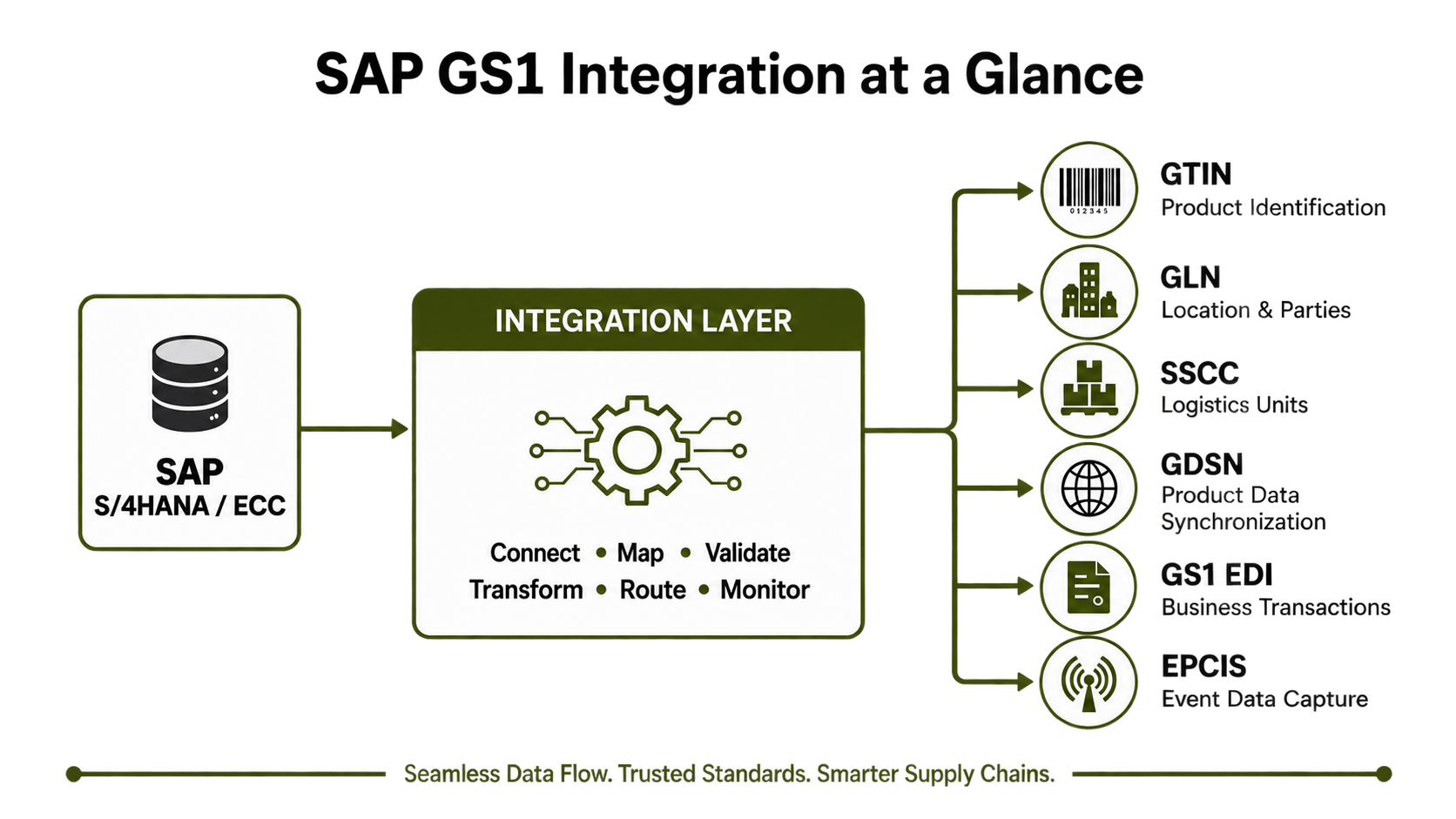
SAP GS1 integration means connecting information stored or processed in SAP with systems and trading partners using GS1 standards and identifiers. SAP itself already includes some functionality related to GS1. SAP documentation describes support for GTIN-based material identification and conversion between GS1 identifiers and SAP material data. But a complete integration can go much further than just adding a GTIN to a material.
For example, a manufacturer may need to:
Maintain product information in SAP.
Link products with GTINs.
Identify business locations using GLNs.
Create SSCCs for logistics units.
Publish product information through GDSN.
Exchange orders and shipping documents using GS1 EDI.
Share supply-chain events through EPCIS.
So the first question in an SAP GS1 project should be:
"Which GS1 process are we actually trying to connect?"
SAP Data vs. GS1-Standardized Data
SAP and GS1 solve different parts of the same problem. SAP manages internal business processes and company data. GS1 gives standard ways to identify and share information between different companies and systems.
A simple mapping can look like this:
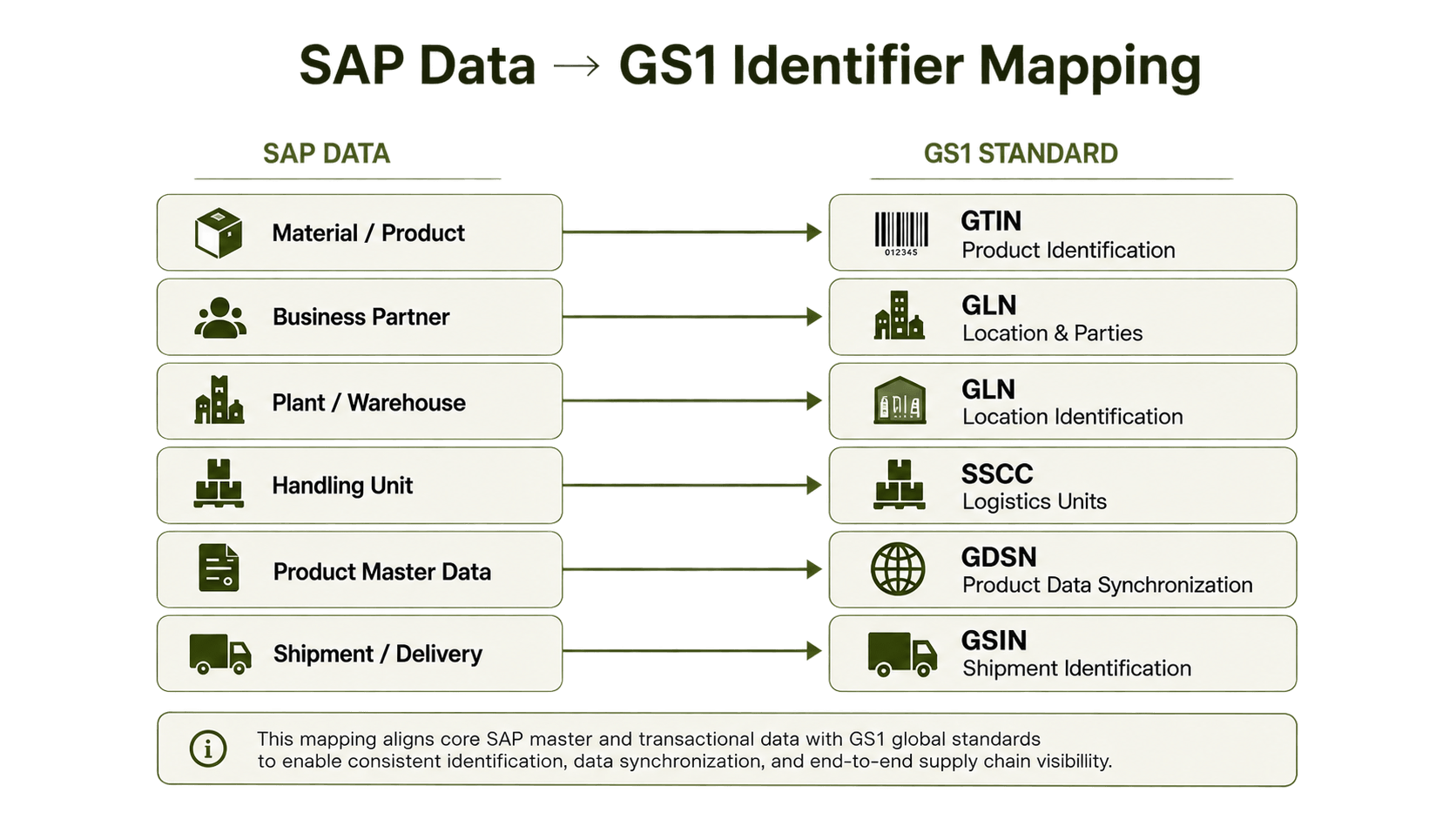
The exact SAP fields and mappings can be different depending on SAP version, industry, setup and trading-partner requirement. This matters because SAP-to-GS1 mapping is not always one-to-one. Integration logic may need lookups, conversions, packaging levels, customer-specific values or validation rules before the data can be sent correctly.
Which GS1 Standards Can Be Connected to SAP?
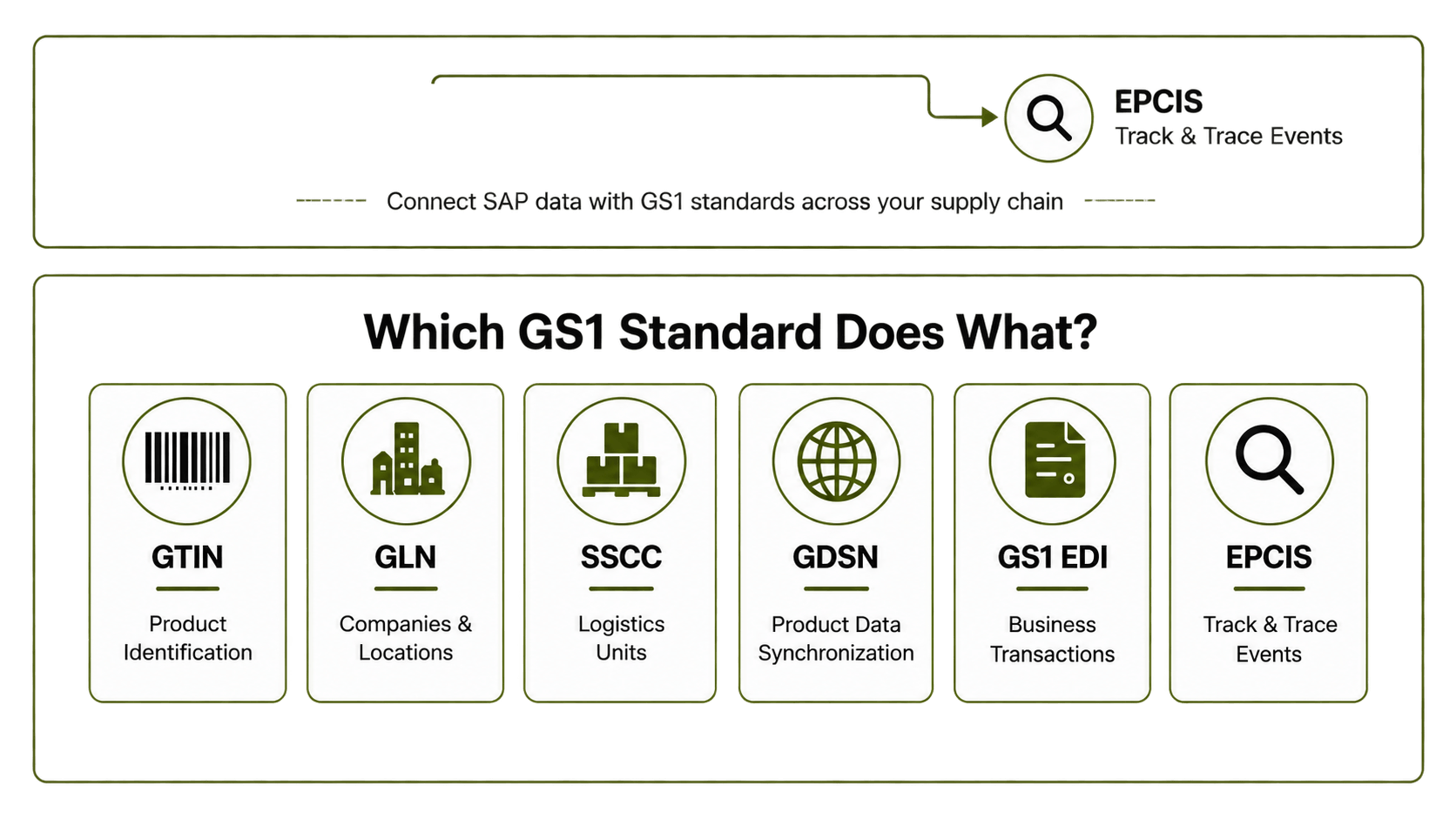
Different parts of GS1 can be useful in an SAP setup.
-> GTIN for Product Identification
The Global Trade Item Number (GTIN) is used to identify trade items in a standard way. A company may use its own SAP material number internally, while customers and retailers identify the same product using GTIN. SAP documentation describes GS1 functionality that can find SAP material information from a GTIN while also using relevant business data. So the integration need to keep the connection between internal SAP product numbers and external GS1 identifiers correct.
-> GLN for Companies and Locations
The Global Location Number (GLN) can identify companies, parties and locations. In SAP integration, GLNs may be used for:
Supplier
Customer
Ship-to location
Warehouse
Manufacturing site
Data recipient or information provider
Within GDSN, GLNs are also used to identify parties such as data sources, recipients, manufacturers, brand owners and information providers.
-> SSCC for Logistics Units
The Serial Shipping Container Code (SSCC) identifies logistics units like pallets and other shipping units. This becomes useful when SAP, SAP EWM, warehouse systems, carriers, label systems and trading partners all need to refer to same physical unit.
A shipment can look like:
SAP Delivery → Handling Unit → SSCC → Logistics Label → Retailer/Warehouse
-> GDSN for Product Master Data Synchronization
The GS1 Global Data Synchronisation Network (GDSN) is used for sharing and keeping product information updated between trading partners. GS1 describes GDSN as a network where product content can be uploaded, maintained and automatically shared with trading partners. Businesses normally participate through a GDSN-certified data pool.
For SAP, the flow may look like:
-> SAP S/4HANA / SAP ECC → Integration Layer → GDSN-Certified Data Pool → Retailers
The integration may send information such as:
GTIN
Brand
Product description
Dimensions and weight
Packaging hierarchy
Product classification
Market-specific attributes
Ordering and logistics data
When product information changes in SAP, integration can detect the change, check the data, convert it and send it forward.
-> GS1 EDI for Orders and Supply Chain Transactions
GDSN and EDI are not the same thing. GDSN is mainly for product master data. GS1 EDI is used for business transactions. GS1 EDI includes standards such as EANCOM, which is based on UN/EDIFACT, and GS1 XML. EANCOM can include identifiers such as GTIN, SSCC and GLN inside business messages.
A normal SAP GS1 EDI flow may look like:
Retailer → GS1 EDI Order → Integration Layer → SAP
followed by:
SAP → Order Response / Despatch Advice / Invoice → Integration Layer → Retailer
This is common in retail, manufacturing, wholesale, consumer goods, healthcare and logistics where business have many trading partners.
-> EPCIS for Track-and-Trace Data
EPCIS is used for supply-chain visibility events. Instead of only asking, "What product is this?", EPCIS can help systems share what happened to a product or object during supply chain process. GS1 describes EPCIS as a way for applications to create and share visibility event data across businesses. Current EPCIS support includes formats such as JSON/JSON-LD and XML with RESTful interfaces.
A possible flow is:
SAP / EWM / WMS / Scanner / IoT → Integration Layer → EPCIS Repository → Supply Chain Partners
This can support product movement, receiving, shipping, transformation, aggregation and traceability.
-> GS1 Digital Link and Connected Product Data
GS1 Digital Link brings GS1 identifiers into web-based use. The standard gives a common way to represent GS1 identifiers in web addresses, so products or other objects can connect with online information and services. For businesses working with connected packaging, product data, authentication, traceability or 2D barcode projects, this can become another thing to consider with SAP product data.
Why Do Companies Integrate SAP with GS1?
Most businesses do not start an SAP GS1 integration project because they simply want another technical standard. Usually, a retailer, customer, marketplace, warehouse, regulator or supply-chain project is asking for standard data.
1] Meet Retailer and Distributor Requirements
Large retailers may ask for specific product IDs, product attributes, EDI messages, logistics labels, packaging details or product-data synchronization. If this information already exists in SAP, entering same data again into portals, spreadsheets or external systems creates more manual work and can also create mistakes.
2] Reduce Duplicate Product Data Entry
Without integration, teams may keep product data inside SAP and then manually enter it again in retailer portals, spreadsheets, data pools and EDI systems. This can create different versions of same information. A better setup is to decide which system owns each data value and then move that information automatically to the systems that need it.
3] Improve Product Data Quality
Sending wrong data faster does not really help. A proper integration should check required attributes, identifiers, formats, packaging relationships and partner rules before sending product information.
4] Improve Supply Chain Visibility
When GTINs, GLNs, SSCCs, logistics events and transactions use consistent identifiers, it becomes easier to connect digital records with physical products and shipments. This can help receiving, warehouse work, traceability, fulfilment and error handling.
Common SAP GS1 Integration Scenarios
There is no one SAP GS1 architecture that works for every company. The flow depends on the business need.
Scenario 1: SAP to GDSN for Product Data
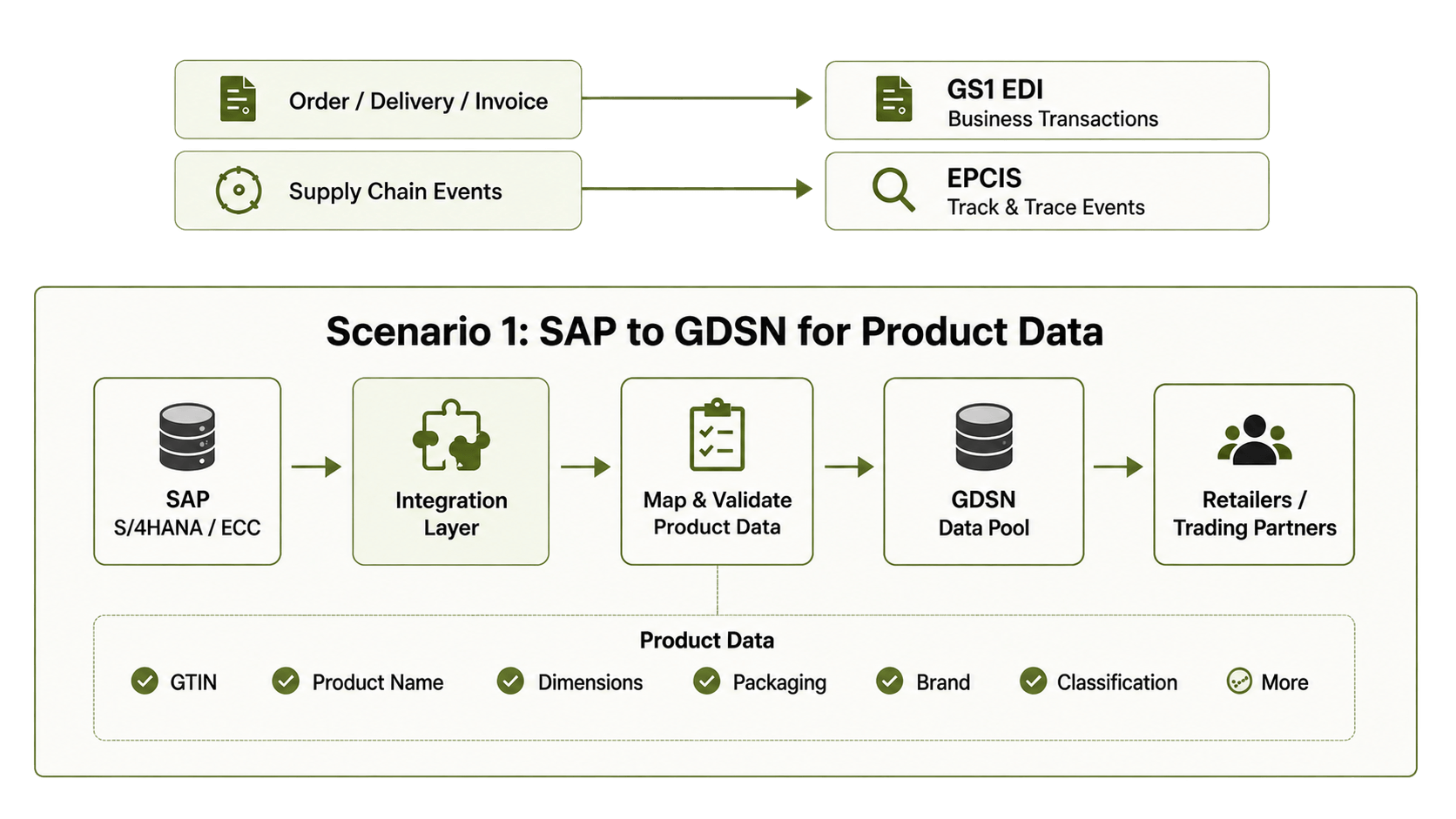
SAP stays as an important source for product information. The integration layer gets the required data, maps it, checks it and sends it to the company's GDSN-certified data pool. GS1 describes the GDSN process around loading, registering, subscribing, publishing and confirming product data between connected parties.
Scenario 2: External Product Data into SAP
The flow can also work in opposite direction:
Supplier / Product Data Source → Validation → Integration Layer → SAP
This may be useful when a company need supplier product information inside SAP for procurement or internal product processes.
Scenario 3: SAP to Retailers Through GS1 EDI
A retailer may send a purchase order and expect other documents back electronically.
For example:
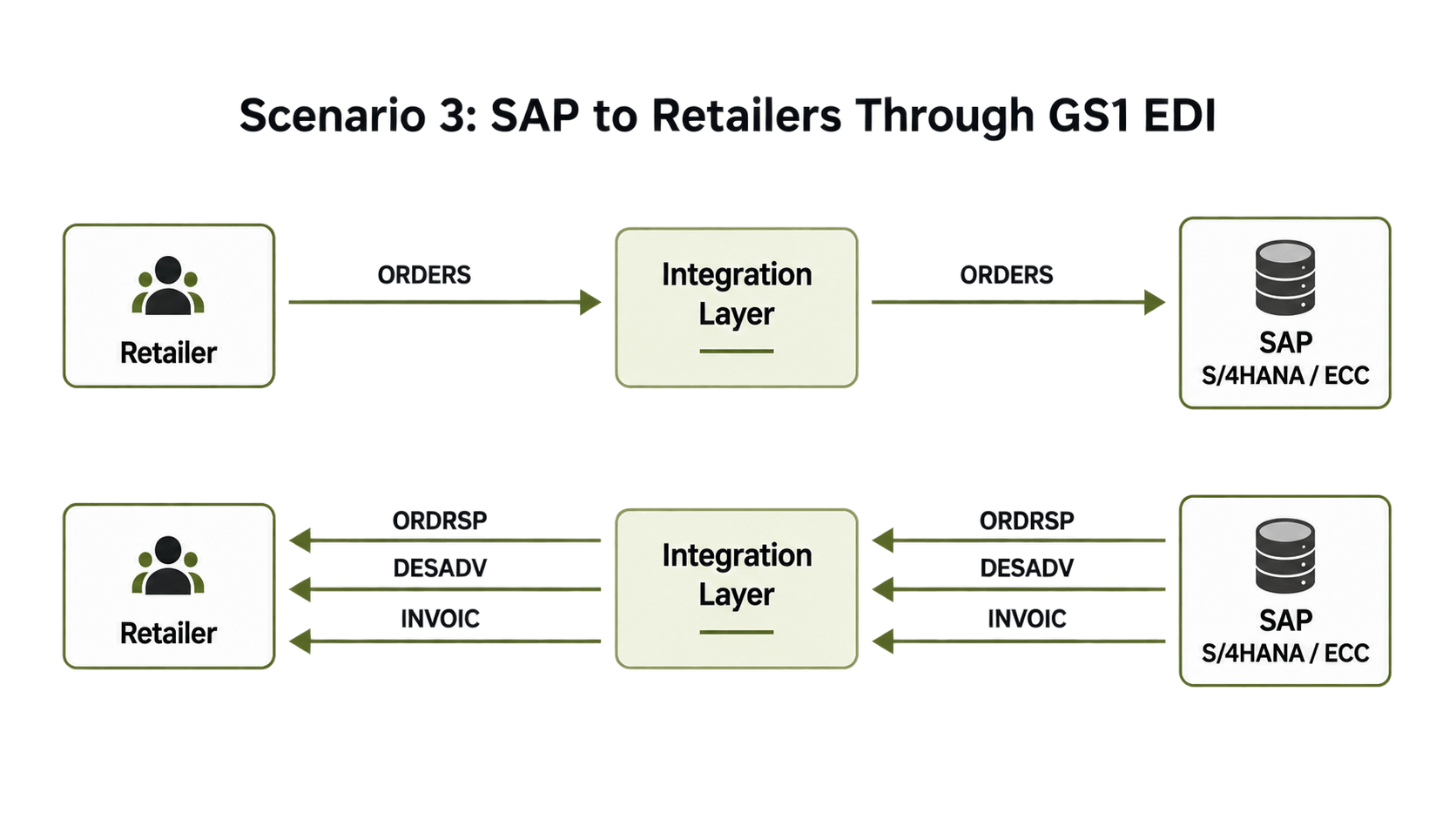
The integration layer maps between SAP structures like IDocs, APIs, XML or files and the GS1 EDI format required by the retailer.
Scenario 4: SAP, Warehouse Systems and SSCC
In warehouse and shipping process, SAP may create or manage handling-unit information while labels use GS1 identifiers. A connected flow can keep ERP transaction, physical pallet, shipping label and retailer receiving process connected around same logistics-unit ID.
Scenario 5: SAP and EPCIS Traceability
A traceability setup may collect events from more than SAP.
For example:
SAP + WMS + Production + Scanning → EPCIS Integration → Shared Traceability Data
The challenge is not only field mapping. Different systems need to use the same identifiers and business context so all events describe same physical supply-chain activity.
What Does an SAP GS1 Integration Architecture Look Like?
For a small and stable requirement, direct integration can work. But things become more complex when business has many retailers, countries, standards, data pools, document formats and communication methods.
A scalable model is often:
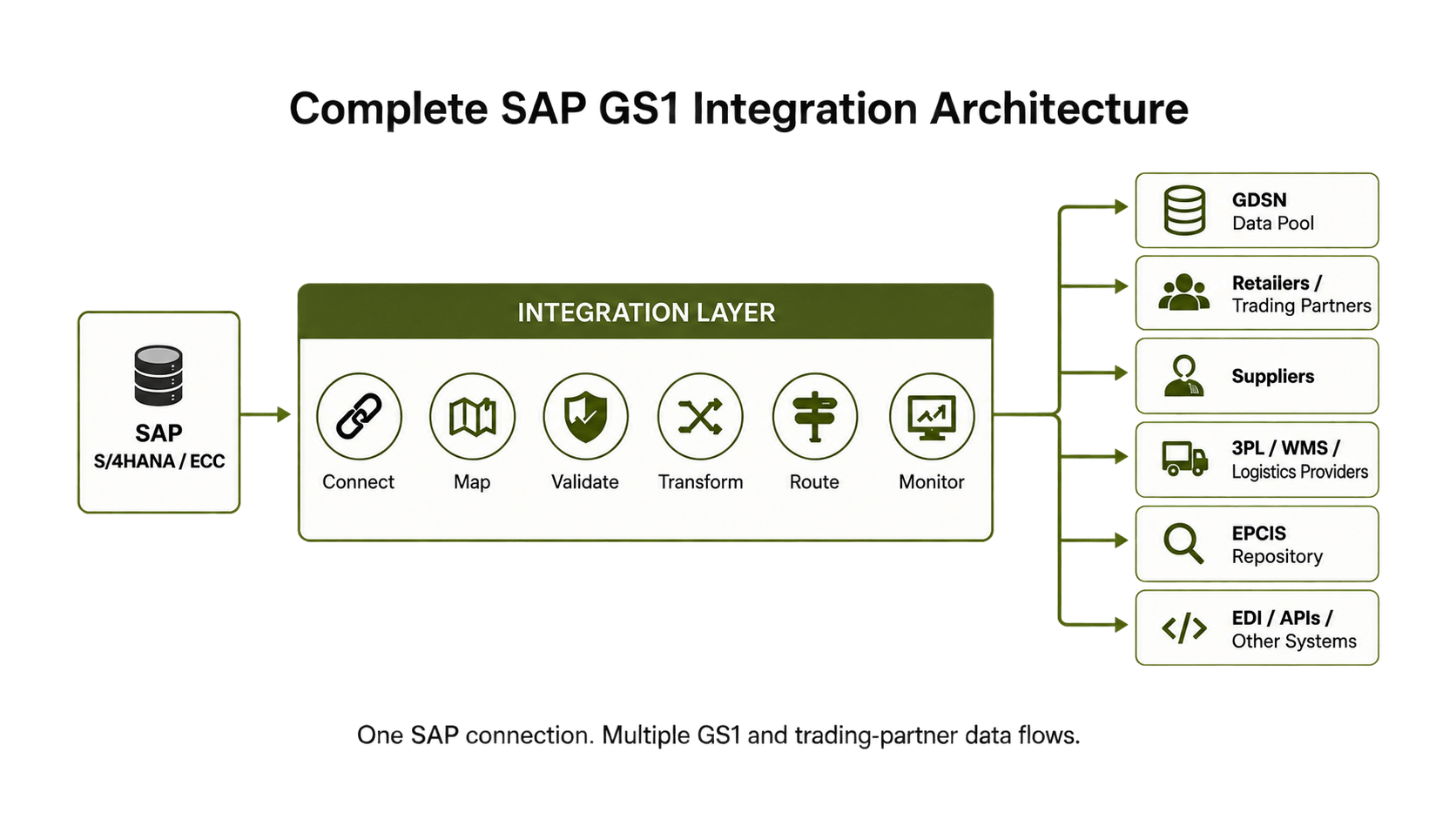
The integration layer handles the translation between internal SAP data and what external systems need. This can reduce the amount of partner-specific logic that need to be built directly inside SAP.
How to Implement SAP GS1 Integration Step by Step
Step 1: Define the Business Requirement
Do not start with the connector.
Start with what the business actually need.
Is the customer asking for GDSN product sync? EANCOM? GTINs? Logistics labels? SSCC? EPCIS?
These are different requirements.
Step 2: Identify the Required GS1 Standards
List every identifier, transaction, attribute and standard the external party expects.
Also include country-specific and retailer-specific rules where needed.
Step 3: Define Data Ownership
Decide where each value comes from.
For example:
SAP Material → Product data
SAP Business Partner → Customer/Supplier data
Warehouse system → Logistics events
GS1 allocation process → GS1 identifiers
Try to avoid having many uncontrolled sources for same information.
Step 4: Map SAP Fields to the Required GS1 Model
Create a mapping that shows the SAP source field, transformation rule, target field, required status, format and validation.
This is often where project complexity starts becoming clear.
Step 5: Choose the Integration Method
Depending on the setup, connectivity may use:
SAP IDocs
APIs
XML
EDI
SFTP
AS2
HTTPS
Web services
Certified GDSN data-pool connectivity
Do not use a protocol only because it already exist in your setup. Choose it based on the actual external requirement and how the process need to work.
Step 6: Add Validation Before Transmission
Check the data before it reaches retailer, data pool or logistics partner.
This can catch missing IDs, invalid codes, incomplete attributes, wrong formats and mapping mistakes earlier.
Step 7: Test Real Business Scenarios
Do not only test one perfect product or order.
Test new products, changed products, different packaging levels, several locations, rejected records, shipping units, cancellations and other exceptions that can really happen.
Step 8: Build Monitoring and Error Handling
A good integration should answer simple questions:
What was sent? Was it accepted? If not, why not? Who need to fix it?
Without proper monitoring, automation can sometimes make errors harder to find.
Common SAP GS1 Integration Challenges
The technical connection is usually not the hardest part. One common issue is poor master-data quality. Mapping cannot fix missing GTINs, wrong units of measure, incorrect dimensions or incomplete packaging hierarchy. Another mistake is thinking every trading partner uses GS1 in exactly same way. A common standard helps reduce differences, but retailers and industries may still have their own rules, fields and validation requirements. Packaging can also make things more difficult. A consumer unit, case and pallet may each have different identification and hierarchy needs.
Companies also sometimes treat GDSN, EDI and traceability like one project. They are connected, but they solve different problems. Keeping these flows separate makes integration more easier to manage.
Direct SAP GS1 Integration vs. an Integration Platform
Area | Direct Integration | Integration Platform |
|---|---|---|
Small number of connections | Can work well | May not be needed at first |
Multiple retailers | More custom interfaces | Central partner management |
Mapping changes | Often affects SAP/interface logic | Managed in integration layer |
Multiple formats | More complexity | Central conversion layer |
Validation | Built separately | Central rules possible |
Monitoring | Spread across systems | Central monitoring possible |
Partner onboarding | More technical work per partner | Reusable flows and mappings |
Scalability | Depends on custom setup | Built around reusable connections |
The right choice depends on scale. If a company has one stable partner connection, direct integration may be enough. If it needs SAP to connect with many retailers, suppliers, EDI standards, APIs, e-invoicing networks and other external systems, an integration layer can reduce long-term complexity.
What to Look for in an SAP GS1 Integration Solution
A practical solution should do more than only move files. Look for support around:
SAP ECC, S/4HANA or relevant SAP application connectivity
IDoc, API, XML and file-based integration
GS1 identifier mapping
Conversion between internal and partner formats
GS1 EDI requirements
Data validation
Partner-specific mappings
Secure communication methods
Central monitoring
Error and exception handling
Reusable partner onboarding
Support across countries and business units
For GDSN, also check how the solution connects with the required GDSN-certified data pool. Normal EDI connectivity does not automatically mean GDSN participation.
How HubBroker Can Simplify SAP GS1-Related Integration
Companies often already have most of the required business information somewhere inside SAP. The difficult part is changing, checking, routing and sending that data in the structure each external party needs.
HubBroker provides an integration layer for connecting SAP with customers, suppliers, marketplaces, logistics providers and external document networks. Its SAP EDI approach supports mapping, format conversion, validation, partner onboarding, API and ERP integration, secure data exchange, monitoring and error handling. For a GS1-related project, the exact setup should first be based on what is actually required, whether that is GS1 EDI, GS1 identifiers, external product-data connectivity, retailer integration or another supply-chain process. This can avoid unnecessary SAP custom work and make it easier to add new partners and requirements later.
FAQ About SAP GS1 Integration
What is SAP GS1 integration?
SAP GS1 integration connects product, partner, logistics and transaction data in SAP with external processes using GS1 standards and identifiers such as GTIN, GLN, SSCC, GDSN, GS1 EDI or EPCIS.
Does SAP support GS1 standards?
SAP provides functionality related to GS1 identification, including GTIN-based material identification and conversion. Wider requirements such as GDSN, partner EDI or EPCIS usually need additional integration with external systems or services.
What is the difference between an SAP material number and a GTIN?
An SAP material number is normally an internal product ID used inside SAP. A GTIN is a GS1 identifier used to identify products consistently across different companies and systems.
How do you integrate SAP with GDSN?
A common setup gets the required product data from SAP, maps and checks it, then sends it through the company's GDSN-certified data pool. GDSN then allows that product information to be shared with subscribed trading partners.
Can SAP exchange GS1 EDI messages?
Yes. SAP transaction data can be taken through IDocs, APIs, XML or files and changed into the GS1 EDI format required by a trading partner. Incoming messages can also be converted back into a format SAP can use.
How are GLNs used in SAP integration?
GLNs can identify companies, parties and physical or business locations. They may be mapped to SAP business partners, plants, warehouses, ship-to addresses or other location records.
What is SSCC and how is it used with SAP?
An SSCC identifies a logistics unit such as a pallet. In SAP or warehouse integration, it can connect handling-unit and shipment data with labels, carrier process, warehouse scanning and trading partner receiving.
What is the difference between GDSN and EPCIS?
GDSN mainly focuses on sharing product master information. EPCIS focuses on sharing visibility events showing what happens to products or other objects across supply chain.
Can SAP GS1 integration use APIs instead of EDI?
Yes, if the external system supports APIs. But APIs and GS1 standards do different jobs. API defines how systems connect, while GS1 standards define how products, locations, events or business information are identified and represented.
The final method depends on what the receiving system requires.
Do I need middleware for SAP GS1 integration?
Not always. A simple one-to-one connection may work directly. Middleware or an integration platform becomes more useful when there are many partners, formats, protocols, mappings, validation rules or monitoring needs.
Connect SAP and GS1 Data Without Creating More Manual Work
SAP GS1 integration is not only about putting a GTIN into an SAP material record. The bigger goal is creating a reliable flow between SAP master data, GS1 identifiers, product-data networks, EDI transactions, logistics processes and supply-chain partners. Start by identifying the exact GS1 requirement. Then check where the data comes from, how it need to be mapped, which validations are required and how external systems need to receive it.
If your retailers, customers or supply-chain partners are asking for GS1-standardized data from SAP,
HubBroker can help you assess the required integration flow and build an architecture for automated data exchange without creating another layer of manual work.
