
Salesforce SAP Integration for Customer and Order Data Synchronization
Sales teams usually manage accounts, contacts, opportunities and other sales activity inside Salesforce. SAP, on the other side, may control customer master data, orders, deliveries and financial processing. Problems start when same customer or order needs to be entered in both systems manually.
A well-planned salesforce sap integration connects these business processes while keeping clear control over customer data, ERP references and order status.
Customer Synchronization Should Start With Data Ownership
Customer synchronization should not mean copying every Salesforce field directly into SAP. First, decide which system should own each type of information. Salesforce may manage CRM contacts, sales activity, opportunity details and customer-facing notes.
SAP may manage ERP customer numbers, payment terms, financial information and operational customer master data.
Define field ownership before turning on two-way synchronization.
This helps prevent one system from overwriting information that should be controlled by the other.
How Should a New Salesforce Customer Reach SAP?
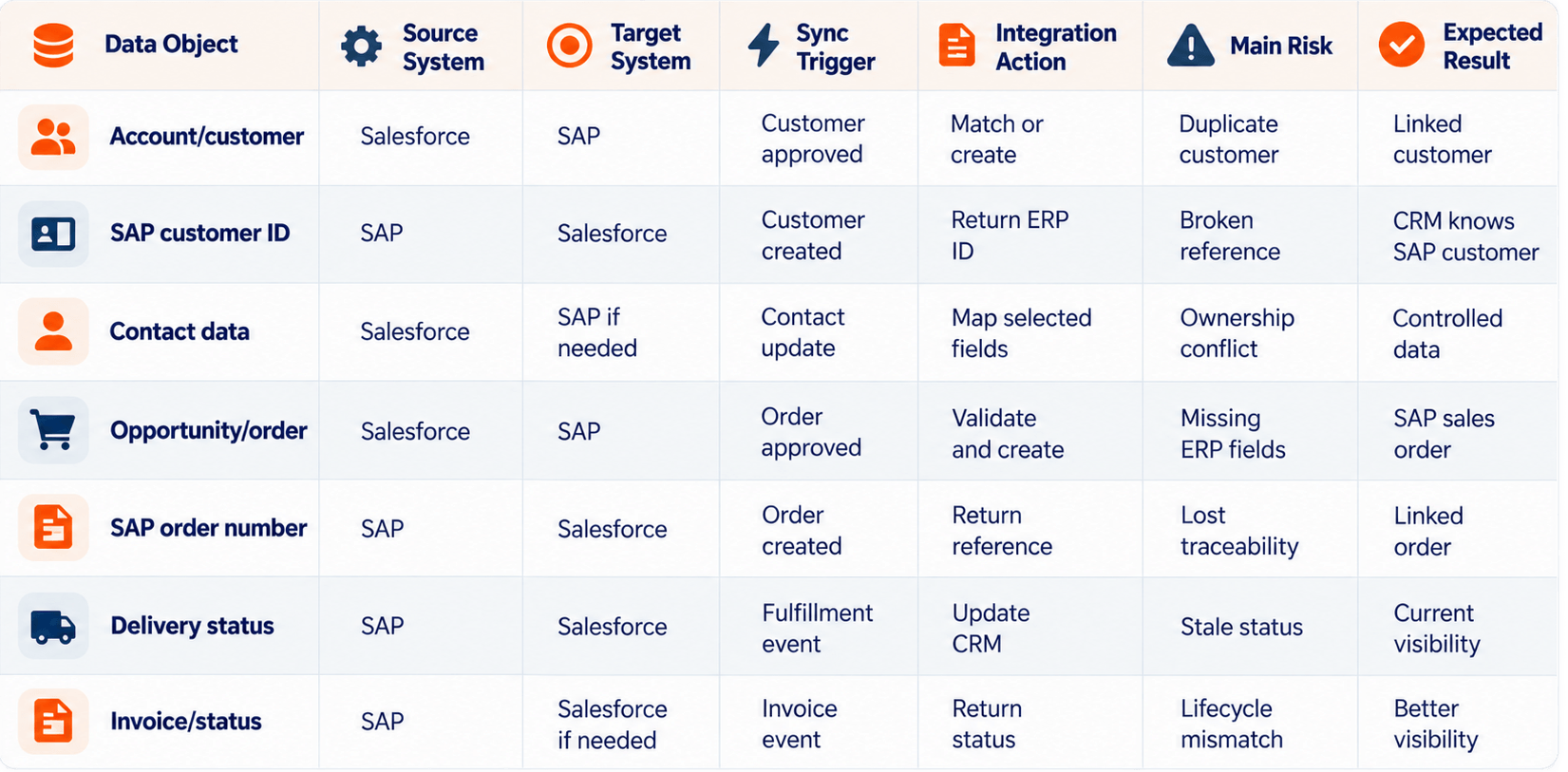
Not every new Salesforce lead or account needs to become SAP customer immediately. Customer creation can happen after qualification, approval, or when an order is ready to move forward.
Customer flow:
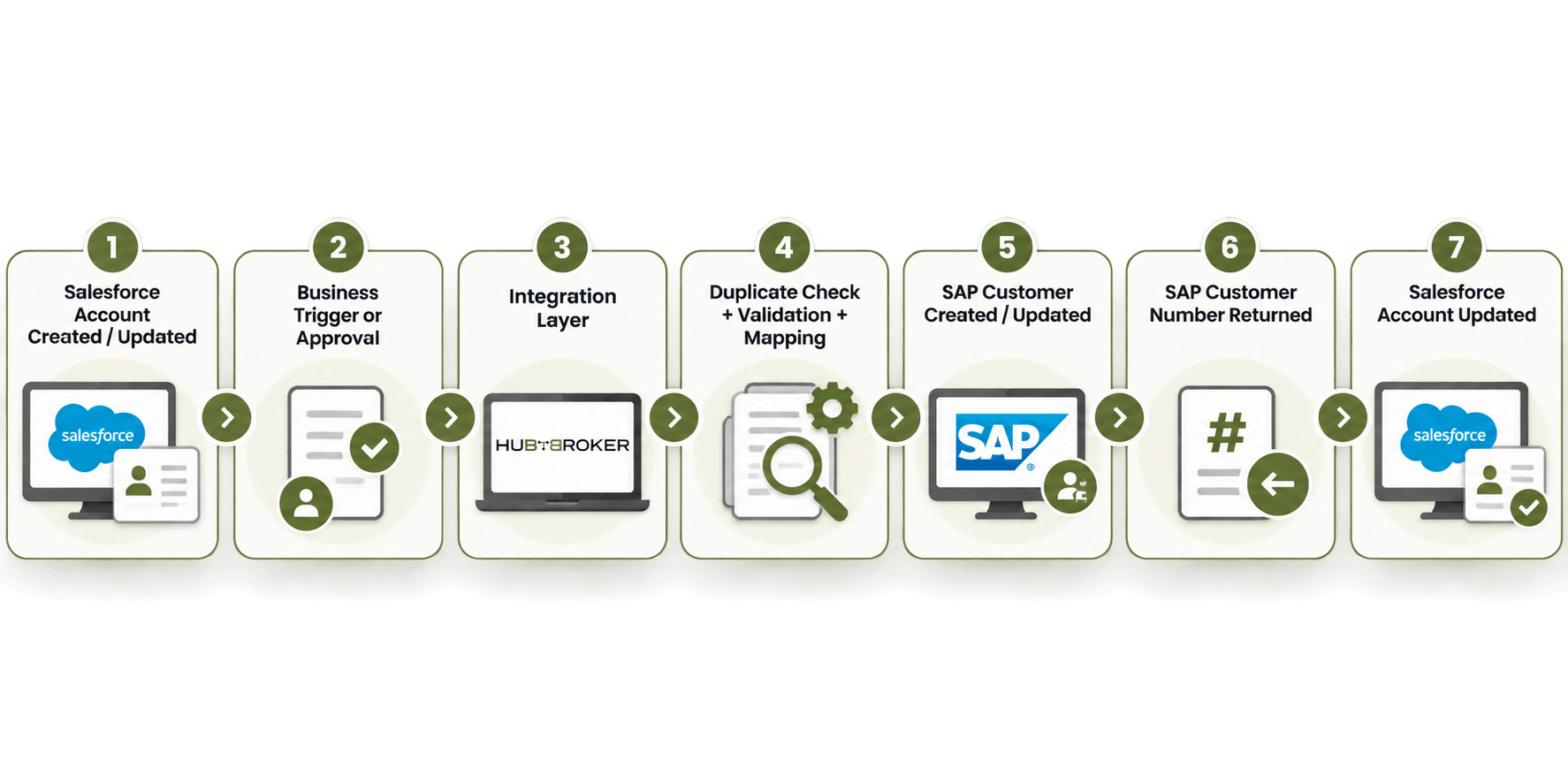
Before creating the customer in SAP, the integration can check existing customer IDs, VAT or business numbers where relevant, company name, address, customer status and required SAP fields. The returned SAP customer number should stay linked with the Salesforce account.
Future orders can then use the correct SAP customer instead of creating another customer record by mistake.
How Does a Salesforce Order Move Into SAP?
Order synchronization should start only when the sales transaction reaches the agreed business stage.
Order flow:
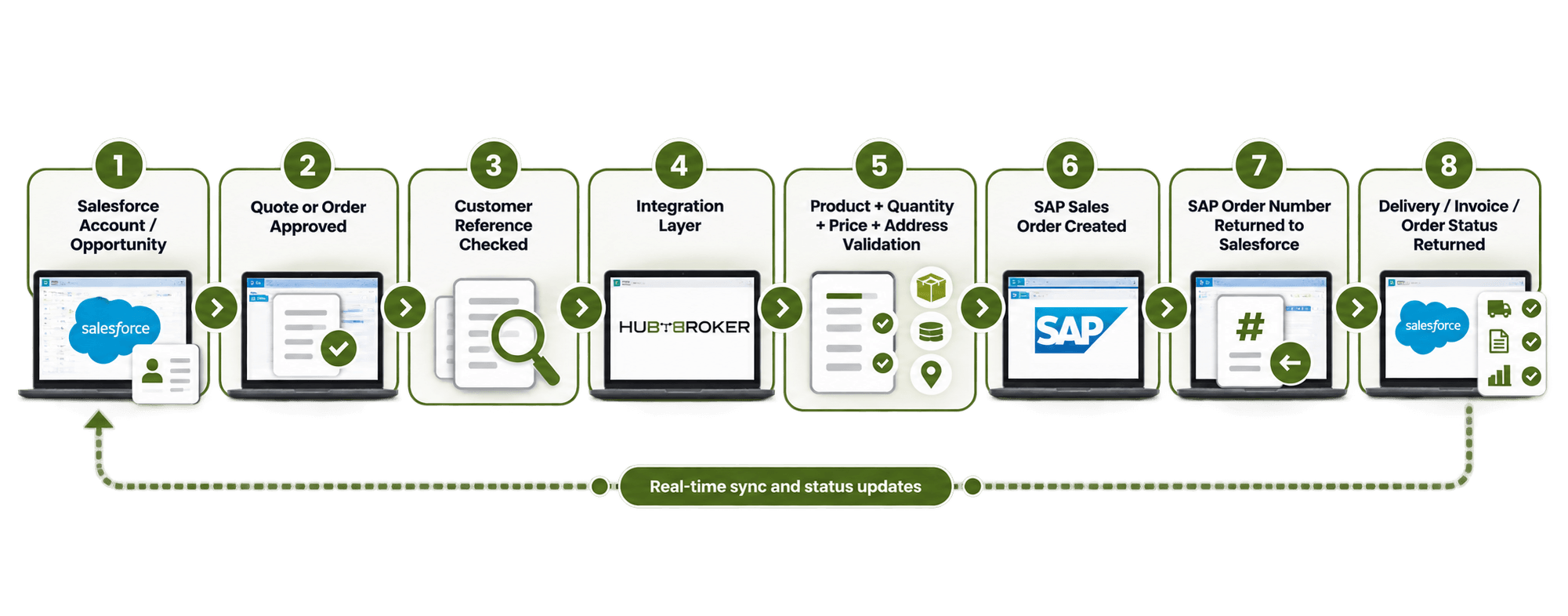
The integration should keep the relationship between both systems:
Salesforce Record ID ↔ SAP Customer ID ↔ SAP Sales Order Number
This gives sales, support and IT teams a clear way to trace the same transaction across CRM and ERP.
What Customer Data Should Actually Synchronize?
Only the information needed for the business process should move between the systems.
✔ Identity: company name, customer number and relevant tax or business identifiers.
✔ Address: billing address, shipping address, country and postal details.
✔ Commercial data: payment terms, currency and required SAP sales-organization information.
✔ CRM information: Salesforce-specific fields should only move into SAP when the SAP process actually needs them.
Keeping synchronization focused on useful fields reduces unnecessary dependency between Salesforce and SAP.
What Order Data Needs to Move From Salesforce to SAP?
SAP normally needs enough information to identify the customer and process the order properly. This may include customer reference, SKU, quantity, price, currency, shipping address, requested delivery details, purchase-order reference, discounts and relevant tax data. SAP can then apply its own ERP rules for pricing, tax, inventory and fulfilment.
Salesforce does not need to copy or recreate every SAP business rule.
How Do You Prevent Duplicate Customers and Orders?
For customer records, use stable identifiers and proper matching rules instead of using company name alone.
For orders, use idempotent processing. This means if the same Salesforce order is sent again because of retry or temporary error, it should not create another SAP sales order. Returning SAP customer numbers and sales-order IDs back into Salesforce also helps both systems understand which records already exist.
Which SAP Statuses Should Return to Salesforce?
A Salesforce SAP integration should not stop once SAP sales order is created. Useful information to send back can include SAP customer number, sales-order number, accepted or rejected status, processing status, delivery details, shipment information, invoice reference and hold or cancellation status. Only return information that sales users actually need to answer customer questions and understand the order lifecycle.
Too much technical ERP data can make Salesforce more difficult to use without adding real value.
What Happens When Synchronization Fails?
Common problems include existing customers, missing required SAP fields, unknown SKUs, blocked customers, incorrect price or currency, unavailable SAP API, or duplicate orders. A business or data error usually needs review or correction. A technical error, such as temporary connection failure, may be suitable for automatic retry.
The integration should clearly show:
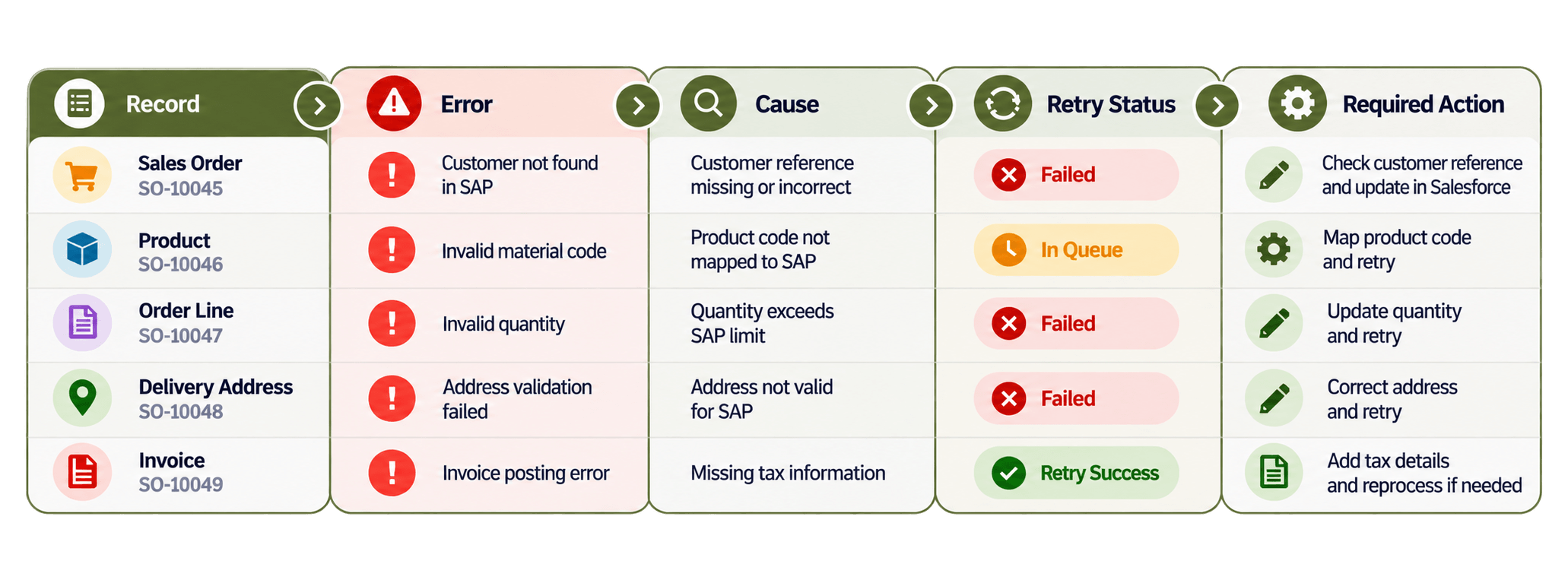
Failed transactions should never disappear silently between the two systems.
What Should European Businesses Consider?
European businesses may need to handle several legal entities, SAP sales organizations, currencies, languages, regional systems, cross-border customers and VAT identifiers. Personal information should also be limited to what the integration actually needs.
There is usually no reason to copy the full Salesforce customer record into SAP if only few fields are required for order or finance processing.
What Should You Look for in a Salesforce SAP Integration Solution?
Check whether the integration can find existing customers, return SAP identifiers to Salesforce, map required fields, create SAP orders from approved Salesforce transactions, prevent duplicates, manage errors and trace transactions across both systems. It should also be flexible enough to connect more EDI, ecommerce, logistics, finance or enterprise applications when business requirements grow.
HubBroker can work as an integration layer where the required Salesforce and SAP interfaces are available:
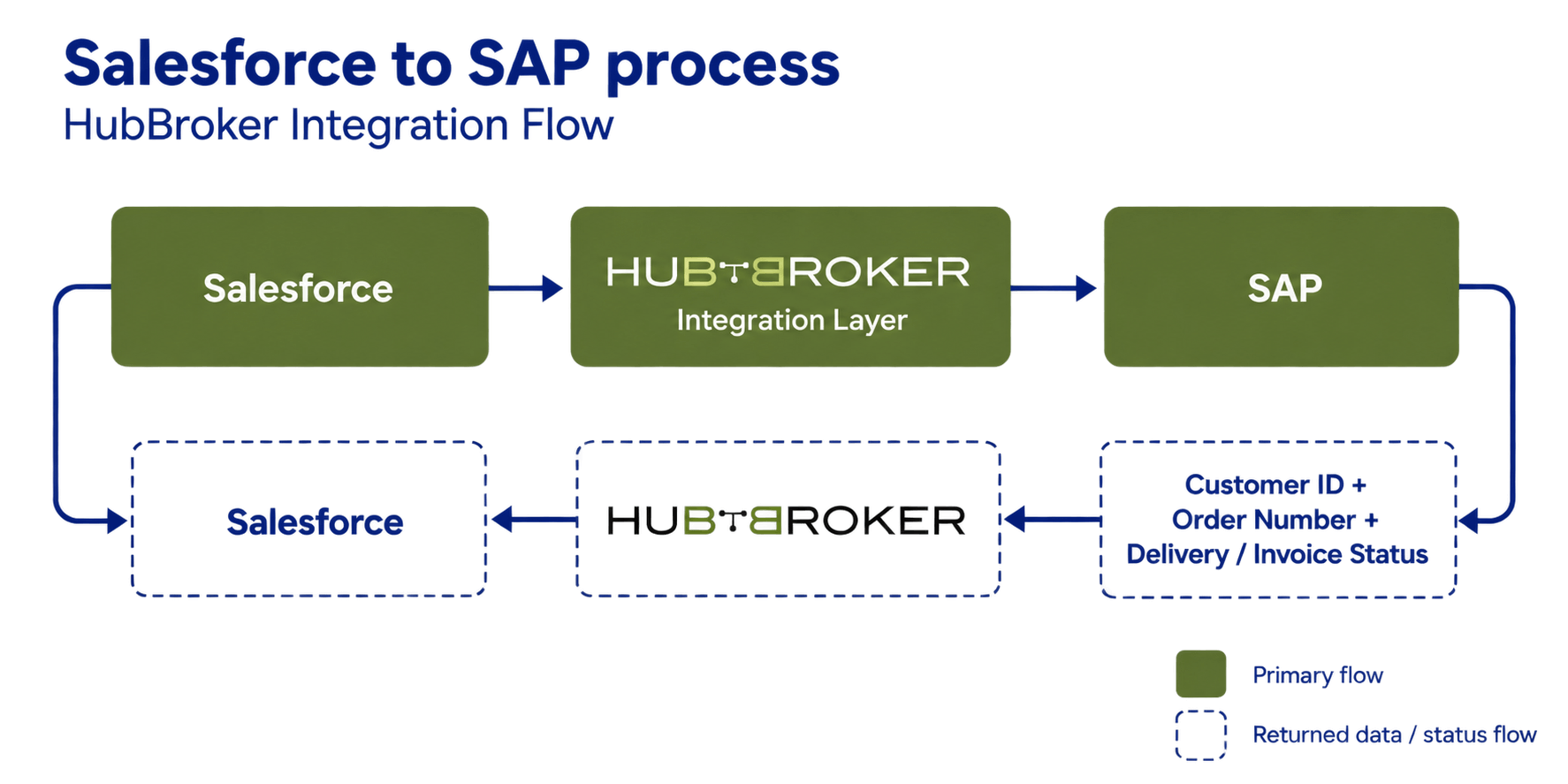
This approach keeps customer and order responsibilities inside the correct system while sharing the references and transaction status needed by both teams.
Need Salesforce and SAP to work with consistent customer and order information?
HubBroker can help connect CRM and ERP workflows through controlled mapping, validation, synchronization, error handling and monitoring. Talk to our team about your Salesforce SAP integration requirements.
