
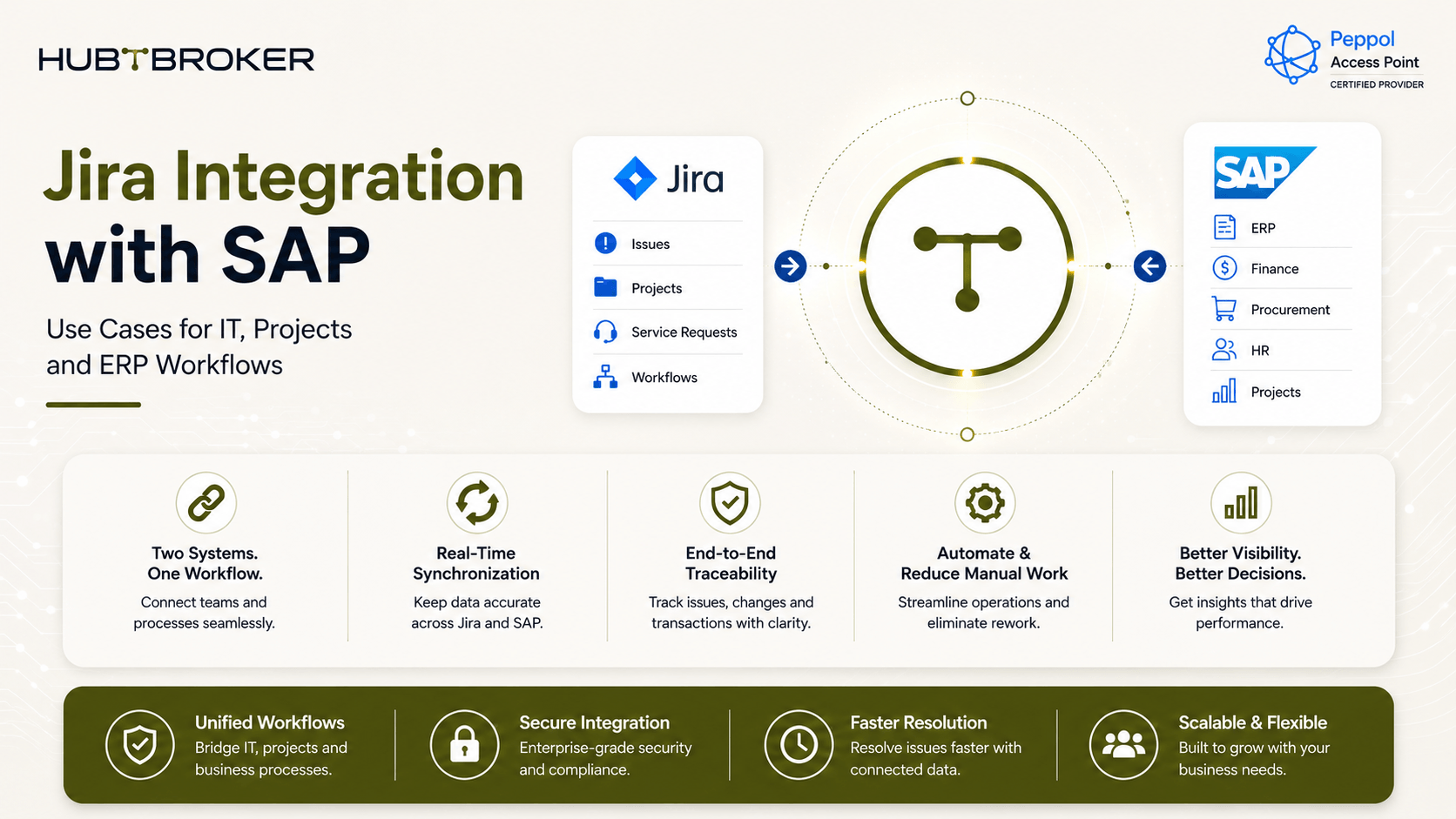
Jira Integration with SAP: Use Cases for IT, Projects and ERP Workflows
Many IT teams use Jira for service requests, change requests, project tasks and incidents. At same time, purchasing, finance, assets and other business records may stay inside SAP. Without integration, one process may need updates in both systems. This means teams may enter same information again, check two systems and manually copy status updates. A good Jira integration with SAP connects selected workflow steps, so Jira can trigger an SAP process and SAP can send the result back to Jira automatically.
Where Does Jira Need to Connect With SAP?
Jira and SAP normally have different jobs. Because of this, the goal should not be to sync every field between both systems. The better question is: which Jira action should start which SAP process, and what information should come back?
A simple example can look like this:
Use Case | Jira Trigger | SAP Process | Data Sent to SAP | Data Returned to Jira | Main Benefit |
|---|---|---|---|---|---|
Procurement request | Request approved | Purchasing | Item, quantity, cost centre | Reference / status | Less manual entry |
IT asset request | Request approved | Asset / purchasing | User, device, location | Order / asset status | Connect IT and ERP |
Project milestone | Status reached | Project / cost process | Project and milestone data | Finance / status data | Better project visibility |
Change request | Change approved | SAP process | Change details | Execution status | Better hand-off |
SAP incident | SAP error/event | Jira issue | Error details | Ticket / status | Faster IT follow-up |
The exact setup depends on which SAP system your company use, Jira setup, available APIs and business approval process. Not every company will need all these use cases.
What Does a Jira Integration with SAP Workflow Look Like?
A normal request flow can look like this:
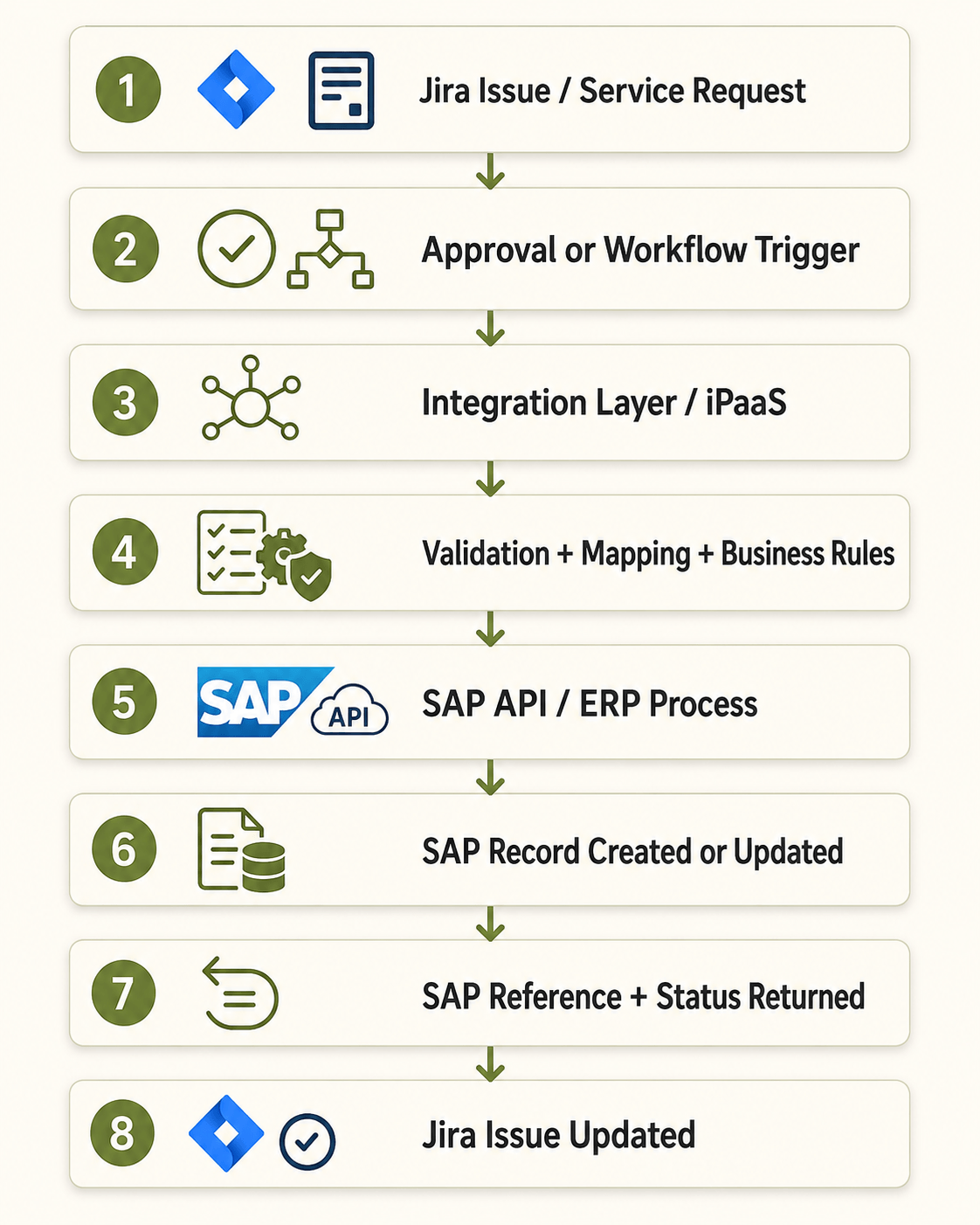
The integration layer works between Jira and SAP. It can help with:
Checking required fields
Mapping Jira data to SAP fields
Applying business rules
Sending data to SAP
Getting the SAP result back
Retry handling
Error logging
Status updates
Monitoring
The goal is not only to send Jira fields into SAP. The important part is making sure the correct SAP process happens and the result is connected back to the same Jira issue.
Three Jira SAP Integration Use Cases Worth Prioritizing
1. IT Service Requests That Trigger SAP Actions
Jira can remain the place where employees submit requests. For example, a user may request:
New laptop
Software purchase
IT equipment
Asset replacement
Purchase approval
After required approval is completed in Jira, the integration can send selected information to SAP. SAP can then create or continue the required purchasing or asset process. The SAP document number or status can come back into Jira. This means requester do not need to check another system or wait for someone to manually update the ticket.
2. Project Work Connected With SAP Finance Data
Jira may be used for tasks, milestones and project delivery, while SAP is used for project cost or finance information. It may not make sense to copy the whole project between both systems. Instead, only important data can be synced. For example:
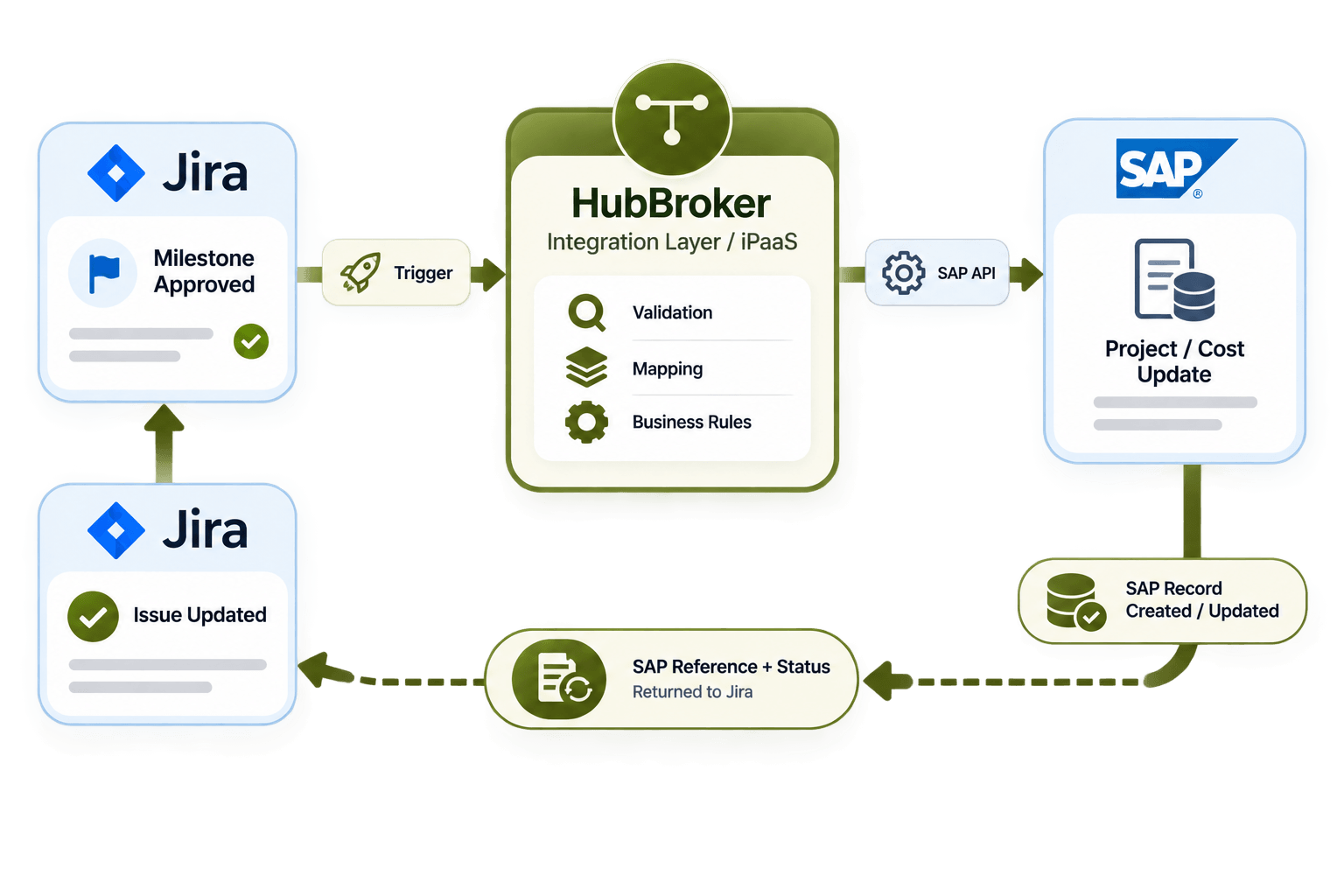
Useful data may include:
Project ID
Milestone
Cost centre
Approved amount
Project status
Financial reference
This keeps the integration smaller and easier to manage.
3. SAP Events That Create Jira Work
Integration should also work from SAP to Jira. A simple flow can be:
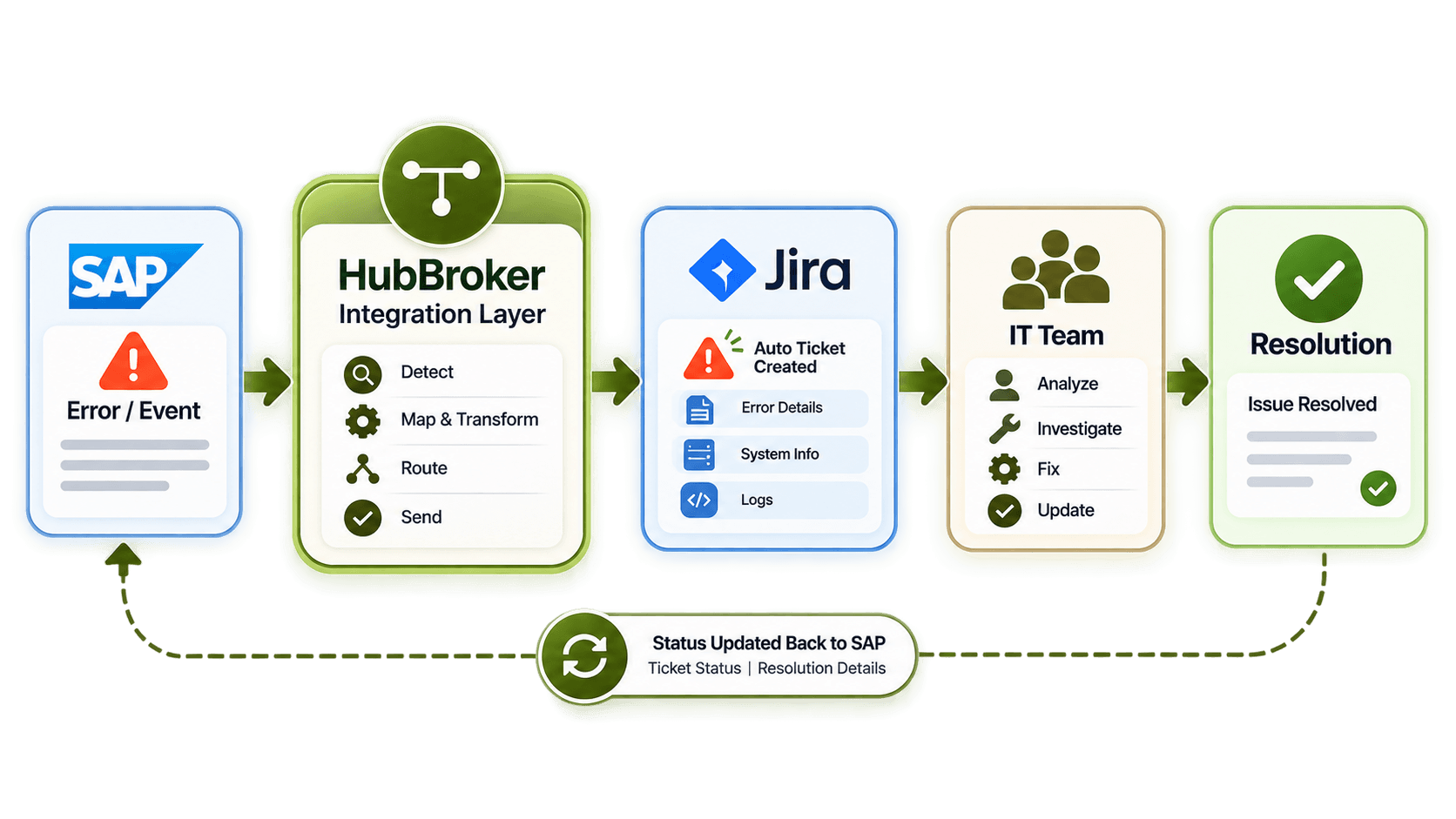
For example, an SAP process may fail or an integration transaction may stop. Instead of someone checking logs manually, the integration can create a Jira ticket with the required error information. The responsible IT team can then work on the problem inside Jira. Once resolved, the result can also be sent back if the process need it.
What Should Stay in Jira and What Should Stay in SAP?
One common mistake is trying to keep every field same in both systems. This can create more problems than it solves. Jira can normally own:
Ticket status
Assignee
Comments
Technical discussion
Sprint information
IT workflow
SAP can normally own:
Purchase orders
Financial postings
ERP transactions
Material data
Asset records
Official SAP document numbers
Some information may be shared, but business should decide which system is the main source. The simple rule is: connect the process, not every field.
Where Do Jira SAP Integrations Usually Fail?
Most problems happen when data from one system does not match what another system expects. Common issues include:
Wrong SAP material number
Missing vendor
Invalid cost centre
Wrong project code
Approval not completed
Duplicate SAP transaction
Missing required Jira field
API failure
Retry problem
Wrong status mapping
Duplicate transactions are one important issue. For example, Jira may send a purchase request to SAP. SAP creates the record, but the response fails because of connection problem. If integration sends same request again without checking, another SAP record can be created. This is why duplicate checking and proper retry handling is needed.
How Should You Design the Integration Layer?
A simple model is: Jira ↔ Integration Layer ↔ SAP
For one small and stable workflow, a direct API connection may work. But when company has several Jira workflows, SAP processes or other business applications, an integration layer can be more useful.
It can keep:
API connections
Mapping
Business rules
Routing
Error handling
Logging
Retry process
Monitoring
This also makes future integrations more easier because same connection logic can often be reused.
What Should European Businesses Consider?
European businesses may have more than one SAP system or legal entity. Different countries may also use different:
Cost centres
Approval rules
SAP company codes
Project structures
User access rules
Business units
Because of this, one Jira-to-SAP workflow may not work same way for every country. Businesses should also only send personal data that is really needed for the process. For example, an IT equipment request may need employee name and location, but it may not need all Jira profile information.
What Should You Look for in a Jira SAP Integration Solution?
A good solution should support the actual business workflow. Check if it can:
Start SAP actions from Jira events
Connect with your SAP environment
Respect Jira approval steps
Map fields correctly
Return SAP document numbers
Return SAP status
Stop duplicate records
Retry failed transactions
Show clear errors
Provide monitoring
Support more workflows later
It is also important to think about future use. Today you may only connect one Jira request with SAP. Later, IT may want to connect project workflows, incidents, assets and other business systems. A setup that is too custom can become hard to change later.
How Can HubBroker Help With Jira Integration With SAP?
HubBroker can work as the integration layer between Jira and SAP. A simple setup can look like:
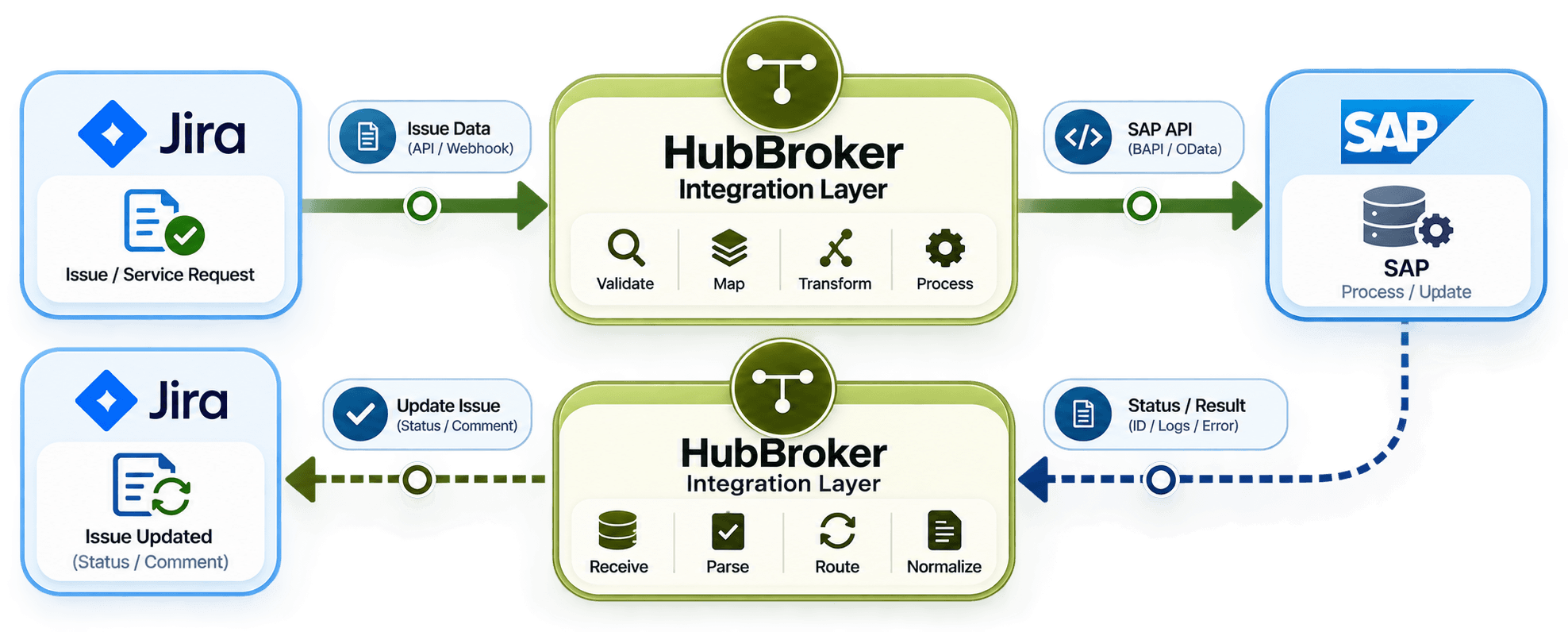
HubBroker can support:
✔ ERP integration
✔ API integration
✔ Data mapping
✔ Transformation
✔ Workflow automation
✔ Error handling
✔ Monitoring
✔ Status updates
This can reduce manual updates between Jira and SAP and make it easier for IT and business teams to follow same process.
Planning Jira integration with SAP?
HubBroker can help review your Jira events, SAP actions, approval flow and return statuses and build an integration around your actual business process.
