
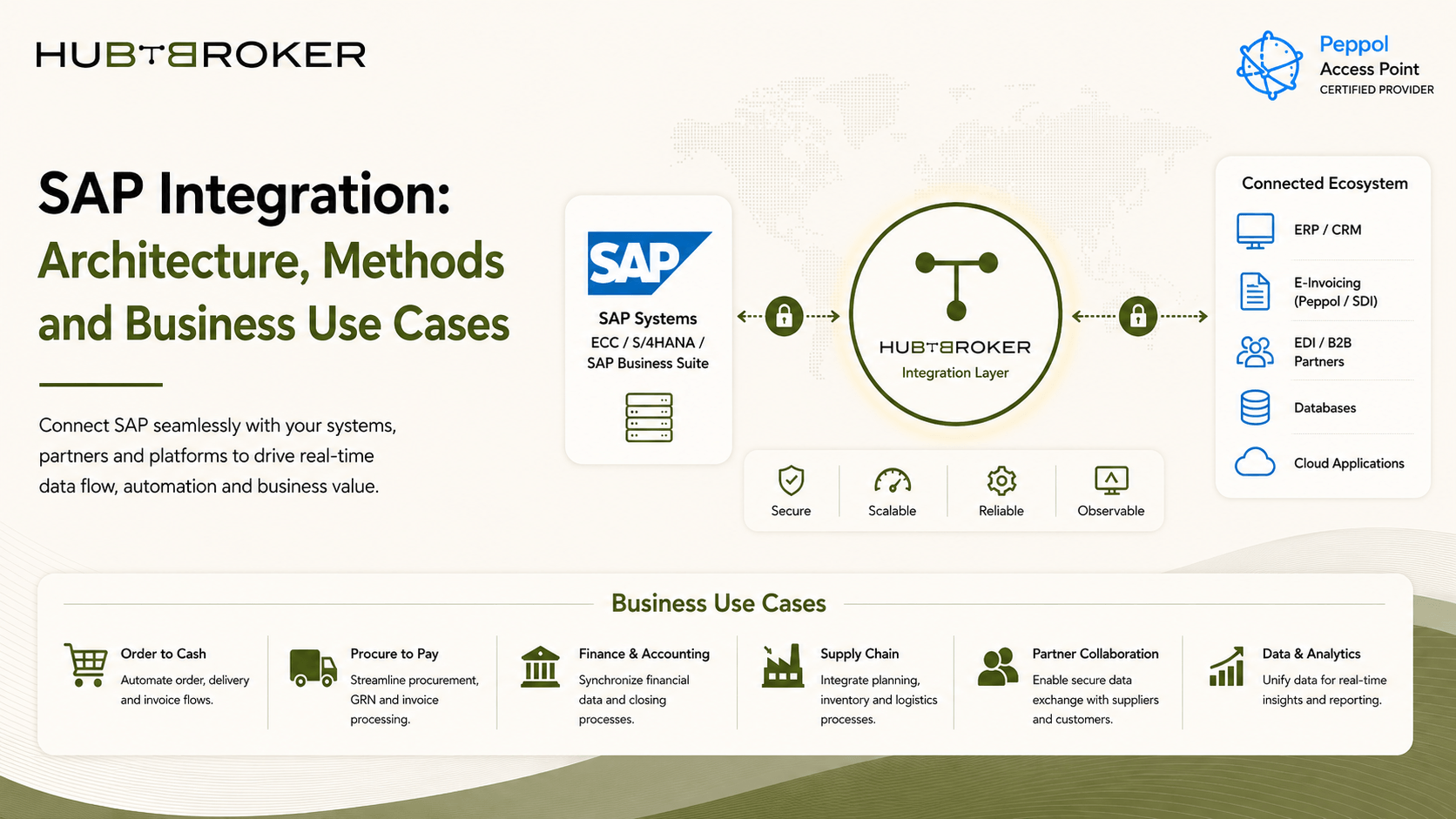
SAP Integration: Architecture, Methods and Business Use Cases
SAP normally does not work alone. Orders can come from e-commerce platforms, suppliers may send EDI documents, logistics companies need shipment details, and finance teams may connect banking, invoicing or reporting systems. SAP integration connects these systems so data can move between SAP and other applications without people entering the same information again and again.
The main question is not only if the systems can connect. It is also about choosing an integration setup that will still be easy to manage when more partners, systems and transactions are added.
What Is SAP Integration?
SAP integration means connecting SAP applications and business data with other SAP or non-SAP systems. It allows information to move between different systems while applying required mapping, validation, security and business rules.
Depending on the company setup, this can include:
SAP S/4HANA
SAP ECC
SAP Business One
Cloud applications
Customer and supplier systems
E-commerce platforms
EDI networks
Finance applications
Logistics systems
The exact integration depends on what data need to move and how often it should be exchanged.
What Does SAP Integration Architecture Look Like?
A simple SAP integration architecture can look like this:
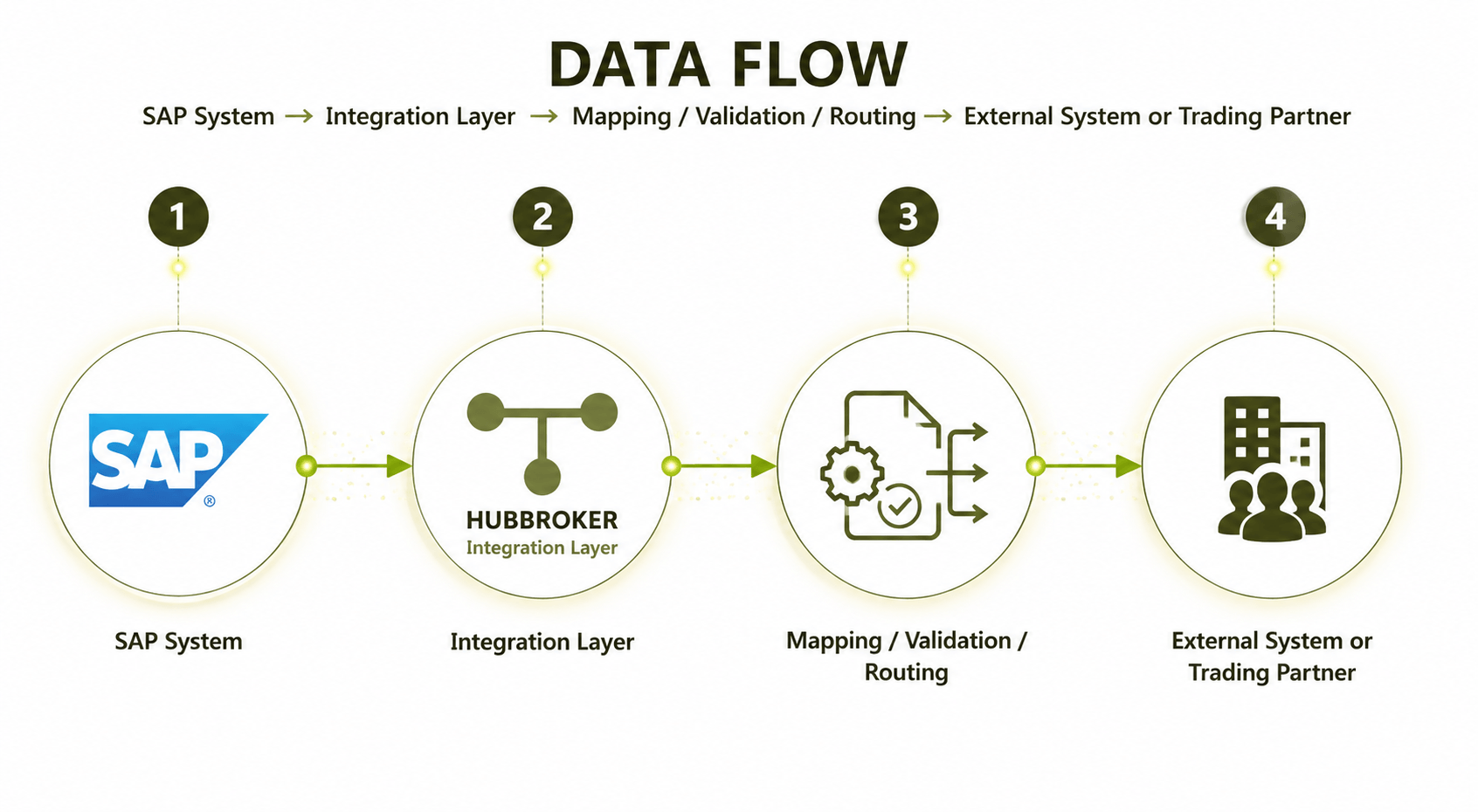
Instead of connecting every system directly with SAP, an integration layer can handle most of the technical work in between.
This layer can manage:
Data mapping
Format conversion
Business rules
Authentication
Routing
Monitoring
Error handling
This becomes important when business have many systems. For example, if SAP is directly connected with 20 different customers and applications, each connection may have its own mapping, security details and error handling. Managing all of them separately can become difficult after some time. A central integration layer makes this more easier to control.
What Are the Main SAP Integration Methods?
There is no one integration method that is best for every SAP process. Different business needs can use different methods.
Method | Best Suited For | Main Consideration |
|---|---|---|
API | Application connectivity and faster data exchange | Security and API availability |
EDI | Structured B2B document exchange | Partner formats and mappings |
Middleware/iPaaS | Connecting several systems and methods | Central management |
File-Based | Scheduled or batch data exchange | Not best for real-time processes |
Custom/Direct | Small or very specific requirements | Maintenance over time |
1] SAP API Integration
SAP API integration is useful when applications need to exchange data directly and quickly.
APIs can be used for things like:
Customer information
Product data
Orders
Inventory
Invoice information
Shipment status
API integration is common when SAP need to communicate with cloud applications or modern business platforms.
2] SAP EDI Integration
SAP EDI integration is normally used for structured business documents exchanged between companies.
This can include:
Purchase orders
Order confirmations
Shipping information
Invoices
Delivery documents
EDI is already used by many companies where large number of business documents are exchanged with customers and suppliers. File-based formats like XML, CSV or JSON can also still work well where data does not need to move instantly.
What Are Common SAP Integration Use Cases?
SAP can be connected with many different business processes. Some common use cases include:
✔ E-Commerce
Orders from an e-commerce platform can move into SAP automatically. The integration can also send product, customer, inventory and fulfilment information between both systems. This helps reduce manual order entry.
✔ EDI and B2B
SAP can exchange documents directly with customers, suppliers, distributors and logistics partners. This helps businesses handle large numbers of documents without manually creating each one.
For example:
Customer PO → EDI → SAP → Order Confirmation → Customer
✔ E-Invoicing
SAP invoice data can be connected with e-invoicing platforms, Peppol networks or country-specific government systems. This is especially important for European businesses because e-invoicing rules are different from one country to another.
✔ CRM
Customer, sales and account information can be shared between SAP and CRM systems. This can help sales and finance team work with the same customer information.
✔ Logistics
SAP can exchange shipping, warehouse, delivery and tracking information with logistics systems. This helps keep order and shipment status more updated.
✔ Finance
Banking, payment, accounting and reporting tools can also connect with SAP. This can reduce the need to download data from one system and upload it again into another.
What Challenges Make SAP Integration Complex?
The difficulty normally starts when data leaves one system and needs to fit inside another system. SAP may store information in one structure, while the customer or application is expecting something different.
Some common challenges are:
➡ Different data formats
➡ Different field names
➡ API authentication
➡ Customer-specific EDI mappings
➡ Missing data
➡ Failed transactions
➡ Duplicate records
➡ Error monitoring
➡ Changes in external systems
➡ Too many direct connections
One of the biggest problems is point-to-point integration. For example, if every application has a separate direct connection with SAP, IT team need to maintain each one separately. Every connection can have different credentials, mappings, retries and error messages. As more systems are added, this setup can become messy very fast.
What Should Businesses Look for in an SAP Integration Solution?
The right SAP integration solution depends on your existing setup. Before choosing one, businesses should check:
✔ Which SAP system they are using
✔ What applications need to connect
✔ API support
✔ EDI requirements
✔ File-based integration needs
✔ Data mapping and conversion
✔ Error handling
✔ Monitoring
✔ Security
✔ Partner connectivity
✔ E-invoicing requirements
✔ Future scalability
Not every company need every integration feature. A small business using SAP Business One may have completely different needs compared with a large company using SAP S/4HANA across different countries. The important thing is that the solution should handle current needs without making future integrations harder.
When Does an SAP Integration Platform Make Sense?
An SAP integration platform becomes useful when the company starts connecting many applications, customers, suppliers or document formats. Instead of building each integration separately, the platform acts like one common layer between SAP and other systems.
It can manage:
Mapping
Routing
API connections
EDI documents
File conversion
Monitoring
Error handling
Workflow automation
This can make it easier for IT team because they have one place to check integrations instead of checking many different connections. HubBroker provides iPaaS, EDI, API integration, e-invoicing and ERP integration capabilities, including SAP Business One connectivity. This type of setup can help businesses keep integration logic outside individual systems and make future connections more simple.
Choosing the Right SAP Integration Approach
The right SAP integration setup depends on your SAP system, connected applications, transaction volume, partner requirements and how much integration work your internal team want to manage. Start by checking which business processes are currently exchanging data manually.
Then look at:
Where the data comes from
Where it needs to go
How fast it need to move
What format is required
Who should monitor errors
How future integrations will be added
A good integration setup should not only work today. It should also be easy enough to manage when more systems and partners are added later.
Looking at SAP integration options?
HubBroker can help connect SAP with EDI, API, e-invoicing and other business systems through a more manageable integration setup.
