

Platform Type
Marketplace and vendor programme

Marketplace and vendor programme
Selling PartnerAPI (SP-API) or supported EDI
Orders, cancellations, refunds, stock
FBA and FBM; consumer and Amazon Business
EU, UK, US and other regions
ERP, warehouse and accounting
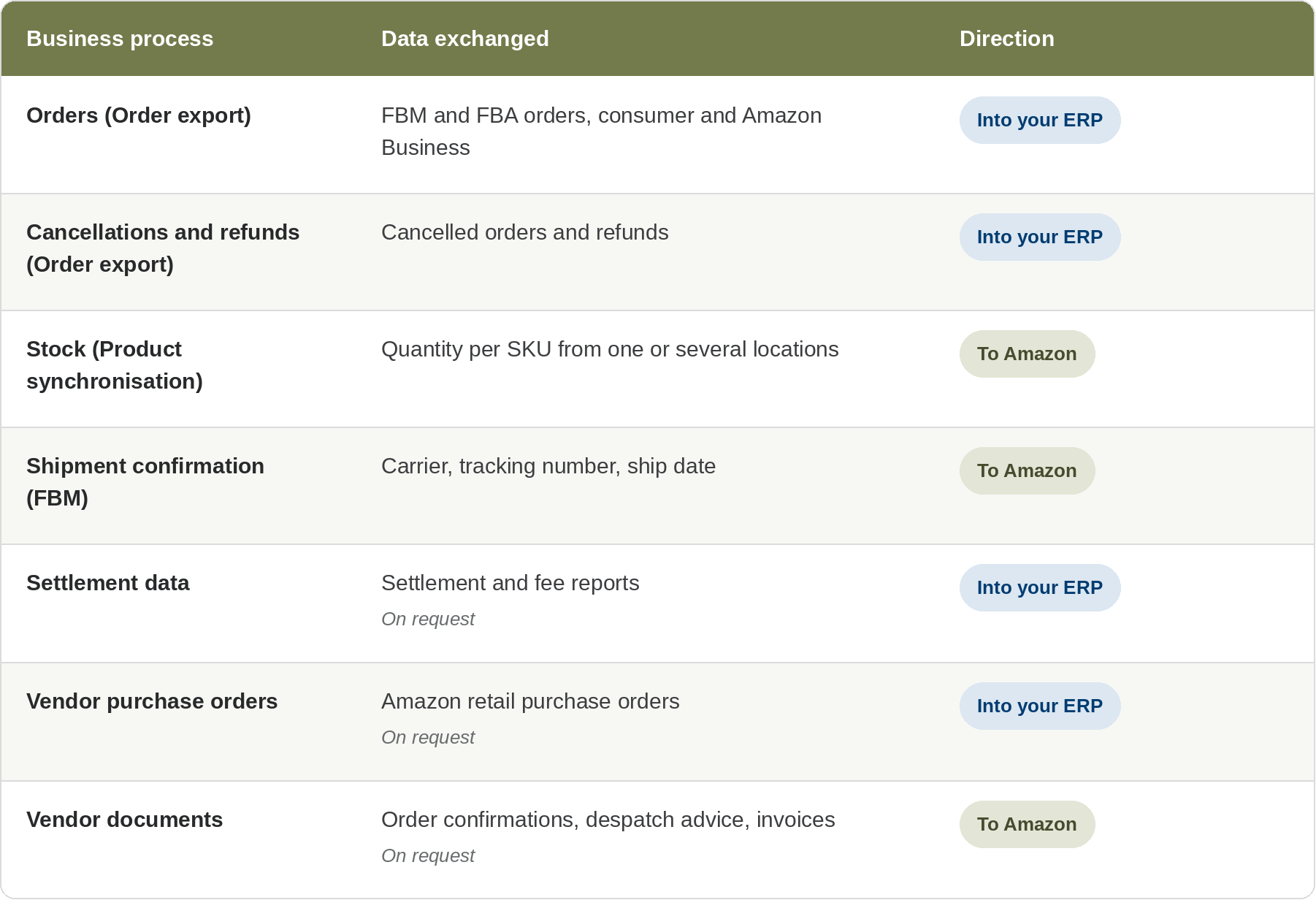
Amazon covers two different trading relationships. As a seller in Seller Central, you list products on the Amazon marketplace and sell to consumers orAmazon Business buyers, fulfilling orders yourself (FBM) or through Fulfillment byAmazon (FBA). As a vendor in Vendor Central, an invitation-only programme, you sell wholesale to Amazon, which then resells your products.
Sellers integrate through SP-API. Vendors exchange purchase orders, order confirmations, despatch advice and invoices by EDI or through Amazon's vendorAPIs. HubBroker's ready-made Amazon adaptors are built for sellers: Order export brings orders into your ERP, and Product synchronisation keeps yourAmazon stock up to date.
Two HubBroker adaptors run side by side: Order export moves orders from Amazon to your ERP, and Product synchronisation moves stock from your ERP to Amazon.
A buyer places an order on any connected Amazon marketplace.
Order export retrieves the order through SP-API, in real time or on a schedule.
Your customised rules map customer, VAT and shipping details to your ERP.
The order is imported into your ERP, and a positive or negative e-mail notification confirms the run.
Product synchronisation reads stock from your ERP or warehouse system and updates yourAmazon listings.
Brands and distributors selling on several Amazon marketplaces.
B2B suppliers serving Amazon Business buyers who need VAT and company details in the ERP.
Sellers mixing FBA and FBM who want both order types recorded in one system.
Manufacturers that are both Amazon vendors and sellers.
Order export imports Amazon orders into your ERP through a connector orAPI and supports multiple ERPs. Typical connections include Microsoft Dynamics 365 Business Central, Microsoft Dynamics 365 Finance & Operations, e-conomic and Uniconta. Product synchronisation can read stock from your ERP, a warehouse system such as Rackbeat, or other platforms.
No more copying orders: Orders from every connected marketplace reach your ERP in one validated structure.
Fewer oversold listings: Stock from your ERP or warehouse updates Amazon, reducing cancellations that affect seller metrics.
B2B and B2C in one flow: Amazon Business and consumer orders use the same adaptor, with rules where VAT or customer data differ.
Set up without code: Guided configuration lets your team set up the adaptors themselves.
Clear status on every run: E-mail notifications show which orders imported and which need attention.
Seller access: An Amazon seller account with HubBroker authorised for SP-API access through Amazon's authorisation flow. HubBroker never needs your Seller Central password.
Vendor access: Vendor EDI (X12 or EDIFACT) orAmazon's vendorAPIs, set up through Amazon's own vendor onboarding and testing.
ERP access: Your ERP's connector orAPI.
Data mapping: Seller SKUs matched to ERP items; customer, VAT and shipping rules agreed during setup.
Scope: Marketplaces, fulfilment models (FBA, FBM) and run schedule (real time or scheduled).
HubBroker runs two Amazon adaptors on HubBroker iPaaS. Order export brings Amazon orders, cancellations and refunds into your ERP with customised mapping rules. Product synchronisation reads stock from your ERP, warehouse system or other platforms and updates yourAmazon listings.
Both adaptors support multiple marketplaces, real-time or scheduled runs, and e-mail notifications. For vendors, Amazon purchase orders, confirmations, despatch advice and invoices can be exchanged through HubBroker's EDI platform on request.

Sellers own the listing and the customer order and connect through SP-API. Vendors sell to Amazon wholesale and exchange purchase orders, confirmations, despatch advice and invoices by EDI or vendorAPI. HubBroker's ready-made adaptors cover sellers; vendor flows are scoped per account.
Yes. Order export handles both. FBA orders come into the ERP for sales and finance records, while FBM orders also go to your warehouse for fulfilment
Yes. Orders are imported into Business Central through a connector orAPI, and Business Central stock updates yourAmazon listings through Product synchronisation.
HubBroker connects Amazon accounts across multiple marketplaces, including EU, UK, US and other regions. Marketplaces are selected per account during setup
You authorise HubBroker for SP-API access from yourAmazon seller account. You can revoke that authorisation in Seller Central at any time.
Yes. Product synchronisation reads stock from one or several warehouse locations before updating Amazon
Not for sellers, who integrate through SP-API. Amazon vendors can use EDI orAmazon's vendorAPIs, depending on their setup with Amazon.
45B 1260 Bredgade , København K Capital Region, Denmark
D-1010, The First, B/H ITC Narmada, Ahmedabad, Gujarat, 380015, India


