
Uniconta API Integration: Automating Invoice and Order Flows
Every order typed in by hand from a webshop export is a chance for a wrong item number. The same goes for every supplier PDF copied line by line into a journal. Small errors like these add up. Bookkeeping falls behind, approvals slow down, and month-end close takes longer.
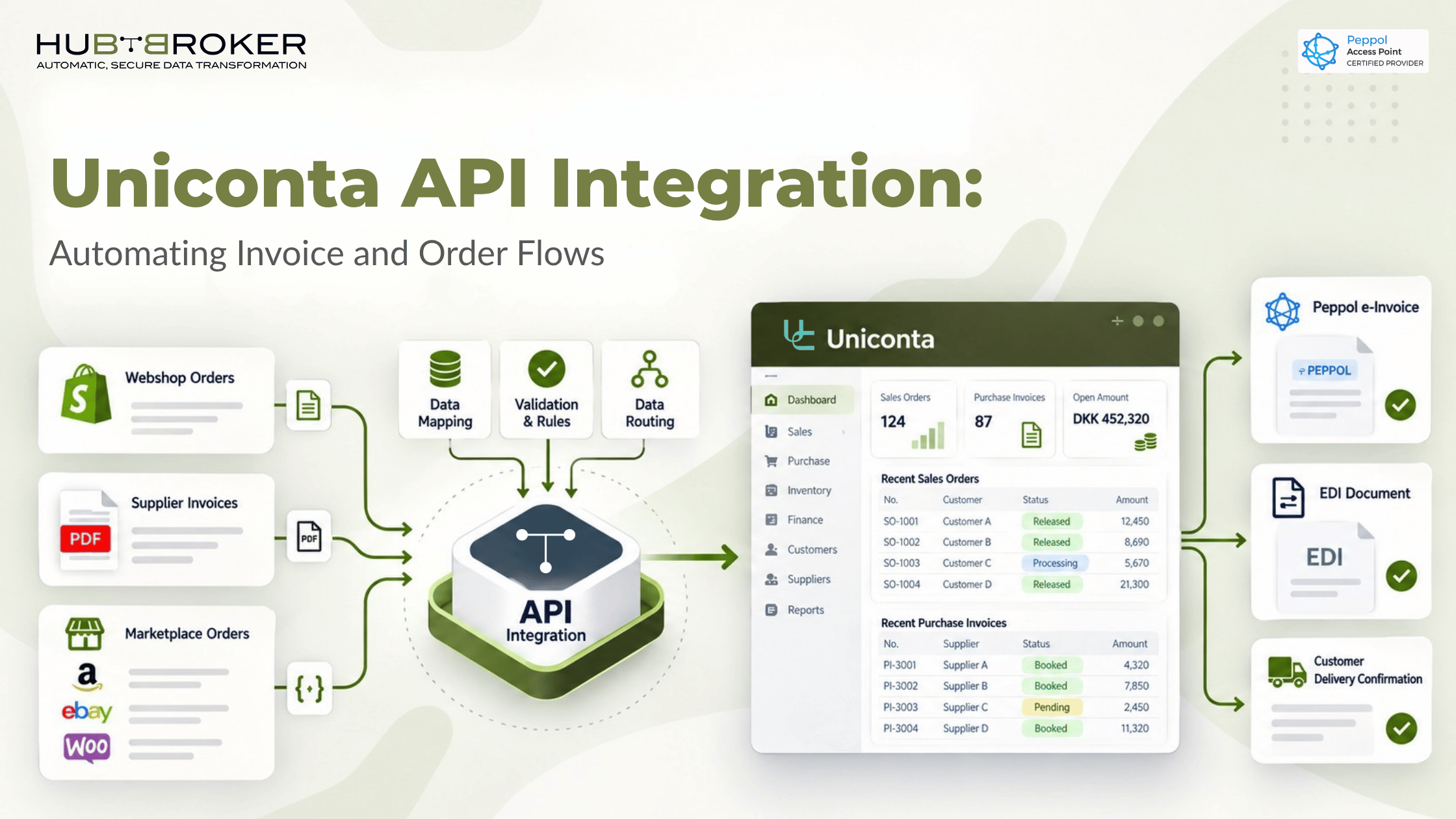
Uniconta API integration fixes this at the source. It connects Uniconta directly to the systems that create your orders and invoices. Your team keeps working in the ERP it already knows, and the data arrives on its own.
What Uniconta API Integration Actually Means
Uniconta API integration means that external systems read data from Uniconta and write data back to it automatically. Those systems include webshops, marketplaces, trading partners and e-invoicing networks. Nobody has to export and import files by hand.

How Uniconta exposes data to external systems
Uniconta offers two routes. According to Uniconta, its API is the only way to interact with the ERP server, with no other type of connection or interface, and using it requires your own Uniconta app identifier.
There is also a lighter option. Uniconta describes a REST-like OData API suited to extracting master data and transactions, connecting reporting tools such as Excel and Power BI, and integrating with non-Windows systems. For full functionality, Uniconta points developers to its .NET API.
Point-to-point scripts vs. an integration platform
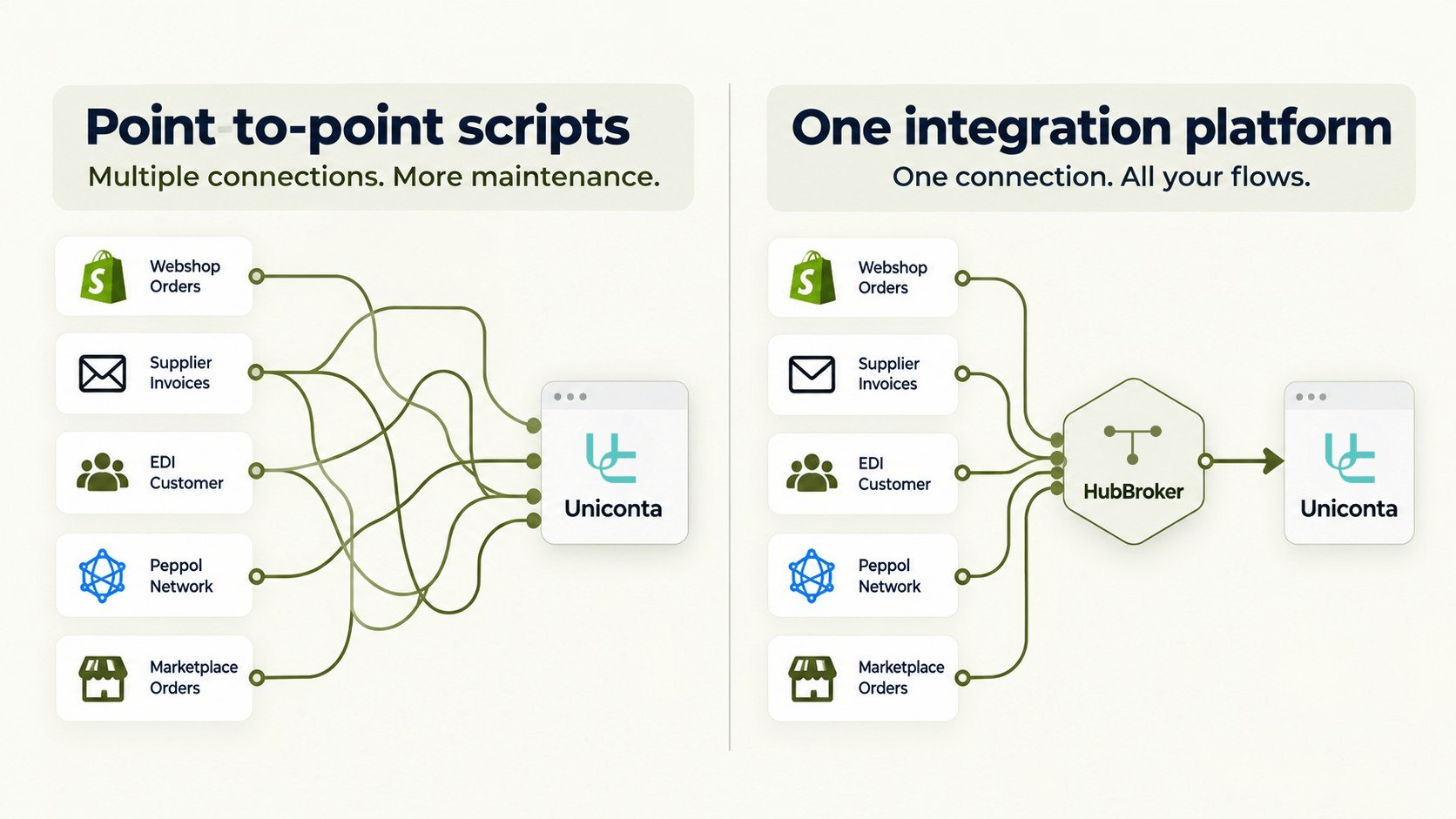
Many companies start with a custom script for each connection: one for the webshop, another for a key customer’s EDI. This works until a partner changes its format or a new channel goes live. Then every script needs its own fix.
An integration platform such as HubBroker’s Uniconta integration connects Uniconta once. It handles mapping, validation and routing for every partner from one place. The same approach applies to other systems through ERP API integration.
Where Manual Invoice and Order Handling Breaks Down
Order flows from webshops and marketplaces
Orders arrive by email, as CSV exports or through marketplace portals. Each one has to be matched to the right debtor account, item number and delivery address before it becomes a Uniconta sales order.
Supplier invoices arriving as PDF, email and EDI
Accounts payable teams receive invoices in every format their suppliers prefer. Structured EDI is easy to process. A scanned PDF has to be read, interpreted and keyed in.
Reconciliation and status gaps
When documents move by hand, nobody can see what was sent, received or rejected. Errors surface weeks later as payment disputes.
Automating Outbound Flows: From Orders to Invoices
Syncing sales orders from Shopify, BigCommerce and other channels
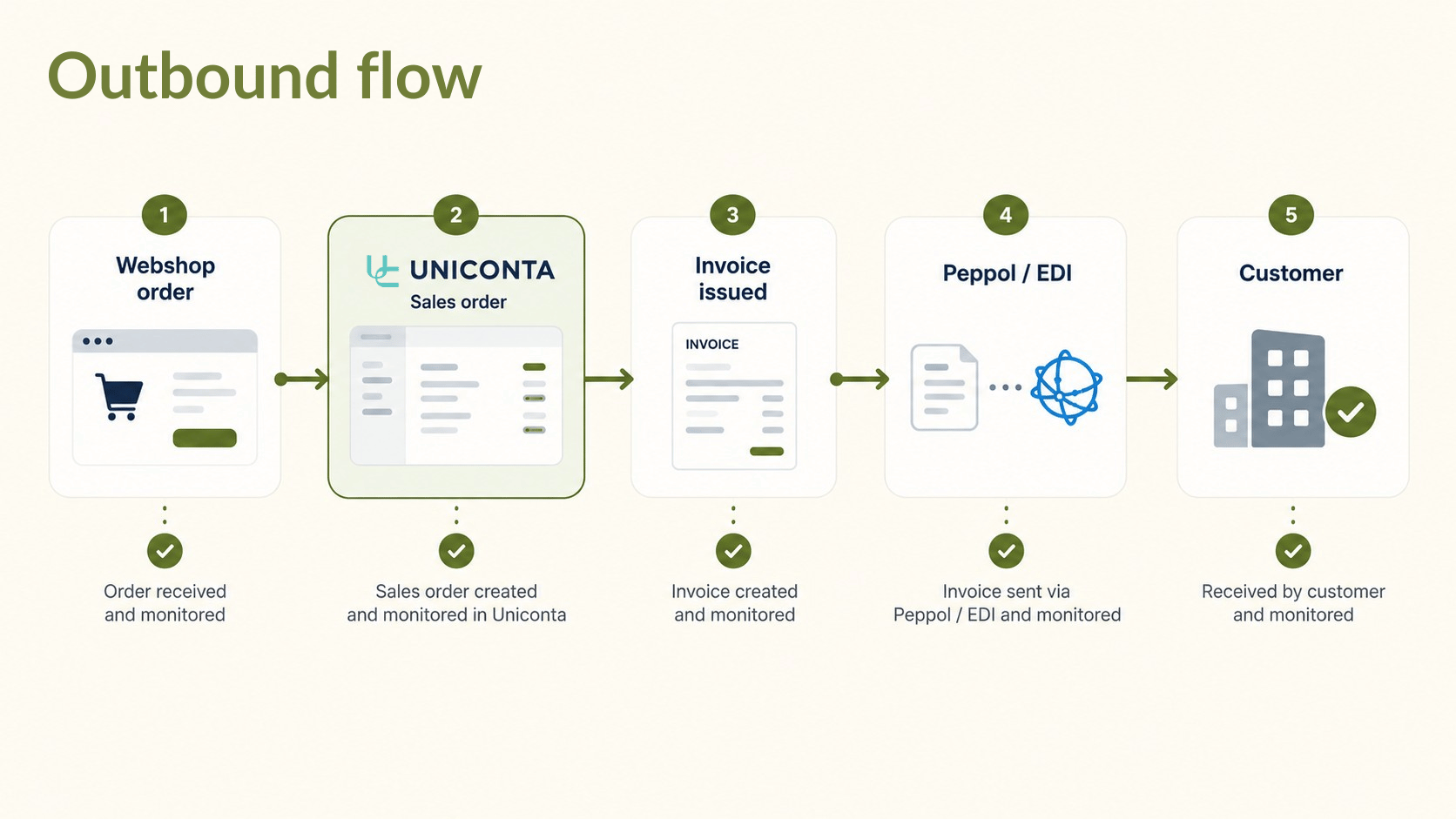
With integration in place, orders from your webshop become Uniconta sales orders with the correct customer, items, quantities and prices. Confirmations and stock updates flow back to the channel. See how this works for Shopify integration.
Sending invoices via Peppol and EDI
Once an invoice is issued in Uniconta, the platform converts it into the format each customer needs, such as an EDI message or a Peppol e-invoice, and delivers it. Peppol e-invoicing gives you one connection that reaches every registered receiver on the network.
Automating Inbound Flows: Supplier Invoices into Uniconta
Receiving Peppol e-invoices
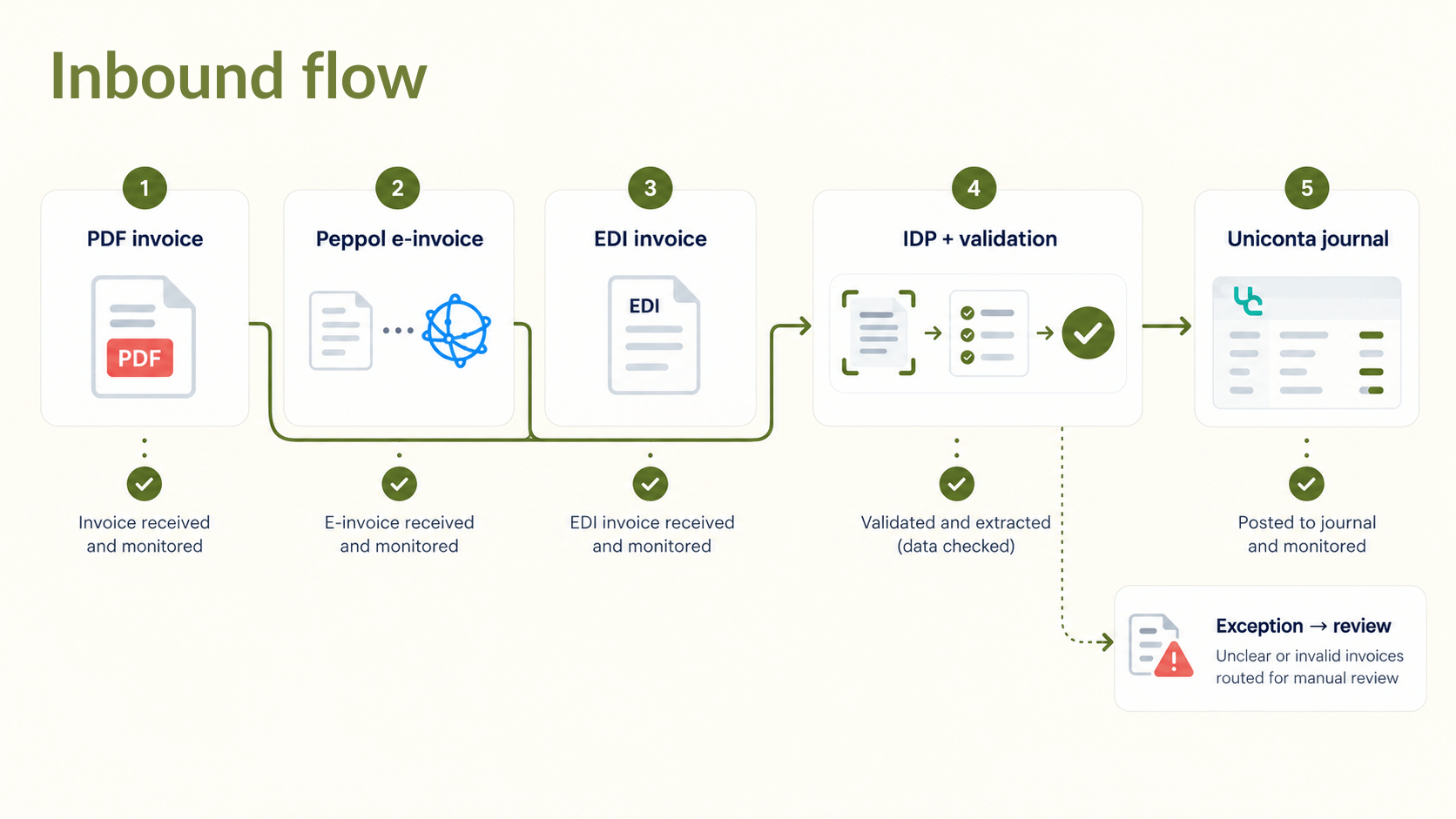
Structured e-invoices arrive as machine-readable data. They are validated and mapped to the right creditor and purchase order before they reach Uniconta.
Turning PDFs into structured data with IDP
Not every supplier sends structured invoices. Intelligent Document Processing reads PDF and scanned invoices and extracts the header and line data. The result is a structured file ready for import. Learn more about AI document processing.
Validation and approval before posting
Automation should not mean blind posting. Invoices can be checked against purchase orders and VAT rules first, and exceptions are flagged so your team reviews only what needs attention.
Why E-Invoicing Mandates Make This Urgent
Danish and EU requirements to watch
Structured e-invoicing is becoming a legal requirement across Europe, both in B2G and increasingly in B2B. Companies that trade across borders face different formats and deadlines in each market. If your Uniconta setup can already send and receive structured invoices, each new mandate becomes a configuration task rather than a new project.
What to Look for in a Uniconta Integration Partner
Look for four things:
Flexible mapping, so partner-specific formats don’t require custom development.
Monitoring and error handling, so failed documents are visible before they cause problems.
GDPR-compliant data processing, with clear documentation of how transaction data is handled.
Room to scale, so new channels, partners and document types can be added without rebuilding.
FAQ
Does Uniconta have an open API?
Yes. Uniconta provides a full .NET API and a REST-like OData API. The OData API is mainly suited to data extraction and reporting.
Do I need to change my Uniconta setup to integrate?
Usually not. An integration layer works with your existing customers, suppliers and items. Master data mapping is part of the setup.
Can Uniconta send and receive Peppol invoices through an integration?
Yes. An integration platform connected to a Peppol Access Point can convert outbound Uniconta invoices and deliver inbound e-invoices into Uniconta.
How long does a typical integration project take?
It depends on the number of flows, partners and formats involved. A requirements review gives you a realistic timeline.
Is data handled GDPR-compliantly?
It should be. Ask any provider how it acts as data processor and where transaction data is stored.
Ready to Map Your Order-to-Invoice Flow?
If your team still spends hours moving orders and invoices in and out of Uniconta, start with a simple map of where documents come from and where they go. The HubBroker team can help you identify which flows to automate first. Book a demo to see how it works with your setup.
