
E-Invoicing Testing Checklist What to Validate Before Going Live
Your ERP generates an electronic invoice, the XML passes validation, and the integration appears ready.
But what happens when a customer rejects the invoice because of an incorrect VAT code or missing buyer identifier?
These problems often emerge only after production begins. A practical e-invoicing testing checklist helps businesses identify compliance gaps, integration errors, and delivery failures before sending real invoices. Whether your company uses Peppol, a government clearance platform, or direct EDI integration, testing must cover the complete invoice journey.
Why Is E-Invoicing Testing Important Before Go-Live?
An invoice can pass XML schema validation and still fail business rules or recipient requirements. Incorrect tax calculations, unsupported document formats, and incomplete customer information can interrupt invoice processing. Different countries also follow different electronic invoicing models. Businesses operating internationally must test applicable local requirements alongside standard technical checks. Effective e-invoicing testing verifies more than document generation. It confirms that invoices can be validated, transmitted, received, and processed correctly.
What Should Your E-Invoicing Testing Checklist Include?
Before switching to production, finance and IT teams should validate these seven critical areas.
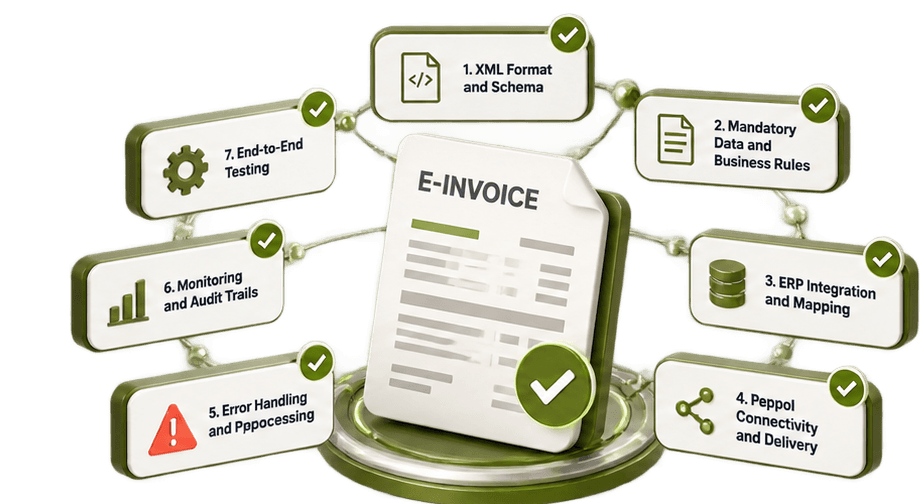
1. Validate Invoice XML Format and Schema
Start by checking whether generated invoices comply with the required technical specification. Common formats include Peppol BIS Billing 3.0, UBL, XRechnung, Factur-X, and country-specific XML formats.
Verify:
Correct XML structure and schema version.
Mandatory elements and valid field values.
Document type and specification identifiers.
Date formats, currency codes, and invoice references.
A technically invalid invoice may be rejected before reaching the recipient's accounting system.
2. Test Mandatory Invoice Data and Business Rules
Schema validation alone cannot confirm that invoice information is accurate. Check supplier and buyer identifiers, tax registration numbers, payment details, invoice totals, and line-item calculations. Test different business scenarios, including credit notes, discounts, multiple VAT rates, zero-rated transactions, and foreign currencies. For example, an invoice might contain all mandatory XML elements but still fail because the calculated VAT amount does not match its taxable base.
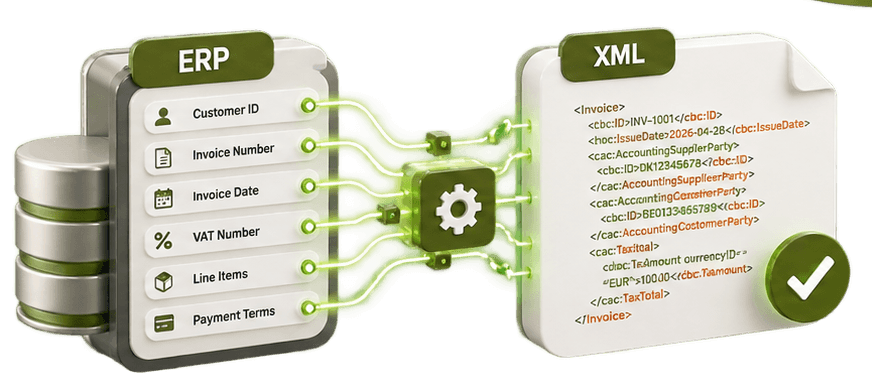
3. Verify ERP Integration and Data Mapping
Your ERP must transfer invoice information accurately into the required electronic format. Test the complete mapping process between systems such as SAP, Microsoft Dynamics 365, Odoo, or other accounting platforms and your e-invoicing solution. Confirm that customer identifiers, product details, payment terms, tax categories, and invoice references remain consistent after transformation. Also verify whether successful incoming invoices can be imported into the receiving ERP without manual corrections.
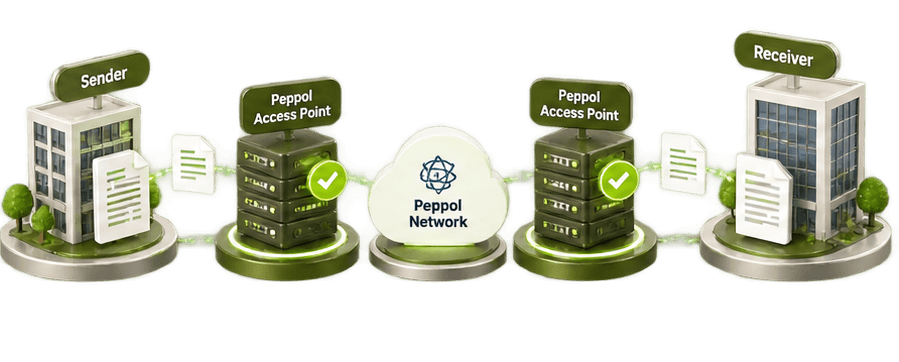
4. Test Peppol Connectivity and Invoice Delivery
For businesses exchanging documents through Peppol, connectivity testing is essential. Confirm that the recipient is registered with the correct participant identifier and supports the required document type.
Test successful transmission, invalid recipient identifiers, unavailable endpoints, and rejected documents. Where government clearance systems apply, verify submission responses, approval statuses, and country-specific reporting requirements. Successful transmission does not always confirm business acceptance. Your system must distinguish network delivery from recipient processing.
5. Check Error Handling and Failed Invoice Reprocessing
What happens when an invoice fails after submission?
Your testing process should confirm that errors are recorded, understandable, and available for correction. Test missing fields, incorrect tax calculations, failed transformations, and delivery errors. Verify that authorized users can correct the problem, validate the document again, and resubmit it without creating unintended duplicate transactions. A reliable exception-handling process reduces manual investigation and operational delays.
6. Validate Invoice Monitoring and Audit Trails
Businesses need visibility into every stage of electronic invoice processing. Check whether your solution records document creation, transformation, validation, transmission, delivery responses, and failures. Confirm that support teams can identify failed transactions and retrieve the original and transformed documents. Test electronic invoice archiving against applicable country-specific retention and accessibility requirements.
7. Perform End-to-End Testing Before Production
Finally, simulate realistic invoice exchanges from the source ERP to the destination system. Include outgoing invoices, incoming invoices, credit notes, and exception scenarios. Validate the actual processing outcome rather than relying only on successful API responses or XML validation results. Both finance and IT teams should approve the results before production activation.
E-Invoicing Go-Live Testing Checklist
Use this table to verify implementation readiness.
Testing area | Expected result |
|---|---|
XML schema | Valid structure and format |
Mandatory fields | Complete and accurate data |
Tax calculations | Correct totals and VAT |
ERP integration | Accurate data transformation |
Peppol connectivity | Successful supported delivery |
Error handling | Failed documents can be corrected |
Transaction monitoring | Status and errors remain traceable |
End-to-end testing | Successful business processing |
Any unresolved critical validation or delivery failure should block go-live until corrected and retested.
How Can HubBroker Support Your E-Invoicing Testing?
Managing different formats, ERP systems, and country-specific requirements can make implementation complicated.
HubBroker provides e-invoicing and EDI integration solutions that help businesses connect ERP systems, transform documents, validate data, and exchange electronic invoices through supported networks. As a certified Peppol Access Point, HubBroker supports structured electronic document exchange and integration workflows across business systems. Whether you are implementing e-invoicing for the first time or expanding internationally, comprehensive testing helps reduce invoice rejections and processing disruptions.
Ready to validate your e-invoicing integration before go-live?
Contact HubBroker to discuss your ERP connectivity, document validation, and global e-invoicing requirements.
