
How EDI Integration Helps ERP Systems Work Faster, Cleaner, and Smarter
Your ERP system may be powerful, but here is the real question:
How much business data still reaches it through manual work?
If your team is copying purchase orders from emails, downloading invoices from portals, checking spreadsheets, or retyping delivery details into your ERP, then your business is not fully automated. It only looks automated from the inside.
That is where EDI Integration and ERP Integration work together.
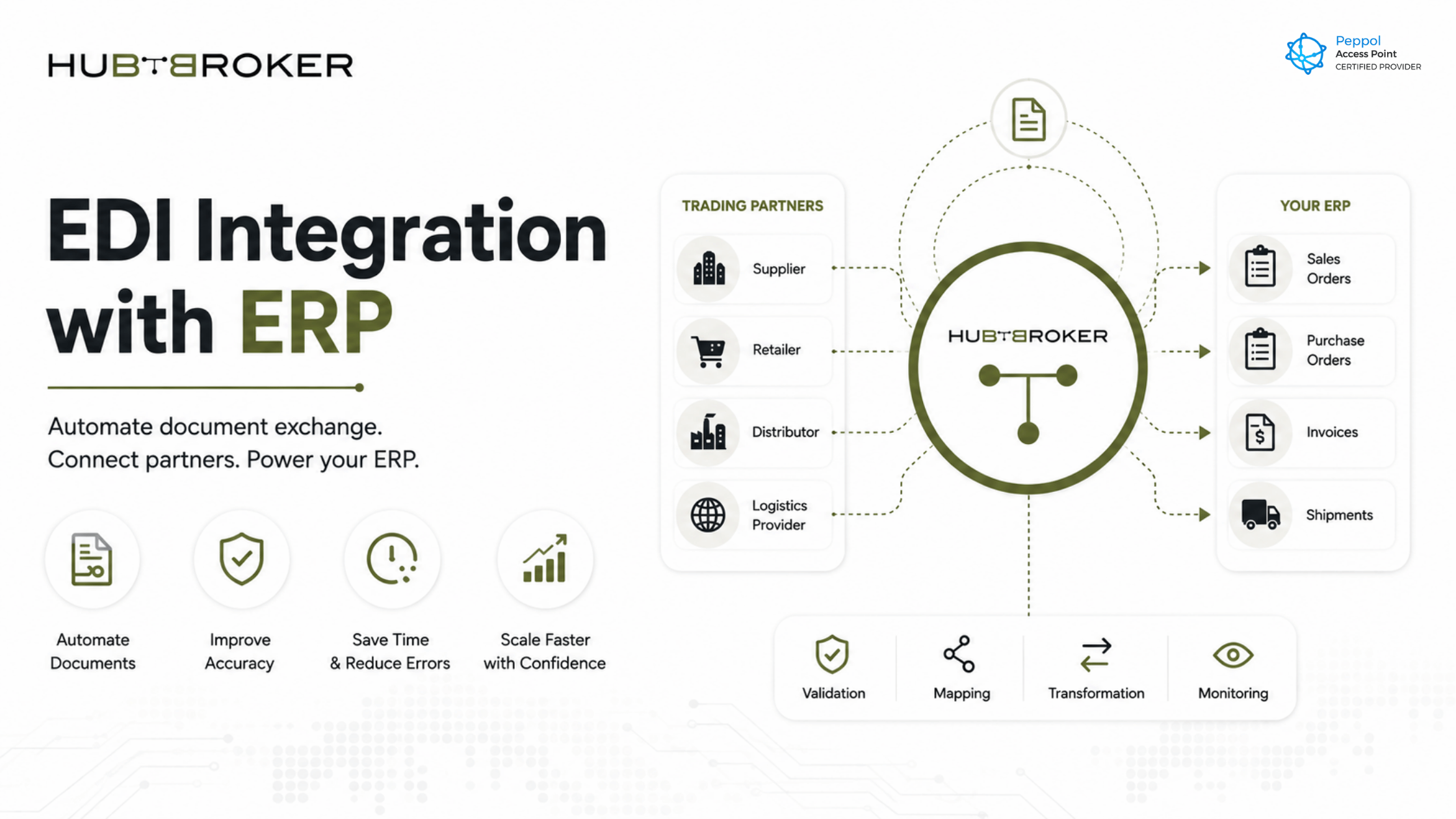
EDI connects your business with customers, suppliers, logistics providers, marketplaces, and trading partners. ERP manages your internal business processes. When both are integrated, documents such as orders, invoices, shipping notices, and inventory updates can move automatically between external partners and your ERP system.
The result is simple: less manual work, fewer errors, faster processing, and cleaner business data.
What Is EDI Integration with ERP?
EDI integration with ERP means connecting Electronic Data Interchange flows directly with your ERP system so business documents can be exchanged automatically.
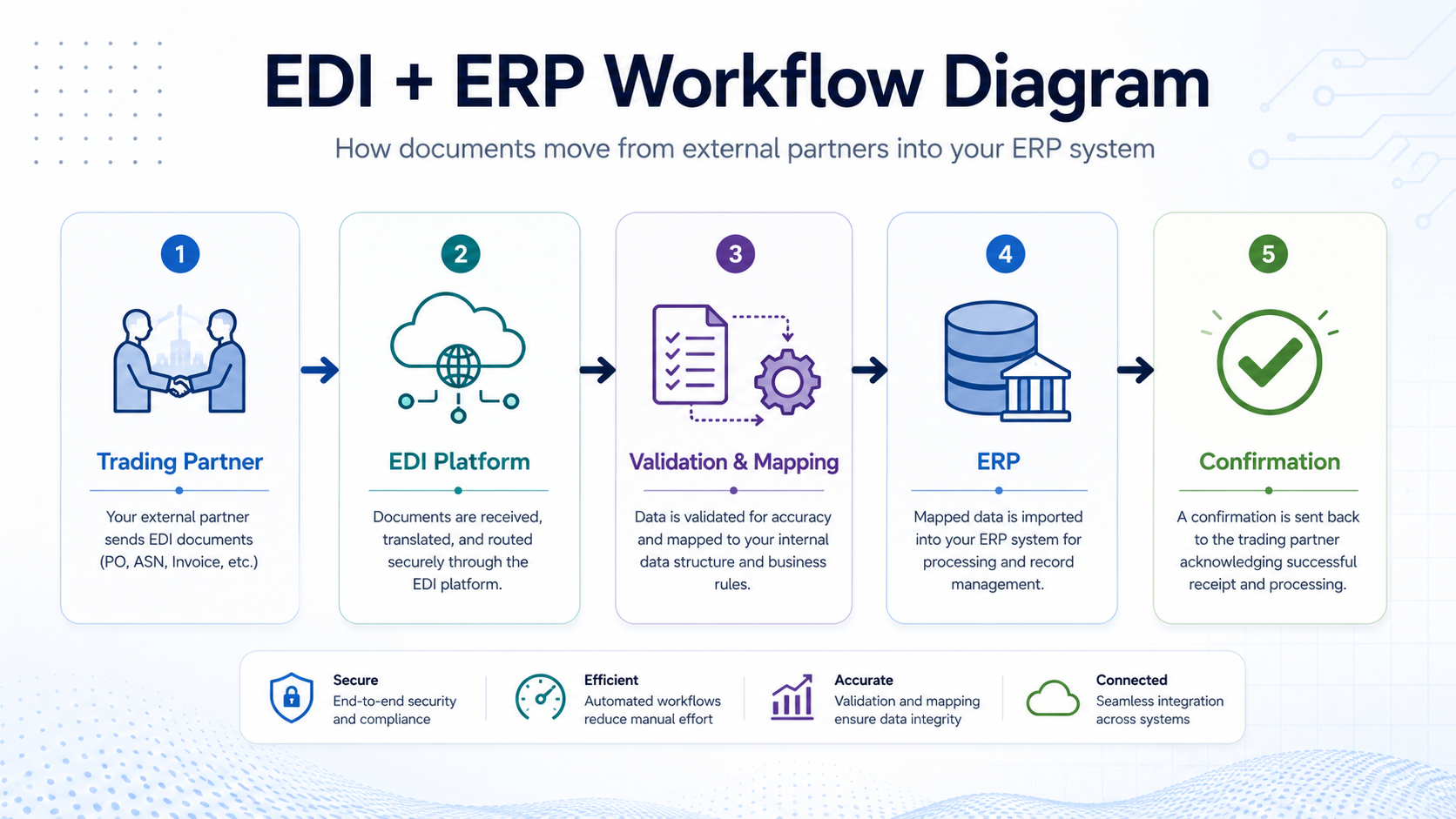
Instead of receiving a purchase order by email and manually entering it into your ERP, the EDI document is received, validated, converted, and sent directly into the right ERP module.
Common documents exchanged through EDI include:
Purchase orders
Sales orders
Invoices
Order confirmations
Shipping notices
Delivery notes
Inventory updates
Credit notes
In simple terms, EDI handles the structured document exchange, while ERP processes the business data.
Why ERP Systems Alone Are Not Enough
ERP systems are excellent for managing internal operations such as finance, inventory, procurement, sales, and production. But most ERP systems are not designed to manage every external document requirement from every trading partner.
Each customer or supplier may have different formats, standards, validation rules, and communication methods.
That creates a gap.
Your ERP may manage the order after it enters the system, but how does the order get there? How does the invoice leave? How do shipping updates reach the customer? How do supplier documents get checked before finance sees them?
Without EDI integration, teams often fill this gap manually.
That leads to:
Slow order processing
Invoice delays
Data entry mistakes
Duplicate work
Poor visibility
Higher operational cost
More pressure on finance and IT teams
ERP manages your business.
EDI connects your business to the outside world.
Why CFOs, IT Managers, and Finance Directors Care About EDI ERP Integration
EDI and ERP integration is not just an IT project. It directly affects cost, control, speed, and business visibility.
For CFOs and Finance Directors
Finance teams need clean data, timely invoices, and reliable reporting. Manual document handling makes that difficult.
With EDI ERP integration, finance teams can reduce invoice errors, improve cash flow visibility, and spend less time chasing missing or incorrect information.
Instead of manually checking every document, teams can focus on exceptions that actually need attention.
For IT Managers
IT teams are often asked to connect multiple customers, suppliers, ERP systems, and business applications. Without a proper integration approach, this can turn into a collection of one-off fixes.
EDI integration gives IT teams a more controlled way to manage trading partner connectivity, document mapping, validation, and ERP data flow.
It reduces dependency on manual uploads, email-based processes, and fragile custom connections.
For Operations and Supply Chain Teams
Operations teams need speed and accuracy. A delayed order or incorrect shipment notice can affect delivery timelines, warehouse planning, and customer satisfaction.
EDI integration helps documents move faster between systems, making it easier to process orders, confirm deliveries, and keep partners updated.
Simplify EDI Integration with Your ERP System
Automate data exchange between your ERP and trading partners to improve accuracy, reduce manual work, and speed up business processes with HubBroker’s EDI integration solutions.
Contact Us to Know More
Common Signs Your Business Needs EDI ERP Integration
You may already need EDI integration with ERP if any of these situations sound familiar:
Your team manually enters customer orders into ERP.
Supplier invoices are checked and typed in by hand.
Customers are asking your business to support EDI.
Your order volume is increasing, but admin work is increasing too.
Different partners require different document formats.
ERP data is often delayed, incomplete, or inconsistent.
Your team depends heavily on email, Excel, or partner portals.
Finance spends too much time fixing invoice mismatches.
These are not just process problems. They are scaling problems.
As your business grows, manual document handling becomes more expensive, slower, and harder to control.
How EDI Integration Improves Order and Invoice Automation
Two important areas where EDI ERP integration creates immediate value are order-to-cash and procure-to-pay.
Order-to-Cash Automation
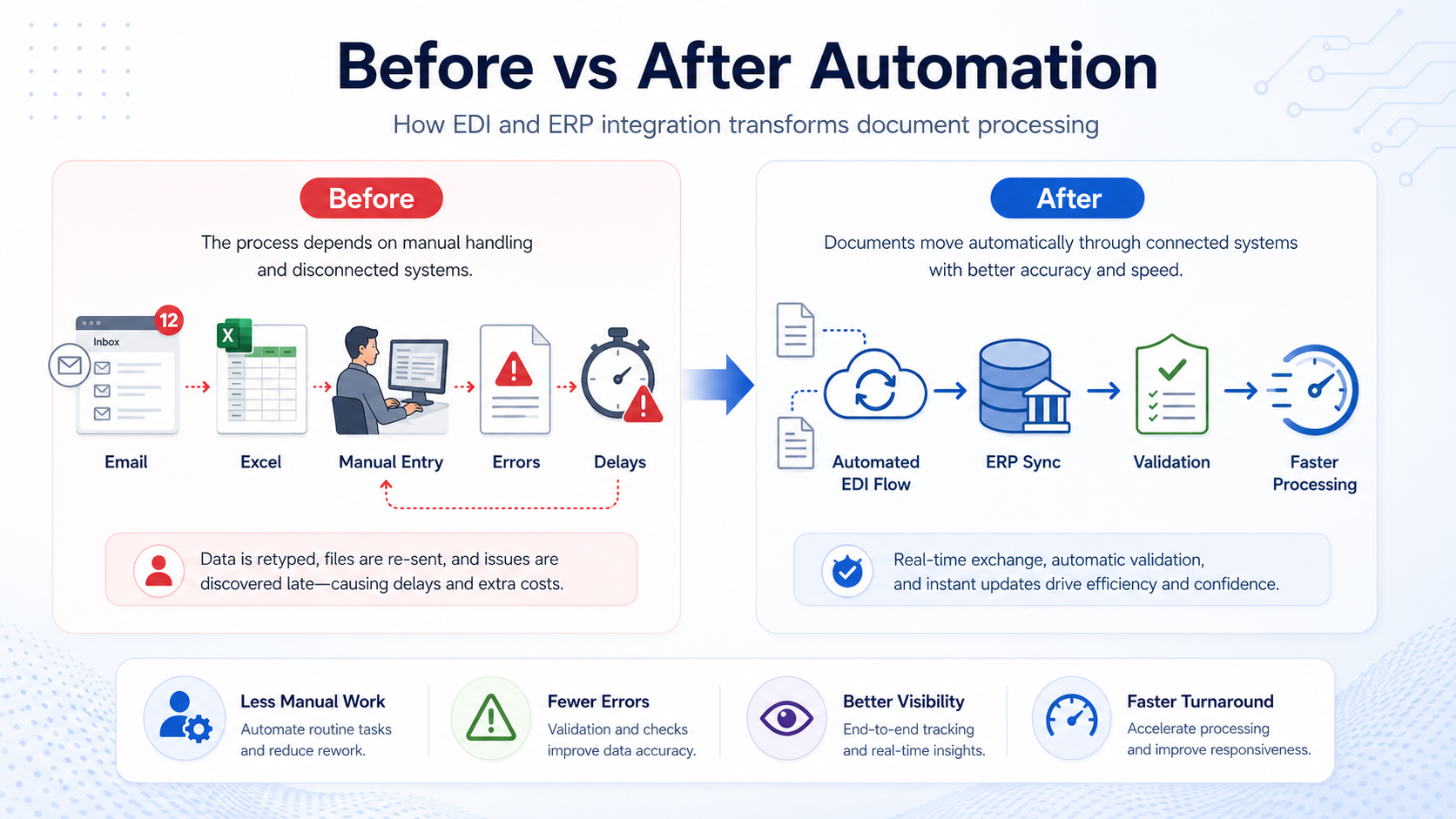
In a manual process, a customer sends a purchase order, someone reads it, enters it into the ERP, confirms the order, prepares shipment details, and later sends the invoice.
With EDI integration, much of this flow can happen automatically.
A purchase order can become a sales order in the ERP. Shipping details can be shared with the customer. The invoice can be generated and exchanged in the required format.
This reduces delays and helps the business process more orders without adding more administrative work.
Procure-to-Pay Automation
Supplier invoices often create bottlenecks for finance teams. If invoices arrive in different formats or contain mismatched data, the approval process slows down.
With EDI and ERP integration, supplier invoices can be validated before they reach the ERP. Correct documents can move forward automatically, while exceptions can be flagged for review.
This gives finance teams better control without forcing them to manually handle every document.
What to Look for in an EDI ERP Integration Solution
Not every EDI solution is the same. A good solution should support both business needs and technical requirements.
Before choosing a provider, look for:
ERP compatibility
Support for multiple EDI formats
Trading partner onboarding support
Data validation and error handling
Document mapping and conversion
Monitoring dashboard
API and file-based connectivity options
Support for orders, invoices, shipping, and inventory flows
Scalable setup for future partners
Strong support and maintenance
The goal is not just to connect one document type. The goal is to build a reliable document exchange flow that can grow with your business.
How HubBroker Helps You Connect EDI with Your ERP
HubBroker helps businesses automate document exchange between trading partners and ERP systems.
With HubBroker’s EDI Integration and ERP Integration solutions, businesses can connect customers, suppliers, marketplaces, and logistics partners through structured, automated data flows.
HubBroker can support document exchange for orders, invoices, shipping updates, and other business-critical documents while helping reduce manual entry and improve process visibility.
Relevant internal links to include:
EDI Integration service page
ERP Integration service page
PDF to XML conversion page
Intelligent Document Processing page
Peppol Access Point page
Related blog posts on supplier invoice automation and ERP data sync
FAQs About EDI Integration with ERP
What is EDI integration?
EDI integration is the automated exchange of structured business documents between companies and business systems. It helps replace manual document handling with system-to-system data exchange.
How does EDI connect with ERP?
EDI connects with ERP through APIs, connectors, file transfer, mapping tools, or integration platforms. The EDI data is converted into a format the ERP system can understand and process.
What documents can be exchanged between EDI and ERP?
Common documents include purchase orders, invoices, order confirmations, shipping notices, delivery notes, inventory updates, and credit notes.
Is EDI integration only for large companies?
No. EDI integration is useful for any business that exchanges regular documents with customers, suppliers, logistics providers, or marketplaces. It becomes especially valuable when document volume increases.
What is the difference between EDI Integration and ERP Integration?
EDI Integration focuses on exchanging structured business documents with external trading partners. ERP Integration connects that document data with the company’s internal ERP system so it can be processed automatically.
Ready to connect your ERP with your trading partners?
Explore HubBroker’s EDI Integration and ERP Integration solutions to automate document exchange from order to invoice.
