

Platform Type
Hosted e-commerce platform

Hosted e-commerce platform
GraphQL Admin API and webhooks
Orders, products, variants, stock, fulfilment
One or several stores and markets
ERP, warehouse, 3PL and accounting
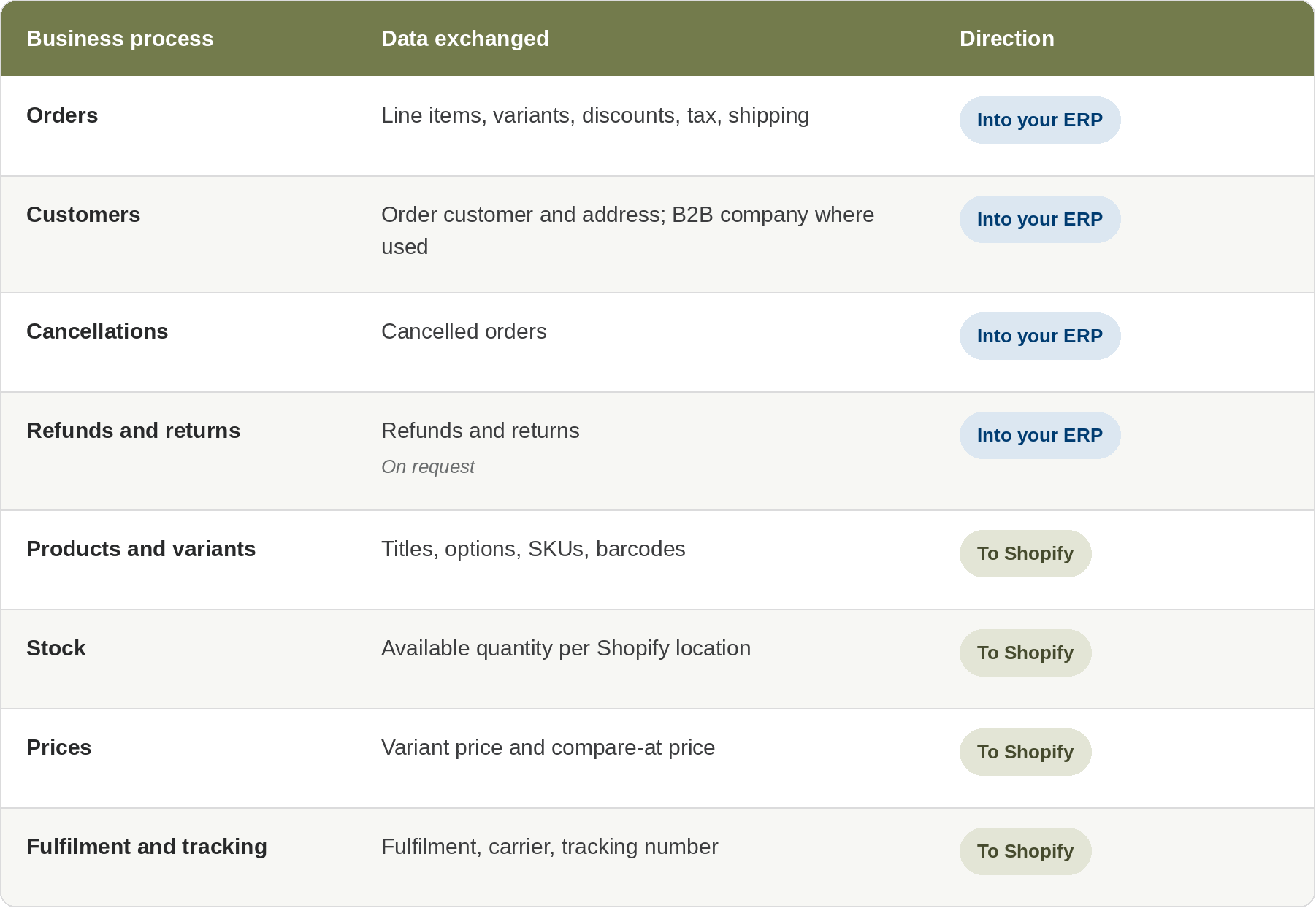
Shopify is a hosted commerce platform used by brands from start-ups to large retailers, including multi-market and wholesale businesses. Because Shopify runs hosting and checkout, integration centres on data: products modelled as variants, stock held per location, and fulfilment handled through Shopify's fulfilment orders.
A Shopify ERP integration brings orders into your ERP automatically and keeps the ERP as the source of truth for items, prices and stock. Brands running one store per country can route each store's orders to the right ERP company, currency and warehouse.
Orders flow from Shopify into your ERP; stock, prices and fulfilment flow back.
A customer places an order, and Shopify notifies HubBroker by webhook.
HubBroker fetches the full order through the GraphQL Admin API.
Variants, customer, tax and shipping are mapped to your ERP values and validated.
The sales order is created in your ERP.
When the order ships, the fulfilment with tracking number is created in Shopify, which
Brands with several stores or markets that want one ERP behind all of them.
Merchants using a 3PL alongside their own warehouse.
Wholesale suppliers using Shopify's B2B features next to retail sales.
Multichannel sellers that also sell on Amazon or other marketplaces and need one stock figure.
HubBroker connects Shopify to the ERP you already use. HubBroker already automates Shopify to Microsoft Dynamics 365 Business Central flows, and connections can also be configured for e-conomic, Uniconta, Microsoft Dynamics 365 Finance & Operations and Rackbeat for inventory
Orders reach the ERP automatically: Webhook-triggered imports move each order into the ERP without exports, so picking starts sooner.
Variants that match ERP items: Each size, colour or option maps to the right ERP item, so pick lists and invoices show the correct product.
Stock per location: ERP or warehouse quantities update each Shopify location, so every store sells only what can ship.
Several stores, one ERP: Orders from different stores or markets route to the right ERP company and currency.
Tracking without manual steps: Fulfilments with carrier and tracking number trigger Shopify's own shipping e-mails.
API access: Shopify GraphQL Admin API, Shopify's current API for new integrations, with access granted by app installation or an access token created in the Shopify admin.
Events: Shopify webhooks for orders, fulfilment orders, products and inventory, with a scheduled check as a safety net.
Permissions: Only the access scopes the agreed flows need, such as orders, products, inventory and fulfilments.
ERP access: Your ERP's connector orAPI.
Data mapping: SKUs on every variant that match ERP items; rules for stores, markets, locations, tax and shipping methods.
HubBroker connects Shopify to your ERP through HubBroker iPaaS, with no code in your store. We configure the connection, map variants, customers, tax and shipping methods to your ERP structure, and automate orders into the ERP and stock, prices and fulfilment back to Shopify. Transaction history, error visibility and e-mail notifications show what has been processed and what needs attention.

Yes. Shopify orders are created as sales orders in Business Central, with items, stock, prices and fulfilment flowing back to Shopify. Field mapping is agreed for your Business Central setup.
Yes. Each store connects separately, and shared rules route its orders to the right ERP company, currency or warehouse. Stock and product updates can be published to every store.
Shopify notifies HubBroker by webhook when an order is created or changed, so import starts straight away. A scheduled check picks up any order a webhook missed.
Variants are matched by SKU or another agreed key. If your ERP uses item variants or separate item numbers per size and colour, the mapping is configured to match.
Where you use Shopify's B2B features, company, location and payment terms on the order can be mapped to ERP customer accounts. Available B2B features depend on your Shopify plan.
Only the access scopes the agreed flows require. Access is granted from your Shopify admin and can be removed there at any time.
45B 1260 Bredgade , København K Capital Region, Denmark
D-1010, The First, B/H ITC Narmada, Ahmedabad, Gujarat, 380015, India


