

Your German Customer Rejected a ZUGFeRD File. Here Is What Validation Caught
The invoice left your ERP on time and the PDF looked right. Three days later, your German customer sent it back with a rejection notice and a validation report full of codes. Payment is on hold until you send a file that passes.
AR teams selling into Germany are having this conversation more often. German buyers run every inbound ZUGFeRD file through a validator, and files that fail go back to the sender. This article covers the ZUGFeRD validation errors behind most rejections. For each one, it explains what it means in plain terms and how to stop it from happening again.
Why German buyers now validate every inbound ZUGFeRD file
Since 1 January 2025, every business in Germany must be able to receive structured e-invoices. Issuing them becomes mandatory on 1 January 2027 for companies with prior-year turnover above €800,000. All other businesses follow on 1 January 2028. Our Germany e-invoicing overview covers the full timeline.
The buyer has the most to lose, which is why it checks so carefully. In its letter of 15 October 2025, the Federal Ministry of Finance (BMF) clarified that a file with format errors does not count as an e-invoice. Once the issuing obligation applies, an invalid e-invoice puts the buyer's input VAT deduction at risk. When a customer rejects your file, it is protecting its own VAT position.
Your customer will validate your file either way. What matters is what the validator finds.
The three layers validation checks
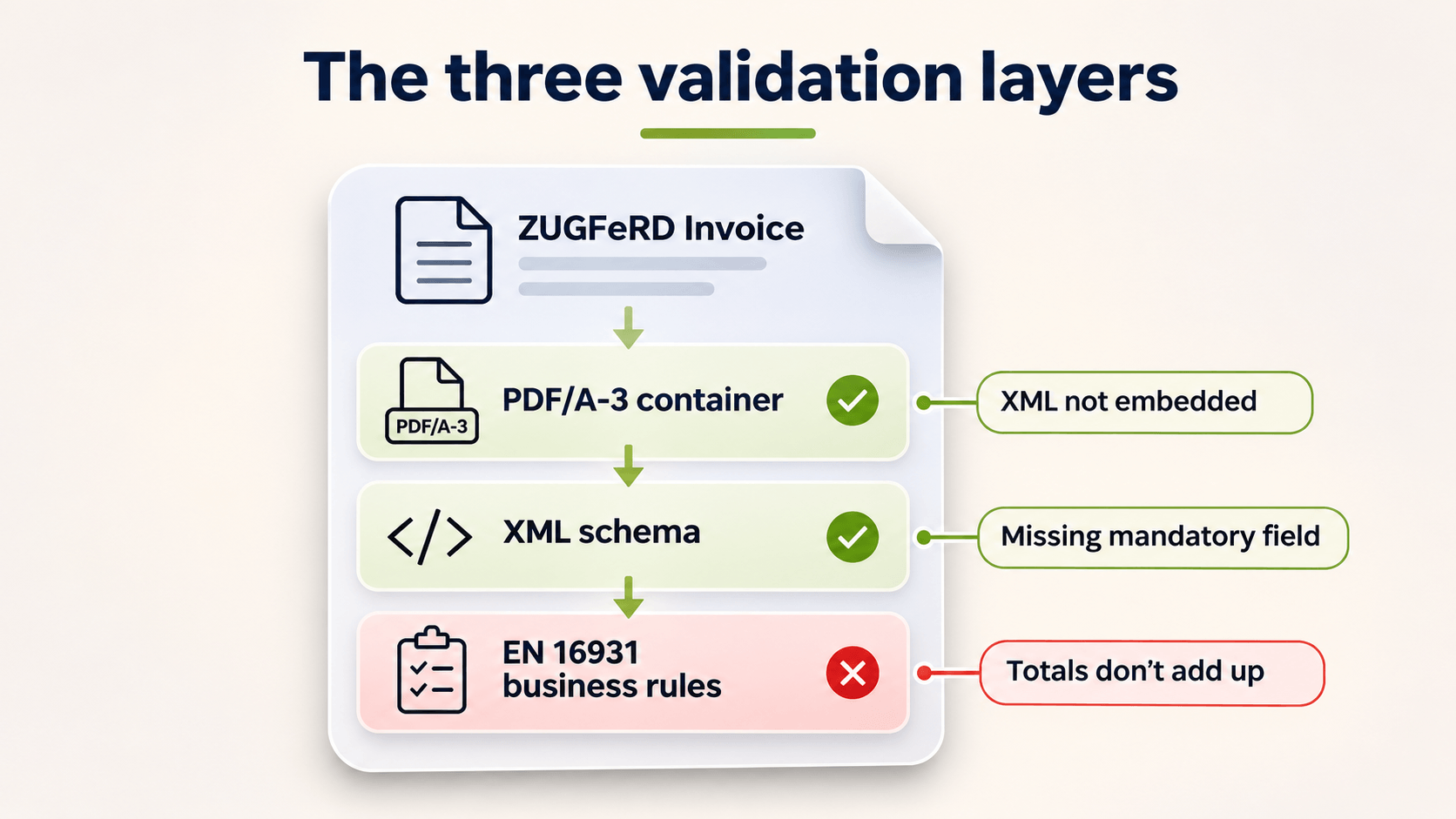
A ZUGFeRD file is a PDF/A-3 with an XML invoice embedded inside it. Validation checks three layers in order, and a failure at any of them can stop the invoice.
The PDF/A-3 container and embedded XML
The validator first checks three things:
The file is a proper PDF/A-3.
The XML is embedded in the PDF.
The metadata declares a valid profile.
A PDF printed from the ERP with the XML sent alongside as a separate file fails at this step.
The XML schema (syntax)
Next, the validator checks the XML against the schema for the declared profile. The schema covers element order, data types and required fields. A missing mandatory element or a date in the wrong format fails here.
EN 16931 business rules (Schematron)
Finally, Schematron rules test the content. They check that totals add up, that the VAT breakdown is consistent and that codes come from approved lists. Rule IDs start with "BR", which is what you see in a rejection report. Most rejections AR teams handle come from this layer.
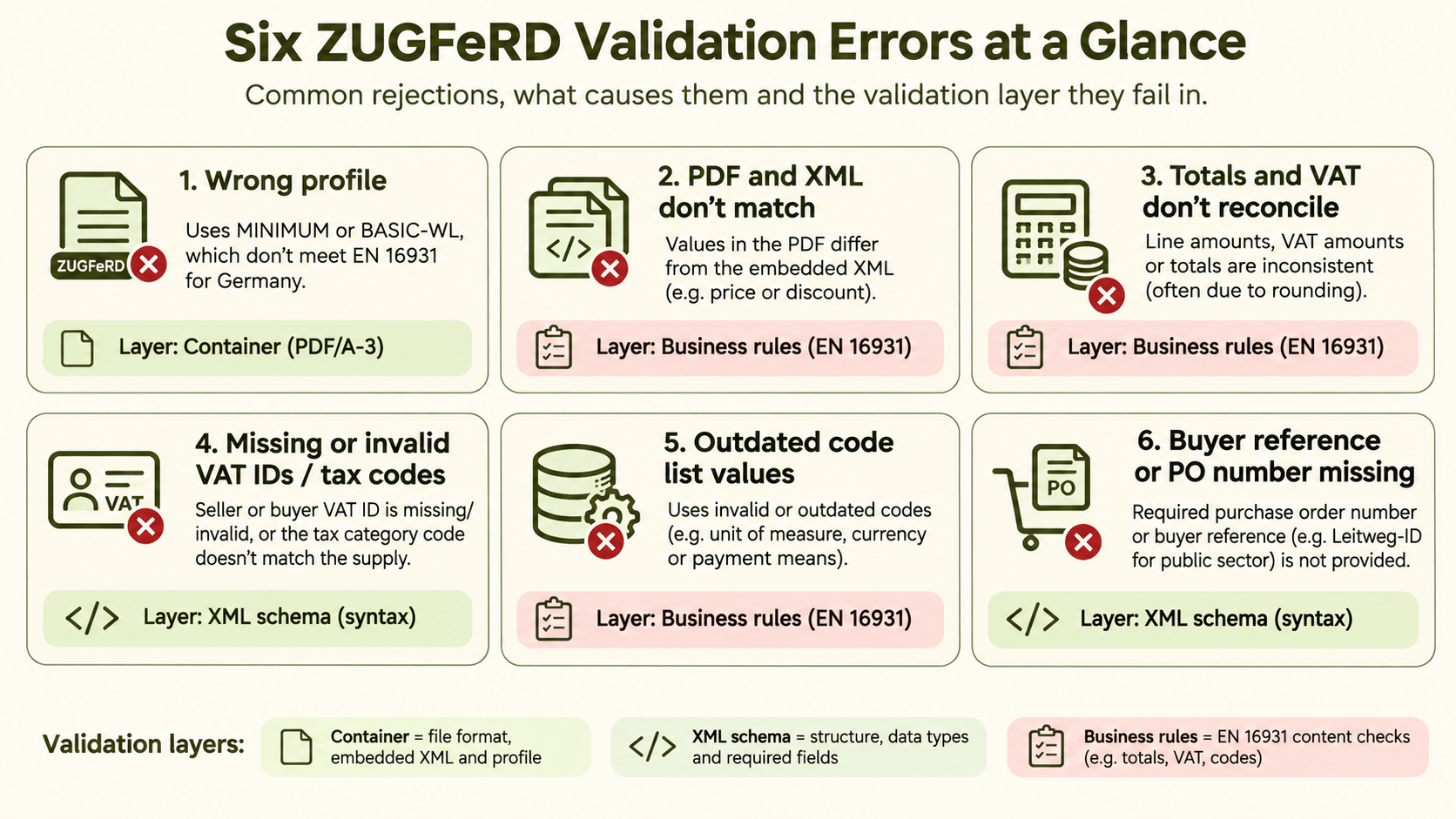
Six ZUGFeRD validation errors that trigger rejections
1. The wrong profile
ZUGFeRD has several profiles. MINIMUM and BASIC-WL carry too little data to meet EN 16931, and German tax guidance does not accept either as an e-invoice. If your ERP or invoicing tool defaults to one of them, every invoice fails, however clean the data is. Check which profile your system writes into the file's metadata.
2. The PDF and the XML don't match
People read the PDF, and systems process the XML. When the two differ, the XML is legally binding. A mismatch can arise in several ways:
Someone edits the PDF layout by hand.
A price change reaches only the print template.
A discount appears on paper but not in the data.
Buyers who compare the two layers reject the file. Buyers who don't compare them book the XML values, even if those differ from what your account manager agreed.
3. Totals and VAT breakdown don't reconcile
Business rules check two things:
Line amounts add up to the invoice total.
The VAT amount for each category matches its taxable amount and rate.
Rounding usually causes this error. Many ERPs round per line, but the rules expect lines, allowances, charges and the VAT breakdown to give consistent results. A one-cent difference is enough to fail.
4. Missing or invalid VAT IDs and tax category codes
The seller's VAT ID, the buyer's VAT ID where required, and each line's VAT category code must all be present and consistent. Reverse charge and exempt supplies cause frequent problems: the category code says one thing, the exemption reason is missing, or a VAT amount appears where none belongs. These errors usually come from customer master data or tax code setup in the ERP. SAP Business One projects in Germany run into the same gaps.
5. Outdated code list values
Units of measure, currencies, payment means and other fields must use values from official code lists, such as UN/ECE Recommendation 20 for units. Those lists change. FeRD and its French partner FNFE-MPE regularly release new versions of ZUGFeRD/Factur-X with updated code lists and validation rules, and ZUGFeRD 2.5.2 has applied since 1 September 2026. An ERP unit such as "PCS" that was never mapped will fail. So will a code withdrawn in an update, from the day the buyer updates its validator.
6. The buyer reference or PO number is missing
Many German buyers require their purchase order number or an internal buyer reference on every invoice so they can match it automatically. This is not always an EN 16931 rule. If the buyer's inbound process depends on the reference, though, a missing one gets the invoice rejected all the same. Public-sector customers invoiced in XRechnung require the Leitweg-ID.
What AR should do when the rejection lands
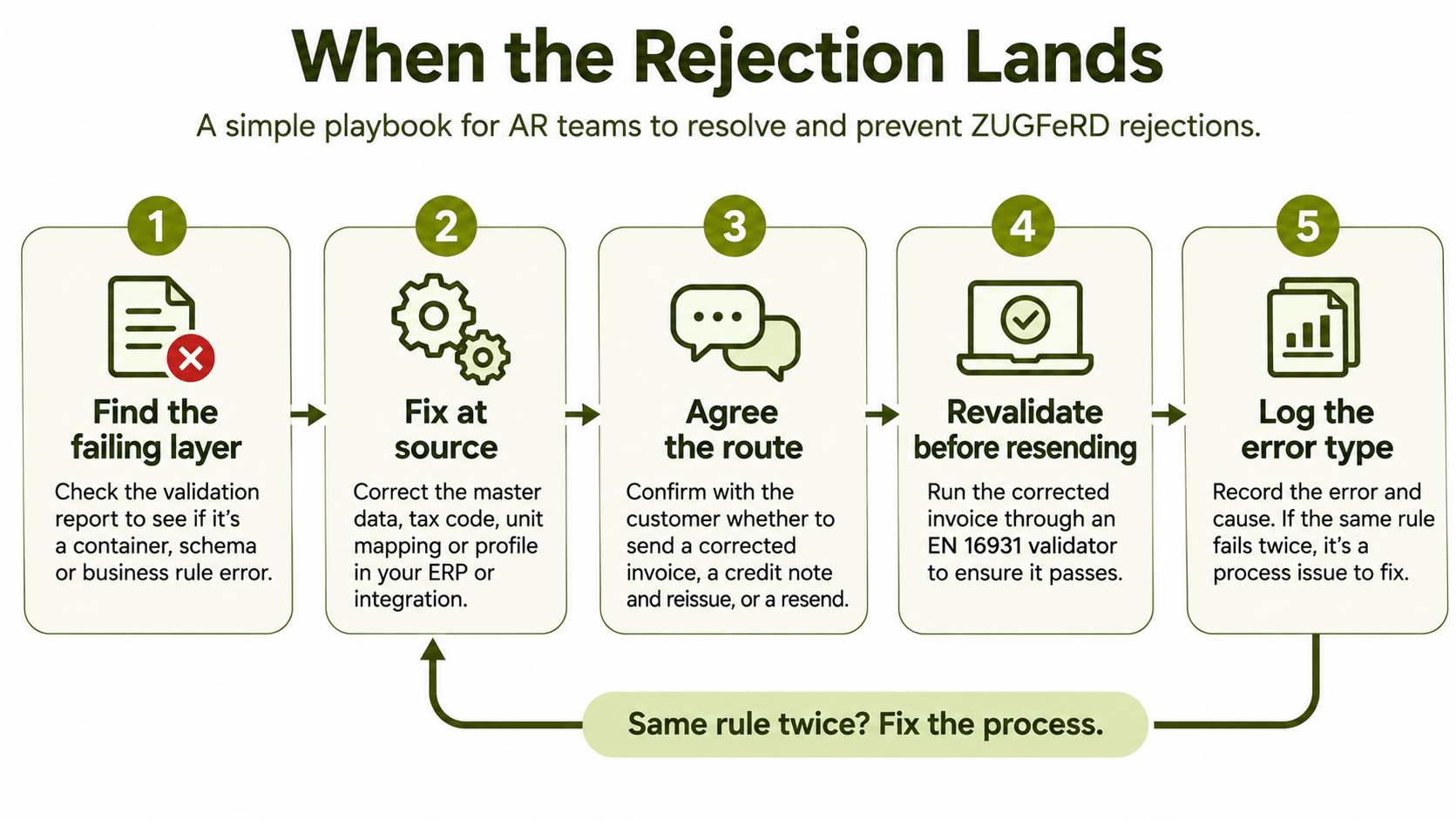
Find the failing layer. Container and schema errors point to how the file is generated. BR codes point to the invoice data.
Fix the cause at the source. Correct the customer record, tax code, unit mapping or profile setting in the ERP or integration. Editing the outgoing file by hand fixes one invoice and leaves the next one broken.
Agree the correction route. Confirm whether the customer expects a corrected invoice, a credit note and reissue, or a resend. Involve your tax adviser if the VAT content changes.
Revalidate before resending. Run the corrected XML through an EN 16931 validator before it goes back. HubBroker's free e-invoice validator checks EN 16931 CII files against the schema and the business rules. That includes the XML from ZUGFeRD and Factur-X files.
Log the error type. If the same rule fails twice, the problem is in your process, not in one invoice.
Catch the errors before your customer does
You can detect every one of these errors before the invoice leaves your business. The practical place to do it is between your ERP and your customers:
Map the invoice data to ZUGFeRD or XRechnung.
Validate it against EN 16931 and the buyer's requirements.
Send it only after it passes.
An invoice that fails stops inside your own process, where a fix takes minutes. Caught by the customer instead, the same error costs days of payment.
That is how e-invoicing solution works. Your ERP remains the system of record, whether that is Business Central, SAP Business One or another system. HubBroker sits on top as the integration layer and handles formats, validation and delivery. It reports invoice status back, so AR sees rejections in one place instead of in a customer's email.
FAQ
Is a ZUGFeRD invoice with the MINIMUM profile a valid e-invoice in Germany? No. German tax guidance accepts ZUGFeRD from version 2.0.1 but excludes the MINIMUM and BASIC-WL profiles. Neither carries the full EN 16931 data set.
Which ZUGFeRD version applies now? ZUGFeRD 2.5.2 has applied since 1 September 2026 and is technically identical to Factur-X 1.09.2. New versions are backward compatible, but updated code lists and validation rules can make previously accepted values fail.
Can a customer reject an invoice over a one-cent rounding difference? Yes. If the difference breaks an EN 16931 calculation rule, the file fails validation, and many buyers reject failed files automatically.
Does a format error affect input VAT? According to the BMF letter of 15 October 2025, a file with format errors does not count as an e-invoice. Once the issuing obligation applies, that creates input VAT risk for the buyer. Confirm the consequences for your situation with a tax adviser.
Should I send XRechnung instead of ZUGFeRD? Both meet German B2B requirements. Public-sector buyers usually require XRechnung. For commercial customers, send the format the buyer asks for. Many suppliers support both.
Find out what your invoices would fail on
Maybe German customers have already rejected some of your ZUGFeRD files, or you expect volume to grow ahead of 2027. Either way, start with a sample of recent invoices. Validate them, note which rules fail and trace each failure back to its source. If you want help building those fixes into your ERP flow, talk to our team.
