
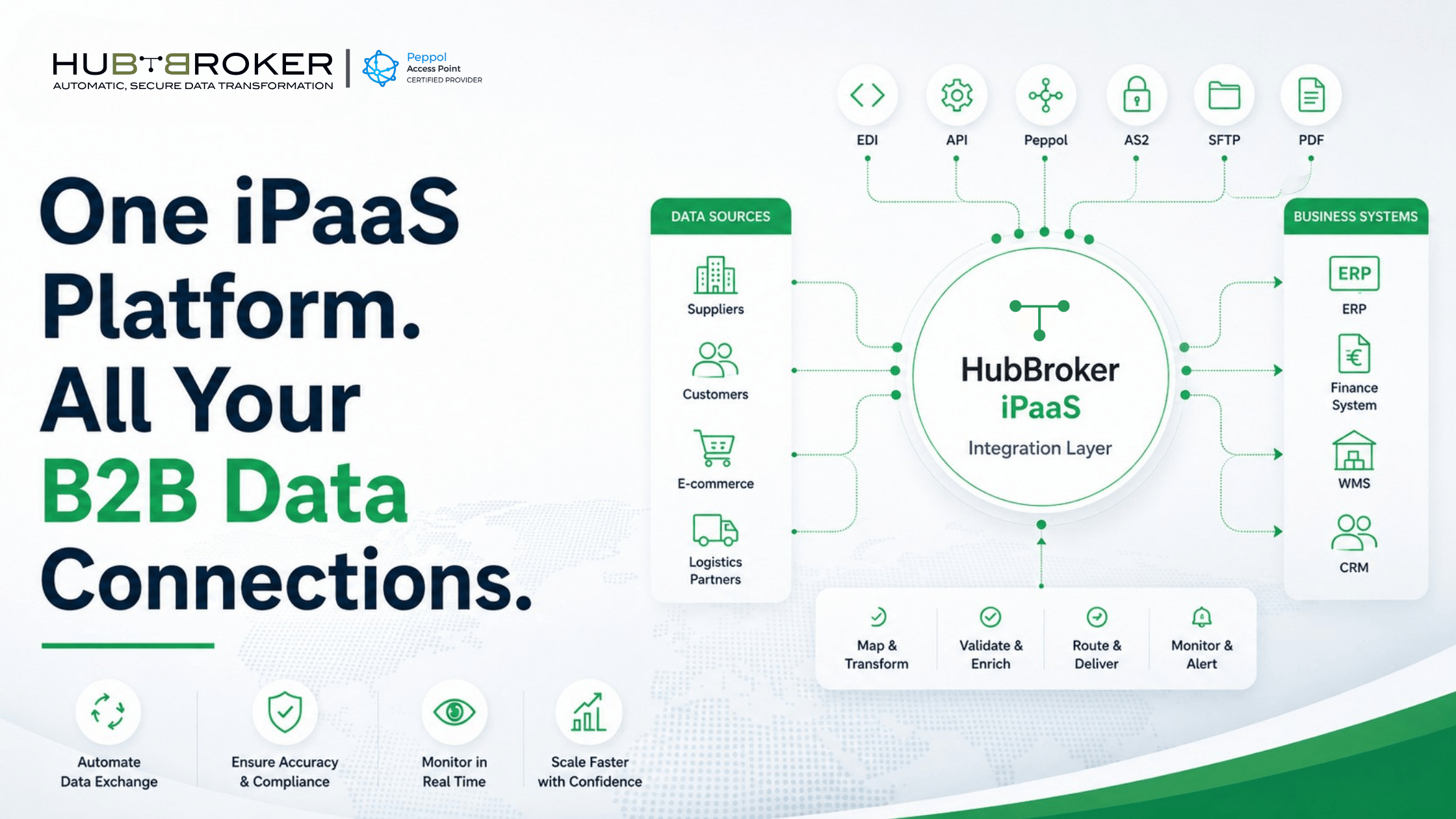
What is an iPaaS platform and how does it help b2b data exchange
A customer order arrives but cannot enter your ERP. A supplier invoice is blocked because its format does not match your finance system. Employees start copying information between emails, spreadsheets, portals and business applications while customers wait for updates.
Understanding what is an iPaaS platform helps businesses address these problems without replacing the systems they already depend on. It provides a controlled integration layer for moving, converting and validating data between internal applications and external trading partners.
What Is an iPaaS Platform?
An iPaaS, or Integration Platform as a Service, is a cloud-based platform used to connect applications, data sources, business systems and external organisations.
It sits between the systems exchanging information. When one system creates a document, the platform receives it, converts the data into the required structure and sends it to the correct destination.
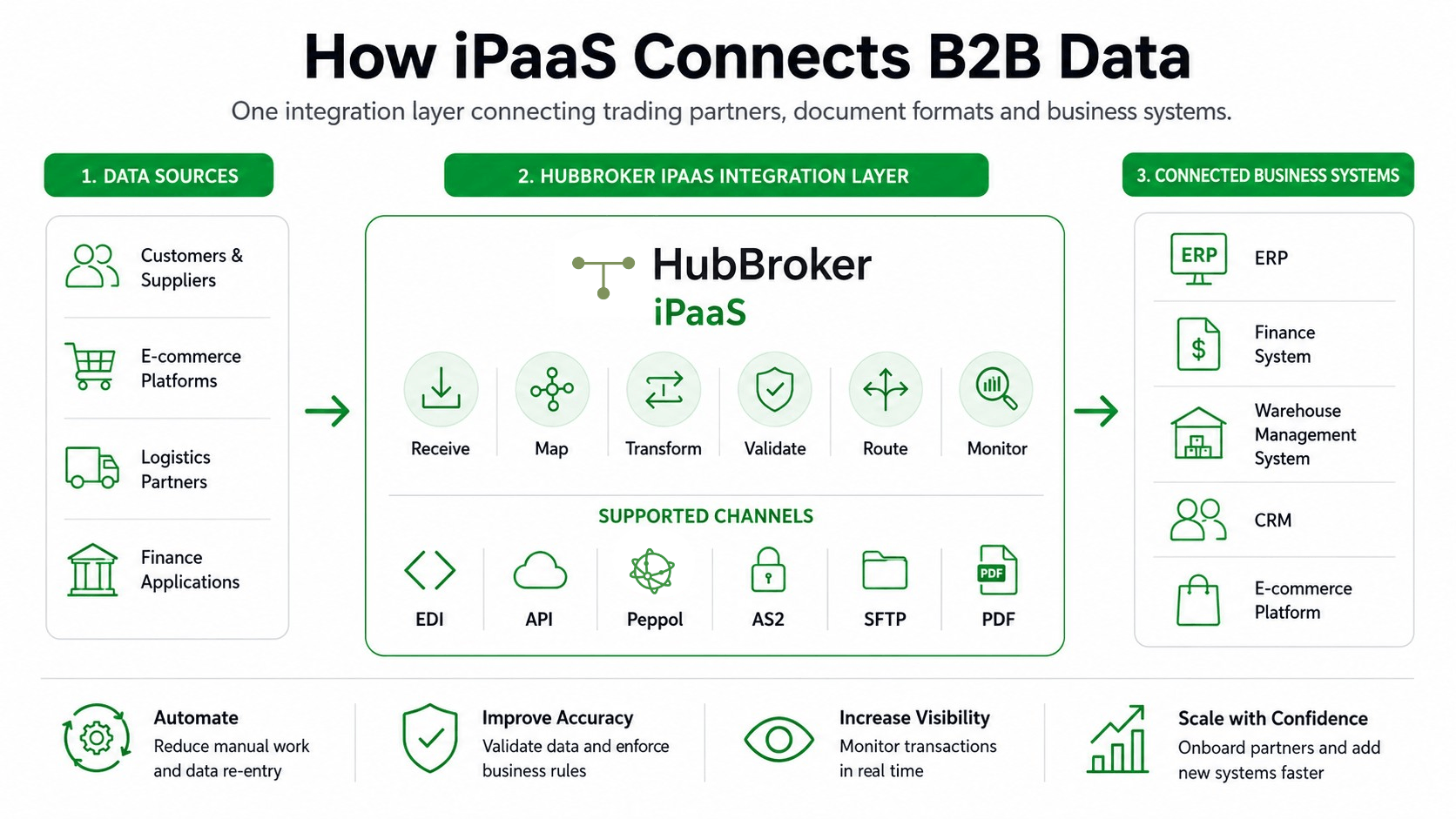
A complete iPaaS platform can manage several integration activities:
Receiving information from connected systems and partners
Mapping fields between different data structures
Converting documents into the required format
Validating mandatory fields and business rules
Routing transactions to the correct destination
Recording document status and processing errors
This is different from simply transferring a file. The platform must make sure the information is understandable and usable when it reaches the receiving application.
Why Does B2B Data Exchange Become Difficult as a Business Grows?
B2B data exchange becomes more complicated as the number of systems, customers, suppliers and document requirements increases.
One customer might send EDIFACT purchase orders through AS2, while another uses an API. A supplier might email invoices as PDFs, while a public-sector customer requires structured electronic invoices through Peppol.
Creating an individual connection for every partner can produce a large network of point-to-point integrations. Each connection may have its own mapping, protocol, validation rules and maintenance requirements.
When a partner changes its format or a business upgrades its ERP, several connections may require redevelopment. An iPaaS centralises these flows, allowing organisations to manage transformation and routing from one integration layer instead of maintaining separate logic inside every connected system.
How Does iPaaS Support Orders, Invoices and Other B2B Documents?
An iPaaS manages the document journey from the sending organisation to the receiving business system.
A typical process follows five stages:
Receive: Data enters through EDI, API, SFTP, AS2, Peppol, email or another configured channel.
Transform: The incoming format is mapped and converted into the structure required by the receiving system.
Validate: Required fields, identifiers and business rules are checked.
Route: The document is delivered to the appropriate ERP, finance application, warehouse platform or trading partner.
Monitor: The transaction is logged so errors and processing statuses can be identified.
This process can be applied to purchase orders, order confirmations, dispatch advice, invoices, credit notes, product records and inventory updates.
For structured partner-document workflows, EDI integration connects external business communications with internal processing systems. HubBroker’s existing ERP integration content also explains how orders, invoices and shipping information can move directly between trading partners and ERP environments.
What Does This Mean for Your ERP and Existing Systems?
Adopting an iPaaS does not mean removing your ERP, finance software, warehouse system or e-commerce platform.
The iPaaS operates as the integration layer around the systems you already run. It translates external data into a structure your ERP understands and converts outgoing ERP data into the format required by each customer, supplier or network.
For example, your ERP may produce invoice data in one internal format. The integration platform can convert that information into UBL, EDIFACT, XML, JSON or another required structure before delivery.
This approach also limits the amount of partner-specific logic placed inside the ERP. When a trading partner changes its requirements, the mapping can be adjusted within the integration layer rather than rebuilding the company’s core financial or operational system.
HubBroker’s ERP EDI integration services are designed around connecting existing ERP workflows with customers, suppliers and document networks. The process covers requirement review, mapping, partner setup, testing, go-live and ongoing monitoring.
When Should a Business Consider an iPaaS Platform?
A business should consider an iPaaS when disconnected systems are creating repeated manual work or operational delays.
Common warning signs include:
Employees enter the same order or invoice information more than once.
Partner onboarding repeatedly requires custom development.
Documents fail because of missing or incorrectly formatted data.
Finance and operations teams cannot see where a transaction failed.
Customers require EDI, APIs, Peppol or specific document formats.
ERP data must be shared with e-commerce, warehouse or finance applications.
Too many independent integrations have become difficult to maintain.
The clearest signal is not simply the number of applications a company uses. It is the amount of manual intervention required to keep information moving between them.
What Should You Look for When Comparing iPaaS Providers?
Start with your actual document flows rather than comparing long feature lists.
Identify which systems must connect, which documents move between them, which formats your partners require and where errors currently interrupt the process.
A suitable cloud integration platform should provide:
Connectivity for your required applications and communication protocols
Mapping and transformation for relevant document formats
Validation before documents enter operational systems
Monitoring and clear exception visibility
A practical process for onboarding new trading partners
Support for ERP integration, EDI and electronic invoicing requirements
Specialist assistance for non-standard partner or format requirements
The platform should reduce integration complexity without forcing your finance and operational teams to redesign established business processes.
For a deeper look at how structured partner documents connect with ERP workflows, read How EDI Integration Helps ERP Systems Work Faster, Cleaner and Smarter. HubBroker also provides a broader comparison in its guide to cloud iPaaS platforms for ERP–EDI integration.
Building a More Controlled B2B Data Flow
An iPaaS gives businesses one integration layer for connecting applications, transforming partner data and monitoring document exchange. It helps existing ERP and finance systems communicate with customers, suppliers and external networks without depending on manual re-entry or a growing collection of isolated connections.
Review your current system and trading-partner flows with HubBroker to identify where an iPaaS could remove manual processing and reduce document disruption.
