
How to Register a Danish Business on NemHandel: Requirements, Steps and Costs
Sending invoices to Danish public authorities requires more than creating a PDF and attaching it to an email. Your business must be able to generate a supported electronic invoice, identify the recipient correctly and transmit the document through the NemHandel infrastructure.
This guide explains how to register a Danish business on NemHandel, what information you need, the expected costs and how to connect NemHandel with your accounting or ERP system.
What Is NemHandel Registration?
NemHandel is Denmark’s infrastructure for exchanging structured electronic business documents. It is commonly used for invoices, credit notes, orders and other procurement documents.
When a company is registered in the NemHandel Register, its electronic address and supported document profiles become discoverable. Customers, suppliers and public authorities can then determine whether the company can receive a particular document type.
The NemHandel Register supports searches using identifiers such as:
CVR number
EAN or GLN number
SE number
Other approved participant identifiers
The public lookup service does not require login. However, making or managing registrations directly in the NemHandel Register requires authentication through MitID.
What Are the Requirements for NemHandel Registration?
Before starting the registration, your business should have a valid company identity and a technical method for receiving electronic documents.
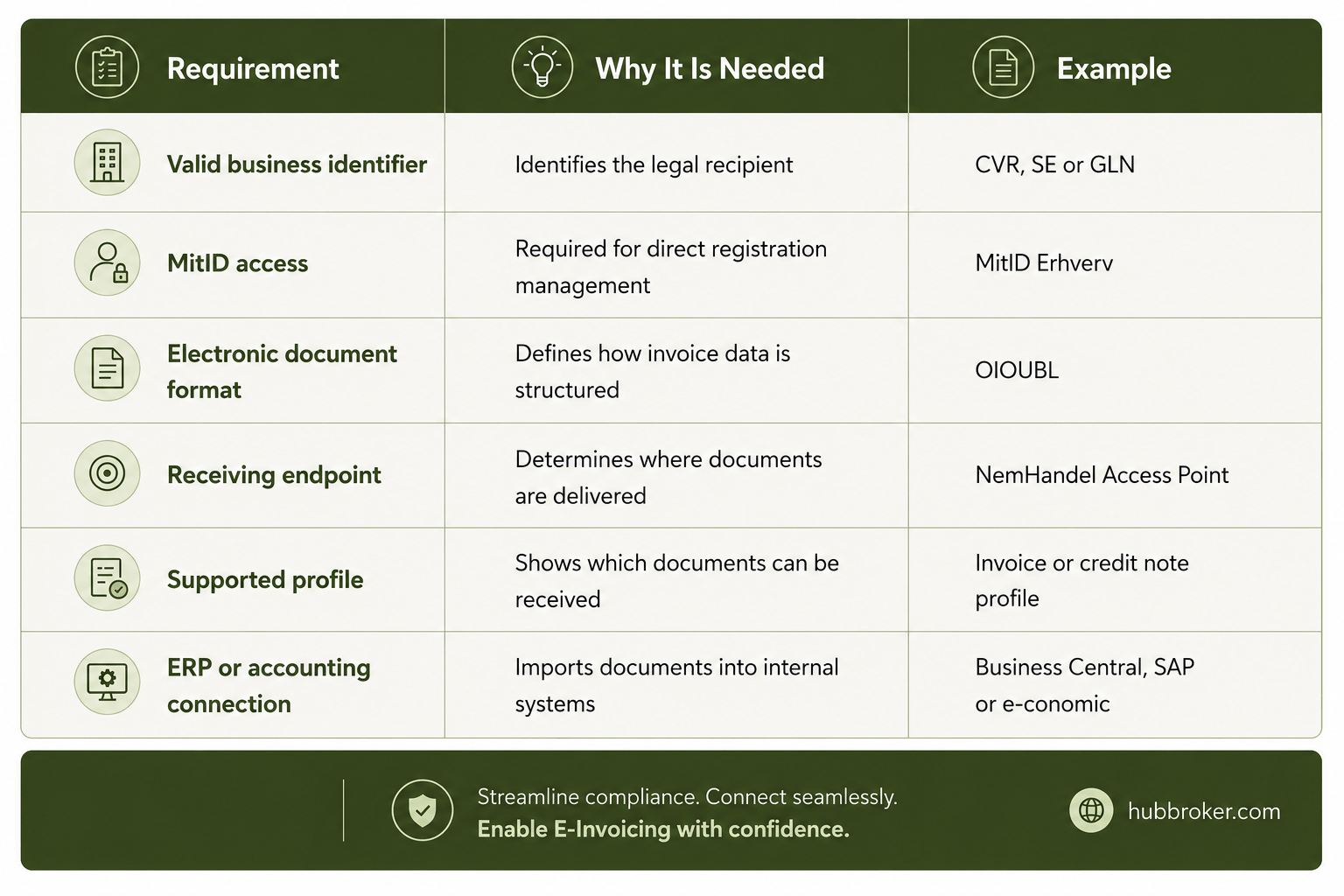
A Danish company will normally use its CVR number or one or more GLN numbers. Before registering, confirm which identifier your customers already use when addressing invoices to your organisation.
Businesses that have not yet received a CVR number must first register with the Danish Business Authority. Registration is free for personally owned businesses, while registration of limited companies and certain other legal structures carries a government fee.
How to Register a Danish Business on NemHandel
Step 1: Confirm Your Company Information
Check that the company name, CVR number, address and contact information are correct in the Danish Central Business Register.
Incorrect company information can create confusion when customers search for your business or validate the recipient of an electronic invoice.
Step 2: Select the Participant Identifier
Choose the identifier that will represent your business in NemHandel.
A CVR number may be suitable for a smaller organisation with one central invoice-receiving function. A company with several departments, branches or invoice workflows may use separate GLN numbers.
Step 3: Choose Your Document Profiles
Define which electronic documents the business must receive.
Most companies begin with invoices and credit notes. Businesses with more advanced procurement processes may also register profiles for purchase orders, order responses and catalogues.
NemHandel lookup results show the participant’s role, supported profile and document standard. This allows senders to verify the recipient’s capabilities before transmitting a document.
Step 4: Establish a Receiving Endpoint
Your business needs a technical endpoint connected to NemHandel. This can be managed internally, through compatible accounting software or by an electronic document service provider.
The provider normally registers the endpoint and connects it with your ERP, accounting system or document workflow.
Step 5: Register in the NemHandel Register
Log in to the registration service using MitID, or authorise your service provider to complete the registration.
The registration should associate your participant identifier with:
Your receiving endpoint
Supported document formats
Registered document profiles
Technical service information
Responsible registration owner
Step 6: Test the Connection
Send test invoices and credit notes before using the connection in production.
Testing should confirm that:
The correct endpoint is found
The document passes format validation
Buyer references are mapped correctly
VAT data is processed correctly
The invoice reaches the correct ERP company
Rejected documents generate useful error messages
Step 7: Verify the Public Registration
Use the public NemHandel lookup service to search for your CVR or GLN number. Confirm that the correct company, profiles and receiving capabilities are visible.
The public lookup can also show which organisation owns and manages the registration.
Should You Register Directly or Use a NemHandel Provider?
Direct registration may appear simpler, but the registration itself is only one part of the project. The business must still receive, validate, convert and import the electronic documents.
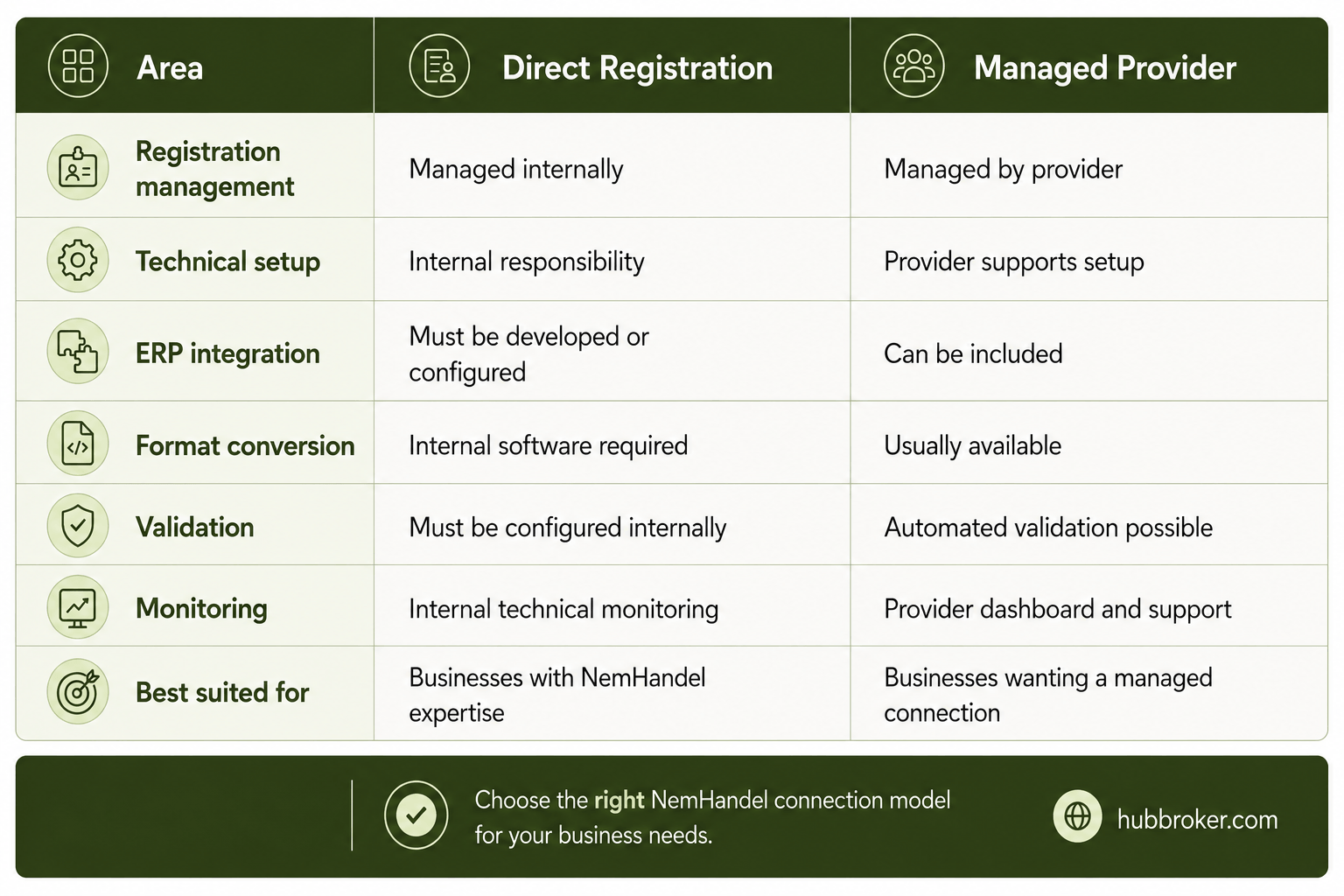
For most organisations, the larger task is connecting NemHandel to the finance or ERP workflow.
How Much Does NemHandel Registration Cost?
There is not one universal NemHandel price for every business. The public register can be accessed without charge, while commercial costs generally depend on the software, provider and integration requirements.
 Request a quotation based on your actual monthly document volume, number of legal entities, ERP system, required document types and integration complexity.
Common NemHandel Registration Mistakes
A company may be visible in the register but still experience failed invoice deliveries. Common reasons include registering the wrong identifier, enabling an unsupported document profile or failing to test the ERP import.
Another frequent mistake is assuming that a readable PDF is sufficient. NemHandel transactions use structured electronic data, allowing invoice fields to be validated and processed automatically.
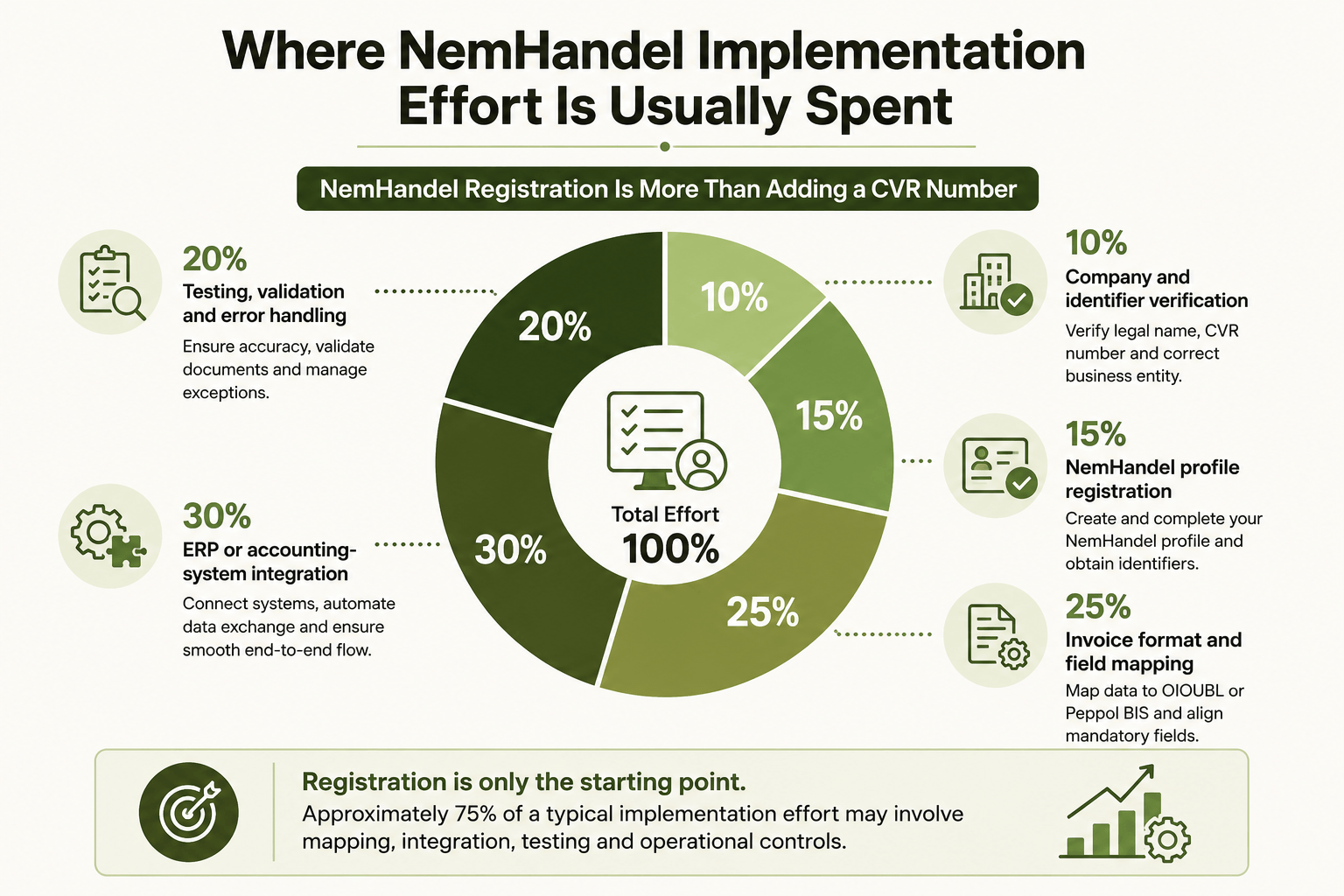
Note: These percentages are an illustrative planning model. Actual effort depends on the ERP, document formats and business processes.
Businesses should also update their registration when changing service providers, endpoints, document capabilities or company structures.
A Practical NemHandel Setup with HubBroker
HubBroker helps Danish and international businesses register, connect and exchange structured documents through NemHandel without managing every technical component internally.
Businesses choose HubBroker for:
NemHandel registration support for CVR and GLN-based endpoints
Certified Peppol Access Point services for Danish and international invoicing
ERP integration with Microsoft Dynamics, SAP, e-conomic, Rackbeat and other platforms
OIOUBL and Peppol document conversion between required invoice formats
Automated validation before documents are sent or imported
Central monitoring and error handling for failed transactions
Dedicated technical support for onboarding, testing and production operations
A managed setup can cover registration, format mapping, ERP connectivity, testing and ongoing document monitoring through one integration partner.
To understand the correct setup and cost for your business, share your CVR number, ERP system, expected document volume and required document types with HubBroker.
