
D365 F&O Electronic Invoicing Service: What Your RCS Configuration Actually Does, and Where It Went
You join a Microsoft Dynamics 365 Finance & Operations project for a customer that has been sending e-invoices for two years. The handover notes say "configured in RCS". You go looking for RCS and find nothing to log into.
Nothing is broken. The configuration moved. But if you don't know what it was doing, you can't support it, extend it or explain to the customer why an invoice is stuck.
This post covers what the D365 F&O Electronic Invoicing Service is, what the RCS configuration controls, and what changed when Microsoft folded RCS into Globalization Studio.
What the D365 F&O Electronic Invoicing Service actually is
Start with the separation that trips most people up. The D365 F&O Electronic Invoicing Service is not part of your F&O environment. Microsoft describes it as a multitenant service, hosted in Azure, that processes electronic invoices and other electronic documents through configuration rather than code.
F&O posts the invoice. The service builds the legal format, signs it where required, submits it and handles the response. Status then flows back into F&O.
Two consequences matter for consultants:
Microsoft built the service mainly for business-to-government scenarios. B2B coverage depends on the country feature and the channel.
There is no on-premises version. On-premises F&O deployments can't use it.
What the RCS configuration does, layer by layer
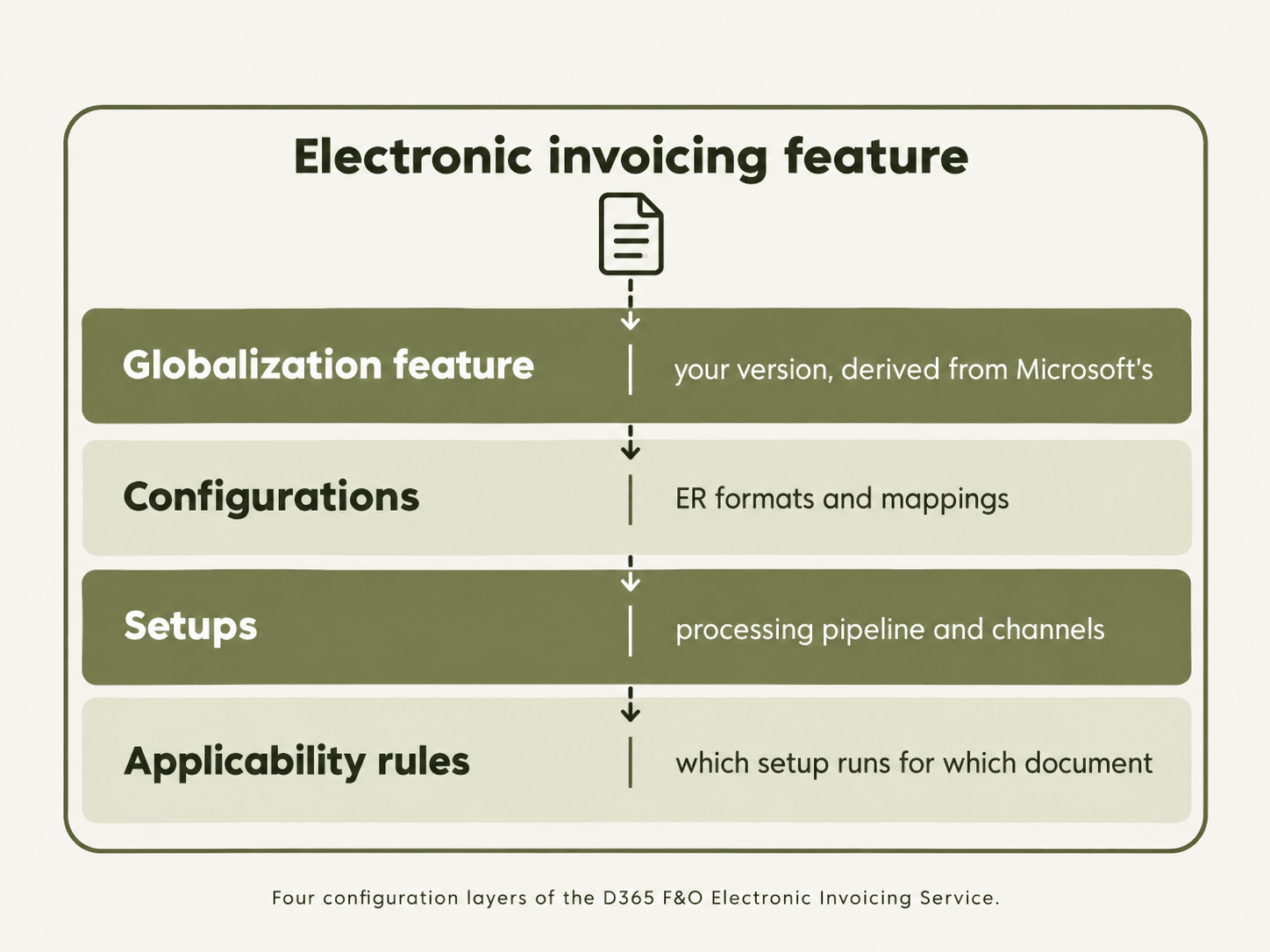
Regulatory Configuration Service (RCS) was the standalone designer where all of this was set up. It let globalisation teams extend tax, e-invoicing, regulatory reporting, banking and business document functionality without developers. For e-invoicing, the configuration has four layers.
Globalization features: the container
Everything lives inside an Electronic invoicing feature. Microsoft publishes country features, such as the Danish OIOUBL and Italian FatturaPA features. You import one from the repository and create your own version derived from it.
You never edit Microsoft's feature directly. That's why your customer's setup has a parent feature and its own version history.
Configurations: the format logic
This component holds the Electronic reporting (ER) formats and format mappings. It turns F&O invoice data into the XML or JSON that the authority or network expects. When a country changes its schema, the change usually lands here. If you need a refresher on how UBL, XRechnung and FatturaPA differ, the formats themselves are worth understanding before you touch the mappings.
Setups: the processing pipeline
A feature setup defines what happens to a document, in order: transform it, sign it, submit it, read the response. Each step is a pipeline action with its own parameters.
Some setups are channels rather than pipelines. An export channel sends documents out. A "Get status" setup polls for responses. Inbound data channels pick up vendor invoices from an email inbox or a SharePoint folder.
Applicability rules: the routing
Applicability rules decide which setup runs for which document. They are conditions on fields such as legal entity, country and document type.
If an invoice posts in F&O and nothing happens in the service, applicability rules are the first place to look.
What happens when you post an invoice
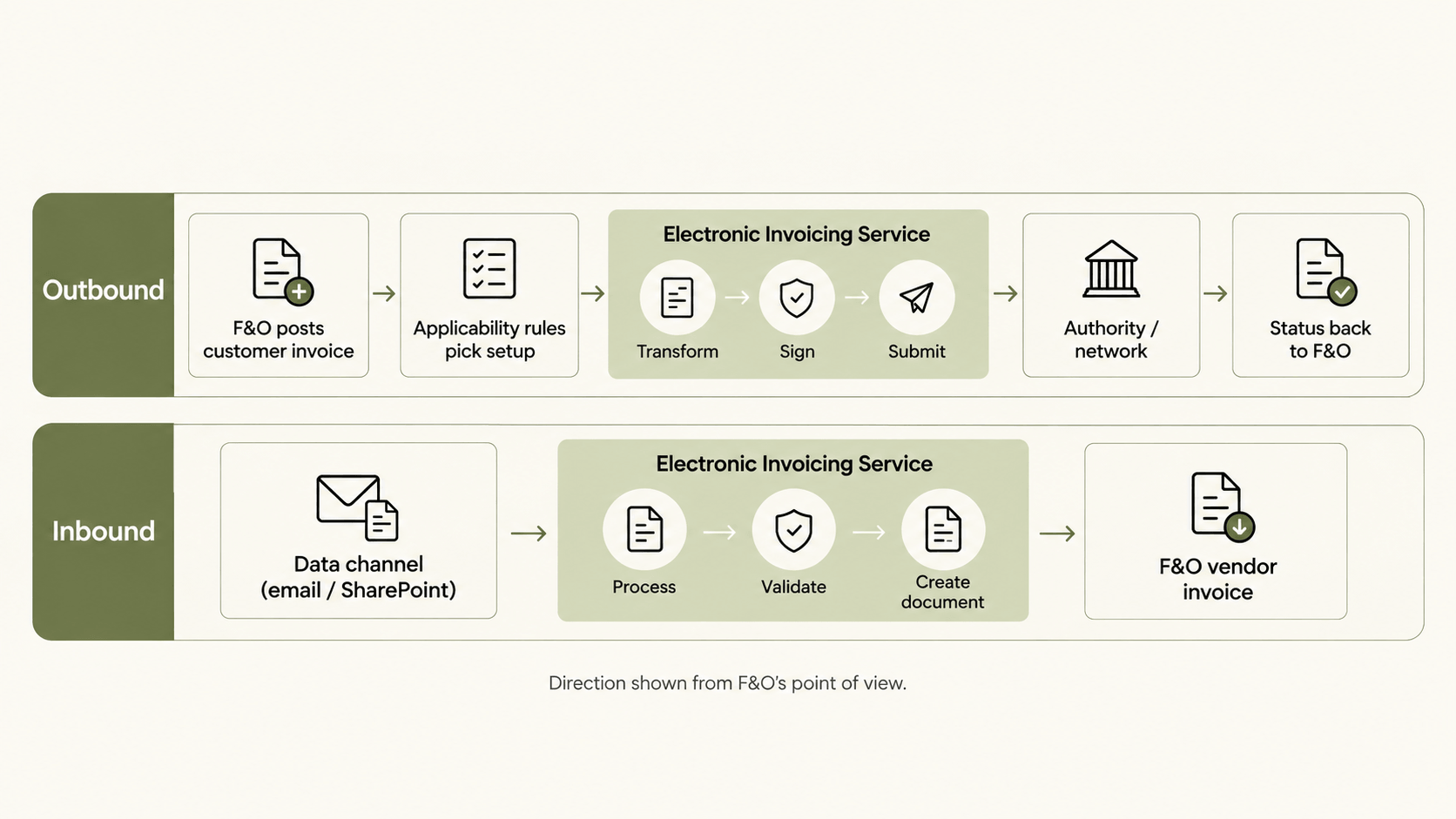
Direction below is from F&O's point of view.
Outbound:
A user posts a customer invoice in F&O, and F&O sends the document data to the service.
The service evaluates the applicability rules and selects the matching setup.
The pipeline runs: ER transformation, signing where required, submission.
The authority, network or connector responds.
The status is written back to F&O, where users see accepted, rejected or failed documents.
Inbound works in reverse. A data channel picks up the vendor invoice, the service processes it, and F&O receives it for vendor invoice creation.
From RCS to Globalization Studio: what changed for consultants
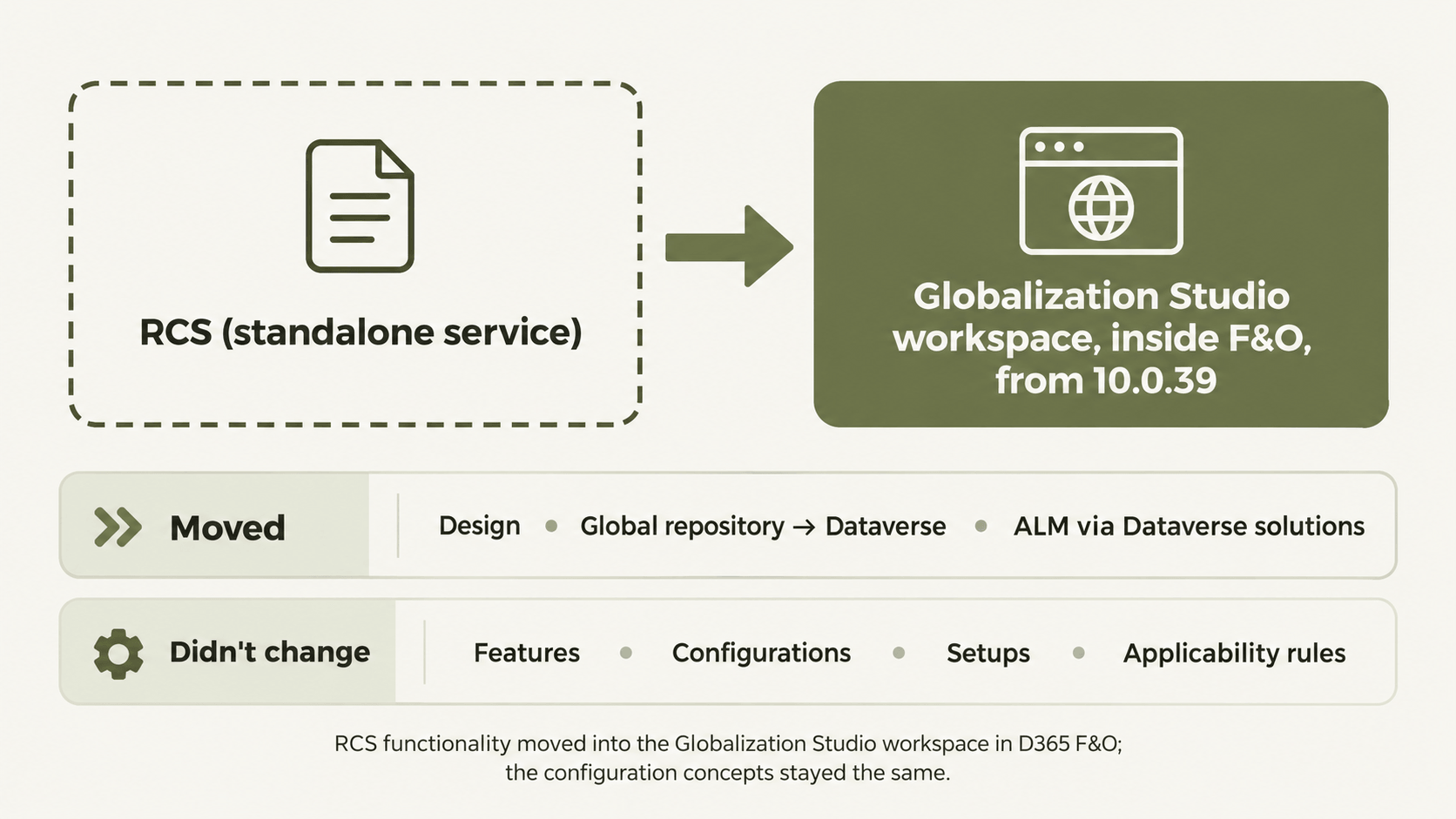
From version 10.0.39, Microsoft merged RCS functionality into the Globalization Studio workspace inside F&O. New RCS provisioning stopped with that release, and Microsoft planned to shut RCS down fully by 1 August 2024.
What changed:
There is no separate service. You design and maintain features inside F&O, under Globalization Studio.
The Global repository gave way to the Dataverse configuration repository, and application lifecycle management now runs through Dataverse solutions.
Tax Calculation service features moved into the same workspace.
What didn't change are the concepts. Features, configurations, setups and applicability rules work as before. If you can read an RCS setup, you can read a Globalization Studio setup. The location moved, not the logic.
If you inherit a project that went live before 10.0.39, confirm that the migration was completed and find out where the customer's derived features now sit.
Where the configuration stops
The D365 F&O Electronic Invoicing Service is strong at producing compliant documents for the countries Microsoft localises. It gets narrower at the edges:
Delivery. Where Microsoft has no direct integration with a government platform or recipient, it points to the ISV last-mile connector, built with Edicom. That connector also opens access to networks such as Peppol. It's one route, not the only one.
Trading partners outside the mandate. Customers who want EDIFACT invoices, order responses or dispatch advice are outside the service's scope.
Countries without a Microsoft feature. Coverage follows Microsoft's localisation roadmap, not your customer's expansion plan.
One view of status. Invoices going to authorities, Peppol receivers and EDI partners end up monitored in different places.
This is where an integration layer helps, alongside F&O rather than instead of it. HubBroker connects to F&O and handles Peppol connectivity, EDI trading partners, inbound invoices and format conversion, with status reported back. You can see the document flows on our Dynamics 365 F&O integration page.
If you're scoping a multi-country rollout, our e-invoicing implementation roadmap covers the stages from compliance assessment to production monitoring.
FAQ
Do I still need RCS for the D365 F&O Electronic Invoicing Service?
No. From version 10.0.39, the design experience lives in the Globalization Studio workspace inside F&O. Existing RCS configurations needed to be migrated.
What's the difference between Electronic reporting and Electronic invoicing?
Electronic reporting is the format engine. It defines how F&O data becomes a file. The Electronic Invoicing Service is the processing layer. It runs ER configurations as one step in a pipeline, alongside signing, submission and status handling.
Can I use the service with an on-premises F&O deployment?
No. Microsoft doesn't support on-premises deployments for Electronic invoicing.
Does the Electronic Invoicing Service cost extra?
F&O licences include a monthly transaction allowance per tenant, and an add-on licence adds more capacity. Check the current guide before quoting numbers to a customer.
Can the D365 F&O Electronic Invoicing Service send invoices through Peppol?
Microsoft's route is the ISV last-mile connector with Edicom, which provides access to Peppol. The alternative is to route F&O invoices through an integration layer connected to a Peppol Access Point.
Ready to close the gaps?
If your F&O project needs invoices to reach Peppol receivers or EDI trading partners that the standard configuration doesn't cover, we're happy to walk through how HubBroker works alongside F&O. Book a free demo with our integration team.
