
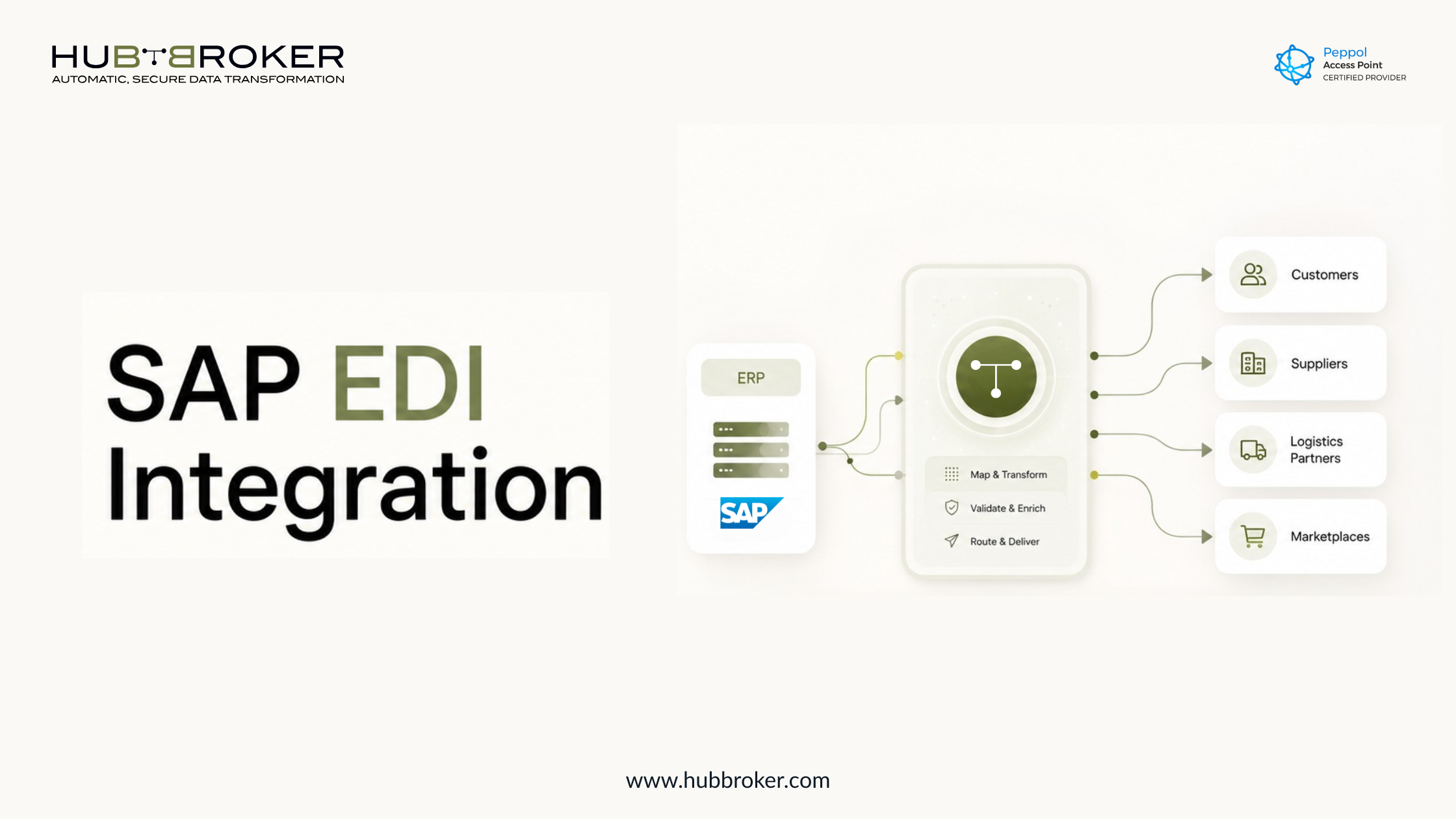
SAP EDI Integration: A Complete Guideb For 2026
SAP is the core ERP system for many companies. It manages orders, invoices, deliveries, inventory, finance, and supplier data. But when those documents need to move between customers, suppliers, logistics partners, marketplaces, or public-sector platforms, SAP often needs an EDI layer.
That is where SAP EDI integration becomes important.
EDI, or Electronic Data Interchange, allows companies to exchange structured business documents electronically instead of using PDFs, emails, spreadsheets, or manual uploads. EDI covers the full exchange process, including document format, transmission, validation, and translation between business systems.
For SAP users, EDI often works through IDocs, partner profiles, mapping rules, validation checks, and middleware. In this blog, we explain how SAP EDI works, what inbound and outbound mapping means, which SAP transaction codes are commonly used, and when a separate EDI solution can make integration easier.
What Is SAP EDI?
SAP EDI is the exchange of structured business documents between SAP and external trading partners. These documents can include purchase orders, sales orders, invoices, order confirmations, delivery notes, credit notes, payment advice, and shipping notices.
In a manual process, teams may receive a PDF order by email, type it into SAP, check the details, and then send back an invoice or confirmation manually.
With SAP EDI, the process becomes more automated:
A trading partner sends a structured document.
The EDI system validates and maps the data.
SAP receives the data in a usable format.
The business transaction is created or updated automatically.
This helps reduce manual work, avoid rekeying errors, and speed up order-to-cash and procure-to-pay workflows.
How Does EDI Work in SAP?
EDI in SAP usually works by converting data between SAP’s internal structure and the format required by an external partner.
A simple flow looks like this:
Trading Partner -> EDI File -> Mapping & Validation -> SAP IDoc/API/File -> SAP Transaction
For outbound documents, the flow works in reverse:
SAP Transaction -> SAP IDoc/API/File -> Mapping & Validation -> EDI File -> Trading Partner
The most important step is mapping. Mapping decides how data fields from one system match fields in another format. For example, a customer purchase order in EDIFACT, ANSI X12, XML, or Peppol BIS may need to be converted into an SAP-compatible IDoc.
EDI documents are normally exchanged using agreed standards and transmission methods such as AS2, SFTP, HTTPS, or other protocols.
Ready to simplify SAP EDI integration?
Contact HubBroker to discuss EDI automation, SAP integration, Peppol, e-invoicing, and document exchange workflows.
Book a Free Demo Now
SAP EDI Architecture: IDocs, Partner Profiles, and Middleware
SAP EDI architecture usually includes several layers.
1. SAP IDocs:- An IDoc, or Intermediate Document, is one of the most common ways SAP exchanges structured transaction data. It contains business information such as customer number, item number, quantity, price, tax, address, and delivery date.
2. Partner Profiles:- Partner profiles define how SAP communicates with a specific customer, supplier, or system. They include the message type, process code, port, and inbound or outbound processing settings.
3. Mapping Layer:- The mapping layer converts SAP data into the required external format or converts incoming EDI data into an SAP-compatible structure.
4. Middleware or EDI Platform:- Middleware sits between SAP and trading partners. It handles communication, mapping, validation, routing, monitoring, and error handling.
This is where many companies use a separate EDI or iPaaS platform to reduce SAP customisation and simplify partner onboarding.
SAP Outbound EDI Mapping Process
Outbound EDI in SAP means SAP sends a document to an external trading partner.
Example: SAP creates an invoice and sends it to a customer as an EDI invoice.
Typical outbound process:
SAP creates the business document:- This could be an invoice, delivery note, order confirmation, or shipping notice.
SAP generates the IDoc or export structure:- The relevant SAP data is prepared for exchange.
The EDI platform receives the SAP data:- The data is passed from SAP to the integration layer.
The document is mapped to the partner format:- The system converts SAP data into EDIFACT, ANSI X12, XML, Peppol BIS, or another required format.
The document is validated and sent:- The EDI solution checks the document before sending it through the agreed communication channel.
This process helps ensure that the trading partner receives the document in the correct format, with the correct structure and mandatory fields.
SAP Inbound EDI Mapping Process
Inbound EDI in SAP means SAP receives a document from an external trading partner.
Example: A customer sends an EDI purchase order, and SAP creates a sales order.
Typical inbound process:
The partner sends the EDI document:- This may arrive through AS2, SFTP, API, VAN, Peppol, or another channel.
The document is validated:- The system checks the sender, structure, document type, and required fields.
The file is mapped into SAP format:- The EDI platform converts the incoming document into an SAP IDoc or another SAP-compatible format.
SAP processes the transaction:- SAP creates or updates the relevant business document.
Errors are monitored and corrected:- If data is missing or incorrect, the document should move into an exception-handling process.
This is important because inbound EDI errors can delay orders, deliveries, invoices, and payments.
Common SAP EDI Documents
SAP EDI can support many business workflows.
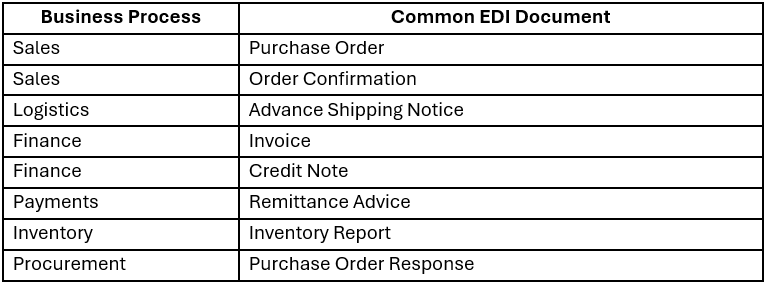
These documents are used heavily in retail, manufacturing, logistics, wholesale, automotive, healthcare, and distribution.
Common SAP EDI Transaction Codes
SAP teams often use transaction codes to monitor and manage IDocs.
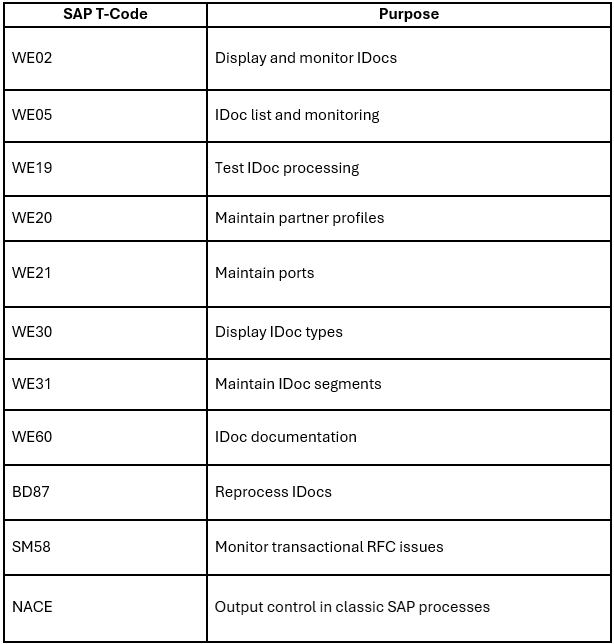
These tools are useful for technical teams, but business users often need a simpler dashboard to see whether documents are processed, failed, pending, or rejected.
Should You Use Native SAP EDI or a Separate EDI Solution?
Native SAP EDI can work well when the company has strong SAP expertise, limited partners, and stable document requirements.
But a separate EDI solution is often better when the business needs to manage:
Multiple trading partners
Different EDI standards
Partner-specific mapping rules
Peppol or e-invoicing requirements
Non-SAP systems
High document volumes
Central monitoring
Faster onboarding
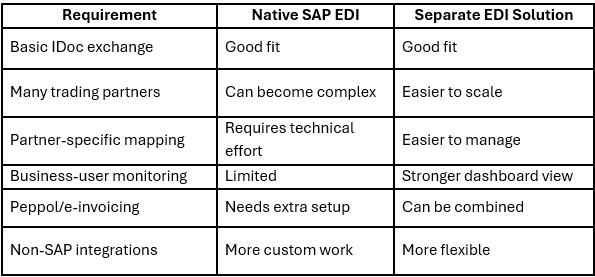
A separate EDI or iPaaS layer helps keep SAP cleaner while making partner communication easier to manage.
How HubBroker Simplifies SAP EDI Integration
HubBroker helps businesses connect SAP with customers, suppliers, marketplaces, logistics providers, and document networks through one integration layer.
Instead of building every map and partner connection directly inside SAP, HubBroker can manage:
EDI mapping
Format conversion
Partner onboarding
Document validation
Secure file exchange
API and ERP integration
Peppol and e-invoicing flows
Transaction monitoring
Error handling
This gives both IT and business teams better control over inbound and outbound document exchange.
Benefits of Pre-Built SAP EDI Integration
Pre-built SAP EDI integration can reduce project effort and improve long-term scalability.
Key benefits include:
Faster partner onboarding
Less custom SAP development
Reduced manual data entry
Fewer invoice and order errors
Better validation before documents reach SAP
Central monitoring for all EDI transactions
Easier support for EDIFACT, ANSI X12, XML, UBL, and Peppol
Better readiness for e-invoicing requirements
For document-heavy businesses, this can improve order processing, invoice handling, supply chain communication, and finance operations.
Conclusion: SAP EDI Should Make Business Easier
SAP EDI integration helps companies exchange orders, invoices, confirmations, delivery notes, and other business documents automatically with trading partners. But as partner requirements grow, managing EDI only inside SAP can become difficult. Each new customer, supplier, document type, and format adds more complexity.
HubBroker makes SAP EDI integration easier by connecting SAP with EDI, Peppol, e-invoicing, APIs, and document automation workflows from one platform. If your business wants faster onboarding, fewer manual tasks, better monitoring, and scalable document exchange, HubBroker can help simplify your SAP EDI process.
