
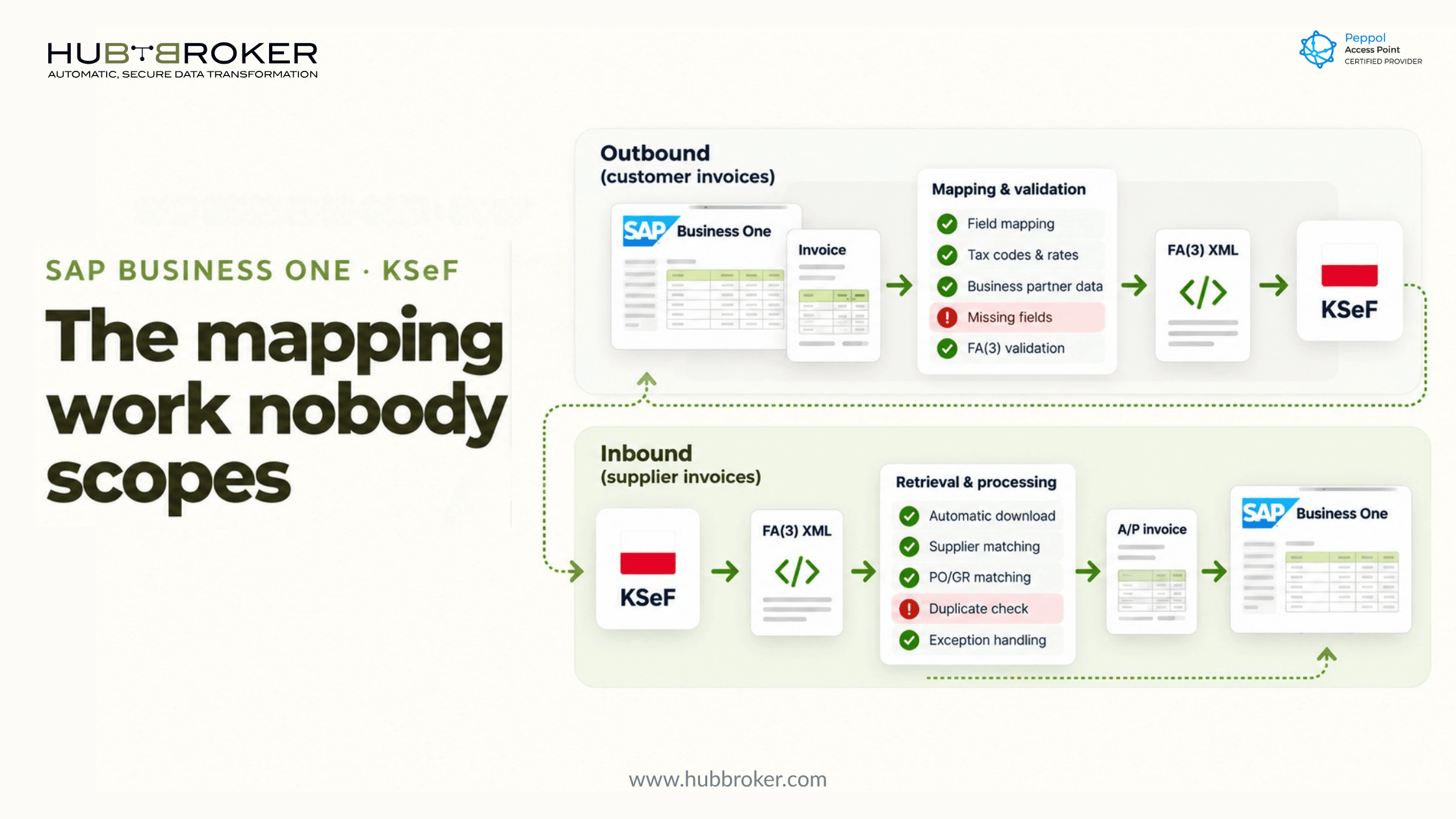
SAP Business One and KSeF: The Mapping Work Nobody Scopes
Most SAP Business One KSeF quotes cover two things: a connection to the Krajowy System e-Faktur and an outbound XML file. The work that overruns budgets sits between them. It is the field-by-field mapping from B1 marketing documents to the FA(3) structure, and the inbound half that most estimates leave out entirely.
KSeF is live. Large taxpayers have issued through it since 1 February 2026, the remaining VAT payers since 1 April 2026, and the smallest businesses join on 1 January 2027. If you are scoping a B1 rollout for a Polish entity now, this is where the hours hide.
Why SAP Business One KSeF Projects Get Underquoted
"Send XML to KSeF" is not the scope
A connector that authenticates, submits a file and reads back a status is the easy part. It is also the part that appears in most estimates. What follows is mapping, validation, exception handling and write-back, and each of those depends on how a specific B1 company has been configured over the years.
We saw the same pattern with German e-invoicing, where SAP B1 does not produce XRechnung out of the box and master data decides the timeline. KSeF is stricter, because the platform clears every invoice before it exists legally.
FA(3) asks for data B1 does not hold in one place
FA(3) expects structured values that B1 often keeps in free-text fields, user-defined fields, print layouts or a consultant's memory. Payment terms written into remarks, procedure markers typed into a Crystal Reports layout, and tax codes reused across scenarios all need a defined source before mapping can start.
Where the Outbound Mapping Work Actually Sits
Direction in this section is shown from the ERP's point of view.
Business partner master data
Every buyer needs a valid NIP or the correct foreign identifier, and a structured address. B1 business partner records built for printed invoices rarely pass validation without cleanup. VAT group membership needs its own handling.
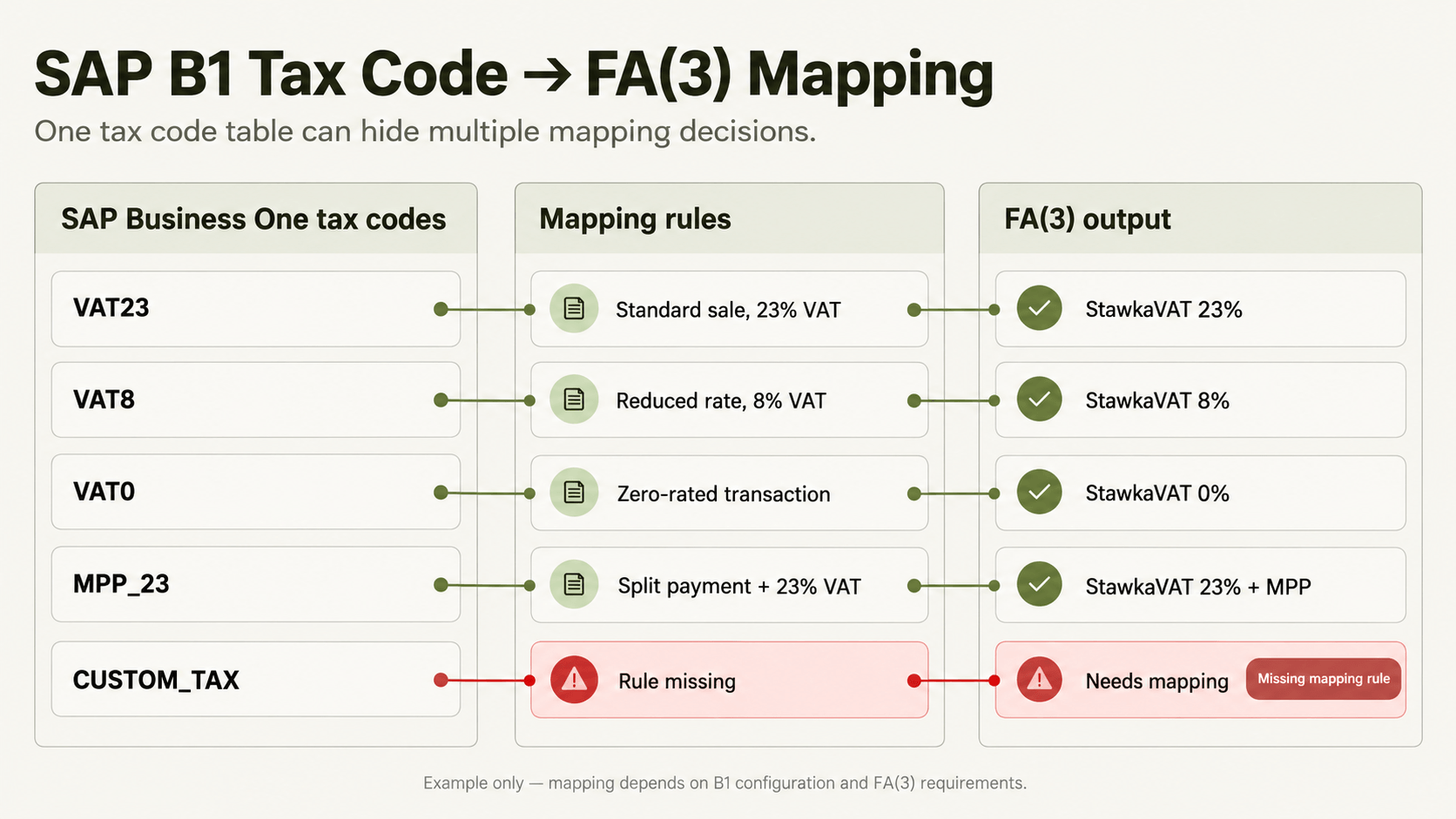
Tax codes to FA(3) VAT rates and procedure markers
This is usually the largest single block of work. Each B1 tax code must map to an FA(3) rate value, and the same code may cover several legal scenarios. GTU codes and procedure markers such as MPP or TP need a reliable source on the item, the business partner or the document.
A HubBroker SAP Business One integration matches tax codes, units and partner identifiers against B1 master data before any document is built. That matching table is the deliverable most scopes forget to price.
Credit memos and corrective invoices
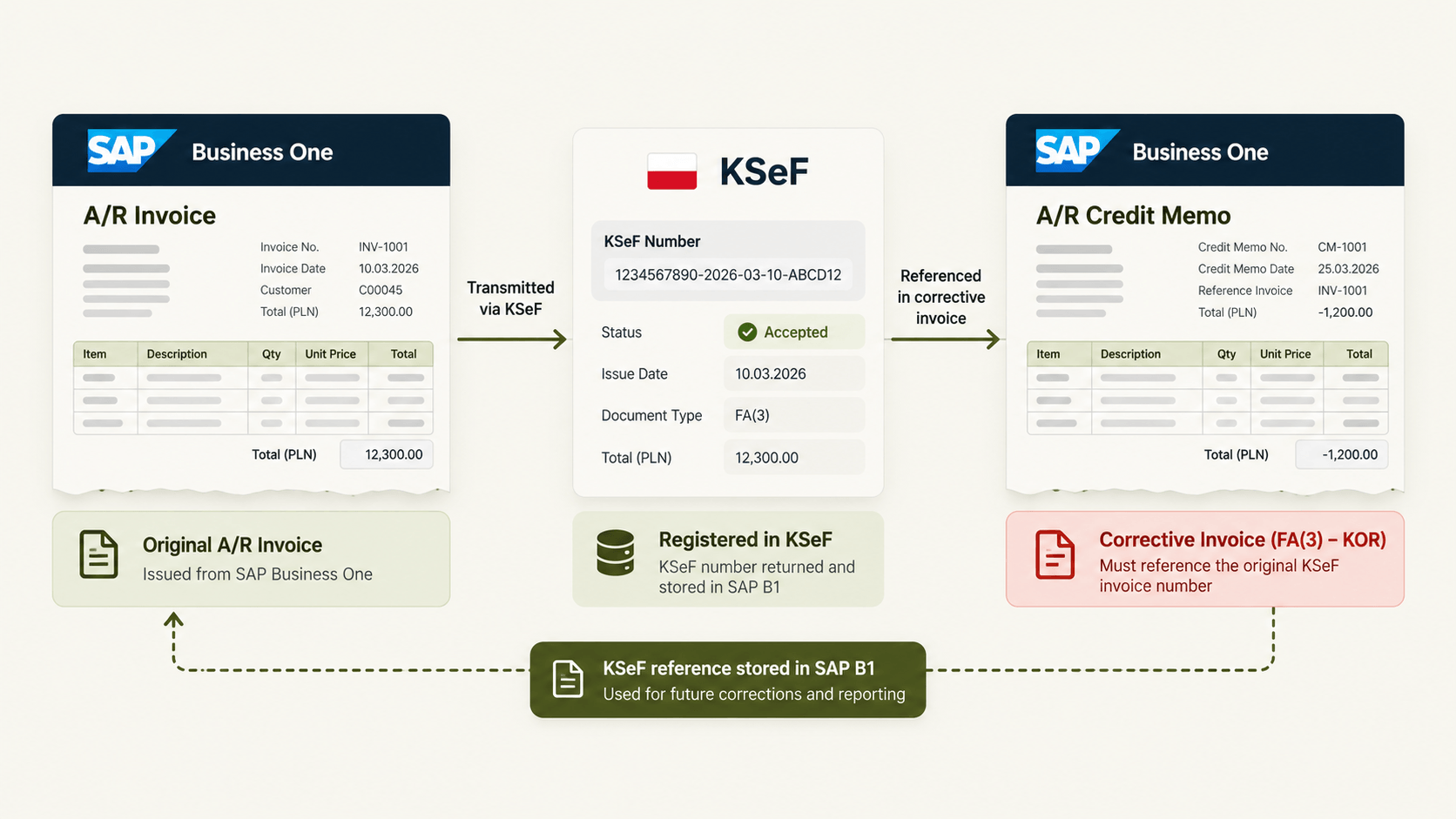
A B1 A/R credit memo becomes a corrective invoice (KOR) that must reference the original invoice's KSeF number. If the original was issued before go-live, or in offline mode, the reference logic changes. Test this early.
Down payments and final invoices
B1 down payment invoices map to advance invoices (ZAL), and the closing A/R invoice maps to a final invoice (ROZ) that settles prior advances. Partial drawdowns across several advances are where mappings break.
Multi-currency invoices
Foreign-currency invoices need the exchange rate and the PLN VAT amount the Polish rules require. B1 rate tables and document-level rate overrides must agree with what the mapping sends.
Third parties and attachments
FA(3) supports additional entity roles, for example for local government units (JST) and VAT groups, and an invoice attachment structure. If the customer invoices public bodies or operates within a VAT group, scope these explicitly.
Inbound: The Half of KSeF Nobody Scopes
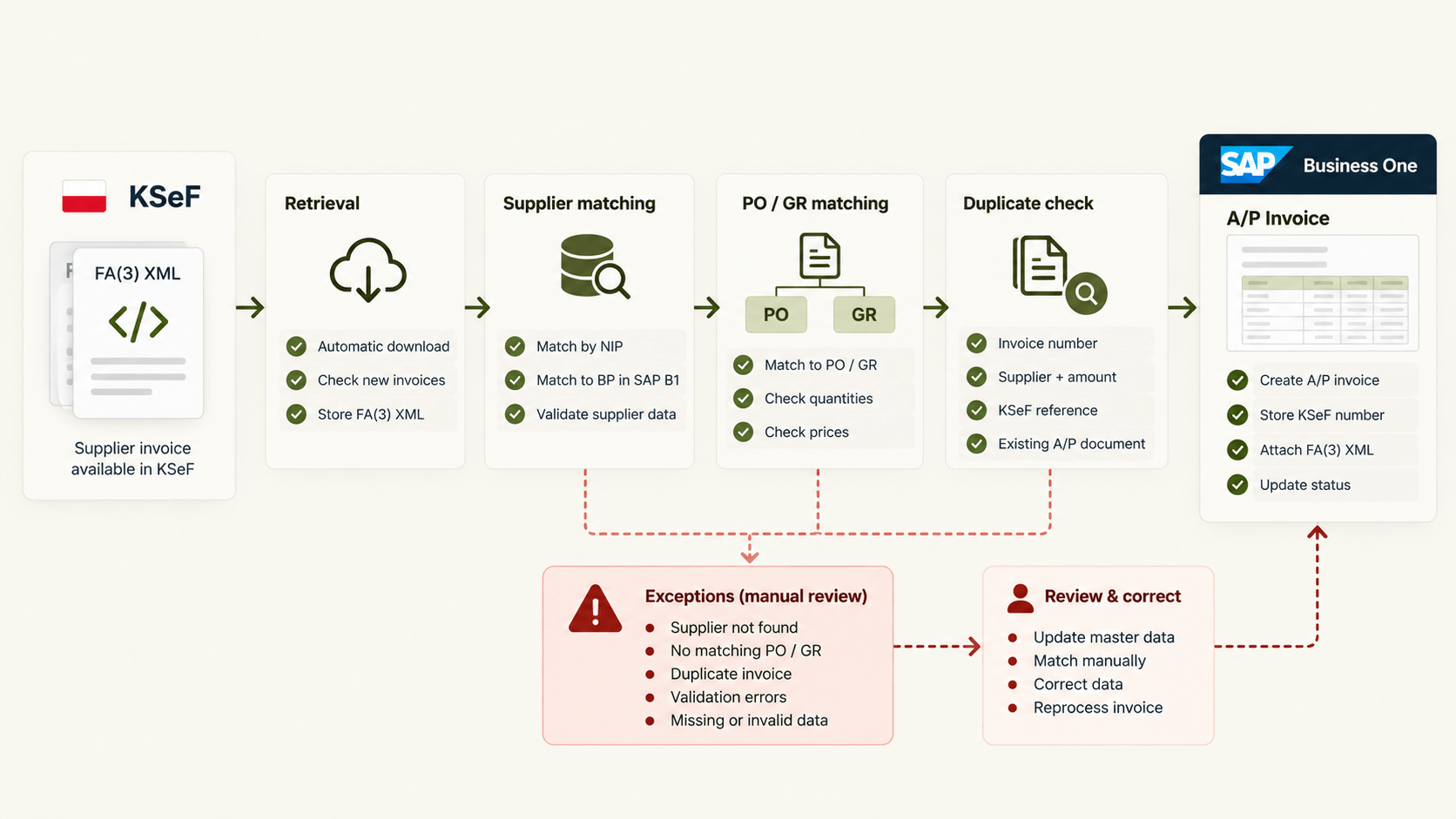
Receiving through KSeF applies to all VAT payers, not only those already issuing. For a B1 company, that means supplier invoices arrive as FA(3) XML and need to become A/P invoices.
The work includes retrieving invoices on a schedule, matching the supplier NIP to a B1 business partner, matching lines to purchase orders and goods receipts, detecting duplicates and routing exceptions to someone who can act. An e-invoicing setup that handles inbound and outbound flows together avoids building this twice.
KSeF Numbers, Status and Write-Back to SAP Business One
Every accepted invoice receives a KSeF number. Store it in B1, usually in a user-defined field on the marketing document, together with the acceptance confirmation (UPO). Finance needs to see rejections inside B1, not in a separate portal.
Plan for the offline modes as well: offline24, offline during system unavailability and emergency mode. Invoices issued offline are submitted later, and the KSeF number arrives after the document already exists in B1.
The KSeF number also needs to reach payment files, as the obligation to quote it in bank transfers applies from 1 January 2027. That touches the B1 payment wizard and bank export formats, which often belong to a different consultant.
A Scoping Checklist for ERP Consultants
Take these into the discovery workshop:
Which B1 document types are issued: A/R invoices, credit memos, down payments, reserve invoices?
How many tax codes are active, and which map to more than one legal scenario?
Where do GTU codes and procedure markers come from today?
Are business partner NIPs and addresses complete and structured?
Does the entity invoice in foreign currency, to public bodies or inside a VAT group?
Who processes inbound supplier invoices, and is PO matching expected?
Where will KSeF numbers, UPOs and rejection reasons live in B1?
Who owns payment file changes?
Our e-invoicing implementation roadmap covers the wider sequence from compliance assessment to production monitoring.
Where an Integration Layer Fits
SAP Business One stays the system of record. An integration layer reads B1 documents through its standard interfaces, maps them to FA(3), validates them before submission, handles KSeF communication and writes numbers and statuses back. The same layer can carry Peppol, EDI and other country formats, so a Polish entity does not need a separate add-on stack inside the ERP.
This approach does not remove the mapping work. It moves it into one place where it can be tested, versioned and changed when the schema changes.
FAQ
Does SAP Business One support KSeF natively? SAP's published FA(3) guidance targets SAP ERP and SAP S/4HANA through Document and Reporting Compliance. B1 projects typically rely on partner add-ons or an integration layer.
Is FA(3) mandatory for all SAP Business One users in Poland? FA(3) replaced FA(2) with KSeF 2.0 on 1 February 2026, and the issuance obligation applies in phases by taxpayer size.
Do we have to receive invoices through KSeF as well as send them? Yes. Receipt applies to all VAT payers in scope, so inbound A/P processing belongs in the project.
How are credit memos handled under KSeF? A B1 credit memo maps to a corrective invoice that references the original invoice's KSeF number.
How long does SAP Business One KSeF mapping take? It depends on document types, tax code complexity and master data quality. Scope it after a mapping review, not before.
Check Your Mapping Before It Checks You
If you are scoping a SAP Business One KSeF project, start with a mapping review of your client's document types and tax codes against FA(3). It shows where the hours are before the quote goes out. Talk to our team about your setup.
