

EDI Data Mapping Services: Why One Wrong Field Can Stop an Order
A retailer sends a purchase order at 02:00. By 08:00 it should be a sales order in your ERP, ready to pick. Instead, it sits in an error queue. The partner used a different identifier for the delivery location, and your ERP cannot work out which warehouse it means.
Or the order goes through, and that is worse. The partner ordered 20 cartons, but your ERP read 20 pieces. Nobody notices until the delivery arrives short and a chargeback follows.
Both problems start in the same place: the data map. EDI data mapping services exist to get that layer right, keep it right, and catch errors before they reach your ERP or your customer.
What EDI Data Mapping Services Actually Do
EDI data mapping is the set of rules that translates one system's data structure into another's. Your ERP stores an order one way. Your trading partner sends it another way, usually based on a standard such as UN/EDIFACT or ANSI X12, with its own rules on top. The map defines which field goes where and how each value is converted along the way.
EDI data mapping services cover the whole job: analysing partner requirements, building and testing the maps, running them in production, and updating them when something changes. Mapping is one part of a wider EDI integration platform that also handles connectivity, validation and monitoring.
Mapping, Translation and Integration: How They Differ
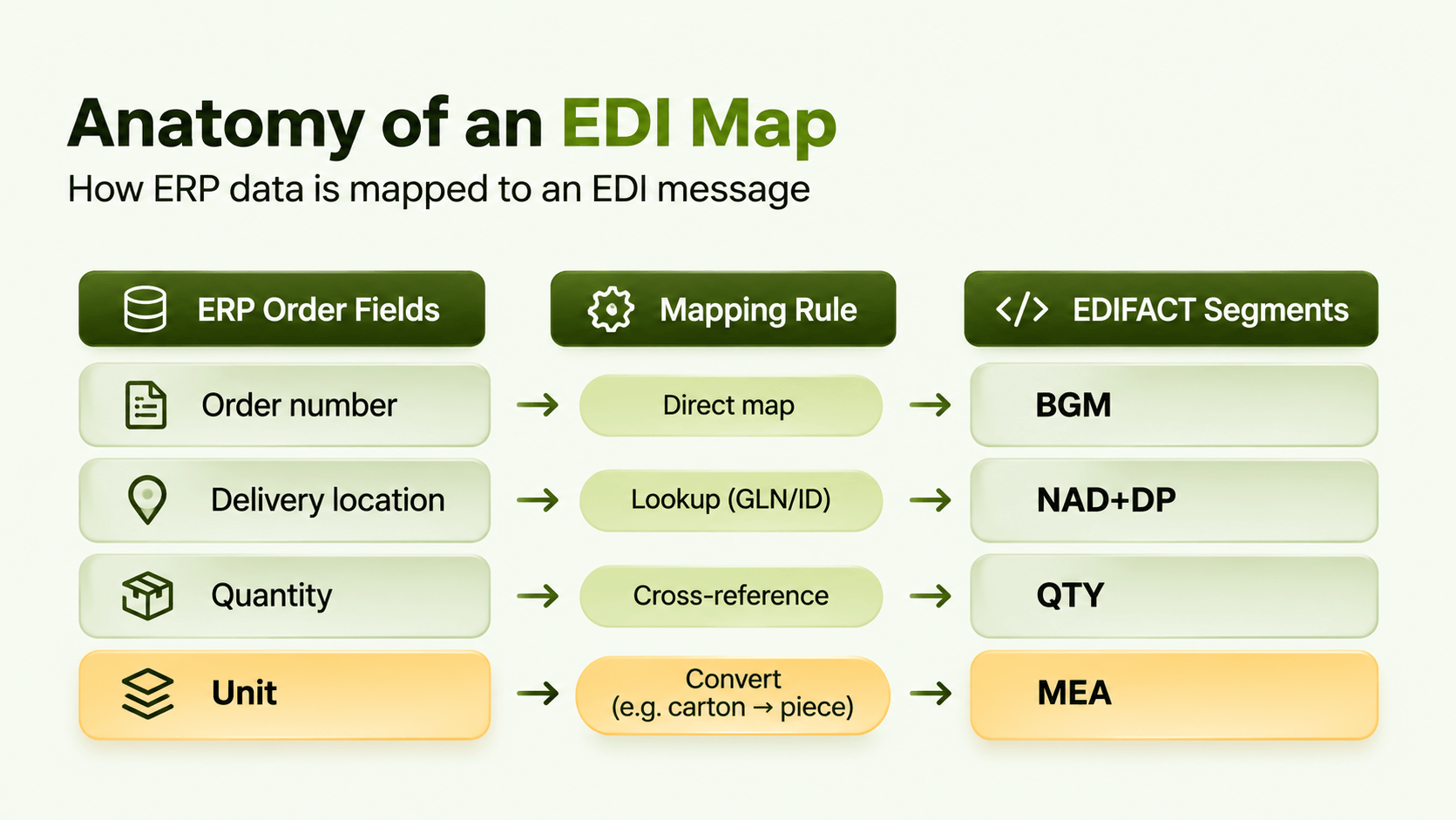
These three terms are often used as if they mean the same thing. They do not.
Translation converts between syntaxes, for example from an EDIFACT file to XML. Mapping decides what the data means on each side: which segment holds the buyer's order number, and which ERP field should receive it. Integration connects the systems so documents actually move, through an API, SFTP, AS2 or a network such as Peppol.
A translator without good maps produces technically valid files with the wrong content.
Inbound and Outbound Flows
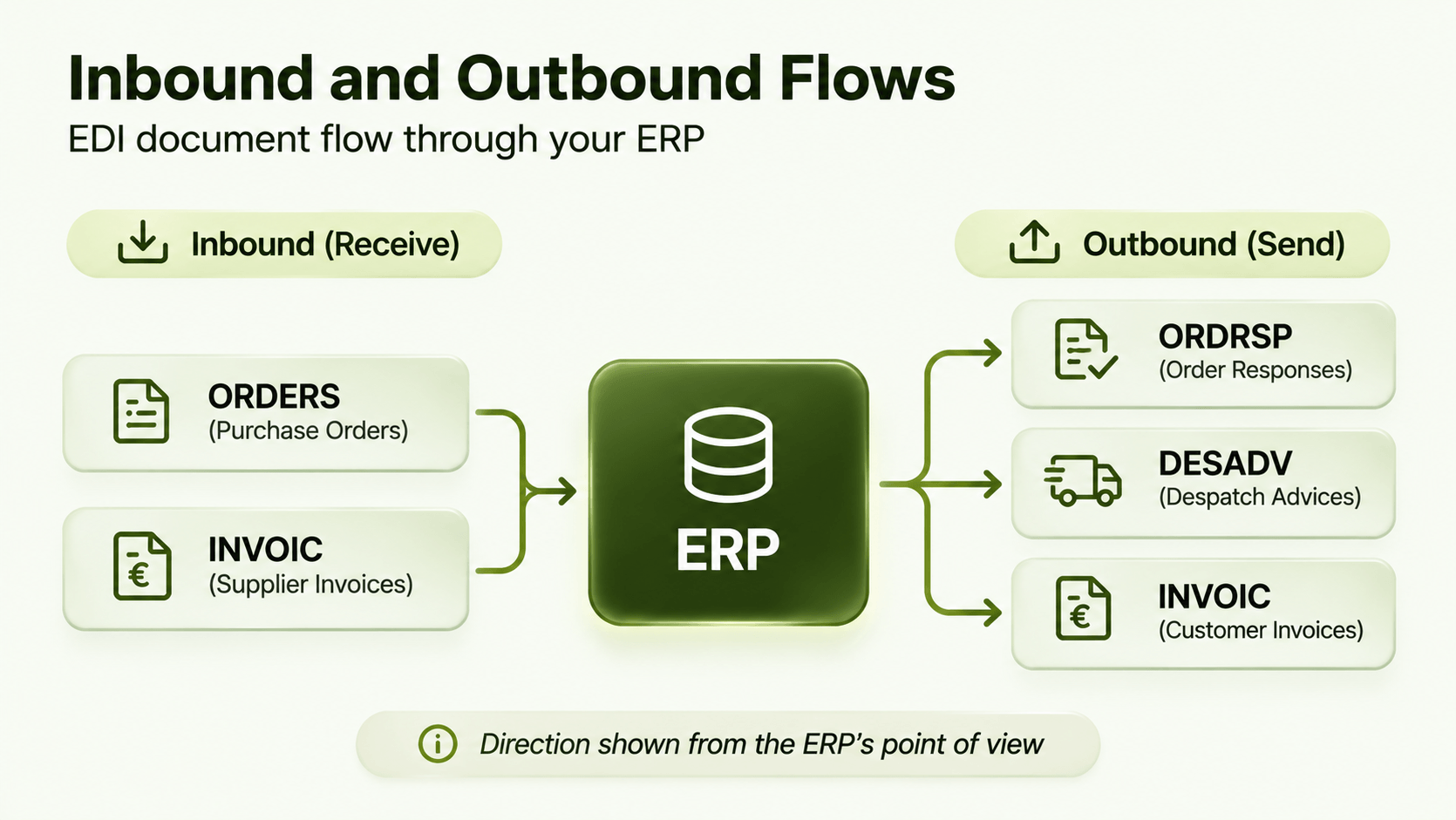
Direction is shown here from your ERP's point of view.
Inbound maps handle documents you receive, such as purchase orders, order changes and supplier invoices. Outbound maps produce documents you send, such as order responses, despatch advices and invoices. Most trading relationships need both directions, and each document type needs its own map.
Why Mapping Is Where EDI Projects Break
The connection to a trading partner is rarely the hard part. Most of the effort in an EDI project, and most of the errors after go-live, sit in the mapping.
Every Trading Partner Has Its Own Implementation Guide
A standard such as EDIFACT defines the message structure. It does not define how every company uses it.
Large retailers and buyers publish their own implementation guides. These say which segments are mandatory, which code values are accepted, and how stores, products and parties are identified. Two customers sending the "same" order message can need two different maps.
Qualifiers, Code Lists and Units of Measure
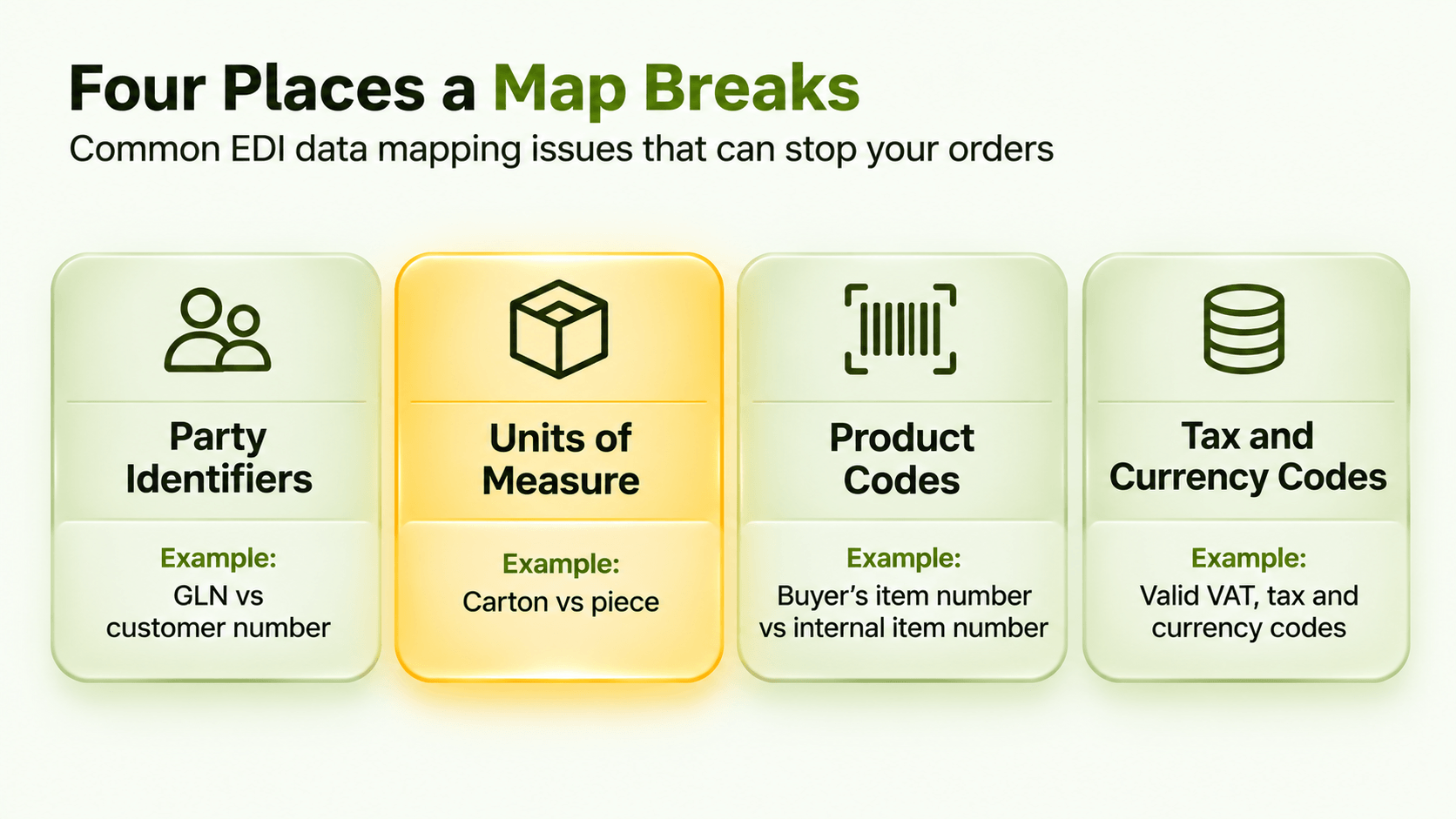
Small details cause most mapping failures:
Party identifiers. One partner identifies locations by GLN, another by its own customer or store number.
Units of measure. A carton and a piece are not the same, and the pack-size conversion has to sit somewhere in the flow.
Product codes. The buyer's item number usually needs a cross-reference to your internal item number.
Tax and currency codes. These must match the code lists the receiving system validates against.
The Business Cost of a Bad Map
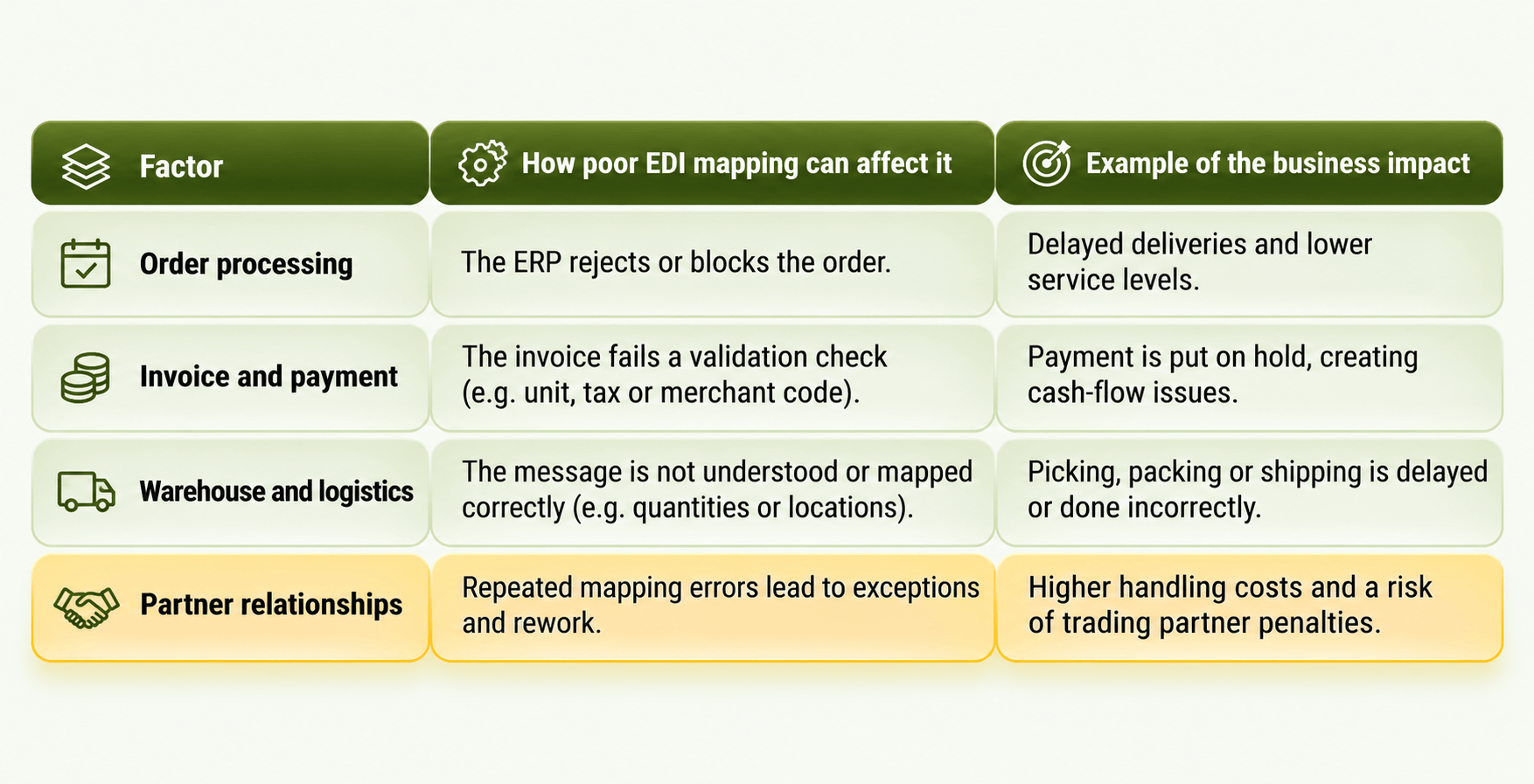
A bad map rarely announces itself. Orders get stuck in an error queue and ship late. Invoices get rejected by the buyer's system, and payment is delayed. Retailers with compliance programmes may issue chargebacks for incorrect or late despatch advices.
Then someone in customer service or finance fixes files by hand. That is exactly the work EDI was meant to remove.
What a Good EDI Data Mapping Service Includes
When you compare providers, look past the mapping tool. What protects your order flow is the process around it.
Partner Specification Review
Before any map is built, the provider should read the partner's implementation guide and compare it with the data your ERP actually holds. Gaps should be flagged early: a mandatory field your ERP does not store, a code list that needs a cross-reference, or a business rule that requires a change to your ERP set-up.
Map Build, Validation and Testing
Maps should be tested with realistic sample files from both sides. Tests should cover normal orders and edge cases, such as partial deliveries, cancelled lines and credit notes.
Validation should check business rules as well as structure, not only whether the file can be read. For XML e-invoices, you can run a first check yourself with HubBroker's free XML and e-invoice validator.
Test data should be anonymised or synthetic, so no personal data from production ends up in test environments.
Monitoring and Error Handling
After go-live, someone needs to see a failed document before your customer does. Look for status tracking, acknowledgement handling and clear error messages. One rejected order should be correctable while the rest keep moving.
Change Management When Partners Update Their Specs
Trading partners change their requirements: a new mandatory field, a new identifier, a new message version. A good service treats map maintenance as ongoing work with a defined change process, not as a new project every time.
Formats You'll Map Between
Most EDI data mapping work sits between three groups of formats.
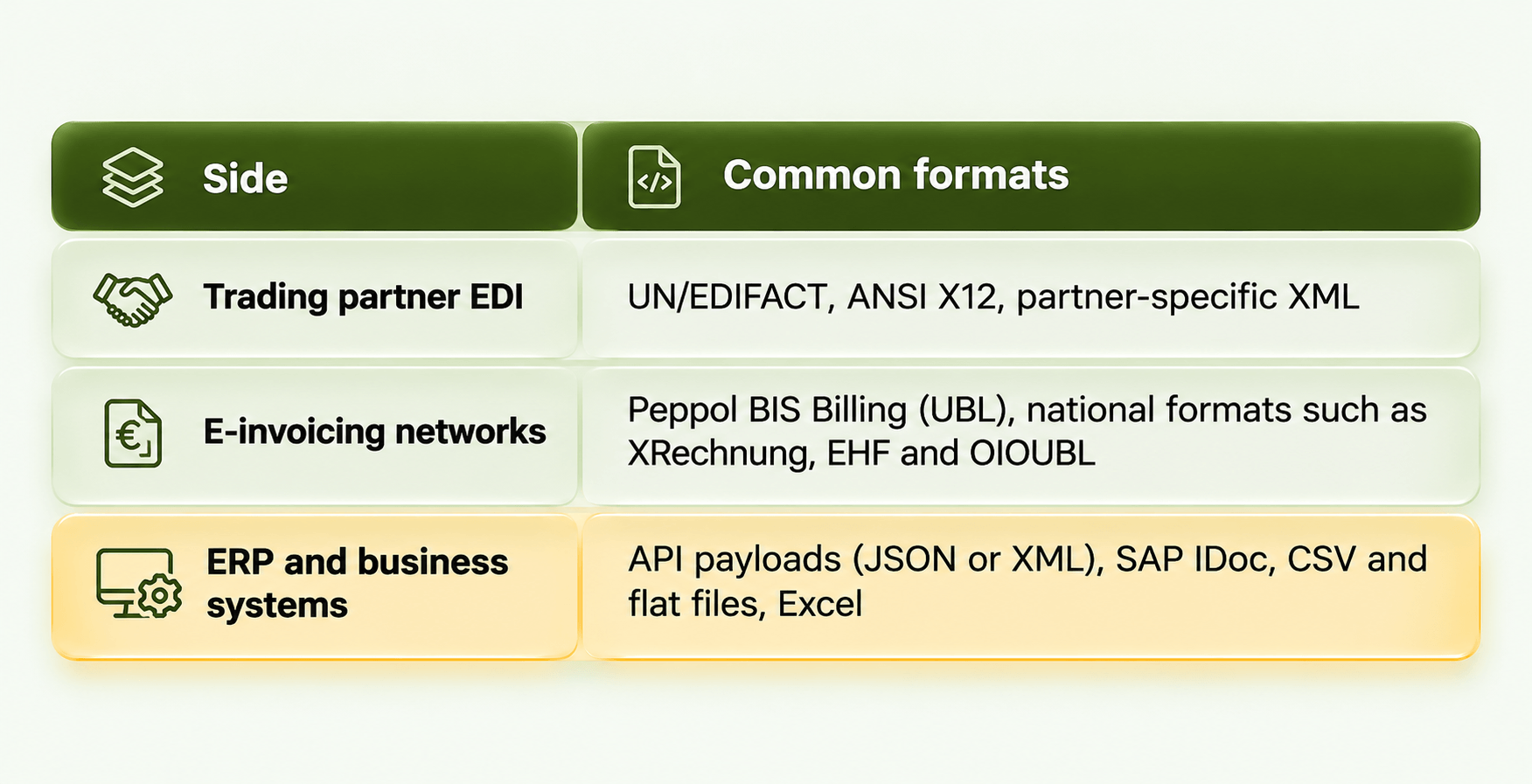
For e-invoicing, mapping means converting ERP invoice data into the format the receiver's network requires, with the right identifiers, tax codes and references. HubBroker handles this as part of its Peppol e-invoicing service, so EDI and e-invoice maps are managed in one place.
On the ERP side, the map has to follow how your system actually works. For Microsoft Dynamics 365 Business Central, for example, our Business Central EDI integration maps partner data to standard sales and purchase documents instead of forcing new processes on your team. The same principle applies to SAP Business One, Microsoft Dynamics 365 Finance & Operations and other ERPs.
In-House Mapping vs Managed EDI Data Mapping Services
Both models work. The right choice depends on how many partners you have, how often they change, and who on your team can maintain the maps.
When In-House Makes Sense
In-house mapping can work if you have a small number of trading partners with stable requirements. You also need an integration specialist who understands both EDI standards and your ERP data model, plus a mapping tool you already own and maintain.
When a Managed Service Is the Better Call
A managed service usually fits better when you onboard new partners regularly or trade with large retailers and public buyers that validate strictly. It also helps when e-invoicing mandates are adding new formats, or when your IT team has no spare capacity for map maintenance. It gives you cover when the person who built the maps moves on.
How HubBroker Handles EDI Mapping
HubBroker iPaaS sits between your ERP and your trading partners as an integration layer. You keep your ERP and its existing exports. The platform maps and transforms the data into each partner's required format, inbound and outbound.
Partner profiles and maps can be reused when you onboard partners with similar requirements, so each new connection does not start from zero. EDI, Peppol e-invoicing and Intelligent Document Processing run on the same platform. A new format requirement from a customer or a mandate does not mean adding another provider.
Frequently Asked Questions
What is the difference between EDI mapping and EDI translation?
Translation converts a file from one syntax to another, for example EDIFACT to XML. Mapping defines which data goes where and how values such as codes, units and identifiers are converted. You need both, but most errors come from the mapping.
How long does it take to onboard a new trading partner?
It depends on the partner's implementation guide, the number of document types, and how closely your ERP data matches what the partner requires. Reusing an existing map for a partner with similar requirements is usually faster than building one from scratch.
Can one map serve several trading partners?
Sometimes. Partners that use the same standard with similar implementation guides can share a base map, with partner-specific rules on top. Partners with strict or unusual requirements usually need their own map.
Does EDI mapping cover Peppol e-invoicing?
Yes. Your ERP invoice data has to be mapped to the Peppol invoice format before it can be sent. The same discipline applies: required fields, party identifiers, tax codes and validation rules.
Who maintains the maps when a partner changes its specification?
With in-house mapping, your team does. With managed EDI data mapping services, the provider should handle the change under an agreed process. Check what your service agreement covers before you rely on it.
Not Sure Where Your Maps Are Failing?
If orders keep landing in error queues or invoices keep coming back, the cause is usually a handful of mapping rules, not the whole integration. Tell us which ERP and trading partners you work with, and we will walk you through how that flow would run in HubBroker iPaaS.
