
Duplicate Invoice Detection: Why AP Teams Still Pay Twice
You usually find a duplicate payment months after it happened. It turns up during a supplier statement reconciliation, an audit sample, or when a supplier kindly points out a credit balance. By then the money is gone and recovering it means emails, credit notes and awkward calls.
Most AP teams already have duplicate invoice detection in their ERP. So why does it keep missing? The short answer is that the check runs on data that looks different every time the same invoice arrives.
What duplicate invoice detection actually checks
Exact-match rules
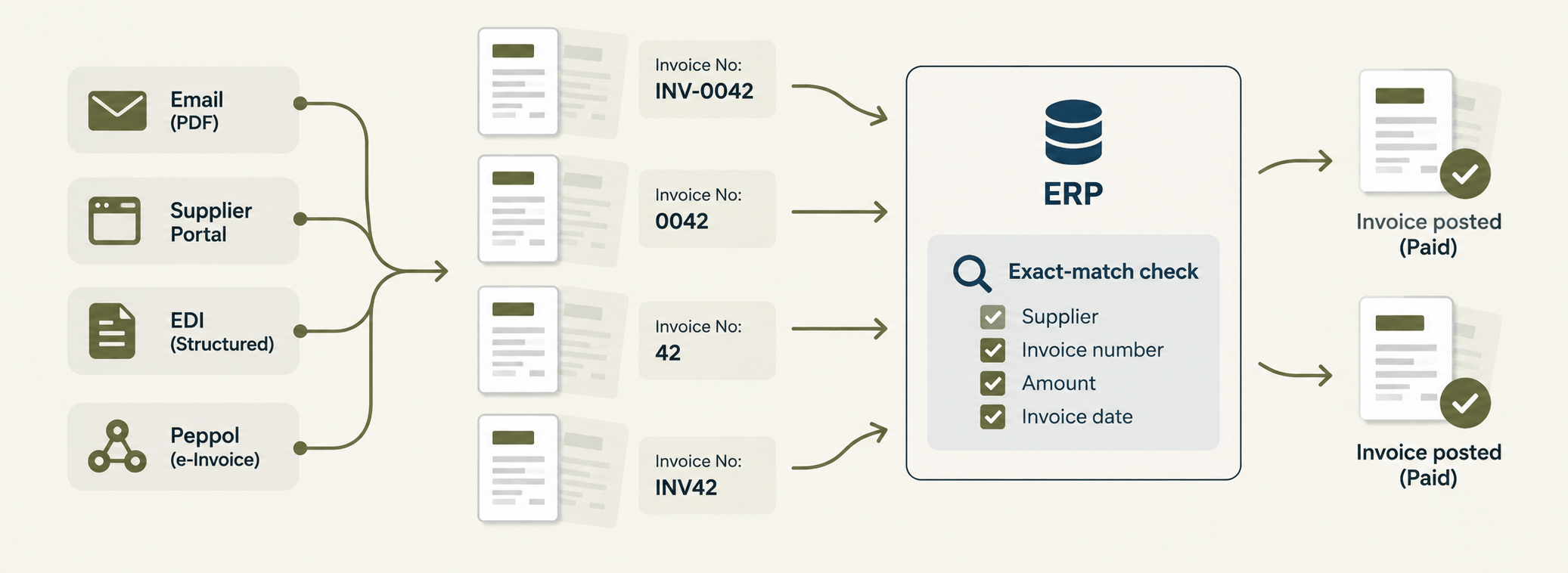
Standard ERP duplicate checks compare a handful of fields: supplier, invoice number, amount and invoice date. If all of them match an invoice already posted, the system blocks or warns.
Why "exact" is the weak point
An exact-match rule only works when both copies of an invoice are keyed or imported identically. Change one character in the invoice number and the ERP sees two different invoices. Two invoices that look identical to a person can look unrelated to a rule.
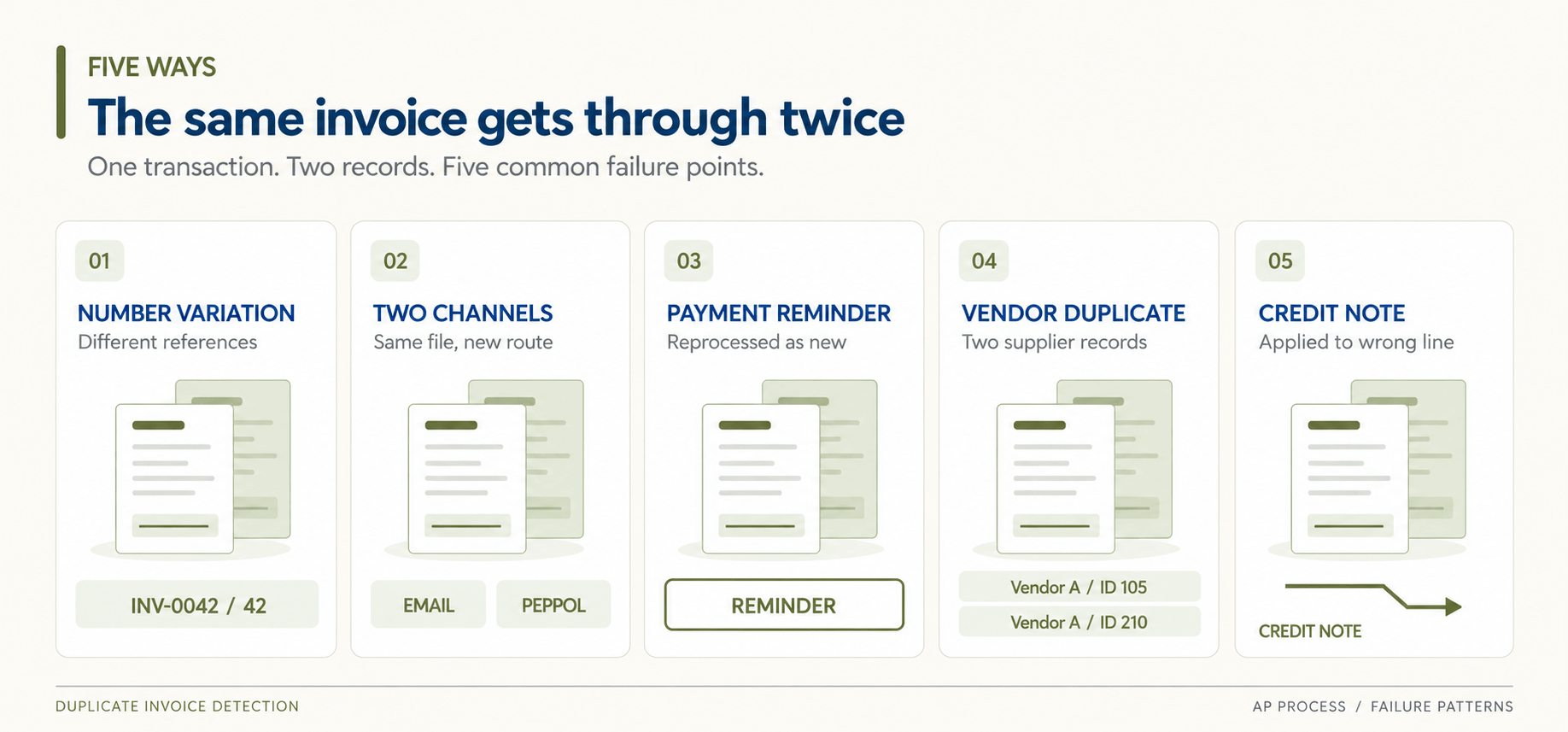
Five ways the same invoice gets through twice
1. The invoice number is entered differently
"INV-0042", "0042" and "42" are the same invoice to your supplier. To an exact-match rule they are three. Add a typed letter O instead of a zero, or a missing prefix, and the check never fires.
2. The same invoice arrives through two channels
A supplier emails a PDF, then uploads it to a portal, or sends a structured e-invoice through the Peppol network as well as a PDF copy "for your records". Each channel produces its own record, often with slightly different data.
3. A reminder is treated as a new invoice
Payment reminders frequently carry the full invoice. When they land in the AP inbox, someone processes them as new documents, especially when the original is still waiting for approval.
4. One supplier, two vendor records
If the same supplier exists twice in your master data, perhaps after an address change or an acquisition, the duplicate check compares within each vendor record and never across them.
5. Credit notes cancel the wrong line
A partial credit note applied to the wrong invoice leaves the original open. The supplier re-invoices, and you end up paying part of the same amount twice.
Why tighter ERP rules alone don't fix it
The natural reaction is to tighten the rules: match on amount and supplier only, or ignore the invoice number. That catches more duplicates, but it also blocks legitimate invoices, such as monthly subscriptions with identical amounts. AP gets flooded with false alerts, and within a few weeks the rules are loosened again.
The ERP is not the problem. The problem is inconsistent data arriving from many sources. Whether you run Microsoft Dynamics 365 Business Central or another system, the duplicate check can only be as good as the data it receives. That is why the fix sits in front of the ERP, in the integration layer that feeds it.
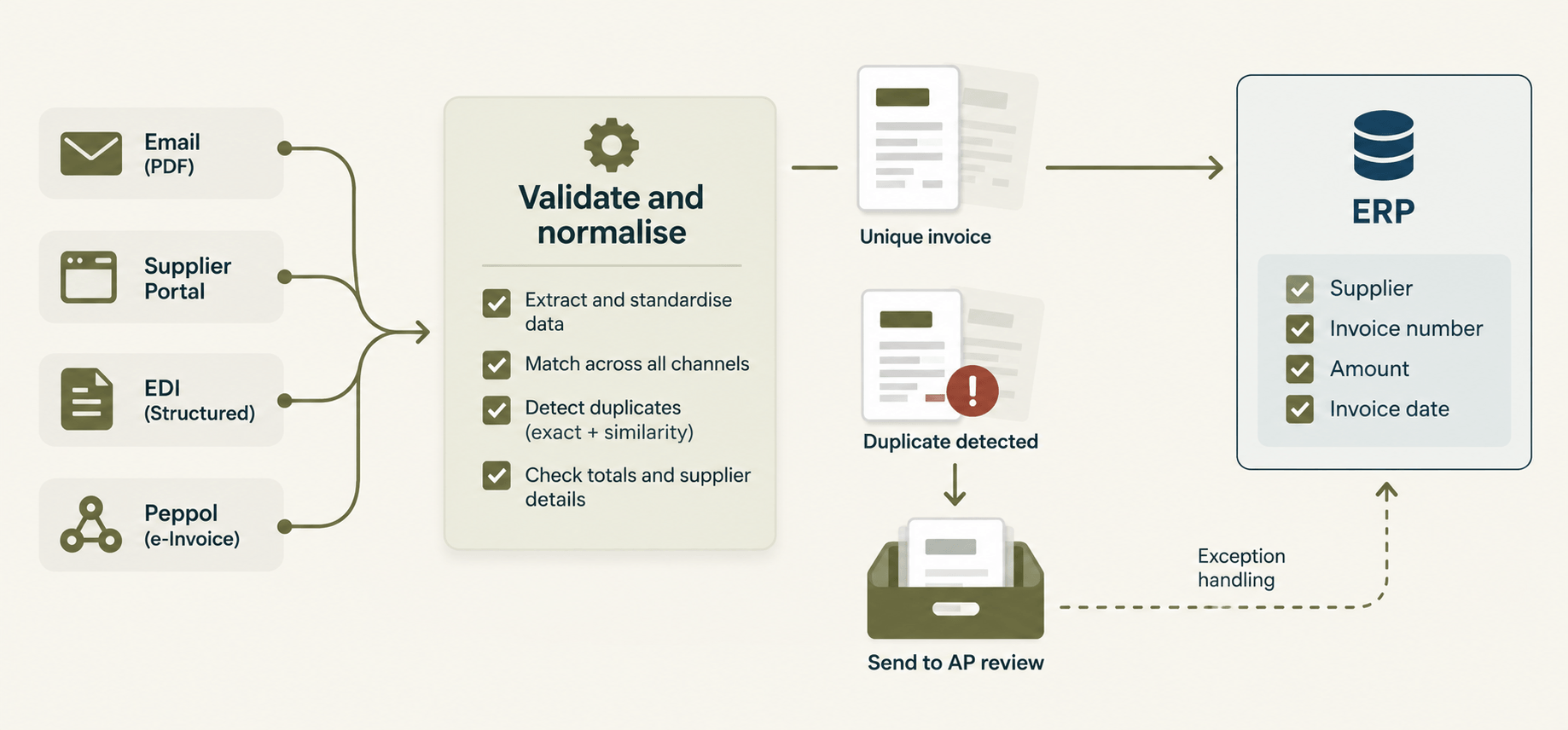
Catching duplicates before they reach the ERP
Normalise invoice data at intake
When PDFs and scans are captured with AI document processing, invoice numbers, dates, amounts and supplier references are converted into one consistent format before anything is posted. "INV-0042" and "42" become comparable. The same applies when PDFs are converted to structured XML for your ERP.
Match across channels, not within one
Duplicate invoice detection works best when every channel (email, portal, EDI, Peppol) feeds one intake point. Then a PDF and an e-invoice for the same transaction are checked against each other instead of living in separate queues.
Keep your ERP, add a control layer
None of this requires replacing your ERP. A validation step in front of it checks for duplicates, missing fields and mismatched totals, and sends only clean, unique invoices through. Exceptions go to AP with the original document attached.
A quick self-check for your AP process
Answer yes or no:
Do invoices reach you through more than one channel?
Is the invoice number typed by hand for any supplier?
Have you found a duplicate vendor record in the last year?
Does your duplicate check run only inside the ERP?
Do payment reminders arrive in the same inbox as invoices?
Two or more "yes" answers mean duplicates can slip through today.
FAQ
What is duplicate invoice detection? It is the process of identifying invoices that have already been received or paid, so the same amount is not paid twice. It usually compares supplier, invoice number, amount and date.
Doesn't my ERP already do this? Most ERPs include an exact-match check. It works when data is consistent, but misses duplicates where the invoice number, format or vendor record differs.
Does e-invoicing eliminate duplicate invoices? It reduces keying errors, because the data arrives structured. It does not stop a supplier sending the same invoice twice, or sending both an e-invoice and a PDF.
What is fuzzy matching in AP? Fuzzy matching compares invoices that are similar rather than identical, for example "INV-0042" and "42" from the same supplier for the same amount.
How do I recover a duplicate payment? Contact the supplier, request a credit note or refund, and record the correction. Then trace how the duplicate got through so the same gap does not repeat.
Stop the second payment before it starts
If your invoices arrive through several channels, start by mapping where each one comes from. When you want to see how a single, normalised intake in front of your ERP would work for your suppliers, book a short demo with the HubBroker team.
