
The ERP Nobody Supports Can Still Send Peppol Invoices. Here's How.
Your ERP was built in-house fifteen years ago, or heavily customised by a partner who no longer exists, or it runs on a platform the vendor stopped developing. It handles orders, stock and invoicing exactly the way your business needs. What it does not have is an e-invoicing connector, and no vendor is going to build one.
For IT managers, this is where e-invoicing turns from a finance topic into an architecture problem. The good news: a custom ERP e-invoicing integration does not require rewriting the ERP or replacing it. It requires getting invoice data out reliably, and putting a layer in between that handles formats, validation and delivery.
Why custom ERPs get left behind when e-invoicing becomes mandatory
Off-the-shelf connectors only cover the big ERP names
E-invoicing providers build pre-built connectors for the systems with the largest install base. If you run Microsoft Dynamics 365 Business Central or SAP Business One, you have options. If you run a homegrown .NET application, a legacy AS/400 system or a heavily modified older ERP, you are usually told to "export a file and figure it out".
The real cost: manual workarounds, rejected invoices, missed deadlines
Without a proper integration, teams fall back on workarounds: rekeying invoices into a portal, emailing PDFs that customers can no longer accept, or writing one-off scripts that break when a format rule changes. Each of these creates risk. Structured e-invoices are validated against strict rules, and an invoice with a missing buyer reference or wrong tax code is rejected, which delays payment.
What a custom ERP e-invoicing integration actually needs to do
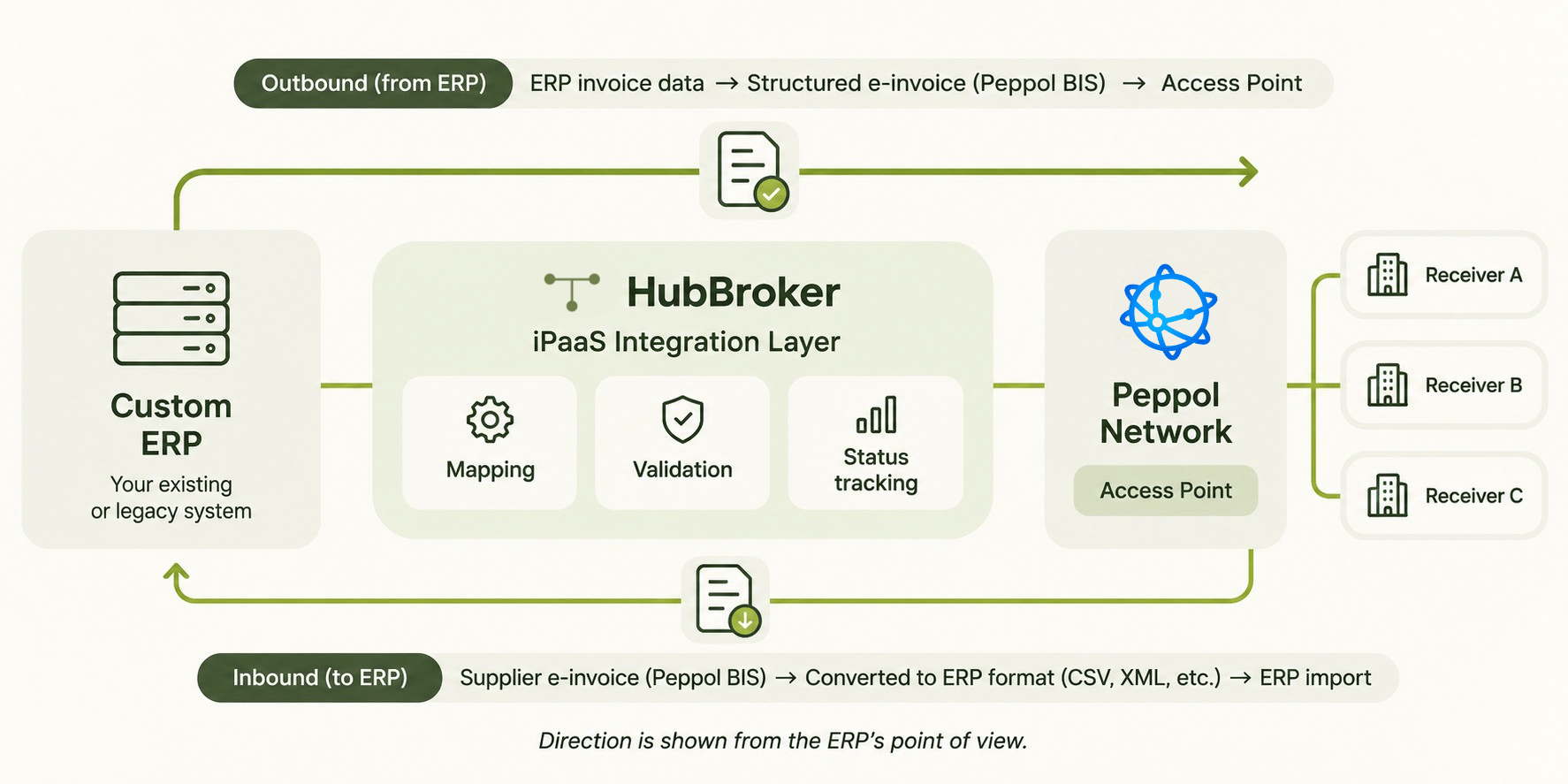
Outbound: turning ERP invoice data into compliant structured formats
Direction here is shown from the ERP's point of view. Outbound, the integration takes invoice data from your ERP and converts it into the structured format the receiver expects. On the Peppol network that is typically Peppol BIS Billing, based on UBL. The receiver is identified through the Peppol lookup services, and the invoice is delivered through a certified Peppol Access Point.
Inbound: receiving e-invoices back into a system that only reads its own format
E-invoicing works in both directions. Suppliers will start sending you structured invoices too, and your ERP will not understand Peppol UBL natively. Inbound, the integration converts received e-invoices into whatever your ERP can import: a CSV, a custom XML schema or a database staging table.
Validation, status handling and archiving
A working integration validates every invoice before it leaves, so errors are fixed before the receiver rejects them. It also tracks delivery status and keeps the original document alongside the converted data, so finance and auditors can trace each invoice end to end.
Four ways to get data out of a system nobody else supports
Every ERP produces invoice data somehow. The question is which route is the most stable.
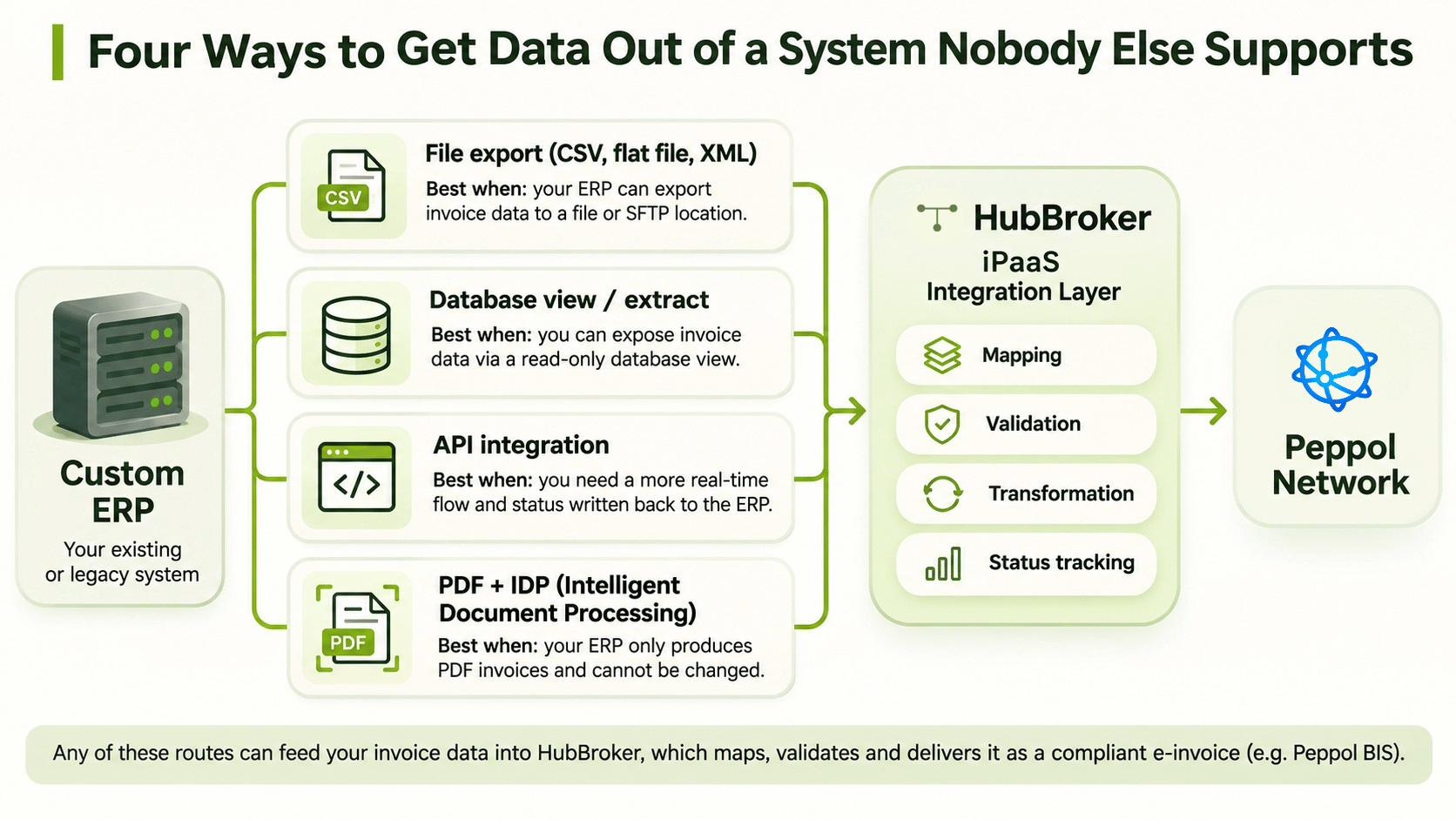
File exports (CSV, flat file, XML)
Most custom ERPs can write a file to a folder or SFTP location. This is often the fastest starting point. The integration layer picks up the file, maps the fields and produces the e-invoice. The ERP needs no code changes, only a reliable export.
Database views or scheduled extracts
If file exports are incomplete, a read-only database view can expose invoice headers and lines in a controlled way. Your team owns the view; the integration reads from it on a schedule.
An existing API, even an undocumented or partial one
Many in-house systems already have an API used by a webshop or reporting tool. Even a partial API can be enough for invoice data and for writing status updates back to the ERP. This is where ERP API integration gives you a more real-time flow than files.
PDF output converted with IDP / PDF-to-XML
If the only thing your ERP produces is a PDF invoice, that can be the source too. Intelligent Document Processing extracts headers, lines, VAT and totals, and PDF to XML invoice conversion turns the result into structured data that can then be validated and sent. It is a pragmatic route for systems that cannot be touched at all.
Where an integration layer fits, and why you don't replace the ERP
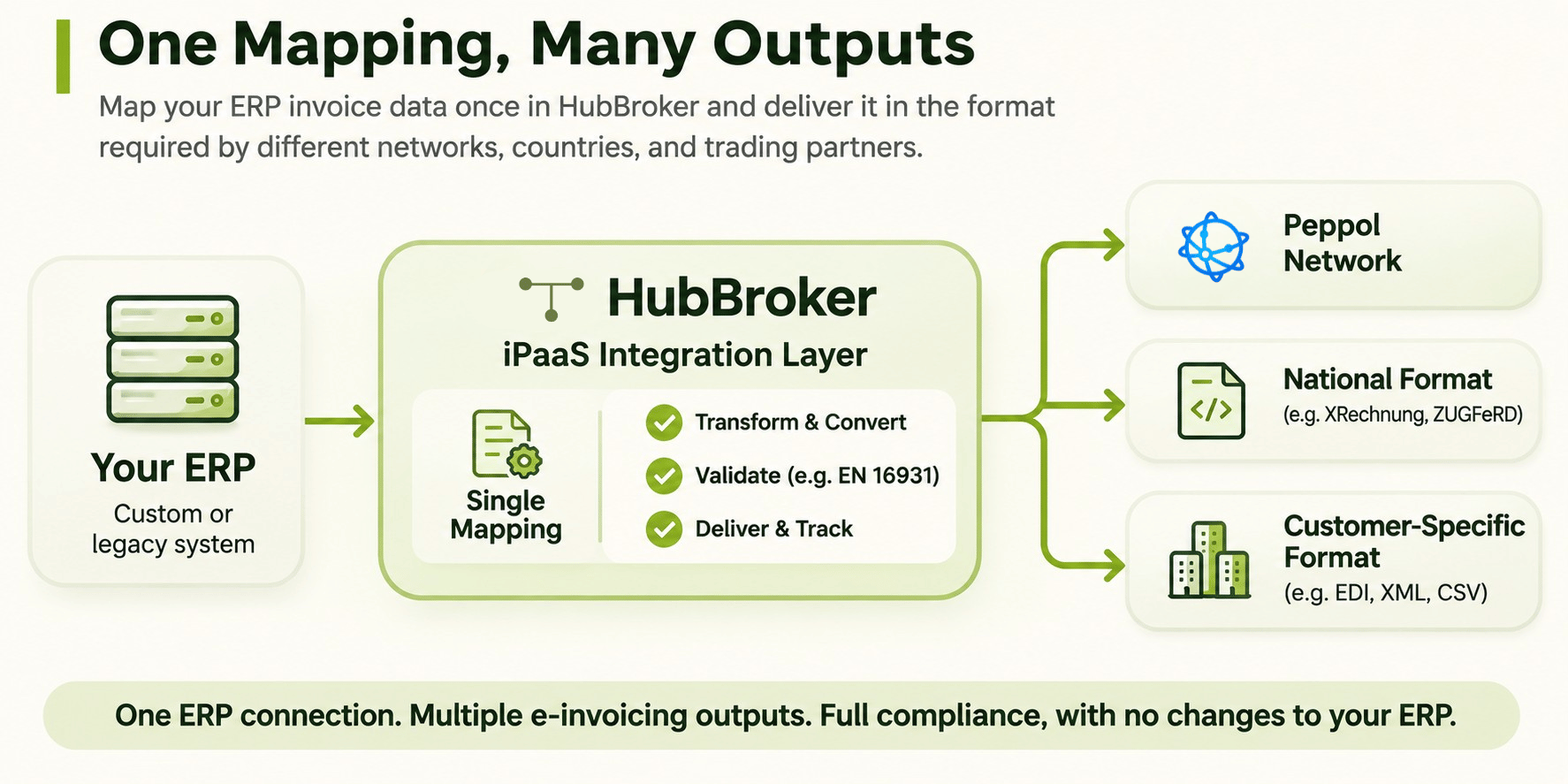
Mapping once, sending to many networks and countries
Once your ERP's invoice data is mapped into the integration layer, that single mapping can feed different outputs: Peppol, national formats or customer-specific requirements. You maintain one connection from the ERP, not one per country or trading partner.
Keeping the ERP untouched while mandates change
E-invoicing rules change. Formats get updated, validation rules tighten, new countries introduce mandates. When that logic lives in the integration layer, those changes are handled there. Your custom ERP stays as it is, and your developers stay focused on the business logic that made you build it in the first place.
A practical rollout plan for IT managers
Audit what your ERP can export today
List every route you have: file exports, database access, APIs and PDF output. Then check the data itself. Buyer identifiers, tax IDs, order references and payment details are the fields most likely to be missing or stored inconsistently.
Pilot with one trading partner or one country
Start with a single customer or one market. Test standard invoices, credit notes and failure cases, such as a missing mandatory field or a rejected delivery. Confirm that status responses reach the right place.
Scale to further mandates
Once the first flow is stable, add more receivers, inbound invoices and further countries on the same mapping. Our e-invoicing implementation roadmap covers the stages from compliance assessment to production monitoring in more detail.
FAQ
Can a custom or legacy ERP connect to Peppol without vendor support?
Yes. Peppol does not care which ERP created the invoice, only that the document is valid and delivered through an Access Point. An integration layer takes data from your ERP through a file, database, API or PDF, and handles the Peppol format and delivery.
Do we need to change our ERP's code?
Usually not. A file export, database view or existing API is often enough. Small changes may be needed if mandatory invoice fields are not stored in the ERP today.
What if our ERP only produces PDF invoices?
PDF invoices can be converted into structured data with Intelligent Document Processing, then validated and sent as e-invoices. A structured export is more robust long term, but PDF conversion is a workable starting point.
How do we handle incoming e-invoices?
The integration layer receives e-invoices from the network and converts them into a format your ERP can import, such as CSV or your own XML schema.
How long does a custom ERP e-invoicing integration take?
It depends on the quality of your export, the number of receivers and countries, and how complete your invoice data is. The audit step above gives the clearest picture of the effort involved.
Talk through your ERP's options
If your ERP is the one nobody else supports, the first step is understanding what it can already export. Share what you have, and HubBroker's integration team can walk you through the routes that fit your system, without touching the ERP itself. Book a conversation with HubBroker
