
BigCommerce ERP Integration: The B2B Wholesale Playbook
A trade buyer logs in, orders 400 units at the price agreed last month, and checks out. Your ERP has a newer price list. Stock that showed as available was allocated to another customer this morning. Your team spends the afternoon on credit notes, phone calls and manual corrections.
This is how B2B wholesale looks when the webshop and the back office run on separate data. A BigCommerce ERP integration fixes it by making both systems work from the same orders, prices and stock. This playbook covers what has to move, the decisions to make before you build, and how to choose an integration approach.
Why B2B wholesale breaks without BigCommerce ERP integration
Retail ecommerce can survive some manual work. Wholesale can't. Order values are higher, price agreements are customer-specific, and buyers expect accurate availability and delivery dates.
Manual re-keying turns every order into a delay
When orders are copied from BigCommerce into the ERP by hand, every order waits for someone to process it. Picking starts later, invoices go out later, and typing errors reach the customer. As volumes grow, the backlog grows with them.
Trading partners also set deadlines. Large buyers often require structured order and invoice exchange before they approve a supplier, and slow onboarding can cost wholesalers the contract.
Customer-specific prices and stock levels drift apart
Your ERP holds the negotiated prices, credit limits and real stock. If BigCommerce gets those figures late, or not at all, buyers order at the wrong price or order stock you don't have. Each mismatch becomes a credit note, a cancelled order or a lost customer.
What data has to move between BigCommerce and your ERP
Direction is shown from the ERP's point of view.
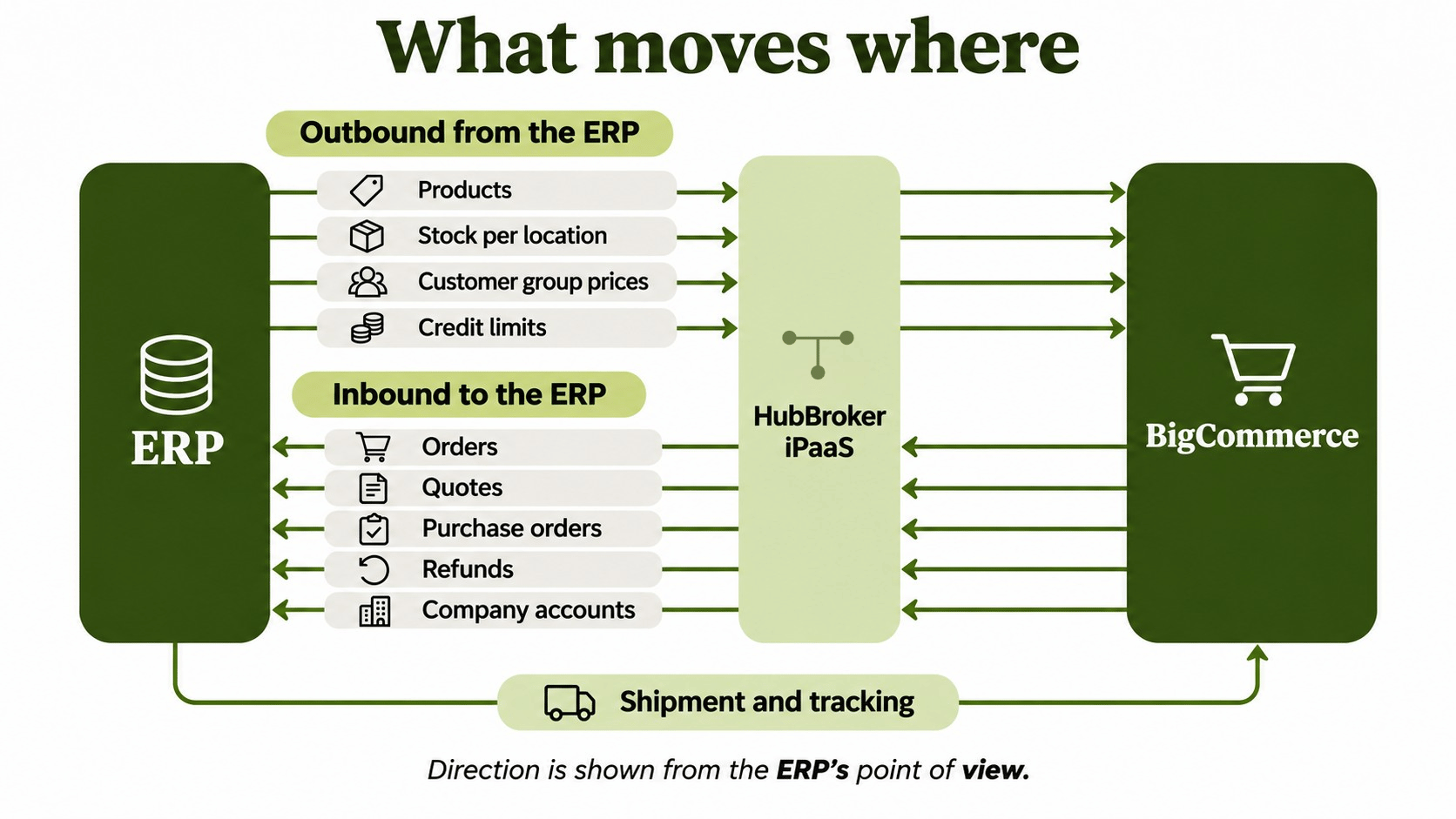
Outbound from the ERP: products, stock, price lists and credit limits
The ERP should normally be the source for item master data, stock per warehouse and approved prices. For wholesale, that means sending prices to the right customer groups so a signed-in trade buyer sees their own price instead of the retail catalogue price. HubBroker's BigCommerce integration supports customer group price lists, location-based stock updates and variant-level SKU matching.
Inbound to the ERP: orders, quotes, purchase orders and company accounts
Orders should reach the ERP with their storefront reference, customer account, taxes, discounts and shipping charges kept as separate amounts. Refunds should come in linked to the original order so finance can post the correct credit. Shipment and tracking data then flows back outbound to BigCommerce.
The wholesale playbook: five integration decisions
Agree on these five points before anyone writes a mapping. They decide whether the integration holds up after go-live.
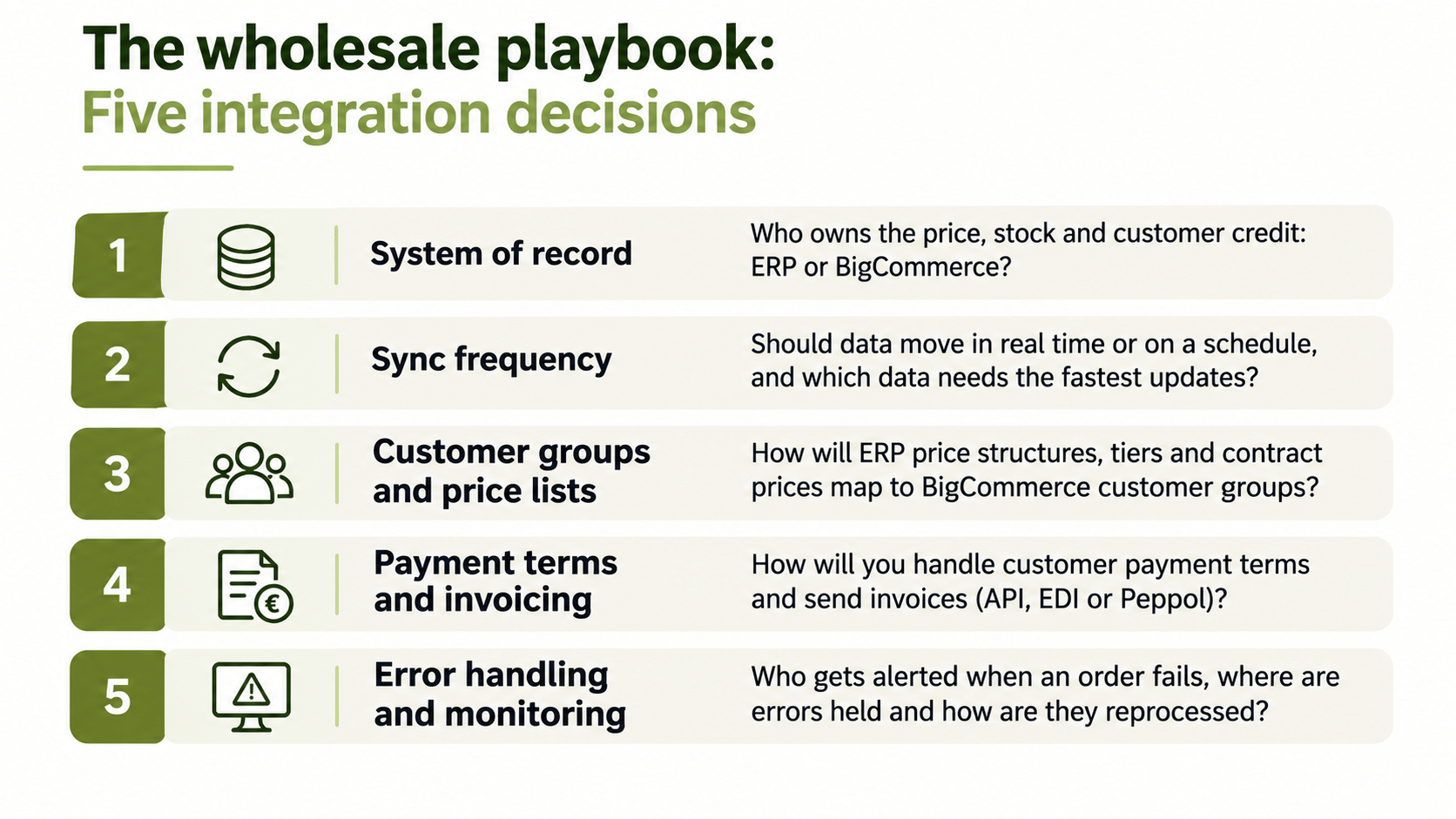
Decide the system of record for each data type
Pick one owner for each data type. The ERP usually owns prices, stock and customer credit. BigCommerce owns the order as placed and the storefront content. Two systems editing the same field is the most common cause of drift.
Choose sync frequency: real time or scheduled
Stock and order status need frequent updates. Price lists and product data can usually sync on a schedule. Match the frequency to the business impact of stale data, not to what is technically possible.
Map customer groups and price lists
Wholesale pricing lives in customer groups, tiers and contract prices. Map each ERP price structure to its BigCommerce equivalent and test with real buyer scenarios, such as a tiered quantity break or a customer with two delivery addresses.
Handle payment terms and invoicing
B2B buyers pay on terms and need invoices in a format their systems accept. In a growing number of European countries that means structured e-invoices, often sent over Peppol. Decide early whether invoices go from the ERP through API, EDI or Peppol. This comparison of API, EDI and Peppol for e-invoicing explains how the options fit together.
Plan error handling and monitoring
Orders will fail on missing SKUs, unknown customers or invalid tax codes. Decide who gets alerted, where failed transactions are held and how they are reprocessed. An integration with no monitoring turns small errors into unnoticed backlogs.
Native connector, custom build or integration layer?
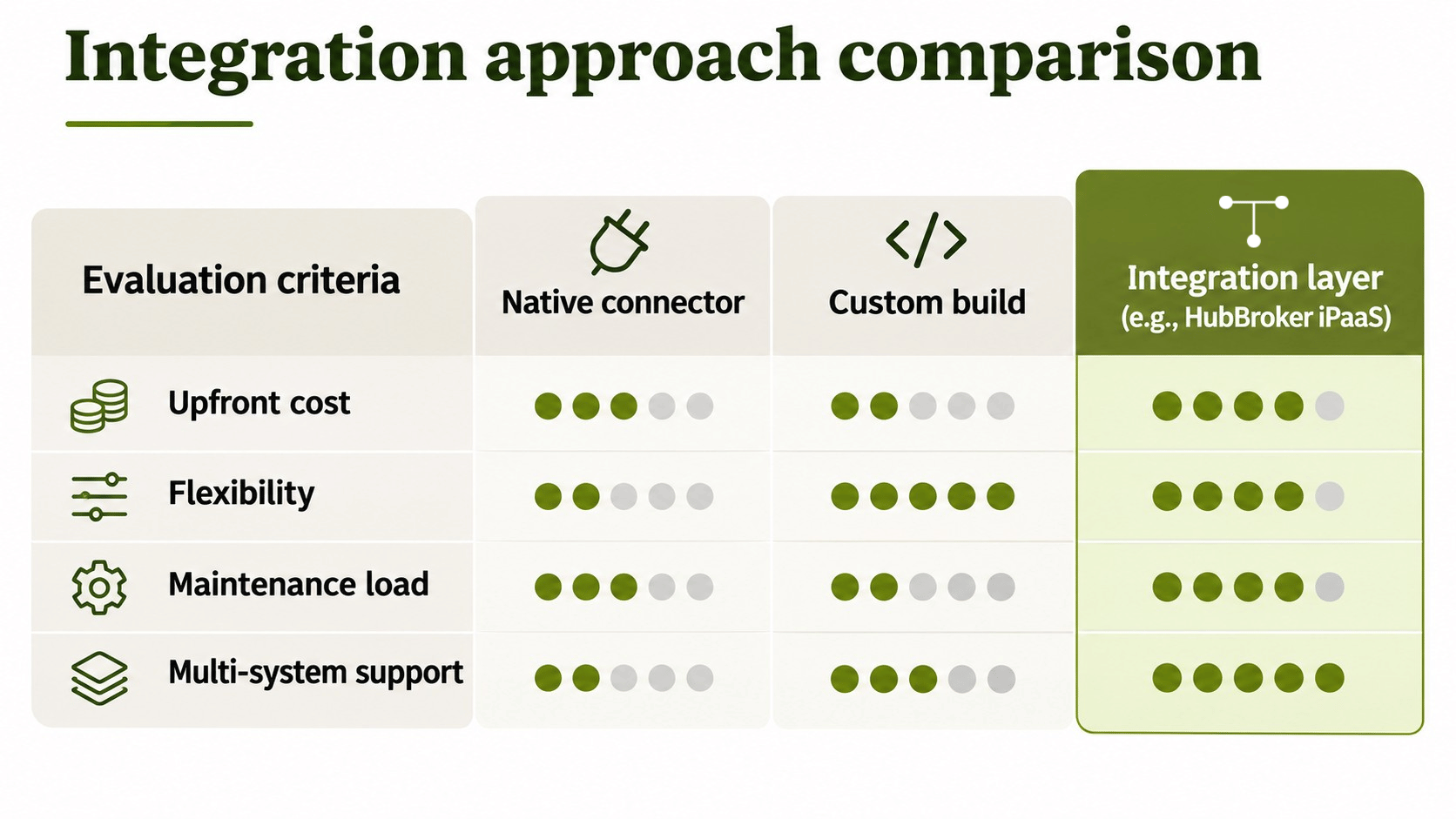
A native connector suits a simple setup. A custom build suits unusual logic and a team that can maintain it. An integration layer suits wholesalers who need to add channels, warehouses or trading partners without rebuilding each time.
Where an integration layer fits your existing ERP
You don't need to replace your ERP to sell wholesale on BigCommerce. HubBroker iPaaS sits between BigCommerce and the ERP you already run, including Microsoft Dynamics 365 Business Central, Microsoft Dynamics 365 Finance & Operations, SAP Business One, e-conomic, Uniconta and Rackbeat.
For example, a Business Central integration can import webshop orders, match customers to existing accounts and send posted invoices and shipment details back to the channel. The same platform also handles EDI with retailers and Peppol e-invoicing, so wholesale, marketplace and invoicing flows run through one connection layer.
FAQ
How long does a BigCommerce ERP integration take?
It depends on the ERP, the number of data flows and how clean the master data is. A standard order, stock and price flow is quicker than a setup with custom pricing logic and several warehouses. [TO CONFIRM: typical timeline from the delivery team]
Does BigCommerce B2B Edition need a different integration than standard BigCommerce?
The core flows are the same, but B2B Edition adds company accounts, quotes and purchase-order payment that also need mapping to the ERP.
Can I integrate BigCommerce with more than one ERP or warehouse system?
Yes. An integration layer can route orders to different ERPs or warehouses and collect stock from several locations into one storefront.
What happens to orders if the integration goes down?
With proper monitoring, failed or delayed orders are held and reprocessed instead of lost. Check that any solution you choose shows transaction status and lets you resend failed documents.
Do I need to replace my ERP to sell wholesale on BigCommerce?
No. Most wholesalers keep their existing ERP and connect it to BigCommerce through an integration layer.
Get your order-to-ERP flow reviewed
If your team still re-keys BigCommerce orders or corrects prices after checkout, start by mapping where the data breaks. Book a demo with HubBroker to review your current flow and see what a connected setup would look like.
