
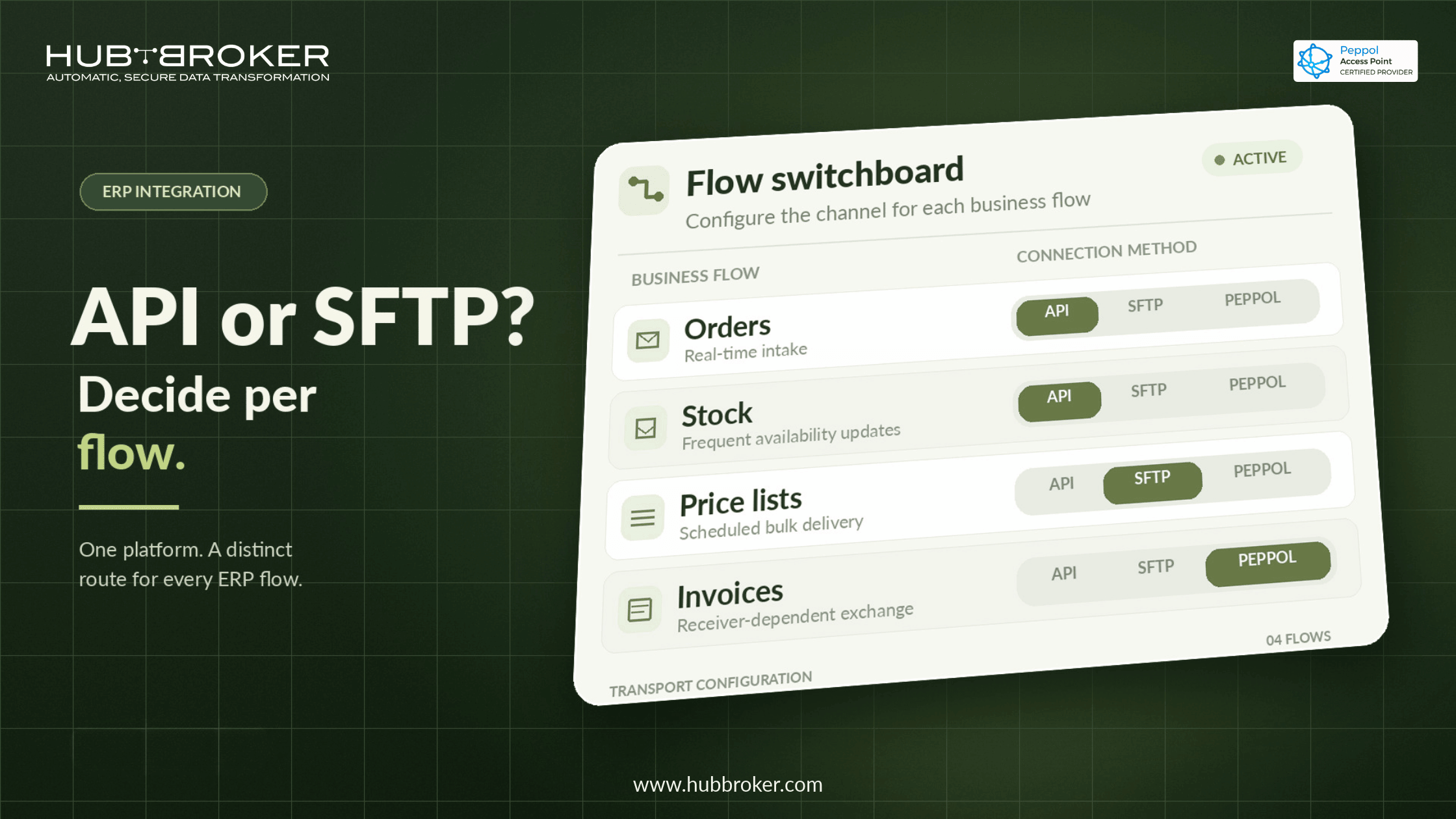
API vs SFTP for ERP Integration: Decide Per Flow, Not Per Platform
Many integration roadmaps start with a single rule, such as "all new integrations go over APIs." It looks clean on an architecture slide. Then the first retail customer will only accept EDI files on SFTP, and a nightly price-list sync of 80,000 lines hits the ERP's API throttling limits.
The api vs sftp erp integration debate usually goes wrong at this point. Neither method is better in general. Each one fits certain flows, and an ERP landscape contains both kinds. This article sets out how to decide flow by flow.
Why "API vs SFTP" Is the Wrong Question at Platform Level
An ERP rarely has one integration pattern. A single Business Central or F&O tenant can run three kinds of flow at once:
Real-time order intake from a webshop
Scheduled EDI exchange with retailers
Monthly master-data loads from a PIM
A company-wide transport standard forces some of those flows into a shape they don't fit. Teams then build workarounds, such as polling jobs that fake real-time or file-splitting scripts that dodge rate limits. Those workarounds become the hardest parts of the landscape to maintain.
The better unit of decision is the integration flow: one business document moving in one direction between two systems.
What Each Method Is Built For
APIs: Event-Driven, Granular, Near Real-Time
An API exchanges individual records on request or on an event. A new order creates one call, and a stock change triggers one update. The caller gets an immediate response, so errors surface at the moment they happen.
This suits flows where freshness matters and payloads are small. It requires authentication management, retry logic and respect for each system's rate limits. HubBroker's ERP API integration covers this pattern for ERPs, marketplaces and portals.
SFTP File Transfer: Bulk, Scheduled, Widely Supported
SFTP moves complete files on a schedule or when a file lands. One transfer can carry thousands of records. Almost every trading partner, logistics provider and legacy system can produce or consume a file, which makes SFTP the common ground in B2B exchange.
The trade-off is latency and delayed feedback. A malformed line may only be detected when the file is processed. For partner-facing EDI, AS2 is a related file-based option that adds signed receipts. Both run alongside API flows in an EDI integration setup.
Five Questions That Decide Each Integration Flow
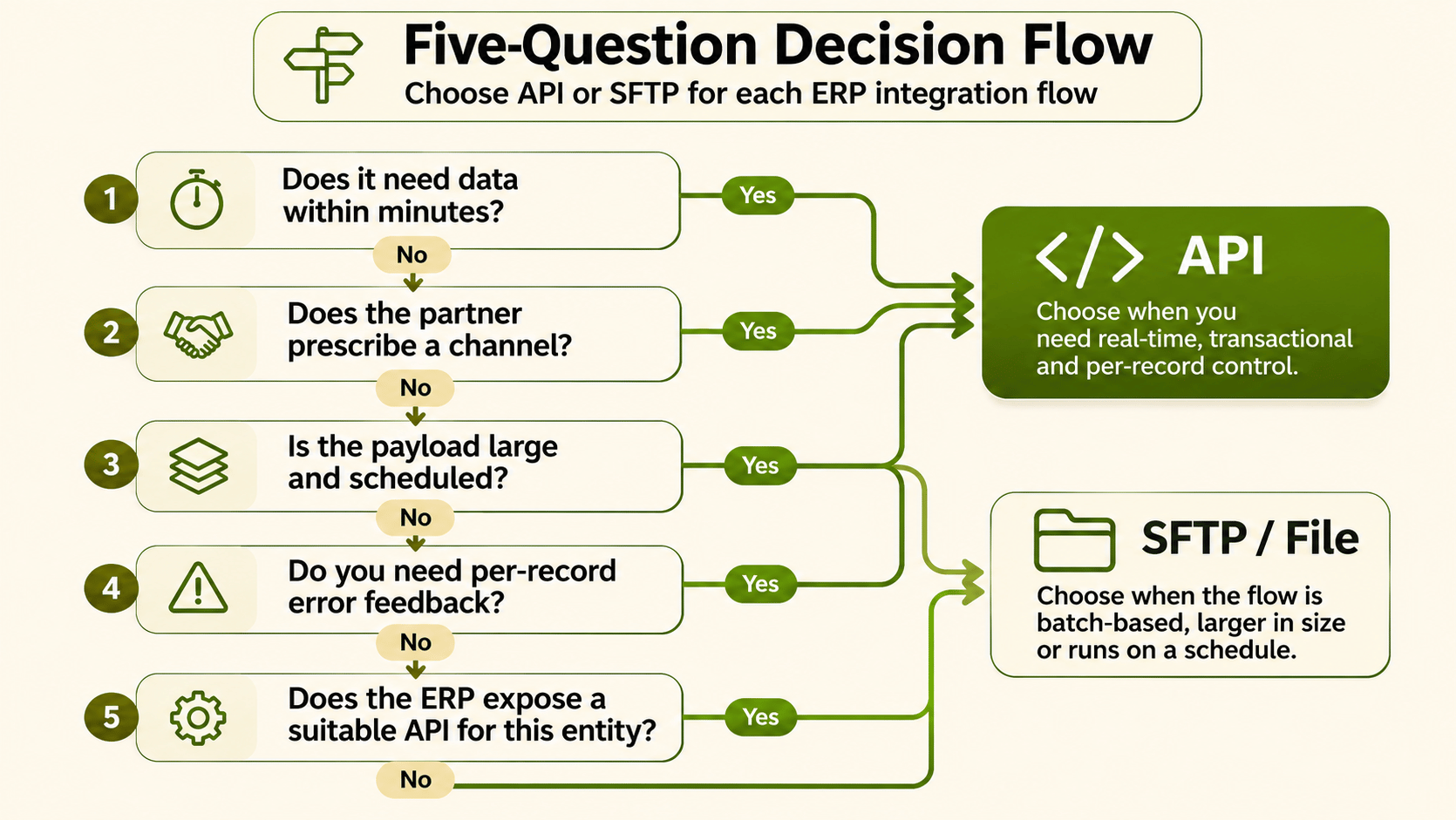
1. How Current Does the Data Need to Be?
If a delay of hours causes real damage, such as overselling or a missed same-day shipment, the flow needs an API or event trigger. If the consumer only acts once a day, a scheduled file is enough and simpler to operate.
2. What Can the Trading Partner Actually Support?
For external flows, the partner usually decides. Large retailers often prescribe a protocol, format and test process. Designing an API for a partner who only accepts EDIFACT over SFTP wastes effort.
3. How Large and How Frequent Is the Payload?
Small, frequent messages favour APIs. Large, infrequent batches favour files. Pushing a full catalogue refresh through record-by-record API calls can take hours and compete with real-time traffic for the same API quota.
4. How Are Failures Detected and Acknowledged?
APIs return errors per request, which makes targeted retries straightforward. File flows need explicit acknowledgements, such as functional acknowledgements, AS2 receipts or a response file. Without them, a rejected file can go unnoticed until a customer calls.
5. What Does the ERP Expose?
Modern ERPs offer REST or OData APIs for most entities, but coverage, performance and limits vary. Some bulk scenarios run better through the ERP's own data import framework. Check what your platform supports for each entity before you fix the method. Our Business Central integration work is a useful reference point.
API vs SFTP in Practice: Flow-by-Flow Examples
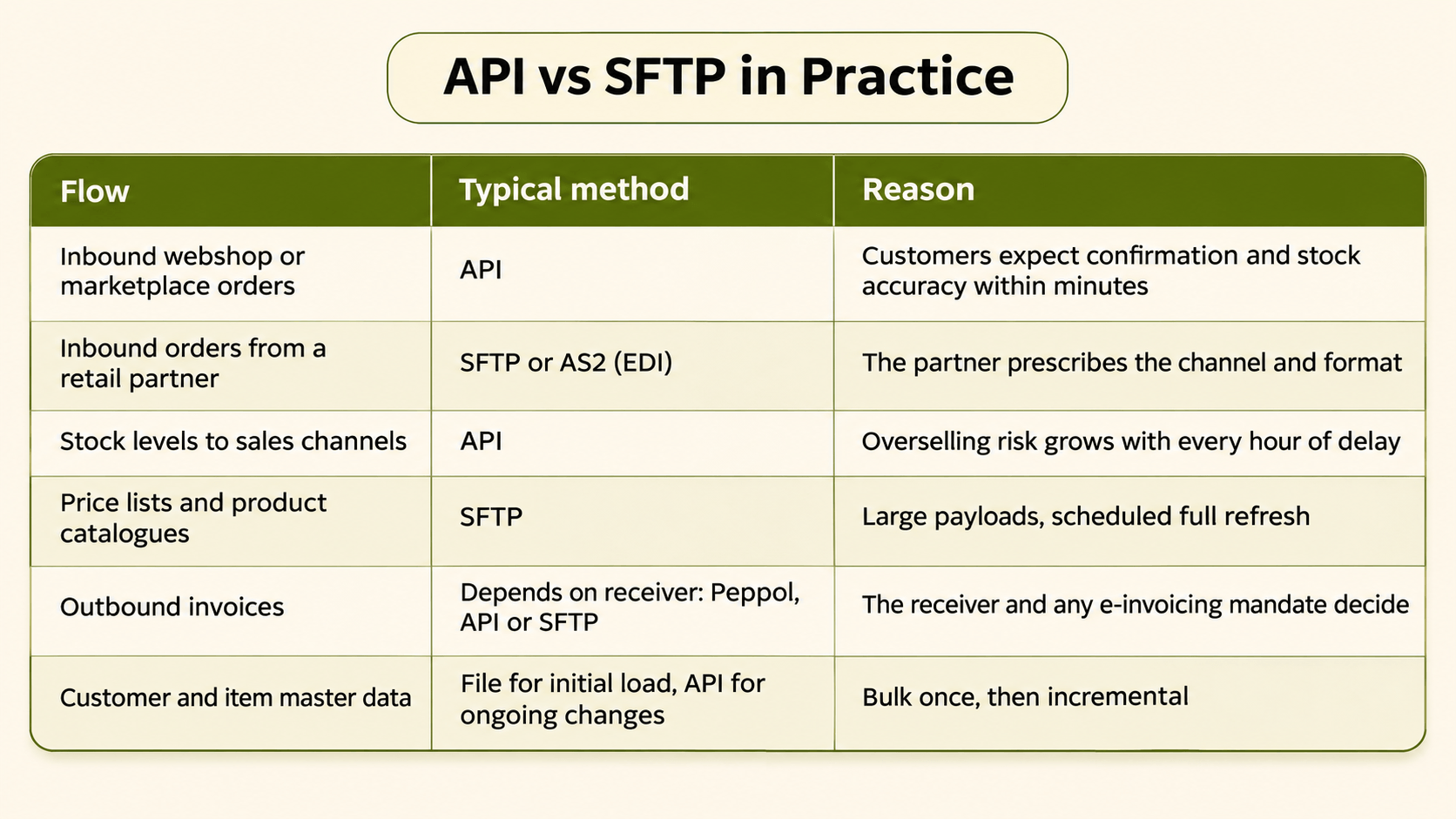
One ERP, six flows, and at least three transport methods. This mix is normal.
Running Both Methods Without Running Two Integration Stacks
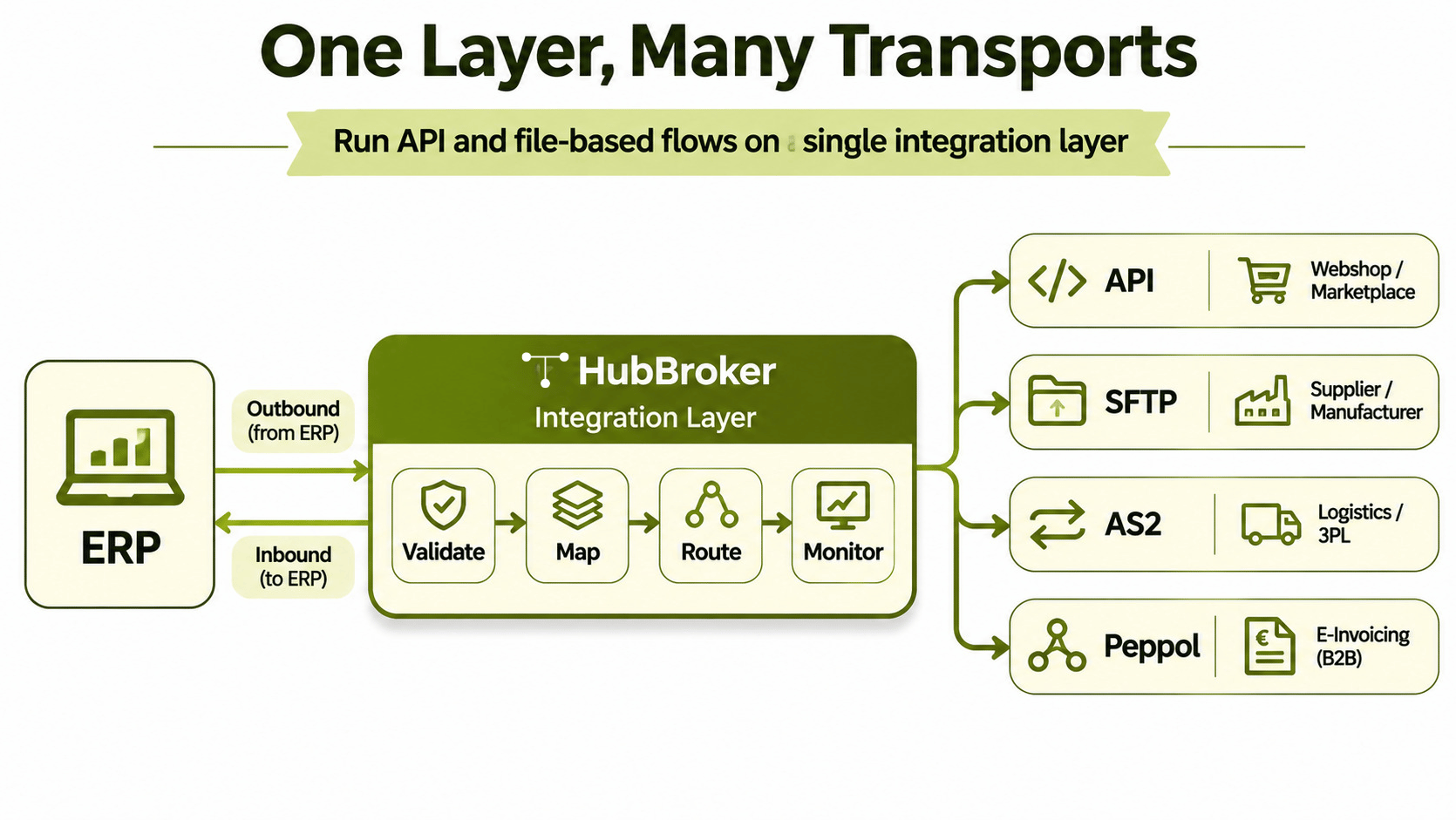
Choosing per flow adds no complexity when API and file flows share one integration layer. The risk lies in building separate tooling for each method, with separate mappings, separate monitoring and separate error queues.
HubBroker sits on top of the existing ERP and treats the transport as a configuration detail of each flow. Validation, mapping and routing are handled the same way whether a document arrives by API call, SFTP file or AS2. Monitoring follows the same model, so operations teams get one view of inbound and outbound status instead of one per protocol.
The ERP stays as it is, and a flow can later move from SFTP to API without rebuilding its mapping. That is the practical value of an iPaaS platform in a mixed landscape.
FAQ
Is SFTP outdated compared to APIs? No. SFTP remains the standard channel for much B2B and EDI exchange because nearly every partner supports it. It is the right tool for bulk and scheduled flows.
Can one trading partner use both API and SFTP? Yes. A partner might send orders by API and receive price catalogues as files. The method follows the flow, not the partner.
Which is more secure for API vs SFTP ERP integration? Both can be secured well. SFTP relies on encrypted transport and key-based authentication. APIs rely on TLS and token-based authentication such as OAuth. Implementation quality matters more than the method.
How do I migrate a flow from SFTP to API later? Keep mapping and business rules separate from transport. If the integration layer abstracts the channel, migration means changing the connection, not rewriting the flow.
Does Business Central or F&O favour one method? Both expose APIs and support file-based imports. The right choice depends on the entity, the volume and the latency requirement of each flow.
Map Your Flows Before You Pick a Standard
If your team is setting integration standards for a new ERP rollout or partner programme, start with a flow inventory rather than a protocol rule. HubBroker can review your inbound and outbound flows with you and show how API and file-based exchange run side by side. Book a demo to walk through your landscape.
